ແນະນຳ
This manual provides instructions for the installation, operation, and maintenance of your Xtreme Smart Wi-Fi Window & Door Sensor. This device is designed to enhance home security by detecting the opening and closing of windows and doors, sending instant notifications to your smartphone.
ຂໍ້ມູນຄວາມປອດໄພ
- ຢ່າໃຫ້ອຸປະກອນຖືກອຸນຫະພູມສູງ ຫຼື ແສງແດດໂດຍກົງ ຫຼື ຄວາມຊຸ່ມ.
- ຢ່າພະຍາຍາມຖອດປະກອບ ຫຼື ສ້ອມແປງອຸປະກອນດ້ວຍຕົນເອງ. ນີ້ຈະເຮັດໃຫ້ການຮັບປະກັນເປັນໂມຄະ.
- ຮັກສາຫມໍ້ໄຟໃຫ້ໄກຈາກເດັກນ້ອຍ. ຖ້າກືນກິນ, ໃຫ້ຊອກຫາແພດທັນທີ.
- Dispose of batteries according to local regulations. Do not mix old and new batteries.
- Ensure the installation surface is clean and dry for proper adhesive attachment.
ເນື້ອໃນຊຸດ
ກວດສອບວ່າລາຍການທັງຫມົດແມ່ນມີຢູ່ໃນຊຸດຂອງທ່ານ:
- Xtreme Smart Wi-Fi Window & Door Sensor (Main Unit)
- Xtreme Smart Wi-Fi Window & Door Sensor (Magnetic Contact)
- ຄູ່ມືຜູ້ໃຊ້ (ເອກະສານນີ້)

Image: The main sensor unit and the smaller magnetic contact unit.
ຄູ່ມືການຕິດຕັ້ງ
1. ການຕິດຕັ້ງຫມໍ້ໄຟ
- Gently slide open the battery cover on the main sensor unit.
- Insert two AAA batteries (not included) into the compartment, ensuring correct polarity (+/-).
- ປິດຝາປິດຫມໍ້ໄຟຢ່າງປອດໄພ.
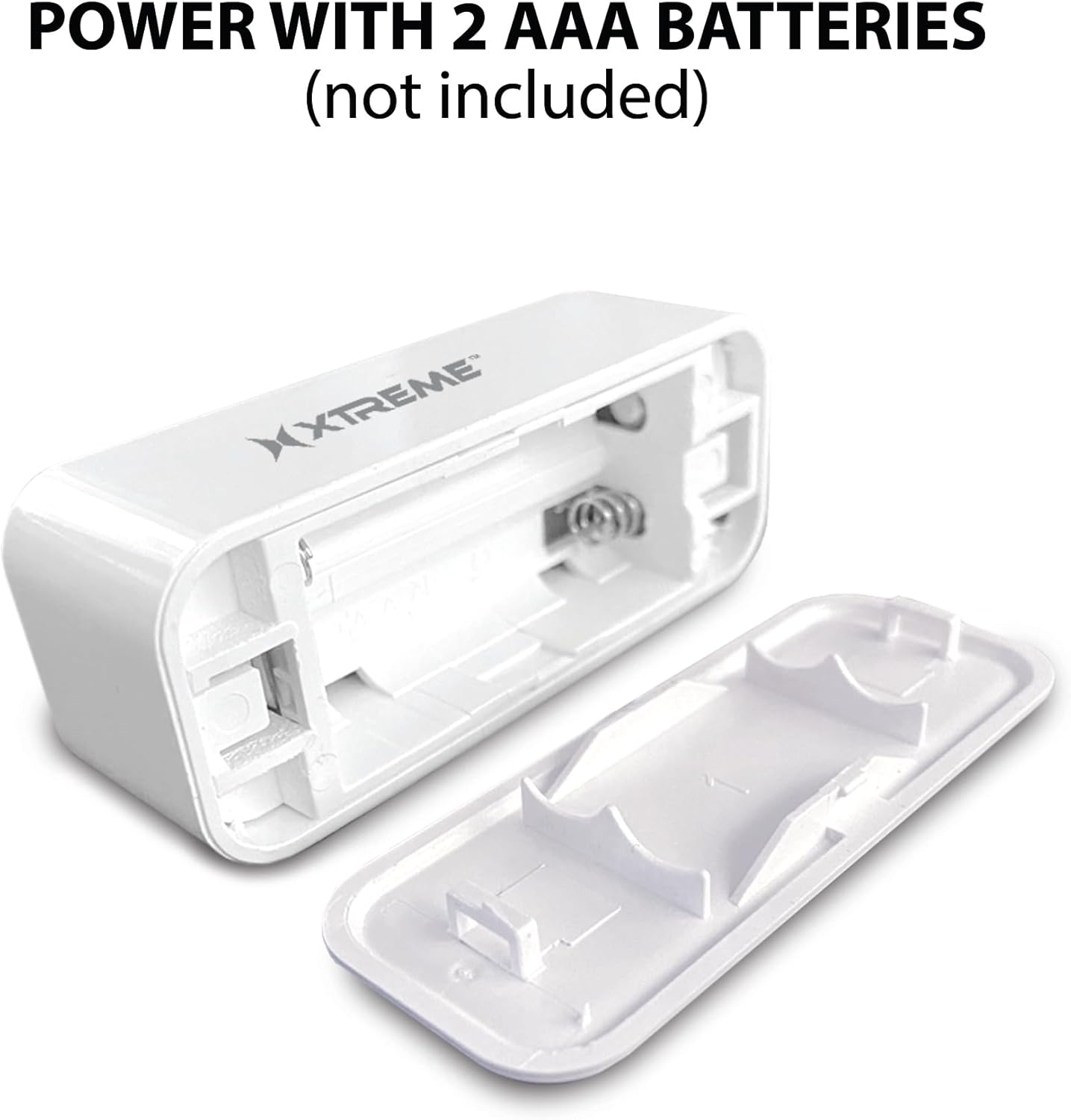
Image: The main sensor unit with its battery compartment open, showing where to insert two AAA batteries.
2. ການດາວໂຫຼດແອັບ ແລະ ການສ້າງບັນຊີ
- ດາວນ໌ໂຫລດ Xtreme Connect Home App from the Apple App Store (for iOS 11 or higher) or Google Play Store (for Android 7.0 or higher).
- ເປີດ app ແລະປະຕິບັດຕາມຄໍາແນະນໍາໃນຫນ້າຈໍເພື່ອສ້າງບັນຊີໃຫມ່ຫຼືເຂົ້າສູ່ລະບົບຖ້າຫາກວ່າທ່ານມີແລ້ວ.

Image: The product box illustrating the Xtreme Connect Home App download options for both iOS and Android devices.
3. ການຈັບຄູ່ອຸປະກອນ
- Ensure your smartphone is connected to a 2.4GHz Wi-Fi network. The sensor does not support 5GHz networks.
- In the Xtreme Connect Home App, tap the "+" icon to add a new device.
- Select "Sensor" or "Door/Window Sensor" from the device list.
- Follow the app's instructions to put the sensor into pairing mode (usually involves pressing and holding a button on the sensor until an indicator light flashes).
- Confirm the Wi-Fi network and enter the password in the app. The sensor will then connect to your home network.
- Once successfully paired, you can name your sensor within the app (e.g., "Front Door," "Bedroom Window").
4. ການຕິດຕັ້ງທາງດ້ານຮ່າງກາຍ
The sensor consists of two parts: a main unit and a smaller magnetic contact. These two parts must be installed close to each other (within 1 cm) on a door or window frame.
- Choose a clean, dry, and flat surface on your door or window frame.
- Peel off the protective backing from the adhesive on both the main unit and the magnetic contact.
- Attach the main unit to the fixed part of the door/window frame.
- Attach the magnetic contact to the moving part of the door/window (the door or window itself), aligning it with the main unit so they are no more than 1 cm apart when the door/window is closed.
- Test the installation by opening and closing the door/window. The app should register the change in status.


Image: Left: The sensor installed on a window sill with the window closed. Right: The sensor detecting an open window, with the magnetic contact separated from the main unit.
ການດໍາເນີນງານ
Monitoring Door/Window Status
Once installed and paired, the Xtreme Smart Wi-Fi Window & Door Sensor will continuously monitor the open/closed status of your designated entry point. When the magnetic contact separates from the main unit (door/window opens), the sensor will detect this change.
ການແຈ້ງເຕືອນທັນທີ
Upon detecting an open or close event, the sensor will send an instant notification to your smartphone via the Xtreme Connect Home App. Ensure app notifications are enabled in your phone's settings to receive these alerts.
ການເຂົ້າເຖິງໄລຍະໄກ
ເຈົ້າສາມາດ view the current status of your sensor (open or closed) and review event history from anywhere using the Xtreme Connect Home App, provided your smartphone has an internet connection.
Smart Scenes Integration
The Xtreme Connect Home App allows you to create "Smart Scenes" to automate actions based on sensor activity. For example:
- "If door opens, then turn on living room lights."
- "If window opens after 10 PM, then send an alert to family members."
Explore the "Smart Scenes" section within the app to customize your home automation.
ບໍາລຸງຮັກສາ
ການປ່ຽນແບັດ
The sensor is powered by two AAA batteries. When the battery level is low, you may receive a notification via the Xtreme Connect Home App. To replace batteries:
- Gently slide open the battery cover on the main sensor unit.
- ເອົາແບັດເກົ່າອອກ.
- ໃສ່ແບັດເຕີລີ AAA ໃໝ່ສອງອັນ, ຮັບປະກັນການຂົ້ວທີ່ຖືກຕ້ອງ (+/-).
- ປິດຝາປິດຫມໍ້ໄຟຢ່າງປອດໄພ.
Note: The sensor is designed for up to four months of battery life under normal usage conditions.
ທໍາຄວາມສະອາດ
Wipe the sensor with a soft, dry cloth. Do not use liquid cleaners or abrasive materials, as these can damage the device.
ການແກ້ໄຂບັນຫາ
| ບັນຫາ | ສາເຫດທີ່ເປັນໄປໄດ້ | ການແກ້ໄຂ |
|---|---|---|
| Sensor not connecting to Wi-Fi. | Incorrect Wi-Fi password; 5GHz network used; sensor too far from router. | Ensure correct 2.4GHz Wi-Fi network and password. Move sensor closer to the router. Re-attempt pairing. |
| ບໍ່ໄດ້ຮັບການແຈ້ງເຕືອນ. | App notifications disabled; sensor offline; app not running in background. | Check phone's notification settings for the Xtreme Connect Home App. Verify sensor status in the app. Ensure app is allowed to run in the background. |
| Sensor not detecting open/close. | Sensor parts misaligned; dead batteries. | Ensure the main unit and magnetic contact are within 1 cm when closed. Replace batteries if low. |
| ອາຍຸແບັດເຕີຣີສັ້ນ. | Frequent activations; poor quality batteries. | Use high-quality alkaline batteries. Reduce unnecessary activations if possible. |
ຂໍ້ມູນຈໍາເພາະ
| ຄຸນສົມບັດ | ລາຍລະອຽດ |
|---|---|
| ໝາຍເລກຕົວແບບ | XHS7-2001-WHT |
| ແຫຼ່ງພະລັງງານ | 2 x ຫມໍ້ໄຟ AAA (ບໍ່ລວມ) |
| ປະເພດຫມໍ້ໄຟ | ດ່າງ |
| ສະບັບtage | 1.5 ໂວນ (DC) |
| ການເຊື່ອມຕໍ່ | 2.4GHz 802.11n Wi-Fi, Bluetooth 4.0 (optional) |
| ວິທີການຄວບຄຸມ | App (Xtreme Connect Home) |
| OS ທີ່ເຂົ້າກັນໄດ້ | Android 7.0+, iOS 11+ |
| ປະເພດການຕິດຕັ້ງ | Adhesive / Wall Mount |
| ຂະໜາດສິນຄ້າ | 2.7 x 2.4 x 4.6 ນິ້ວ |
| ນ້ໍາຫນັກລາຍການ | 2.39 ອອນ |
| ສີ | ສີຂາວ |
| UPC | 805106232399 |
ການຮັບປະກັນແລະການສະຫນັບສະຫນູນ
For warranty information and technical support, please refer to the documentation included with your purchase or visit the official Xtreme Digital Lifestyle Accessories website. Do not attempt to return the product to the retailer without first contacting customer support, as per manufacturer guidelines.
ຜູ້ຜະລິດ: Xtreme
ຍີ່ຫໍ້: ອຸປະກອນເສີມຊີວິດດິຈິຕອລ XTREME


