ແນະນຳ
This manual provides detailed instructions for the setup, operation, and maintenance of your CITLLA L570 Wireless Bluetooth Mouse. Please read this manual thoroughly before using the product to ensure proper functionality and to maximize your user experience.

ຮູບພາບ: ເທິງ view of the CITLLA L570 Wireless Bluetooth Mouse.

Image: User operating the CITLLA L570 mouse.
ເນື້ອໃນຊຸດ
ກວດສອບວ່າລາຍການທັງຫມົດແມ່ນມີຢູ່ໃນຊຸດ:
- CITLLA L570 Wireless Bluetooth Mouse
- USB-A Receiver (stored inside the mouse)
- ສາຍໄຟແບບ Type-C
- ຄູ່ມືຜູ້ໃຊ້ (ເອກະສານນີ້)
ສິນຄ້າເກີນview
Familiarize yourself with the components and key features of your CITLLA L570 mouse.

ຮູບພາບ: ຫຼາຍກວ່າview of the CITLLA L570 mouse features.

Image: CITLLA L570 mouse alongside a keyboard.
ຄຸນນະສົມບັດທີ່ສໍາຄັນ:
- 4-Way Scroll Wheel: Provides both vertical high-speed scrolling and horizontal tilt scrolling.
- DPI ທີ່ສາມາດປັບໄດ້: Four levels (1000/1600/2400/3000) for precise control.
- ການເຊື່ອມຕໍ່ຫຼາຍອຸປະກອນ: Connects to up to three devices via one 2.4G USB-A receiver and two Bluetooth channels.
- ແບັດເຕີຣີທີ່ສາມາດສາກໄດ້: Built-in high-capacity lithium battery with Type-C charging.
- ການຄລິກທີ່ງຽບໆ: Designed for a quiet working environment.
- ປຸ່ມສົ່ງຕໍ່/ກັບຄືນ: Located on the side for enhanced navigation.
ຕັ້ງຄ່າ
The CITLLA L570 mouse offers flexible connectivity options. Choose between 2.4G wireless or Bluetooth connections.
1. 2.4G USB-A Receiver Connection
- Locate the USB-A receiver. It is typically stored in a compartment on the underside of the mouse.
- Insert the USB-A receiver into an available USB port on your computer or device.
- ເປີດເມົ້າໂດຍໃຊ້ສະວິດໄຟທີ່ຕັ້ງຢູ່ເທິງລຸ່ມ.
- Press the device switch button (usually on the top or bottom of the mouse) to select the 2.4G mode (indicated by a specific LED color or number, refer to the mouse's physical markings). The mouse should connect automatically.
2. ການເຊື່ອມຕໍ່ Bluetooth (BT1 / BT2)
The mouse supports two independent Bluetooth connections (BT1 and BT2).
- ເປີດເມົ້າໂດຍໃຊ້ສະວິດໄຟ.
- Press the device switch button to select either Bluetooth 1 (BT1) or Bluetooth 2 (BT2) mode. The corresponding indicator light will flash.
- For initial pairing, hold down the device switch button for three seconds until the indicator light flashes rapidly. This indicates the mouse is in pairing mode.
- ໃນອຸປະກອນຂອງທ່ານ (ຄອມພິວເຕີ, ແທັບເລັດ, ໂທລະສັບສະຫຼາດ), ທ່ອງໄປຫາການຕັ້ງຄ່າ Bluetooth.
- ຊອກຫາ new devices. The mouse should appear as "CITLLA L570" or a similar name.
- Select the mouse to pair. Once connected, the indicator light will stop flashing and remain solid for a few seconds before turning off.
To connect to a second Bluetooth device, repeat steps 2-6, selecting the other Bluetooth channel (BT2).

Image: Multi-device connectivity of the CITLLA L570 mouse.
ຄໍາແນະນໍາການດໍາເນີນງານ
1. ການປັບ DPI
The mouse features 4 adjustable DPI settings to suit various tasks and preferences.
- 1000 DPI: Suitable for design work requiring high precision.
- 1600 DPI: Ideal for general study and browsing.
- 2400 DPI: Recommended for work and productivity tasks.
- 3000 DPI: Optimal for gaming or fast-paced activities.
To change the DPI setting, press the ປຸ່ມ DPI located below the scroll wheel. Each press cycles through the available DPI levels.

Image: DPI adjustment settings and their recommended uses.
2. 4-Way Scroll Wheel
The innovative scroll wheel provides enhanced navigation capabilities:
- Vertical Scrolling: Scroll the wheel up or down for standard vertical navigation. The smart fly scroll feature allows for super-fast scrolling on long web ໜ້າ.
- Horizontal Scrolling: Tilt the scroll wheel to the left or right to enable horizontal scrolling, useful for wide documents or spreadsheets.
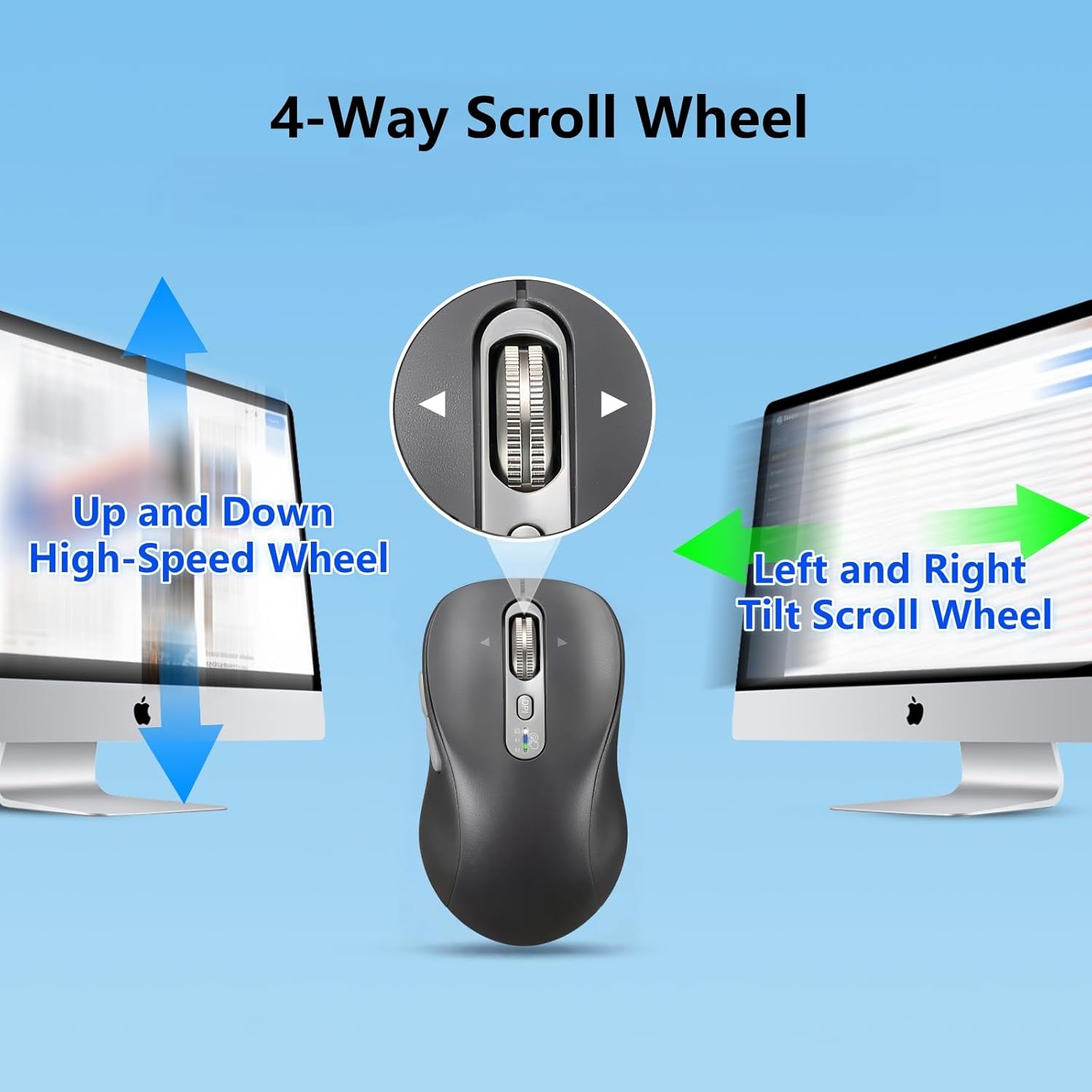
Image: Explanation of the 4-way scroll wheel functionality.
3. ການສະຫຼັບຫຼາຍອຸປະກອນ
To switch between connected devices (2.4G, BT1, BT2), simply press the device switch button. The indicator light will show which channel is currently active.

Image: Mouse used with multiple devices.
4. ການສາກໄຟ
The CITLLA L570 mouse is equipped with a rechargeable battery.
- Connect the provided Type-C charging cable to the charging port on the front of the mouse and to a USB power source.
- A full charge typically takes 1.5-2 hours and can provide approximately 60 days of normal use.
- The low power indicator light will illuminate when the remaining power is sufficient for less than 7 days of use, providing ample time to recharge.

Image: Mouse charging via Type-C cable.

Image: Mouse connected for charging.
ຄວາມເຂົ້າກັນໄດ້
The CITLLA L570 mouse is designed for broad compatibility across various operating systems and devices.
- ລະບົບປະຕິບັດການ: Windows (8/10/11 and later), Mac OS (10.15 and later; USB connection supports 10.10 and later), Chrome OS (11 and later; USB connection supports 9 and later), iOS (13.4 and later), Android (5.0 and later), Linux (10 and later; USB connection supports 8 and later).
- ອຸປະກອນ: Desktops, Laptops, Tablets, Smartphones, All-in-one PCs.

Image: Operating system compatibility icons.

Image: Specific system version compatibility details.
ບໍາລຸງຮັກສາ
To ensure the longevity and optimal performance of your CITLLA L570 mouse, follow these maintenance guidelines:
- ທໍາຄວາມສະອາດ: ໃຊ້ຜ້າແຫ້ງທີ່ອ່ອນໆເຊັດພື້ນຜິວຂອງຫນູ. ສໍາລັບຝຸ່ນ stubborn, a ເລັກນ້ອຍ damp ຜ້າສາມາດນໍາໃຊ້ໄດ້, ແຕ່ໃຫ້ແນ່ໃຈວ່າບໍ່ມີຄວາມຊຸ່ມຊື່ນເຂົ້າໄປໃນອົງປະກອບພາຍໃນ. ຫຼີກເວັ້ນການສານເຄມີທີ່ຮຸນແຮງຫຼືເຄື່ອງເຮັດຄວາມສະອາດຂັດ.
- ການເກັບຮັກສາ: ເມື່ອບໍ່ໄດ້ໃຊ້ເປັນເວລາດົນ, ໃຫ້ເກັບຮັກສາເມົາສ໌ໄວ້ໃນບ່ອນທີ່ເຢັນແລະແຫ້ງ.
- ການດູແລຫມໍ້ໄຟ: Avoid fully discharging the battery frequently. Charge the mouse when the low power indicator appears. Do not expose the battery to extreme temperatures.
- ຜູ້ຮັບ: Keep the USB-A receiver in its designated storage slot within the mouse when not in use to prevent loss.
ການແກ້ໄຂບັນຫາ
| ບັນຫາ | ການແກ້ໄຂ |
|---|---|
| ເມົ້າບໍ່ຕອບສະໜອງ (2.4G) |
|
| ເມົ້າບໍ່ຕອບສະໜອງ (Bluetooth) |
|
| ການເຄື່ອນໄຫວຕົວກະພິບແມ່ນຜິດພາດ ຫຼືຊ້າ |
|
| Scroll wheel not working |
|
| Low battery indicator always on |
|
ຂໍ້ມູນຈໍາເພາະ
| ຄຸນສົມບັດ | ລາຍລະອຽດ |
|---|---|
| ໝາຍເລກຕົວແບບ | L570 |
| ເຕັກໂນໂລຊີການເຊື່ອມຕໍ່ | 2.4G USB-A Receiver, Bluetooth 1, Bluetooth 2 |
| ການຕັ້ງຄ່າ DPI | 1000 / 1600 / 2400 / 3000 |
| ການກວດຈັບການເຄື່ອນໄຫວ | Optical |
| ຄຸນນະສົມບັດພິເສດ | 4-Way Scrolling, Forward/Back buttons, Multi-Device (3 devices), Quiet Clicks (10 million click lifespan), Rechargeable (Type-C charging) |
| ປະເພດຫມໍ້ໄຟ | High-capacity Lithium Battery (500mAh) |
| ພອດສາກໄຟ | ປະເພດ-C |
| ອາຍຸແບັດເຕີຣີ (ປະມານ) | 60 days after 1-hour charge |
| ນ້ໍາຫນັກລາຍການ | 5.6 ອອນ |
| ຂະໜາດ | 5.59 x 3.11 x 2.13 ນິ້ວ |
ການຮັບປະກັນແລະການສະຫນັບສະຫນູນ
CITLLA products are manufactured with quality and reliability in mind. For warranty information or technical support, please refer to the contact details provided with your purchase or visit the official CITLLA webເວັບໄຊ.
ສໍາລັບການຊ່ວຍເຫຼືອເພີ່ມເຕີມ, ທ່ານອາດຈະຕິດຕໍ່ຜູ້ຂາຍໂດຍກົງຜ່ານເວທີທີ່ຜະລິດຕະພັນໄດ້ຖືກຊື້.
ຜູ້ຜະລິດ: CITLLA
ຮ້ານແບຣນ: Visit the CITLLA Store on Amazon


