ແນະນຳ
This manual provides detailed instructions for the installation, operation, maintenance, and troubleshooting of the HALLOMOTOR Speed Unlimited 600C TFT Display. This advanced display is designed to seamlessly integrate with various Bafang mid-drive motors, including M200, M300, M400, M410, M420, M500, M560, M510, M600, M620, M800, and M820 models. It utilizes CAN protocol for reliable communication and offers a vibrant TFT screen for clear data monitoring and customizable settings.
ສິນຄ້າເກີນview

ຮູບ 1: ດ້ານຫນ້າ view of the HALLOMOTOR 600C TFT Display, showing the screen and control buttons.

Figure 2: The 600C TFT Display, highlighting its CAN version and compatibility with Bafang M200, M300, M400, M410, M420, M500, M510, M560, M600, M620, M800, and M820 motors.

Figure 3: The 600C TFT Display mounted on bicycle handlebars, demonstrating its 2.4-inch HD screen, multi-language support, multi-mode interface, and IP65 waterproof rating.

ຮູບ 4: ການຕິດຕັ້ງ view of the 600C TFT Display on an electric bicycle, showing its compact design and handlebar mounting.
ການຕິດຕັ້ງແລະການຕິດຕັ້ງ
1. ເນື້ອໃນຊຸດ
- 600C TFT Display Unit
- Mounting Bracket (integrated)
- ສາຍເຊື່ອມຕໍ່
2. Mounting the Display
The 600C TFT Display is designed for handlebar mounting. Ensure the handlebar diameter is compatible with the integrated clamp (approximately Ø22.2mm as per dimensions). Position the display centrally for optimal viewການເຂົ້າເຖິງ ແລະ ປຸ່ມຕ່າງໆ.
- Loosen the mounting screw on the display's integrated clamp.
- Place the display on your bicycle's handlebar in the desired position.
- Tighten the mounting screw securely, ensuring the display is stable and does not rotate freely. Do not overtighten.

Figure 5: Technical dimensions of the 600C TFT Display, showing measurements in millimeters for width, height, and handlebar clamp diameter (Ø22.2mm).
3. ການເຊື່ອມຕໍ່ໄຟຟ້າ
Connect the display's cable to the corresponding port on your Bafang mid-drive motor system. Ensure the connectors are clean and dry before mating. The display uses a specific CAN protocol connector (often green, as shown in product images).
- Locate the display connection port on your Bafang motor's wiring harness.
- Align the male and female connectors of the display cable and the motor harness.
- Push firmly until the connectors click into place, ensuring a secure and waterproof seal.
- Route the cable neatly along the handlebars and frame, securing it with cable ties to prevent snagging or damage.
ຄໍາແນະນໍາການດໍາເນີນງານ
1. Display Layout and Buttons
The 600C TFT display features a clear screen and intuitive button layout for easy control.
- Power Button (middle): Turns the display and e-bike system on/off.
- Up Button (+): Increases assist level, navigates menus upwards, or increases values.
- Down Button (-): Decreases assist level, navigates menus downwards, or decreases values.
- ປຸ່ມ M (ໂໝດ): Cycles through display information, enters/exits settings menus.
2. ການດໍາເນີນງານພື້ນຖານ
- ເປີດ/ປິດ: Press and hold the Power button for approximately 2 seconds to turn the system on or off.
- Changing Assist Levels: Use the Up (+) and Down (-) buttons to adjust the motor's pedal assist level. The current level will be displayed on the screen.
- Cycling Display Information: Press the M button briefly to cycle through various data displays such as speed (current, average, max), distance (trip, total), battery level, and power output.
3. Advanced Settings and Interface Modes
The 600C display supports multiple interface modes and customizable settings. Refer to the on-screen menu for specific options.
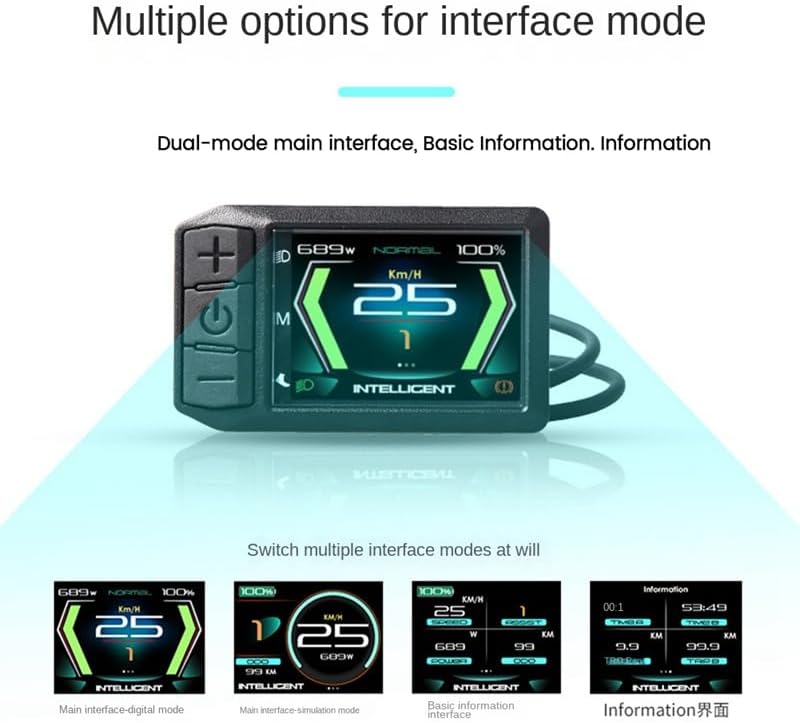
ຮູບທີ 6: ຕົວຢ່າງamples of multiple interface modes available on the 600C TFT Display, including digital, simulation, basic information, and detailed information views.
- ການເຂົ້າເຖິງການຕັ້ງຄ່າ: Typically, pressing and holding the M button, or a combination of buttons, will enter the settings menu. Follow the on-screen prompts.
- ການປັບແຕ່ງ: Within the settings, you may be able to adjust parameters such as wheel diameter, speed unit (km/h or mph), battery voltage, backlight brightness, and password protection.
- ໂໝດການໂຕ້ຕອບ: The display offers various visual layouts for data presentation. Navigate to the 'Interface Mode' setting to select your preferred view.
ບໍາລຸງຮັກສາ
- ທໍາຄວາມສະອາດ: The display is IP65 waterproof. Use a soft, damp ຜ້າເຊັດໜ້າຈໍ ແລະ ຄasing. Avoid abrasive cleaners or solvents. Do not use high-pressure water jets directly on the display.
- ການເກັບຮັກສາ: When not in use for extended periods, store the display and e-bike in a cool, dry place, away from direct sunlight and extreme temperatures.
- ການກວດສອບສາຍ: Periodically check the display cable and connectors for any signs of wear, damage, or corrosion. Ensure connections remain secure.
ການແກ້ໄຂບັນຫາ
| ບັນຫາ | ສາເຫດທີ່ເປັນໄປໄດ້ | ການແກ້ໄຂ |
|---|---|---|
| ຈໍສະແດງຜົນບໍ່ເປີດ. | Low battery, loose connection, system fault. | Check e-bike battery charge. Ensure all cables are securely connected. If problem persists, consult a technician. |
| No speed or distance data. | Speed sensor issue, loose motor connection. | Check speed sensor alignment and connection. Verify motor connection. |
| ຈໍສະແດງຜົນສະແດງລະຫັດຂໍ້ຜິດພາດ. | ລະບົບຜິດປົກກະຕິ. | Note the error code and refer to your motor's manual or contact support for specific meaning and resolution. |
| ປຸ່ມບໍ່ຕອບສະໜອງ. | ຂໍ້ຜິດພາດຂອງຊອບແວຊົ່ວຄາວ, ຄວາມເສຍຫາຍທາງຮ່າງກາຍ. | Try restarting the display (power off and on). Inspect buttons for physical damage. |
ຂໍ້ມູນຈໍາເພາະ
- ຊື່ຕົວແບບ: 600C TFT display with CAN protocol
- ຍີ່ຫໍ້: HalloMOTOR
- ປະເພດການສະແດງ: TFT (Thin-Film Transistor)
- ຂະໜາດໜ້າຈໍ: 2.4-inch (HD display screen)
- ອະນຸສັນຍາ: CAN (ເຄືອຂ່າຍພື້ນທີ່ຄວບຄຸມ)
- ຄວາມເຂົ້າກັນໄດ້: Bafang Mid Drive Motors (M200, M300, M400, M410, M420, M500, M560, M510, M600, M620, M800, M820)
- ວັດສະດຸ: ພາດສະຕິກ
- ສີ: ດຳ
- ປະເພດການຕິດຕັ້ງ: Handlebar Mount (Ø22.2mm)
- ການປະເມີນກັນນ້ໍາ: IP65
- ອົງປະກອບລວມ: LCD 600C CAN
ການຮັບປະກັນແລະການສະຫນັບສະຫນູນ
ຂໍ້ມູນການຮັບປະກັນ
This product comes with a limited warranty. For specific details regarding warranty coverage, duration, and terms, please refer to the documentation provided with your purchase or contact HALLOMOTOR directly. Keep your proof of purchase for warranty claims.
ການຊ່ວຍເຫຼືອລູກຄ້າ
If you encounter any issues not covered in this manual or require further assistance, please contact the seller or HALLOMOTOR customer support. Provide your product model number and a detailed description of the issue for efficient service.


