ແນະນຳ
Welcome to the comprehensive user manual for your OnePlus Buds Pro 3 Wireless Earbuds. These earbuds are designed to deliver an exceptional audio experience with advanced features such as dual drivers, adaptive noise cancellation, and high-resolution audio support. This guide will help you set up, operate, maintain, and troubleshoot your earbuds to ensure optimal performance and longevity.

Image: OnePlus Buds Pro 3 earbuds and their charging case in Midnight Opus color.
ແມ່ນຫຍັງຢູ່ໃນກ່ອງ
- OnePlus Buds Pro 3 Earbuds
- ກ່ອງສາກ
- ສາຍສາກ USB-C
- Eartips (XS, S, M, L sizes)
- ຄູ່ມືຜູ້ໃຊ້
ຕັ້ງຄ່າ
1. ການຈັບຄູ່ເບື້ອງຕົ້ນ
- ໃຫ້ແນ່ໃຈວ່າຫູຟັງຂອງທ່ານສາກໄຟແລ້ວ.
- Open the charging case. The earbuds will automatically enter pairing mode (indicated by a flashing white light).
- On your smartphone or device, go to Bluetooth settings and select "OnePlus Buds Pro 3" from the list of available devices.
- ປະຕິບັດຕາມການກະຕຸ້ນໃນຫນ້າຈໍໃດຫນຶ່ງເພື່ອສໍາເລັດຂະບວນການການຈັບຄູ່.
2. ການເລືອກປາຍຫູ
For optimal sound quality and comfort, choose the ear tips that provide a good seal with your ear canals. The OnePlus Buds Pro 3 come with four sizes (XS, S, M, L) of rounded ear tips.

Image: OnePlus Buds Pro 3 earbuds shown with various ear tip sizes (XS, S, M, L) for a customized fit.
3. App Installation (HeyMelody)
Download the HeyMelody app from your device's app store (Google Play Store for Android or App Store for iOS). This app allows for firmware updates, personalized sound settings, and custom controls for your earbuds.
ປະຕິບັດການ
1. ແຕະການຄວບຄຸມ
The earbuds feature intuitive touch controls on their stems:
- Quick Squeeze: ຫຼິ້ນ/ຢຸດດົນຕີ.
- Double Squeeze: ຕິດຕາມຕໍ່ໄປ.
- Triple Squeeze: Previous track or Voice Assistant activation.
- ບີບ ແລະ ຖື: Toggle between Noise Cancellation and Transparency modes.
- ເລື່ອນຂຶ້ນ/ລົງ: ປັບລະດັບສຽງ.
2. Noise Cancellation & Transparency Mode
The earbuds offer up to 50dB adaptive noise cancellation to minimize external distractions. Use Transparency mode to hear your surroundings without removing the earbuds.

Image: Diagram illustrating the 50dB adaptive noise cancellation feature of the OnePlus Buds Pro 3.
3. ຄຸນະພາບສຽງ
Equipped with dual drivers (11mm woofer and 6mm tweeter) and dual DACs, the earbuds deliver rich, detailed sound. They support LHDC 5.0 for high-resolution audio. Customize your sound profile using Dynaudio EQs and BassWave™ for enhanced bass.

ຮູບພາບ: ລະເບີດ view of OnePlus Buds Pro 3 showing 11mm woofer and 6mm tweeter with dual DACs.
4. ຄຸນນະພາບການໂທ
Enjoy crystal-clear calls thanks to three microphones and a bone conduction microphone (VPU) that effectively suppress background noise.
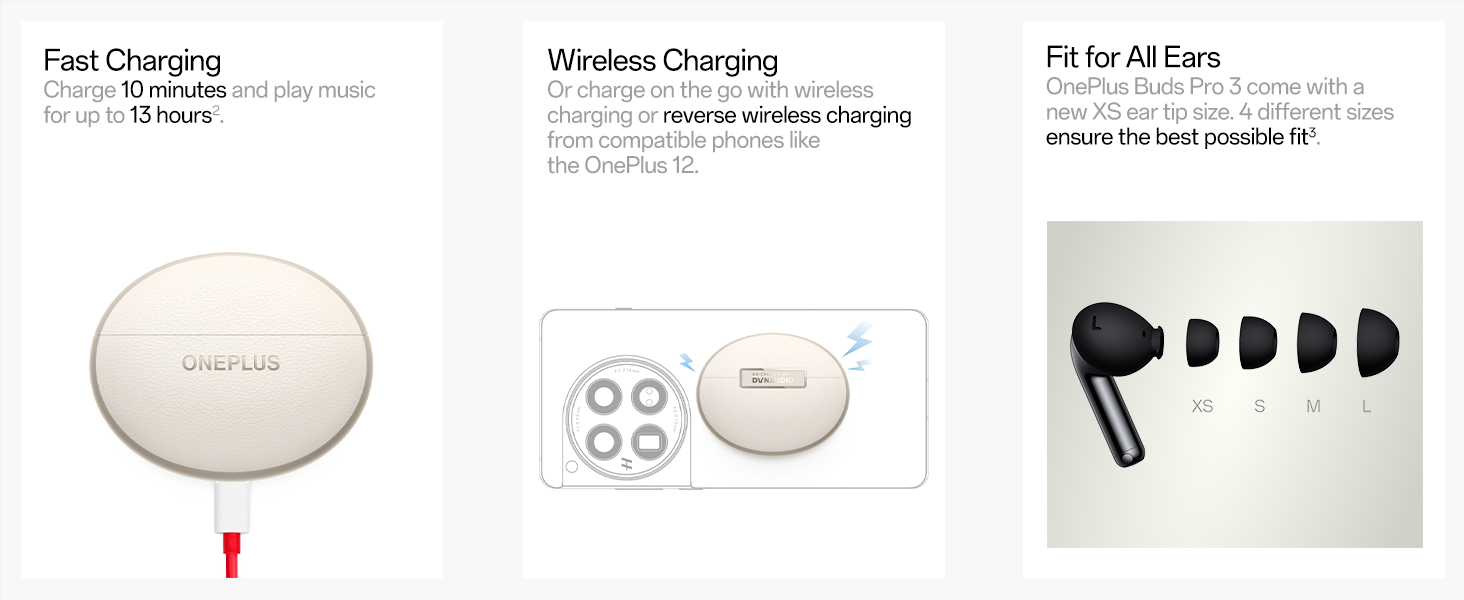
Image: Internal diagram of OnePlus Buds Pro 3 highlighting the microphone placement for call clarity.
5. Spatial Audio & Head Tracking
Experience immersive 3D sound with proprietary on-device spatial audio rendering, compatible with any Android or iOS device. Head tracking ensures the sound remains fixed in space relative to your head movements.

Image: Visual representation of spatial audio with head tracking on OnePlus Buds Pro 3.
6. ຮູບແບບເກມ
Activate Game Mode for ultra-low latency (94ms) to ensure a seamless and responsive gaming experience.

Image: OnePlus Buds Pro 3 in Game Mode with 94ms ultra-low latency for gaming.
7. Find My Earbuds
If you misplace your earbuds, use the "Find My Earbuds" feature in the HeyMelody app to make them emit sounds until you locate them.

Image: Screenshot of the HeyMelody app showing the "Find My Earbuds" feature.
8. Neck Health & Zen Mode Air
Integrated IMU sensors monitor your activity and provide timely posture alerts for improved neck health. Zen Mode Air offers spatial soundscapes for focus, calm, or complete escape.

Image: Visuals depicting Neck Health monitoring and various Zen Mode Air soundscapes.
ການສາກໄຟ & ແບັດເຕີຣີ
The earbuds offer up to 43 hours of total battery life with the charging case (ANC off). A quick 10-minute charge provides over 5 hours of music playback.

Image: Detailed battery life breakdown and fast charging capabilities of OnePlus Buds Pro 3.
ວິທີການສາກໄຟ
- ການສາກ USB-C: Connect the provided USB-C cable to the charging case and a power source.
- ການສາກໄຟໄຮ້ສາຍ: ວາງກ່ອງສາກໃສ່ແຜ່ນສາກໄຮ້ສາຍທີ່ເຂົ້າກັນໄດ້.
ບໍາລຸງຮັກສາ
The earbuds have an IP55 rating, making them resistant to dust and splashes. To maintain performance, regularly clean the ear tips and charging contacts with a soft, dry cloth. Avoid exposing them to extreme temperatures or harsh chemicals.
ການແກ້ໄຂບັນຫາ
ບັນຫາທົ່ວໄປ ແລະການແກ້ໄຂ:
- ບໍ່ມີບັນຫາສຽງ/ການເຊື່ອມຕໍ່: Ensure earbuds are charged, Bluetooth is enabled on your device, and they are within range. Try unpairing and re-pairing the earbuds.
- ຄຸນະພາບສຽງບໍ່ດີ: Check ear tip fit for a proper seal. Ensure earbuds and device are updated to the latest firmware via the HeyMelody app.
- ບັນຫາການສາກໄຟ: Clean charging contacts on earbuds and case. Ensure the charging cable/pad is working correctly.
- ຫູຟັງຫູຟັງບໍ່ຕອບສະໜອງ: Place earbuds back in the case, close the lid for 10 seconds, then open to reset.
ຂໍ້ມູນຈໍາເພາະ
| ຍີ່ຫໍ້ | OnePlus |
| ຊື່ຕົວແບບ | OnePlus Buds Pro 3 |
| ເຕັກໂນໂລຊີການເຊື່ອມຕໍ່ | ໄຮ້ສາຍ (Bluetooth 5.4) |
| ປະເພດໄດເວີສຽງ | Dual Drivers (11mm woofer + 6mm tweeter) |
| ການຄວບຄຸມສິ່ງລົບກວນ | Active Noise Cancellation (ເຖິງ 50dB) |
| ຊີວິດຫມໍ້ໄຟ | Up to 43 hours (with charging case, ANC off) |
| ເວລາສາກໄຟ | 10 mins charge for 5+ hours playback |
| ລະດັບຄວາມຕ້ານທານນ້ໍາ | IP55 (ກັນຝຸ່ນ ແລະ ນ້ຳกระเด็น) |
| ນ້ໍາຫນັກລາຍການ | 0.002 ອອນ |
| ຂະໜາດສິນຄ້າ | 2.76 x 2.36 x 1.18 ນິ້ວ |
ການຮັບປະກັນ & ສະຫນັບສະຫນູນ
Your OnePlus Buds Pro 3 are covered by a standard manufacturer's warranty. For detailed warranty information, technical support, or service requests, please visit the official OnePlus support webເວັບໄຊ ຫຼືຕິດຕໍ່ບໍລິການລູກຄ້າຂອງເຂົາເຈົ້າ.
ວິດີໂອຜະລິດຕະພັນຢ່າງເປັນທາງການ
ວິດີໂອ: ວິດີໂອຜະລິດຕະພັນຢ່າງເປັນທາງການ showcasing the OnePlus Buds Pro 3 Wireless Earbuds. This video provides an overview of the earbuds' design and key features.


