ແນະນຳ
Thank you for choosing the Oraimo Traveler Link 20 Power Bank. This device is designed to provide reliable portable power for your electronic devices. With a high capacity of 20000mAh and multiple built-in charging cables, it offers convenient and efficient charging on the go. Please read this manual carefully to ensure proper use and optimal performance.
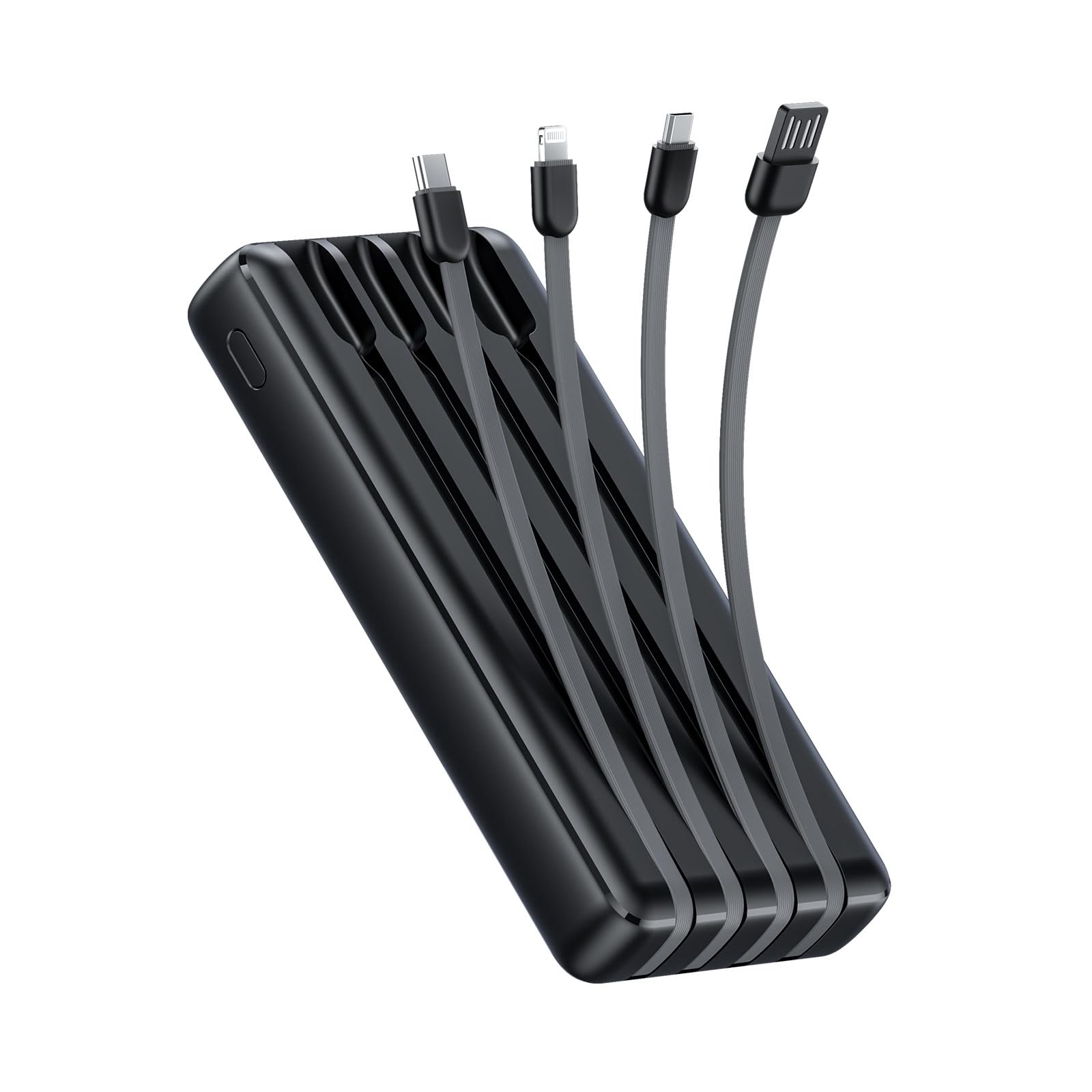
Image: The Oraimo Traveler Link 20 Power Bank, showcasinການອອກແບບທີ່ກະທັດຮັດ ແລະ ສາຍໄຟປະສົມປະສານ.
ຕັ້ງຄ່າ
ການສາກໄຟເບື້ອງຕົ້ນ
Before first use, fully charge your Oraimo Traveler Link 20 Power Bank. This ensures the battery is calibrated and ready for optimal performance.
- Connect the power bank to a power source using one of the built-in recharging cables (USB-A, Type-C, or Micro-USB) or an external USB-A to Type-C/Micro-USB cable.
- The LED indicators on the power bank will illuminate to show the charging status.
- Once all LED indicators are solid, the power bank is fully charged. Disconnect it from the power source.
ການກໍານົດອົງປະກອບ
Familiarize yourself with the power bank's features:
- ສາຍສາກໄຟໃນຕົວ: Includes Type-C, Micro-USB, and Lightning cables for charging various devices.
- Built-in Recharging Cable: A USB-A cable is integrated for convenient recharging of the power bank itself.
- USB-A Output Port: An additional USB-A port for charging devices using your own cable.
- ຕົວຊີ້ວັດ LED: ສະແດງລະດັບແບັດເຕີຣີທີ່ຍັງເຫຼືອ ແລະ ສະຖານະການສາກ.
- ປຸ່ມເປີດປິດ: Activates the power bank and controls the LED flashlight.
- ໄຟສາຍ LED: Integrated light for emergency use.
ຄໍາແນະນໍາການດໍາເນີນງານ
ກຳລັງສາກອຸປະກອນຂອງທ່ານ
The Traveler Link 20 allows you to charge up to four devices simultaneously using its built-in cables and USB-A output port.
- Select the appropriate built-in cable (Type-C, Micro-USB, or Lightning) for your device.
- ເຊື່ອມຕໍ່ສາຍເຂົ້າກັບພອດສາກໄຟຂອງອຸປະກອນຂອງທ່ານ.
- Alternatively, use your own USB charging cable with the dedicated USB-A output port.
- The power bank will automatically begin charging your device(s). The LED indicators will show the power bank's remaining charge.

ຮູບພາບ: ໃກ້ຊິດ view of the Oraimo Traveler Link 20 showing its integrated Type-C, Micro-USB, and Lightning charging cables.

Image: The power bank simultaneously charging a smartphone, a smartwatch, and a portable toothbrush, demonstrating its multi-output capability.

Image: The Oraimo Traveler Link 20 demonstrating wide compatibility with various devices including iOS smartphones, Android smartphones, and accessories like earbuds.

Image: An illustration highlighting the 20000mAh capacity of the Oraimo Traveler Link 20, capable of fully charging a phone multiple times.
ກຳ ລັງສາກ Power Bank
The power bank can be recharged using its built-in USB-A cable or via its Type-C or Micro-USB input ports.
- Using Built-in USB-A Cable: Plug the integrated USB-A cable into a USB wall adapter, computer USB port, or other USB power source.
- Using Type-C or Micro-USB Input: Connect a compatible cable (not included for these inputs) to the respective port on the power bank and then to a power source.
- ຕົວຊີ້ວັດ LED ຈະກະພິບໃນລະຫວ່າງການສາກໄຟ ແລະຍັງຄົງແຂງເມື່ອສາກເຕັມ.

Image: The power bank being recharged via its built-in USB-A cable connected to a power strip, and also showing an alternative recharge method using a Type-C cable and wall adapter.
ຟັງຊັນໄຟສາຍ LED
The power bank includes a built-in LED flashlight with an SOS light alarm function for emergencies.
- ເພື່ອເປີດ/ປິດໄຟສາຍ: ກົດປຸ່ມເປີດປິດຄ້າງໄວ້ປະມານ 3 ວິນາທີ.
- ເພື່ອເປີດໃຊ້ໂໝດ SOS: While the flashlight is on, short press the power button to cycle through modes (steady light, SOS flashing).

Image: The Oraimo Traveler Link 20 with its LED flashlight illuminated, demonstrating its emergency lighting capability.
ໂຫມດການສາກໄຟປະຈຸບັນຕໍ່າ
The power bank automatically detects and switches to low current charging mode for small devices like wireless earbuds or smartwatches, preventing damage from overcurrent.
- Simply connect your low-current device. The power bank will intelligently adjust the output.
ບໍາລຸງຮັກສາ
To ensure the longevity and safe operation of your Oraimo Traveler Link 20 Power Bank, follow these maintenance guidelines:
- ການເກັບຮັກສາ: ເກັບຮັກສາ Power bank ໃນບ່ອນທີ່ເຢັນ, ແຫ້ງ, ຫ່າງຈາກແສງແດດໂດຍກົງ ແລະອຸນຫະພູມທີ່ຮຸນແຮງ.
- ທໍາຄວາມສະອາດ: ໃຊ້ຜ້າປຽກແຫ້ງເພື່ອເຮັດຄວາມສະອາດດ້ານນອກຂອງ power bank. ຢ່າໃຊ້ເຄື່ອງເຮັດຄວາມສະອາດຂອງແຫຼວຫຼືວັດສະດຸຂັດ.
- ຫຼີກລ້ຽງການທໍາລາຍທາງດ້ານຮ່າງກາຍ: Do not drop, puncture, or disassemble the power bank. Avoid exposing it to water or high humidity.
- ການສາກໄຟປົກກະຕິ: ຖ້າບໍ່ໄດ້ໃຊ້ເປັນເວລາດົນ, ໃຫ້ສາກໄຟແບດເຕີຣີຢ່າງໜ້ອຍໜຶ່ງຄັ້ງໃນທຸກໆສາມເດືອນເພື່ອຮັກສາສຸຂະພາບຂອງແບັດເຕີຣີ.
ການແກ້ໄຂບັນຫາ
ຖ້າເຈົ້າພົບບັນຫາກັບ power bank ຂອງເຈົ້າ, ໃຫ້ເບິ່ງບັນຫາ ແລະ ວິທີແກ້ໄຂບັນຫາທົ່ວໄປຕໍ່ໄປນີ້:
| ບັນຫາ | ສາເຫດທີ່ເປັນໄປໄດ້ | ການແກ້ໄຂ |
|---|---|---|
| Power bank ບໍ່ສາກອຸປະກອນ. | Low battery; incorrect cable connection; device incompatibility. | Ensure power bank is charged. Check cable connections. Verify device compatibility. |
| Power bank ບໍ່ສາກໄຟ. | Faulty charging cable/adapter; power source issue. | Try a different charging cable and wall adapter. Ensure the power source is active. |
| ການສາກໄຟຊ້າ. | Using a non-fast charging adapter; multiple devices connected; cable quality. | Use a compatible fast-charging adapter. Disconnect other devices. Use high-quality cables. |
| ໄຟສາຍ LED ບໍ່ເຮັດວຽກ. | Incorrect operation; low battery. | Long press the power button for 3 seconds. Recharge the power bank. |
The Oraimo Traveler Link 20 features a multi-protection system (over-current, short-circuit, over-discharge, high/low-temperature charging/discharge, overcharge, output overvoltage) to protect itself and your devices. If the power bank stops functioning, it might be due to one of these protection mechanisms activating. Disconnect all devices and cables, then try again after a few minutes.

Image: Diagram illustrating the multi-protection system of the Oraimo Traveler Link 20, highlighting various safety features.
ຂໍ້ມູນຈໍາເພາະຂອງຜະລິດຕະພັນ
| ຄຸນສົມບັດ | ລາຍລະອຽດ |
|---|---|
| ຊື່ຕົວແບບ | Traveler Link 20 |
| ໝາຍເລກຕົວແບບ | OPB-P5201 |
| ຍີ່ຫໍ້ | ໂອເຣໂມ |
| ຄວາມອາດສາມາດຫມໍ້ໄຟ | 20000mAh (Lithium Ion) |
| ພະລັງງານຜົນຜະລິດ | ສູງສຸດ 12W (ສູງສຸດ 5V/2.4A) |
| ການປ້ອນຂໍ້ມູນ Voltage | 5V |
| ປະເພດຕົວເຊື່ອມຕໍ່ | USB Type-C, USB Type-A, Micro USB (built-in cables: Type-C, Micro-USB, Lightning; built-in recharging cable: USB-A) |
| ຄຸນນະສົມບັດພິເສດ | 4 Built-in Charging & Recharging Cables, Charge up to 4 devices simultaneously, Multi-protection System, LED Flashlight with SOS, Low Current Protection |
| ຂະໜາດ | 20.5 x 3 x 11 cm |
| ນ້ຳໜັກ | 200 ກຣາມ |
| ສີ | ດຳ |
ການຮັບປະກັນແລະການສະຫນັບສະຫນູນ
Oraimo products are manufactured to the highest quality standards. This product is covered by a limited warranty from the date of purchase. Please refer to the warranty card included in your product packaging for specific terms and conditions.
For technical support, troubleshooting assistance, or warranty claims, please contact Oraimo customer service through their official webເວັບໄຊ ຫຼືຂໍ້ມູນຕິດຕໍ່ທີ່ສະໜອງໃຫ້ຢູ່ໃນເອກະສານຜະລິດຕະພັນຂອງທ່ານ. ຮັກສາຫຼັກຖານການຊື້ຂອງທ່ານສໍາລັບການຮັບປະກັນຄວາມຖືກຕ້ອງ.


