1. ບົດແນະນຳ
Thank you for choosing the Techno Line WD2200 Weather Station. This device provides comprehensive weather data, including indoor and outdoor temperature and humidity, barometric pressure, and a 3-day weather forecast. It also features connectivity with the 'Direct Weather' application for smartphones (iOS and Android), allowing you to view data on your mobile device. This manual will guide you through the setup, operation, and maintenance of your weather station to ensure optimal performance.
2. ຂໍ້ມູນຄວາມປອດໄພ
- ອ່ານຄໍາແນະນໍາທັງຫມົດຢ່າງລະອຽດກ່ອນທີ່ຈະໃຊ້ອຸປະກອນ.
- Keep the device away from extreme temperatures, direct sunlight, strong vibrations, and impacts.
- ຫ້າມນຳອຸປະກອນຈຸ່ມໃສ່ນ້ຳຫຼືຂອງແຫຼວອື່ນໆ.
- ຢ່າພະຍາຍາມຖອດປະກອບ ຫຼືສ້ອມແປງອຸປະກອນດ້ວຍຕົນເອງ. ອ້າງອີງການບໍລິການທັງໝົດໃຫ້ກັບບຸກຄະລາກອນທີ່ມີຄຸນວຸດທິ.
- ຖິ້ມແບັດເຕີລີທີ່ໃຊ້ແລ້ວຢ່າງມີຄວາມຮັບຜິດຊອບຕາມລະບຽບທ້ອງຖິ່ນ.
- ກວດໃຫ້ແນ່ໃຈວ່າໃສ່ໝໍ້ໄຟທີ່ມີຂົ້ວທີ່ຖືກຕ້ອງ.
3. ເນື້ອໃນຊຸດ
ກະລຸນາກວດສອບວ່າອົງປະກອບທັງໝົດມີຢູ່ໃນຊຸດຂອງທ່ານແລ້ວ:
- WD2200 Weather Station (Main Unit)
- TX205DTH Outdoor Transmitter (Sensor)
- ຄູ່ມືຜູ້ໃຊ້
ຫມາຍເຫດ: ຫມໍ້ໄຟບໍ່ໄດ້ລວມແລະຕ້ອງໄດ້ຮັບການຊື້ແຍກຕ່າງຫາກ.
4. ຜະລິດຕະພັນເກີນview
The Techno Line WD2200 Weather Station consists of a main display unit and an external wireless sensor. The main unit displays all collected data and forecasts, while the external sensor measures outdoor temperature and humidity.
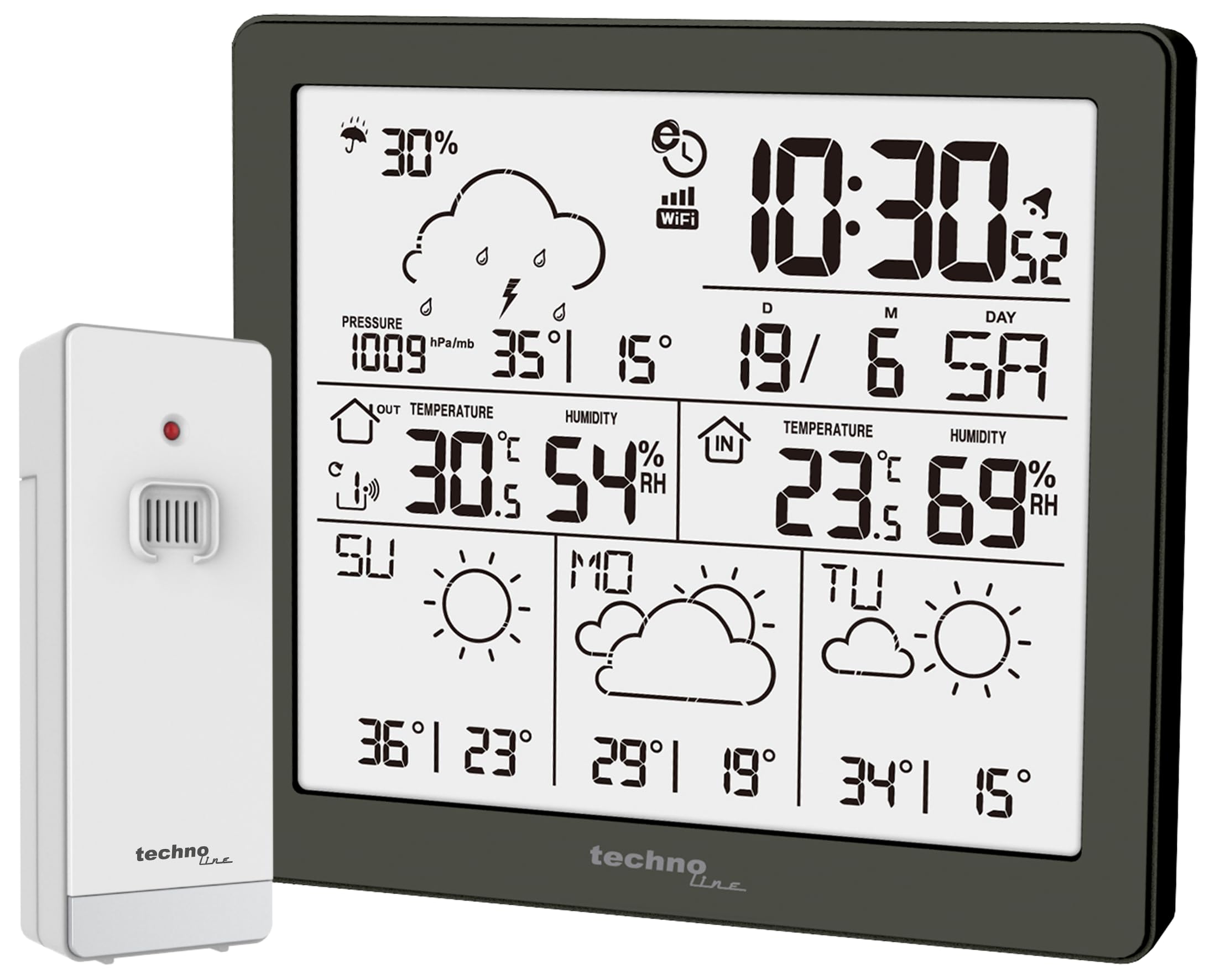
ຮູບທີ 1: ດ້ານໜ້າ view of the Techno Line WD2200 Weather Station display. The display shows time, date, indoor and outdoor temperature and humidity, barometric pressure, precipitation probability, and a 3-day forecast with corresponding weather icons and min/max temperatures.
ອົງປະກອບສະແດງ:
- ຊ້າຍເທິງ: Precipitation probability (e.g., 30%).
- ຂວາເທິງ: Current time (e.g., 10:30) and date (e.g., 19/6 SA for June 19th, Saturday).
- Middle Left (Outdoor Data): Barometric pressure (e.g., 1009 hPa/mb), outdoor temperature (e.g., 30.5°C), and outdoor humidity (e.g., 54% RH).
- Middle Right (Indoor Data): Indoor temperature (e.g., 23.6°C) and indoor humidity (e.g., 69% RH).
- ພາກສ່ວນລຸ່ມ: 3-day forecast (e.g., Sunday, Monday, Tuesday) with weather icons (sunny, cloudy) and corresponding minimum and maximum temperatures (e.g., SU: 36°/23°, MO: 29°/19°, TU: 34°/15°).
5. ຕັ້ງຄ່າ
5.1 ການຕິດຕັ້ງຫມໍ້ໄຟ
- Outdoor Transmitter (TX205DTH): Open the battery compartment on the back of the sensor. Insert 2 x AA Mignon LR06 batteries, observing the correct polarity (+/-). Close the compartment securely.
- Main Unit (WD2200): Open the battery compartment on the back of the main unit. Insert 4 x AA Mignon LR06 batteries, observing the correct polarity (+/-). Close the compartment securely.
Note: It is recommended to insert batteries into the outdoor sensor first, then into the main unit, to ensure proper pairing.
5.2 ການເປີດເຄື່ອງເບື້ອງຕົ້ນ ແລະ ການຈັບຄູ່ເຊັນເຊີ
Upon inserting batteries into the main unit, the display will light up, and the unit will begin searching for the outdoor sensor. The outdoor temperature and humidity readings should appear on the main unit within a few minutes. If the outdoor data does not appear, refer to the Troubleshooting section.
5.3 App Connection (Direct Weather)
The WD2200 Weather Station connects to your smartphone via Bluetooth for enhanced data viewing and settings management through the 'Direct Weather' app.
- Download the 'Direct Weather' app from the App Store (iOS) or Google Play Store (Android).
- ໃຫ້ແນ່ໃຈວ່າ Bluetooth ຖືກເປີດໃຊ້ຢູ່ໃນໂທລະສັບສະຫຼາດຂອງທ່ານ.
- Open the 'Direct Weather' app and follow the on-screen instructions to pair with your WD2200 Weather Station. The app will guide you through the connection process.
6. ການໃຊ້ງານສະຖານີອາກາດ
6.1 ການອ່ານຈໍສະແດງຜົນ
The main unit's display provides a comprehensive overview of current and forecasted weather conditions:
- ເວລາ ແລະວັນທີ: Automatically synchronized via the app or manually set.
- ອຸນຫະພູມ ແລະ ຄວາມຊຸ່ມຊື່ນພາຍໃນ: Measured by the main unit.
- ອຸນຫະພູມ ແລະ ຄວາມຊຸ່ມຊື່ນກາງແຈ້ງ: Received from the TX205DTH outdoor sensor.
- ຄວາມກົດດັນ Barometric: Displays current atmospheric pressure.
- Precipitation Probability: Indicates the likelihood of rain or snow.
- 3-Day Forecast: Provides weather icons and expected high/low temperatures for today and the next three days.
6.2 Using the Direct Weather App
The 'Direct Weather' app offers additional functionalities:
- ຂໍ້ມູນລະອຽດ View: Access historical data and more detailed graphs of temperature, humidity, and pressure.
- ການຕັ້ງຄ່າການຕັ້ງຄ່າ: Adjust time, date, measurement units (°C/°F, hPa/inHg), and other preferences directly from your phone.
- ແຈ້ງເຕືອນ: Set up custom alerts for specific temperature or humidity thresholds.
7. ບໍາລຸງຮັກສາ
7.1 ການທໍາຄວາມສະອາດ
ເຊັດໜ່ວຍຫຼັກ ແລະ ເຊັນເຊີພາຍນອກດ້ວຍຜ້າອ່ອນໆ.amp cloth. Do not use abrasive cleaners or solvents, as these may damage the surfaces or electronic components.
7.2 ການທົດແທນຫມໍ້ໄຟ
When the battery indicator appears on the display, replace the batteries in the respective unit (main station or outdoor sensor). Always replace all batteries in a unit at the same time with new ones of the same type.
7.3 Outdoor Sensor Placement
For accurate outdoor readings, place the TX205DTH sensor in a shaded area, protected from direct sunlight and precipitation. Ensure it is within the effective transmission range of the main unit (typically up to 30 meters, depending on obstacles).
8. ການແກ້ໄຂບັນຫາ
- ບໍ່ມີການສະແດງຜົນ: Check battery polarity and ensure batteries are fresh.
- Outdoor Data Not Appearing:
- Ensure batteries in the outdoor sensor are correctly installed and fresh.
- Relocate the outdoor sensor closer to the main unit.
- Press the reset button on both the main unit and the outdoor sensor (if available) and allow them to re-pair.
- ການອ່ານທີ່ບໍ່ຖືກຕ້ອງ: Ensure both units are placed in appropriate locations (main unit indoors, sensor outdoors in a shaded, protected area). Allow some time for readings to stabilize after setup or relocation.
- ບັນຫາການເຊື່ອມຕໍ່ແອັບ:
- ໃຫ້ແນ່ໃຈວ່າ Bluetooth ຖືກເປີດໃຊ້ຢູ່ໃນໂທລະສັບສະຫຼາດຂອງທ່ານ.
- Restart the 'Direct Weather' app.
- Try unpairing and re-pairing the device within the app's settings.
9. ຂໍ້ມູນຈໍາເພາະ
| ໝາຍເລກຕົວແບບ | WD2200 |
| Main Unit Dimensions (L x H x P) | 129 x 118 x 29 ມມ |
| Outdoor Sensor Dimensions (L x H x P) | 40 x 102 x 26 ມມ |
| ການສະໜອງພະລັງງານຂອງໜ່ວຍຫຼັກ | 4 x AA Mignon LR06 batteries (not included) |
| ແຫຼ່ງຈ່າຍໄຟເຊັນເຊີພາຍນອກ | 2 x AA Mignon LR06 batteries (not included) |
| ເຕັກໂນໂລຊີການເຊື່ອມຕໍ່ | Bluetooth |
| ການນໍາໃຊ້ທີ່ແນະນໍາ | Home weather monitoring |
| ຄຸນນະສົມບັດພິເສດ | Lightweight, App integration |
10. ການຮັບປະກັນແລະການສະຫນັບສະຫນູນ
Techno Line products are designed for reliability and performance. For information regarding warranty terms and conditions, please refer to the documentation provided at the time of purchase or visit the official Techno Line website. For technical support or further assistance, please contact your retailer or the manufacturer's customer service department.


