1. ບົດແນະນຳ
Thank you for choosing the GAOMON 88-Key Semi-Weighted Digital Piano Keyboard. This instrument is designed to provide a realistic piano playing experience for both beginners and experienced musicians. Its portable design, versatile features, and connectivity options make it suitable for various musical applications. Please read this manual thoroughly to understand the functions and ensure proper use and maintenance of your digital piano.

Image: The semi-weighted keys offer a realistic piano feel.
2. ມີຫຍັງແດ່
Your GAOMON 88-Key Semi-Weighted Digital Piano Keyboard package includes the following components:
- 88-Key Digital Piano Keyboard
- ຫູຟັງ
- ສະຫນັບສະຫນູນ Pedal
- ກະເປົາຖື
- Book Clip (Music Rest)
- Power Adapter
- Note Stickers

Image: All included accessories for your digital piano.
3. ຕັ້ງຄ່າ
3.1 ການຕິດຕັ້ງເບື້ອງຕົ້ນ
- ຖອດສ່ວນປະກອບທັງໝົດອອກຈາກກ່ອງ.
- Place the keyboard on a stable, flat surface or a compatible keyboard stand (if purchased separately).
- Connect the power adapter to the DC 5V power jack on the rear of the keyboard and then to a power outlet.
- Press the power button to turn on the keyboard. The LCD display will illuminate.
3.2 Keyboard Stand Assembly (for models with stand)
If your package includes a keyboard stand, follow these instructions for assembly. This video demonstrates the assembly process for the X-style keyboard stand.
Video: Assembly instructions for the X-style keyboard stand. Ensure all parts are securely fastened for stability.
3.3 ການເຊື່ອມຕໍ່ອຸປະກອນເສີມ
Refer to the diagram below for the location of various ports and controls on your keyboard:
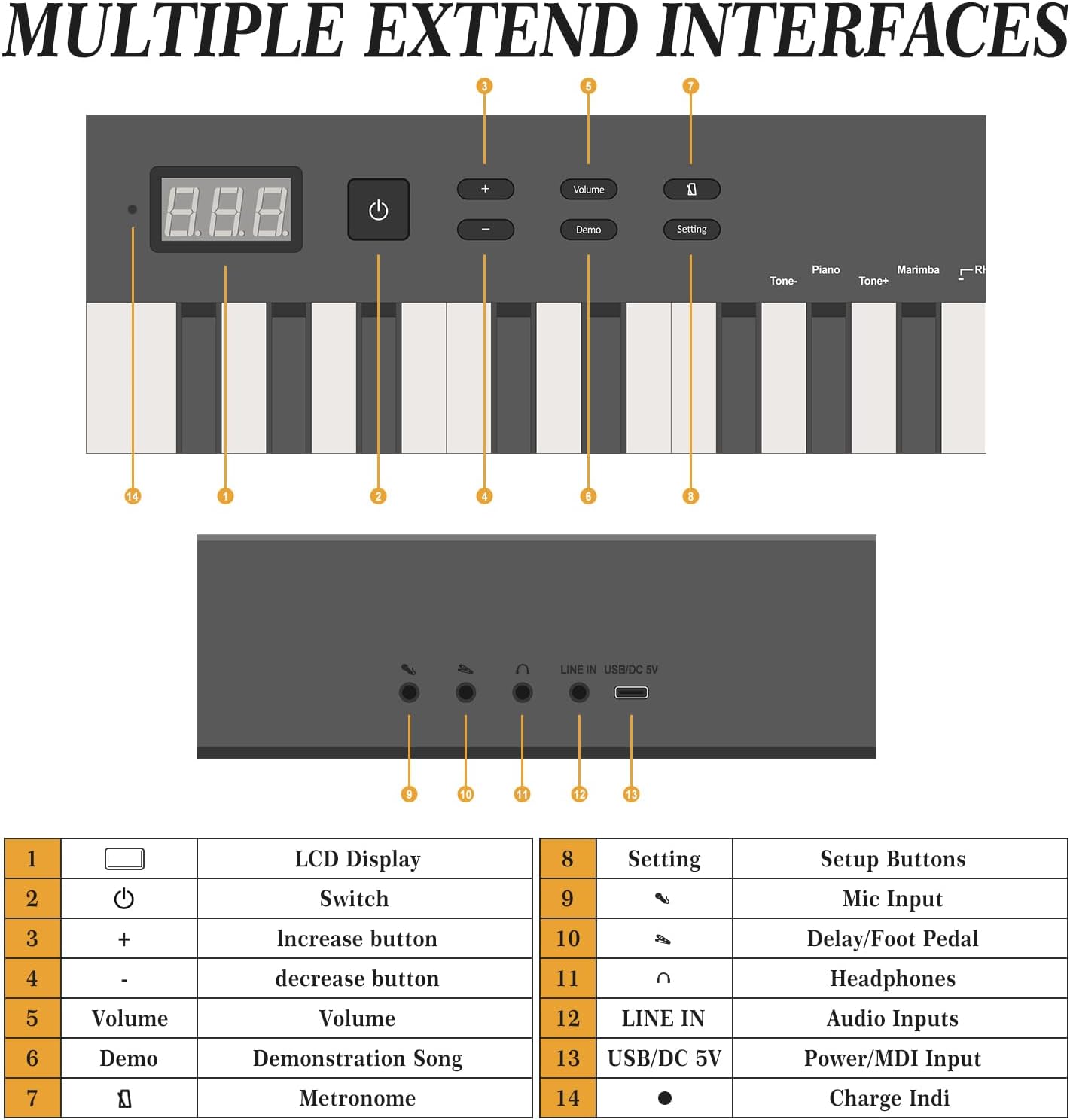
ຮູບພາບ: ຫຼາຍກວ່າview of the keyboard's control panel and rear ports.
- ຫູຟັງ: Connect the included headphones to the 3.5mm headphone jack for private practice.
- Sustain Pedal: Connect the sustain pedal to the dedicated pedal input for expressive playing.
- ໄມໂຄຣໂຟນ: Use the microphone input for vocal accompaniment.
- Audio Input (LINE IN): Connect external audio sources using the LINE IN port.
- USB/MIDI: Use the USB MIDI port for connecting to computers or other MIDI devices.
4. ຄໍາແນະນໍາການດໍາເນີນງານ
The GAOMON digital piano offers a variety of functions accessible via the control panel and LCD display.

Image: Key functions and features of the digital piano.
4.1 ການຄວບຄຸມພື້ນຖານ
- Power (Switch): Press to turn the keyboard on or off.
- ປະລິມານ (+/-): ປັບລະດັບສຽງຕົ້ນສະບັບ.
- ຈໍ LCD: Shows current settings, tone numbers, rhythm numbers, and other operational information.
4.2 Tones and Rhythms
- The keyboard features 129 different tones. Use the 'Tone+' and 'Tone-' buttons to cycle through available instrument sounds.
- Explore 128 rhythms by using the dedicated rhythm selection controls.
4.3 Demo Tracks
- The keyboard includes 30 demo tracks. Press the 'Demo' button to start playback. Use the '+' and '-' buttons to select different demo songs.
4.4 ເມໂທຣໂນມ
- Activate the metronome function to assist with timing and rhythm practice. Adjust the tempo as needed.
4.5 ຟັງຊັນການບັນທຶກ
- The recording function allows you to capture your performances. Refer to the specific instructions in the full manual for detailed steps on how to record and playback your music.
4.6 Dual Keyboard Mode
Engage the dual keyboard mode to split the keyboard into two identical sections, allowing two players to play simultaneously, ideal for teaching or duets.

Image: Dual keyboard mode for collaborative playing.
5. ການເຊື່ອມຕໍ່
The GAOMON digital piano offers versatile connectivity options for enhanced functionality.

Image: Bluetooth and MIDI functions for connecting to external devices.
5.1 ການຈັບຄູ່ Bluetooth
- ກວດໃຫ້ແນ່ໃຈວ່າແປ້ນພິມເປີດຢູ່.
- Activate Bluetooth on your mobile phone, computer, or tablet.
- ຊອກຫາ available Bluetooth devices and select the GAOMON keyboard.
- Confirm pairing on your device. Once connected, you can use the keyboard with interactive piano learning apps or other music software.
5.2 USB MIDI
Connect the keyboard to a computer using a USB cable for MIDI functionality. This allows you to use the keyboard as a MIDI controller for digital audio workstations (DAWs) or other music production software. Ensure appropriate drivers are installed on your computer if necessary.
6. ບໍາລຸງຮັກສາ
Proper care will extend the life and performance of your digital piano.
- ທໍາຄວາມສະອາດ: ໃຊ້ຜ້າອ່ອນໆແຫ້ງເຊັດໜ້າຜິວຂອງແປ້ນພິມ. ສຳລັບຝຸ່ນທີ່ຝັງແໜ້ນ, ໃຫ້ເຊັດອອກເລັກນ້ອຍampen the cloth with water and a mild soap solution, then wipe dry immediately. Avoid abrasive cleaners or solvents.
- ການເກັບຮັກສາ: When not in use, store the keyboard in its carrying bag to protect it from dust and moisture. Avoid placing heavy objects on the keyboard.
- ສະພາບແວດລ້ອມ: Keep the keyboard away from direct sunlight, extreme temperatures, and high humidity. Do not place it near heat sources or in areas with excessive vibration.
7. ການແກ້ໄຂບັນຫາ
If you encounter issues with your GAOMON digital piano, refer to the following common solutions:
| ບັນຫາ | ສາເຫດທີ່ເປັນໄປໄດ້ | ການແກ້ໄຂ |
|---|---|---|
| ບໍ່ມີສຽງ | ປະລິມານຕ່ໍາເກີນໄປ; ເຊື່ອມຕໍ່ຫູຟັງ; ບັນຫາພະລັງງານ. | Increase volume; disconnect headphones; ensure power adapter is securely connected. |
| ປຸ່ມບໍ່ຕອບສະໜອງ | Keyboard not powered on; specific mode activated. | Turn on power; check if a specific mode (e.g., dual keyboard) is affecting key response. |
| ບັນຫາການເຊື່ອມຕໍ່ Bluetooth | Device not in pairing mode; interference; incorrect device selected. | Ensure keyboard and device are in pairing mode; move closer to the keyboard; select the correct device. |
| MIDI not working | Incorrect cable; driver issues; software settings. | Use a proper USB MIDI cable; check computer device manager for drivers; verify MIDI input settings in your software. |
If the problem persists after attempting these solutions, please contact GAOMON customer support for further assistance.
8. ຂໍ້ມູນຈໍາເພາະ
Detailed technical specifications for the GAOMON 88-Key Semi-Weighted Digital Piano Keyboard:
- ຈໍານວນກະແຈ: 88
- ປະເພດຫຼັກ: Semi-Weighted, Touch Sensitive, Full-Size
- ໂທນ: 129
- ຈັງຫວະ: 128
- Demo Tracks: 30
- ການເຊື່ອມຕໍ່: Bluetooth, USB MIDI, Audio Input (LINE IN), Headphone Jack (3.5mm), Microphone Input, Pedal Jack, DC 5V Power Jack
- ແຫຼ່ງພະລັງງານ: ໄຟຟ້າສາຍ
- ຂະໜາດຜະລິດຕະພັນ: 50.67"D x 5"W x 10.43"H (128.7 cm D x 12.7 cm W x 26.5 cm H)
- ນ້ໍາຫນັກລາຍການ: 15.67 ປອນ (7.11 ກິໂລ)
- ສີ: ດຳ
- ໝາຍເລກຕົວແບບ: ZPPEL_0S8UWZHTNf7
- ຜູ້ຜະລິດ: GAOMON
9. ການຮັບປະກັນແລະການສະຫນັບສະຫນູນ
For warranty information, product registration, or technical support, please refer to the warranty card included in your package or visit the official GAOMON webເວັບໄຊ. ຮັກສາໃບຮັບເງິນການຊື້ຂອງທ່ານໄວ້ເປັນຫຼັກຖານການຊື້ສໍາລັບການຮຽກຮ້ອງການຮັບປະກັນໃດໆ.


