1. ບົດແນະນຳ
This manual provides essential information for setting up, operating, and maintaining your NIMO Mini-PC MPL2R. Please read it thoroughly before use to ensure optimal performance and longevity of your device.

ຮູບພາບ 1.1: ດ້ານໜ້າ ແລະ ດ້ານຫຼັງ view of the NIMO Mini-PC MPL2R, showcasing ການອອກແບບທີ່ຫນາແຫນ້ນຂອງມັນແລະພອດຕ່າງໆ.
The NIMO Mini-PC MPL2R is a compact and powerful computing solution, equipped with a 12th Gen Intel N100 processor, 16GB DDR5 RAM, and 768GB storage (512GB M.2 SSD + 256GB Micro SD). It supports triple 4K display output, WiFi 6, and Bluetooth 5.2, making it suitable for a variety of applications from home entertainment to business and educational tasks.

ຮູບພາບ 1.2: ຫຼາຍກວ່າview of key features including Intel 12th Gen N100 processor, 4K triple-screen display support, Bluetooth 5.2, LPDDR5 RAM, WiFi 6, and PCIe SSD.
2. ສິ່ງທີ່ຢູ່ໃນກ່ອງ
ເມື່ອເປີດຊຸດ, ກວດເບິ່ງວ່າລາຍການຕໍ່ໄປນີ້ລວມທັງຫມົດ:
- NIMO Mini-PC MPL2R
- Power Adapter
- VESA ພູເຂົາ
- ຄູ່ມືຜູ້ໃຊ້

Image 2.1: Visual representation of the items included in the NIMO Mini-PC MPL2R packaging: the Mini PC unit, power adapter, VESA mount, and user guide.
3. ຄູ່ມືການຕິດຕັ້ງ
3.1 ການເຊື່ອມຕໍ່ກັບຈໍສະແດງຜົນ
- Connect one end of an HDMI cable to an HDMI port on the NIMO Mini-PC.
- Connect the other end of the HDMI cable to an HDMI input on your monitor or TV.
- For triple display setup, use the second HDMI port and the full-function Type-C port with appropriate adapters/cables.

Image 3.1: The NIMO Mini-PC MPL2R connected to three external monitors, demonstrating its triple 4K display capability.
3.2 ການເຊື່ອມຕໍ່ອຸປະກອນຕໍ່
- ອຸປະກອນ USB: Connect your keyboard, mouse, and other USB devices to the available USB 3.0 ports.
- ສຽງ: Connect speakers or headphones to the 3.5mm audio jack.
- ເຄືອຂ່າຍ: For a wired connection, connect an Ethernet cable to the Gigabit Ethernet port.
3.3 ການເຊື່ອມຕໍ່ພະລັງງານ
- Connect the power adapter to the DC input port on the Mini-PC.
- ສຽບອະແດບເຕີໄຟໃສ່ກັບປລັກສຽບໃສ່ຝາ.
3.4 ການຕິດຕັ້ງ Mount VESA (ທາງເລືອກ)
The included VESA mount allows you to attach the Mini-PC to the back of a compatible monitor, saving desk space.
- Attach the VESA mount bracket to the back of your monitor using the provided screws.
- Slide the NIMO Mini-PC onto the mounted bracket until it clicks securely into place.
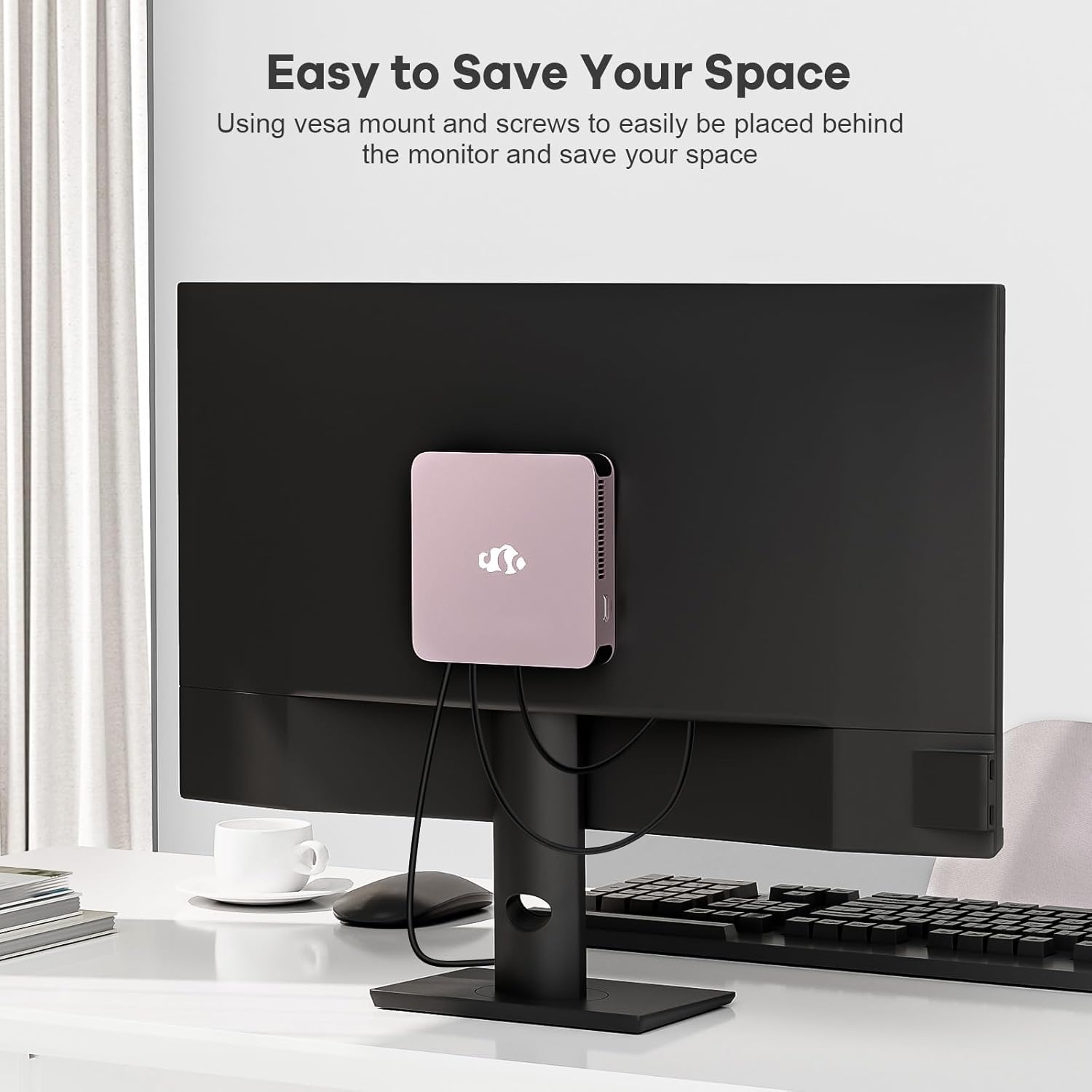
Image 3.2: The NIMO Mini-PC MPL2R shown mounted on the back of a monitor, illustrating its space-saving VESA mount capability.
4. ຄໍາແນະນໍາການດໍາເນີນງານ
4.1 ການເປີດ/ປິດ
- ເປີດ: Press the power button located on the front of the Mini-PC. The power indicator light will illuminate.
- ປິດພະລັງງານ: To shut down the system, use the operating system's shutdown function. For a forced shutdown, press and hold the power button for approximately 5 seconds.
4.2 ການບູດເບື້ອງຕົ້ນ ແລະ ລະບົບປະຕິບັດການ
The NIMO Mini-PC comes with a pre-installed operating system. Upon first boot, follow the on-screen instructions to complete the initial setup, including language selection, network configuration, and user account creation.
4.3 ການເຊື່ອມຕໍ່ໄຮ້ສາຍ
- WiFi 6: To connect to a wireless network, access the network settings in your operating system, select your desired WiFi network, and enter the password.
- Bluetooth 5.2: To pair Bluetooth devices (e.g., keyboard, mouse, headphones), enable Bluetooth in your operating system settings and follow the pairing instructions for your specific device.

Image 4.1: The NIMO Mini-PC MPL2R depicted in multiple usage scenarios, including business meetings, graphic design, home theater, and office work, highlighting its versatility.
5. ຂໍ້ມູນຈໍາເພາະ
Detailed technical specifications for the NIMO Mini-PC MPL2R:
| ຄຸນສົມບັດ | ຂໍ້ມູນຈໍາເພາະ |
|---|---|
| ໂຮງງານຜະລິດ | Intel N100 (4 Cores, 4 Threads, up to 3.4GHz, 6MB Cache) |
| ຮູບພາບ | Intel UHD Graphics (up to 750MHz) |
| RAM | 16GB DDR5 (LPDDR5) |
| ການເກັບຮັກສາ | 512GB M.2 SSD (PCIe x2) + 256GB Micro SD |
| ສະແດງຜົນອອກ | 2x HDMI (4K@60Hz), 1x Full-function Type-C (4K@60Hz) - Triple Display Support |
| ການເຊື່ອມຕໍ່ໄຮ້ສາຍ | WiFi 6, Bluetooth 5.2 |
| ທ່າເຮືອ | 4x USB 3.0, 1x Full-function Type-C, 2x HDMI, 1x Gigabit Ethernet, 1x 3.5mm Audio Jack, 1x Micro SD Card Slot |
| ລະບົບປະຕິບັດການ | System (Pre-installed) |
| ຂະໜາດ (LxWxH) | 4.72 x 4.72 x 0.91 ນິ້ວ |
| ນ້ໍາຫນັກລາຍການ | 1.65 ປອນ |
| ແຫຼ່ງພະລັງງານ | DC |

Image 5.1: Dimensions of the NIMO Mini-PC MPL2R, illustrating its compact size relative to common objects like a pen and a coin.

Image 5.2: Diagram illustrating the internal cooling structure of the NIMO Mini-PC MPL2R, featuring a fan with speeds up to 5300 RPM for efficient heat dissipation.
6. ບໍາລຸງຮັກສາ
- ທໍາຄວາມສະອາດ: Use a soft, dry cloth to clean the exterior of the Mini-PC. Avoid using liquid cleaners or abrasive materials. Ensure ventilation openings are free from dust and debris.
- ອັບເດດຊອບແວ: ປັບປຸງລະບົບປະຕິບັດການ ແລະໄດເວີຂອງທ່ານຢ່າງເປັນປົກກະຕິເພື່ອຮັບປະກັນປະສິດທິພາບ ແລະຄວາມປອດໄພທີ່ດີທີ່ສຸດ.
- ການລະບາຍອາກາດ: Ensure the Mini-PC is placed in a well-ventilated area to prevent overheating. Do not block the air vents.
- ການເກັບຮັກສາ: Avoid placing heavy objects on the Mini-PC. Store it in a cool, dry environment when not in use.
7. ການແກ້ໄຂບັນຫາ
This section addresses common issues you might encounter with your NIMO Mini-PC.
7.1 ບໍ່ມີພະລັງງານ
- Ensure the power adapter is securely connected to both the Mini-PC and a working power outlet.
- ກວດສອບວ່າປລັກສຽບໄຟເຮັດວຽກໄດ້ໂດຍການສຽບໃສ່ອຸປະກອນອື່ນ.
7.2 ບໍ່ມີການສະແດງຜົນອອກ
- Check that the HDMI or Type-C cable is firmly connected to both the Mini-PC and the monitor.
- Ensure the monitor is powered on and set to the correct input source (e.g., HDMI 1, HDMI 2).
- ລອງເຊື່ອມຕໍ່ກັບຈໍສະແດງຜົນອື່ນ ຫຼືໃຊ້ສາຍອື່ນເພື່ອຄວບຄຸມອົງປະກອບທີ່ຜິດພາດ.
7.3 ບໍ່ມີການເຊື່ອມຕໍ່ອິນເຕີເນັດ
- Wired: Ensure the Ethernet cable is properly connected and your router is functioning.
- ໄຮ້ສາຍ: Verify that WiFi is enabled in the operating system, you are connected to the correct network, and the password is entered correctly. Restart your router if necessary.
7.4 ອຸປະກອນຕໍ່ພ່ວງບໍ່ຕອບສະໜອງ
- Try connecting USB devices to different USB ports.
- For Bluetooth devices, ensure they are in pairing mode and Bluetooth is enabled on the Mini-PC.
- Check device drivers in the operating system's device manager.
8. ການຮັບປະກັນແລະການສະຫນັບສະຫນູນ
NIMO is committed to providing reliable products and excellent customer service.
8.1 ຂໍ້ມູນການຮັບປະກັນ
Your NIMO Mini-PC MPL2R comes with a 2-year technical support warranty. This warranty covers manufacturing defects and technical issues under normal use conditions.
8.2 ນະໂຍບາຍການກັບຄືນ
A ນະໂຍບາຍການກັບຄືນ 90 ມື້ is offered, allowing for returns or exchanges within 90 days of purchase.
8.3 ສະຫນັບສະຫນູນດ້ານວິຊາການ
If you encounter any problems or have questions regarding your NIMO Mini-PC, please contact our professional after-sales team. Our computer experts are available to provide technical support and repair services.
- ອີເມວຕິດຕໍ່: service@nimopc.com
- ຄວາມພ້ອມໃຫ້ບໍລິການ: ບໍລິການ 24 ຊົ່ວໂມງ

ຮູບພາບ 8.1: ຫຼາຍກວ່າview of NIMO's customer service, highlighting domestically partial assembly, 90-day returns, and 2-year support.


