1. ບົດແນະນຳ
This manual provides detailed instructions for the safe and efficient operation, installation, and maintenance of your feyree 40A Level 2 EV Charger. Please read this manual thoroughly before using the product to ensure proper functionality and to prevent damage or injury.
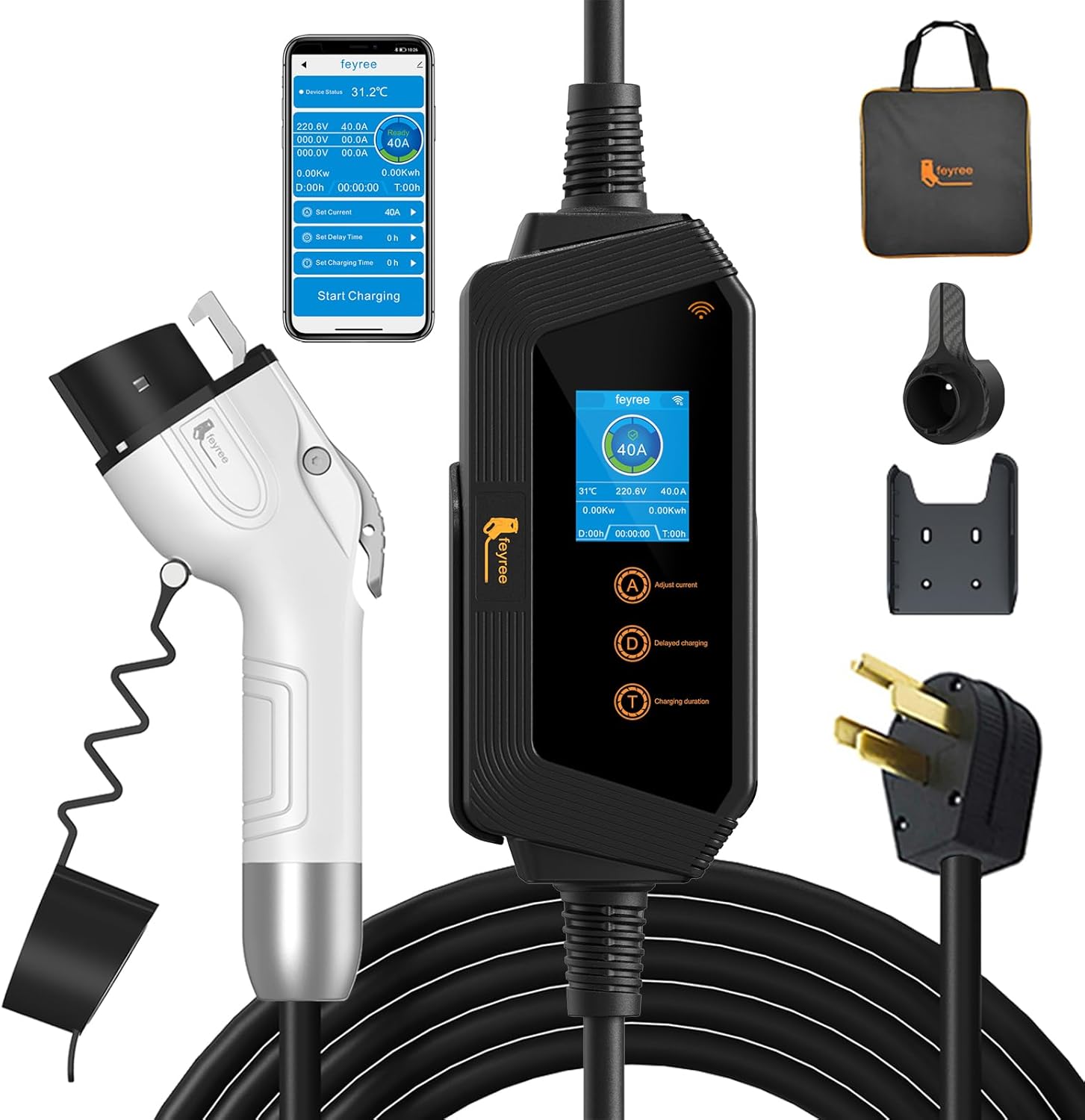
ຮູບ 1: ເກີນview of the feyree 40A Level 2 EV Charger components.
2. ຄຸນລັກສະນະຂອງຜະລິດຕະພັນ
The feyree 40A Level 2 EV Charger is designed for fast, reliable, and smart electric vehicle charging. Key features include:
- WiFi Connection & Smart APP Control: Monitor charging status, adjust current, and set charging times remotely via a dedicated mobile application.
- Up to 40A Fast Charging: Delivers up to 9.6KW of power, significantly reducing charging time compared to Level 1 chargers.
- SAE J1772 Compatibility: Compatible with all J1772 electric and plug-in hybrid vehicles (Tesla requires an additional adapter).
- ການປົກປ້ອງຄວາມປອດໄພຂັ້ນສູງ: Includes over-current, over-voltage, under-voltage, leakage (TypeA), over-heating, and grounding protection.
- ການກໍ່ສ້າງທົນທານ: Made from high flame-retardant material (UL94V-0 fire rating) and IP66 waterproof for outdoor use.
- Two Usage Modes: Can be wall-mounted for permanent installation or used as a portable charger with the included carrying bag.

Figure 2: Key specifications and features of the feyree EV Charger.

Figure 3: Comparison of charging speed, highlighting 8X faster charging.
3. ສິ່ງທີ່ຢູ່ໃນກ່ອງ
ເມື່ອເປີດຊຸດດັ່ງກ່າວ, ກະລຸນາກວດສອບວ່າລາຍການທັງໝົດຕໍ່ໄປນີ້ແມ່ນລວມຢູ່ແລ້ວ:
- 40A Portable EV Charger Level 2
- ຜູ້ຖືສາຍສາກ EV
- EV Plug Holder
- Screw Kit for installation
- ຄູ່ມືຜູ້ໃຊ້ (ເອກະສານນີ້)
- ກະເປົ໋າພົກພາ

ຮູບທີ 4: ອົງປະກອບທັງໝົດລວມຢູ່ໃນຊຸດຜະລິດຕະພັນ.
4. ຕັ້ງຄ່າ
4.1 Installation (Wall-Mounted)
For a fixed charging station, you can mount the charger and cable holder to a wall using the provided screw kit. Choose a location near your NEMA 14-50P outlet that allows the charging cable to comfortably reach your vehicle's charging port.
- Identify a suitable wall location, ensuring it is structurally sound and free from obstructions.
- Use the charger holder as a template to mark drilling points on the wall.
- ເຈາະຮູແລະໃສ່ສະມໍຝາຖ້າຈໍາເປັນ.
- Secure the charger holder and EV plug holder to the wall using the provided screws.
- Hang the charger unit on its holder and neatly coil the cable.

ຮູບທີ 5: ຕົວຢ່າງample of a wall-mounted installation.
4.2 ການໃຊ້ງານແບບພົກພາ
The feyree charger is also designed for portability. When traveling, simply store the charger and cable in the provided portable bag. Ensure the NEMA 14-50P outlet is accessible at your charging location.

Figure 6: Portable storage of the charger in a vehicle trunk.
4.3 ການເຊື່ອມຕໍ່ກັບພະລັງງານ
The charger uses a NEMA 14-50P plug. Ensure you have a compatible 240V NEMA 14-50R outlet available. Plug the charger's power cord firmly into the outlet.

Figure 7: NEMA 14-50P plug and compatible outlet.
5. ຄໍາແນະນໍາການດໍາເນີນງານ
5.1 Basic Charging
To begin charging your electric vehicle:
- Ensure the charger is securely plugged into a NEMA 14-50R outlet.
- Open your vehicle's charging port cover.
- Insert the SAE J1772 connector firmly into your vehicle's charging port until it clicks into place.
- The charger will automatically begin charging, and the LCD screen will display charging status.
- To stop charging, disconnect the J1772 connector from your vehicle.

Figure 8: Compatibility with J1772 EVs.
5.2 Smart APP Control (WiFi Connection)
The feyree charger can be controlled and monitored via a smart application (Tuya Smart or Smart Life). This allows for real-time monitoring, current adjustment, and scheduling.
- Download the Tuya Smart or Smart Life app from your device's app store.
- ລົງທະບຽນຫລືເຂົ້າບັນຊີຂອງທ່ານ.
- Add the charger device by following the in-app instructions for WiFi/Bluetooth pairing.
- ເມື່ອເຊື່ອມຕໍ່ແລ້ວ, ທ່ານສາມາດເຮັດໄດ້ view charging status, adjust current, and set charging schedules directly from your smartphone.

Figure 9: APP remote monitoring interface.
5.3 Adjusting Current
You can adjust the charging current to optimize charging speed or manage power consumption. The charger supports 8 levels of current adjustment.
- ຜ່ານ APP: Use the 'Set Current' option within the mobile application to select your desired ampອາຍຸ.
- Via Charger Buttons: Use the 'A' button on the charger unit to cycle through available current settings.

Figure 10: Current adjustment options.
5.4 Setting Charging Time (Delayed Charging)
ເອົາ advantage of off-peak electricity rates, you can schedule delayed charging times.
- ຜ່ານ APP: Use the 'Set Delay Time' option in the app to specify when charging should begin.
- Via Charger Buttons: Use the 'D' button on the charger unit to manually set a delayed charging time (0-15 hours).

Figure 11: Scheduling delayed charging for cost efficiency.
5.5 ຈໍ LCD ເກີນview
The 2.8-inch LCD display provides real-time information about the charging process:
- WiFi State: Indicates connection status (Connection Waiting, Connect, Not Connected).
- ສະຖານະການສາກໄຟ: Shows if the charger is actively charging.
- ກຳ ລັງສາກໄຟtage: ສະແດງສະບັບປະຈຸບັນtage.
- Real-time Temperature: Shows the operating temperature of the unit.
- ພະລັງງານໃນເວລາຈິງ: Displays instantaneous power consumption (KW).
- Selectable Current: Shows the currently selected ampອາຍຸ.
- ກຳລັງສາກໄຟ: Displays the actual current being drawn.
- ການບໍລິໂພກພະລັງງານ: Total energy consumed (KWh).
- Set Delayed Charging Time: Displays the set delay time.
- Set Charging Time: Displays the set charging duration.

Figure 12: LCD display information.
5.6 ການທໍາງານຂອງປຸ່ມ
The charger unit features three buttons for direct control:
- 'A' Button (Adjust Current): Short press to cycle through current levels.
- 'D' Button (Set Delay Time): Short press to enter delay time setting.
- 'T' Button (Set Charging Time / Menu): Short press to enter charging duration setting. Long press for 10 seconds to enter the main menu page.

Figure 13: Charger button functions.
6. ບໍາລຸງຮັກສາ
Regular maintenance ensures the longevity and optimal performance of your feyree EV charger.
- ທໍາຄວາມສະອາດ: Wipe the charger unit and cable with a soft, damp ຜ້າ. ຢ່າໃຊ້ສານເຄມີທີ່ຮຸນແຮງຫຼືເຄື່ອງເຮັດຄວາມສະອາດຂັດ. ກວດໃຫ້ແນ່ໃຈວ່າໄດ້ຖອດປລັກເຄື່ອງອອກກ່ອນທຳຄວາມສະອາດ.
- ການກວດສອບສາຍ: Periodically inspect the charging cable and connector for any signs of wear, damage, or fraying. Do not use if damaged.
- ການເກັບຮັກສາ: When not in use, store the charger in a dry, clean place. Use the provided cable holder for wall-mounted units or the portable bag for storage.
6.1 ຄວາມຕ້ານທານຕໍ່ສິ່ງແວດລ້ອມ
The feyree charger is designed with an IP66 waterproof rating, making it suitable for various weather conditions. It can withstand temperatures ranging from -22°F (-30°C) to 131°F (55°C).

Figure 14: IP66 waterproof and temperature resistance.
7. ຄຸນນະສົມບັດຄວາມປອດໄພ
Your feyree EV charger is equipped with multiple safety protection functions to ensure safe operation:
- ການປົກປ້ອງເກີນປະຈຸບັນ
- ເກີນ Voltage ການປົກປ້ອງ
- ລະດັບສຽງຕໍ່າtage ການປົກປ້ອງ
- Leakage Protection (TypeA)
- ການປົກປ້ອງຄວາມຮ້ອນເກີນ
- ການປົກປ້ອງດິນ
- ການປ້ອງກັນລັດວົງຈອນ
- ປ້ອງກັນຟ້າຜ່າ

ຮູບທີ 15: ການປົກປ້ອງຄວາມປອດໄພທີ່ສົມບູນແບບ.
8. ການແກ້ໄຂບັນຫາ
If you encounter issues with your feyree EV charger, consider the following common troubleshooting steps:
- ບໍ່ມີພະລັງງານ: Ensure the NEMA 14-50P plug is fully inserted into the outlet and that the circuit breaker for the outlet is not tripped.
- ບໍ່ໄດ້ສາກໄຟ: Verify the J1772 connector is securely plugged into the vehicle's charging port. Check the LCD display for any error codes or status messages.
- ບັນຫາການເຊື່ອມຕໍ່ແອັບ: Ensure your mobile device is connected to a stable WiFi network. Restart the charger and your mobile device, then attempt to reconnect via the app.
- ການສາກໄຟຊ້າ: Check the current setting on the charger's LCD or via the app to ensure it is set to the desired amperage. Verify your vehicle's charging capabilities.
- ຄວາມຮ້ອນເກີນ: If the charger indicates an overheating error, disconnect it immediately and allow it to cool down in a well-ventilated area. Ensure the charger is not covered or in direct sunlight during operation.
For persistent issues or error codes not listed, please refer to the detailed troubleshooting section within the mobile application or contact customer support.
9. ຂໍ້ມູນຈໍາເພາະ
| ຄຸນລັກສະນະ | ຂໍ້ມູນຈໍາເພາະ |
|---|---|
| ຍີ່ຫໍ້ | ຟີຣີ |
| ຕົວແບບ | Electric Car Charger Level 2 |
| ໝາຍເລກຕົວແບບ | Hero EV-H8 (40A) |
| ໝາຍເລກພາກສ່ວນຜູ້ຜະລິດ | FR-CP-0616 |
| ປະຈຸບັນສູງສຸດທີ່ເຄຍ | 40A |
| ພະລັງງານສູງສຸດ | 9.6KW |
| ການປ້ອນຂໍ້ມູນ Voltage | 240V |
| ປະເພດຕົວເຊື່ອມຕໍ່ | SAE J1772 (ປະເພດ 1) |
| ປະເພດປລັກສຽບໄຟ | NEMA 14-50P |
| ຄວາມຍາວສາຍ | 17FT |
| ນ້ໍາຫນັກລາຍການ | 9.79 ປອນ |
| ຂະໜາດແພັກເກັດ | 15.16 x 15.12 x 4.53 ນິ້ວ |
| ການຈັດອັນດັບຄວາມປອດໄພ | CE/FCC |
| ການປະເມີນກັນນ້ໍາ | IP66 |
| ອຸນຫະພູມປະຕິບັດການ | -22°F ຫາ 131°F (-30°C ຫາ 55°C) |
10. ການຮັບປະກັນແລະການສະຫນັບສະຫນູນ
10.1 ຂໍ້ມູນການຮັບປະກັນ
Feyree provides a 2-year assurance service for all feyree products. This warranty covers defects in materials and workmanship under normal use.
10.2 ສະຫນັບສະຫນູນລູກຄ້າ
If you have any questions, require technical assistance, or need to claim warranty service, please feel free to contact our professional after-sales support team. Refer to the product packaging or the feyree official webເວັບໄຊສໍາລັບຂໍ້ມູນຕິດຕໍ່ໃນປະຈຸບັນຫຼາຍທີ່ສຸດ.


