ແນະນຳ
Thank you for choosing the ESX Vision VMX700DAB Universal 2 DIN Multimedia Receiver. This device is designed to provide a comprehensive in-car entertainment and communication experience, featuring a 7-inch touchscreen, digital radio, smartphone integration, and versatile media playback options. This manual provides essential information for the proper installation, operation, and maintenance of your new multimedia receiver.
ຄຸນນະສົມບັດທີ່ສໍາຄັນ
- 7-inch (17.8 cm) Touchscreen Display
- ຄວາມເຂົ້າກັນໄດ້ແບບໄຮ້ສາຍຂອງ Apple CarPlay ແລະ Android Auto
- DAB+ Digital Radio with included DAB antenna
- FM/AM Radio with RDS function
- Bluetooth Hands-free Function with audio streaming
- Front USB-C port for media and charging (1.5A)
- Rear USB-A port for Apple CarPlay/Android Auto and charging (1.5A)
- 4 x 80 W max. music power output
- 4V RCA pre-amplified outputs (FL/FR/RL/RR/SUB1/SUB2)
- ວັດສະດຸປ້ອນ RCA AUX (L/R/VIDEO)
- RCA Camera inputs (Front/Rear)
- Internal and external microphone support
- Compatible with analog steering wheel remote control (learnable)
- ເຄື່ອງຮັບ GPS ແບບປະສົມປະສານ
- Multimedia player for audio, video, and photos (AVI, FLV, MOV, MKV, WMV, WMA, MP3, FLAC, JPEG, PNG, BMP)
ຕັ້ງຄ່າ
1. ເນື້ອໃນຊຸດ
Before beginning installation, ensure all components are present. The package typically includes:
- ESX VMX700DAB Multimedia Receiver
- Power and Speaker Wiring Harnesses
- ໄມໂຄຣໂຟນພາຍນອກ
- DAB+ ເສົາອາກາດ
- ເຄື່ອງຮັບ GPS
- Mounting Hardware and Trim Frame
- RCA Cables for AUX and Camera Inputs
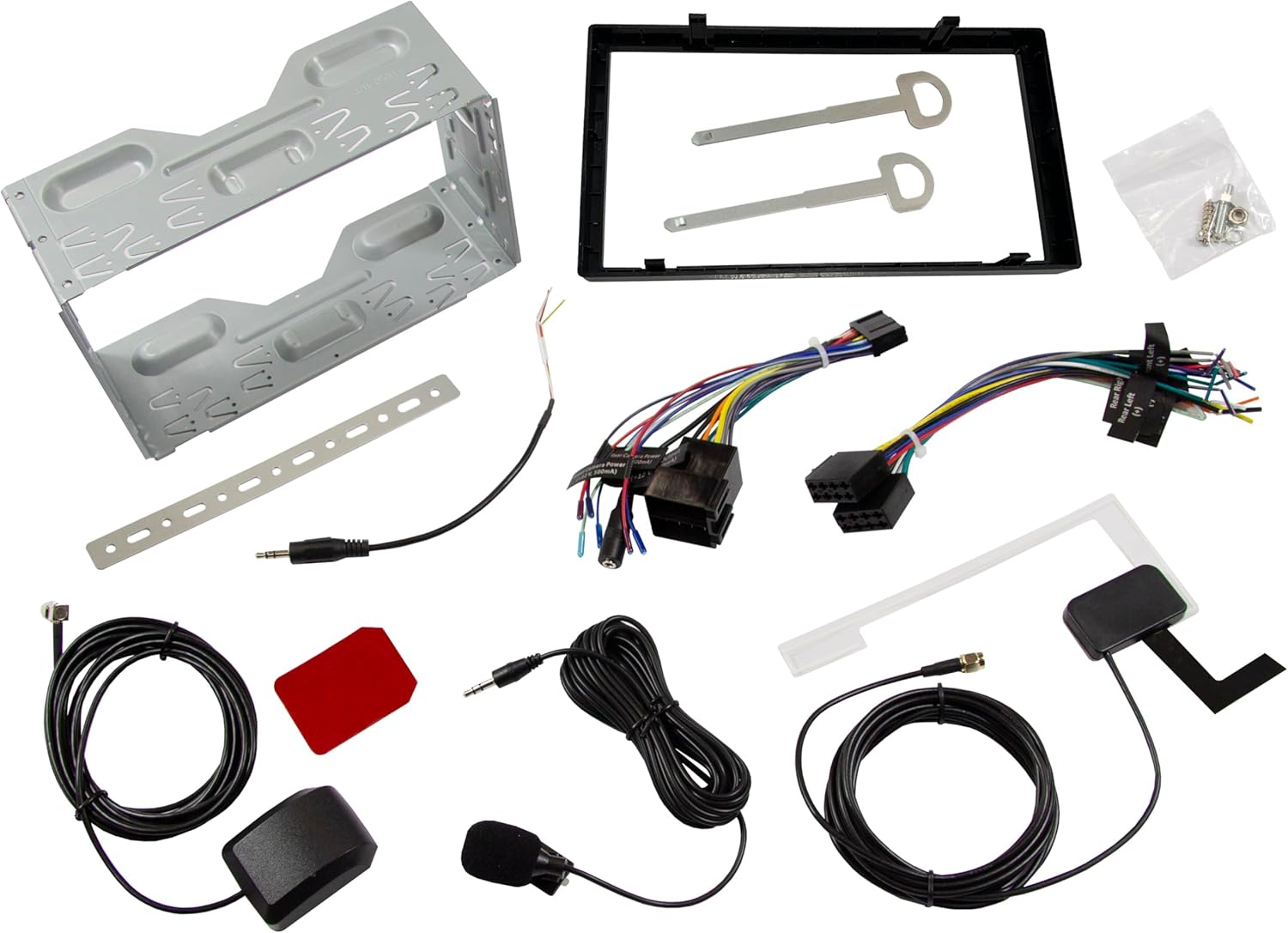
ຮູບພາບ: ຫຼາຍກວ່າview of all included accessories and cables for the ESX VMX700DAB multimedia receiver, including wiring harnesses, antennas, and mounting brackets.
2. ການຕິດຕັ້ງ
Installation of the ESX VMX700DAB should ideally be performed by a qualified professional to ensure proper wiring and functionality. Incorrect installation can lead to damage to the unit or vehicle electrical system.
- ການຕິດຕັ້ງ: Secure the 2 DIN unit into your vehicle's dashboard opening using the provided mounting brackets and screws. Ensure it is firmly seated.
- ສາຍໄຟ: Connect the main power harness, speaker wires, and other auxiliary connections (RCA pre-outs, AUX-in, camera inputs) as per your vehicle's wiring diagram and the receiver's connection ports.
- ເສົາອາກາດ: Connect the DAB+ antenna and GPS receiver to their respective ports on the rear of the unit. Position the antennas for optimal signal reception.
- ໄມໂຄຣໂຟນພາຍນອກ: Connect the external microphone to the designated input for improved hands-free call quality.
- ການຄວບຄຸມພວງມາໄລ: If your vehicle supports analog steering wheel controls, connect the appropriate wires and configure the learning function in the unit's settings.
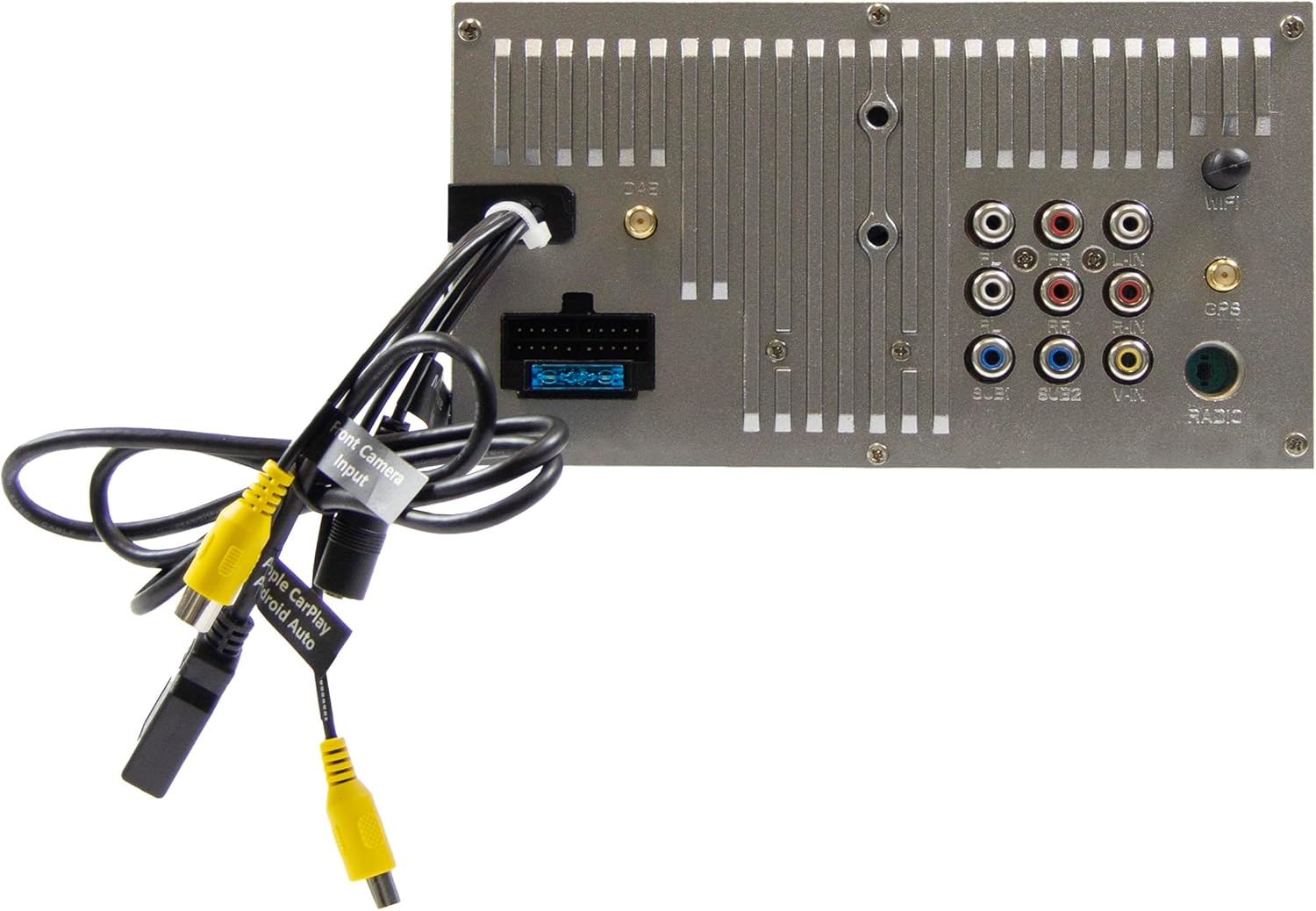
Image: Rear panel of the ESX VMX700DAB multimedia receiver, displaying the array of input and output ports including RCA, USB, and antenna connections for comprehensive system integration.

ຮູບພາບ: ຂ້າງ view of the ESX VMX700DAB unit, highlighting its compact 2 DIN chassis design and the front panel layout with physical controls and USB-C port.

ຮູບພາບ: ທາງຫນ້າ view of the ESX VMX700DAB multimedia receiver, showcasing its 7-inch touchscreen display and the physical rotary knob and buttons on the left side for easy access to essential functions.
3. ການເປີດເຄື່ອງເບື້ອງຕົ້ນ
After installation, turn on your vehicle's ignition. The unit should power on automatically. Follow any on-screen prompts for initial setup, such as language selection or time zone settings.
ຄໍາແນະນໍາການດໍາເນີນງານ
1. ການຄວບຄຸມພື້ນຖານ ແລະ ອິນເຕີເຟດ
The VMX700DAB features a large rotary knob for volume control and three function keys on the left side of the control panel for quick access. The primary interface is the 7-inch touchscreen.

Image: The main home screen of the ESX VMX700DAB multimedia receiver, displaying various application icons for functions such as Apple CarPlay, Android Auto, Radio, Phone, Camera, Bluetooth Audio, USB, DAB, Equalizer, AUX, and Settings.
- ລູກປືນ Rotary: Turn to adjust volume. Press to mute/unmute or access specific menus depending on context.
- ປຸ່ມຟັງຊັນ: These keys provide shortcuts to common functions. Refer to the on-screen labels for their specific actions.
- ໜ້າຈໍສຳຜັດ: Navigate through menus, select options, and control playback by touching the corresponding icons or areas on the display.
2. Radio Functions (FM/AM & DAB+)
Select the "Radio" or "DAB" icon from the home screen to access radio functions.
- ວິທະຍຸ FM/AM: Use the on-screen controls to scan for stations, save presets, and utilize RDS features for station information.
- ວິທະຍຸ DAB+: The integrated DAB+ tuner provides access to digital radio broadcasts. Ensure the DAB antenna is properly connected for optimal reception. Scan for available DAB stations and save your favorites.
3. ການເຊື່ອມຕໍ່ Bluetooth
The built-in Bluetooth module supports hands-free calling and high-quality wireless music streaming.
- ການຈັບຄູ່: Go to the Bluetooth settings on the receiver and enable pairing mode. On your smartphone, search for available Bluetooth devices and select "ESX VMX700DAB" to connect.
- ໂທຟຣີ: Once paired, you can make and receive calls directly through the receiver. The 7-inch display shows your phonebook, allowing direct contact selection. The external microphone ensures clear voice quality.
- ກະແສສຽງ: Stream music wirelessly from your smartphone to the receiver. Control playback (play/pause, skip tracks) from the receiver's touchscreen.
4. Apple CarPlay & Android Auto (Wireless & USB)
The ESX VMX700DAB supports both wireless and wired connections for Apple CarPlay and Android Auto, mirroring your smartphone's compatible apps directly onto the receiver's screen.

Image: The Apple CarPlay interface displayed on the ESX VMX700DAB screen, showing common iOS applications like Phone, Music, Maps, Messages, and Now Playing, providing seamless smartphone integration.

Image: The ESX VMX700DAB multimedia receiver installed in a car dashboard, displaying music playback information on its screen while a smartphone is held nearby, illustrating the integrated media experience.
- ການເຊື່ອມຕໍ່ໄຮ້ສາຍ: Ensure your smartphone's Wi-Fi and Bluetooth are enabled. Select the Apple CarPlay or Android Auto icon on the receiver's home screen and follow the on-screen instructions to establish a wireless connection.
- ການເຊື່ອມຕໍ່ USB: Connect your smartphone to the dedicated USB-A port (usually at the rear, or via the front USB-C if supported for data) using a certified USB cable. The system will automatically launch CarPlay or Android Auto.
- ການທໍາງານ: Access navigation (e.g., Google Maps with live traffic), music streaming services (e.g., Spotify), messaging, and other compatible apps directly from the receiver's touchscreen.
5. ການຫຼິ້ນສື່
The VMX700DAB supports various audio, video, and photo formats via its USB ports.
- ສື່ USB: Insert a USB drive into the front USB-C port or rear USB-A port. Select the "USB" icon to browse and play media files.
- ຮູບແບບທີ່ຮອງຮັບ: AVI, FLV, MOV, MKV, WMV, WMA, MP3, FLAC, JPEG, PNG, BMP.
- AUX Input: Connect external audio/video devices to the RCA AUX inputs (L/R/VIDEO) at the rear of the unit. Select "AUX" from the source menu to play content.
6. Camera Inputs
The unit features two RCA camera inputs (Front/Rear) for connecting external cameras.
- ກ້ອງຫຼັງ: When connected, the display will automatically switch to the rear camera view ເມື່ອລົດຖືກໃສ່ໃນເກຍປີ້ນ.
- ກ້ອງໜ້າ: ກ້ອງໜ້າ view can typically be activated manually from the "Camera" icon on the home screen or through specific settings.
ບໍາລຸງຮັກສາ
- ທໍາຄວາມສະອາດຫນ້າຈໍ: ໃຊ້ຜ້າແພທີ່ອ່ອນນຸ່ມ, ບໍ່ມີສານດ່າງເພື່ອເຊັດໜ້າຈໍສຳຜັດຄ່ອຍໆ. ສໍາລັບ smudges stubborn, ເລັກນ້ອຍ dampໃສ່ຜ້າດ້ວຍນ້ໍາຫຼືເຄື່ອງເຮັດຄວາມສະອາດຫນ້າຈໍທີ່ປອດໄພ. ຫຼີກລ້ຽງການວັດສະດຸຂັດຫຼືສານເຄມີທີ່ຮ້າຍແຮງ.
- ທໍາຄວາມສະອາດທົ່ວໄປ: ຮັກສາເຄື່ອງໃຫ້ປອດຈາກຂີ້ຝຸ່ນ ແລະສິ່ງເສດເຫຼືອ. ໃຊ້ແປງອ່ອນ ຫຼືອາກາດອັດແໜ້ນເພື່ອອະນາໄມບໍລິເວນປຸ່ມ ແລະພອດຕ່າງໆ.
- ອັບເດດຊອບແວ: Periodically check the ESX website for any available firmware updates for your VMX700DAB model. Updates can improve performance, add features, or fix bugs. Follow the instructions provided with the update file ລະມັດລະວັງ.
ການແກ້ໄຂບັນຫາ
If you encounter issues with your ESX VMX700DAB, refer to the following common problems and solutions:
| ບັນຫາ | ສາເຫດທີ່ເປັນໄປໄດ້ | ການແກ້ໄຂ |
|---|---|---|
| ບໍ່ມີພະລັງງານ | Blown fuse, incorrect wiring, vehicle ignition off. | Check vehicle fuses and the unit's fuse. Verify power wiring connections. Ensure vehicle ignition is on. |
| ບໍ່ມີສຽງ | ລະດັບສຽງຕໍ່າເກີນໄປ, ປິດສຽງເປີດໃຊ້ງານ, ສາຍລຳໂພງບໍ່ຖືກຕ້ອງ, ampບັນຫາ lifier. | Increase volume. Check if mute is active. Verify speaker connections. If using external amplifier, ກວດເບິ່ງພະລັງງານແລະການເຊື່ອມຕໍ່ຂອງມັນ. |
| ການຮັບສັນຍານວິທະຍຸບໍ່ດີ (DAB/FM) | ເສົາອາກາດບໍ່ໄດ້ເຊື່ອມຕໍ່, ການຈັດວາງເສົາອາກາດບໍ່ດີ, ພື້ນທີ່ສັນຍານອ່ອນ. | Ensure antenna is securely connected. Reposition antenna for better signal. Try in an area with stronger signal. |
| Bluetooth ບໍ່ເຊື່ອມຕໍ່ | Device not in pairing mode, incorrect pairing process, interference. | ກວດໃຫ້ແນ່ໃຈວ່າອຸປະກອນທັງສອງຢູ່ໃນໂໝດຈັບຄູ່. ລຶບການຈັບຄູ່ກ່ອນໜ້າແລ້ວລອງໃໝ່ອີກຄັ້ງ. ຍ້າຍໄປໃກ້ກັບຫນ່ວຍບໍລິການ. |
| Apple CarPlay/Android Auto ບໍ່ເປີດຕົວ | Incorrect USB cable, phone settings, app issues, wireless connection problems. | Use a certified USB cable. Check phone settings for CarPlay/Android Auto. Restart phone and unit. For wireless, ensure Wi-Fi and Bluetooth are on and paired. |
| ໜ້າຈໍສຳຜັດບໍ່ຕອບສະໜອງ | ລະບົບຄ້າງ, ມີຝຸ່ນຕິດໜ້າຈໍ. | Perform a soft reset (refer to manual for specific reset button/procedure, often a small pinhole). Clean the screen. |
If the problem persists after trying these solutions, please contact ESX customer support or a qualified service technician.
ຂໍ້ມູນຈໍາເພາະ
| ຄຸນສົມບັດ | ລາຍລະອຽດ |
|---|---|
| ໝາຍເລກຕົວແບບ | VMX700DAB |
| ຈໍສະແດງຜົນ | 7-inch (17.8 cm) Touchscreen |
| ເຕັກໂນໂລຊີການເຊື່ອມຕໍ່ | Bluetooth, USB (Type A, Type C), Auxiliary (RCA) |
| ຄຸນນະສົມບັດພິເສດ | Wireless Apple CarPlay, Wireless Android Auto, DAB+ Digital Radio, Hands-free Calling |
| ອຸປະກອນທີ່ເຂົ້າກັນໄດ້ | ໂທລະສັບສະຫຼາດ |
| Max Music Power Output | 4 x 80 ວ |
| ກ່ອນamplified ຜົນໄດ້ຮັບ | 4V RCA (FL/FR/RL/RR/SUB1/SUB2) |
| ໂໝດປ້ອນຂໍ້ມູນສຽງ | ສະເຕຣິໂອ |
| ການຕັ້ງຄ່າຊ່ອງສຽງອ້ອມຮອບ | 4.2 |
| Video Encoding Formats | AVI, FLV, MOV, MKV, WMV |
| Audio Encoding Formats | WMA, MP3, FLAC |
| ຮູບແບບຮູບພາບ | JPEG, PNG, BMP |
| ນ້ໍາຫນັກລາຍການ | 1.61 ກິໂລກຣາມ |
ການຮັບປະກັນແລະການສະຫນັບສະຫນູນ
For warranty information, please refer to the warranty card included with your product or visit the official ESX webເວັບໄຊ. ຮັກສາຫຼັກຖານການຊື້ຂອງທ່ານສໍາລັບການຮຽກຮ້ອງການຮັບປະກັນໃດໆ.
For technical support, troubleshooting beyond this manual, or service inquiries, please contact ESX customer support through their official channels. Contact information can typically be found on the ESX webສະຖານທີ່ຫຼືຢູ່ໃນການຫຸ້ມຫໍ່ຜະລິດຕະພັນ.


