1. ບົດແນະນຳ
Thank you for choosing the truefree O2 Open Ear Headphones. This manual provides detailed instructions for setting up, operating, and maintaining your new wireless earbuds. Please read this guide thoroughly to ensure optimal performance and a satisfying user experience.
2. ເນື້ອໃນຊຸດ
ກວດສອບວ່າລາຍການທັງຫມົດທີ່ລະບຸໄວ້ຂ້າງລຸ່ມນີ້ແມ່ນມີຢູ່ໃນຊຸດຂອງທ່ານ:
- truefree O2 Open Ear Earbuds (x2)
- ກ່ອງສາກ
- ສາຍສາກ USB-C
- ຄູ່ມືຜູ້ໃຊ້
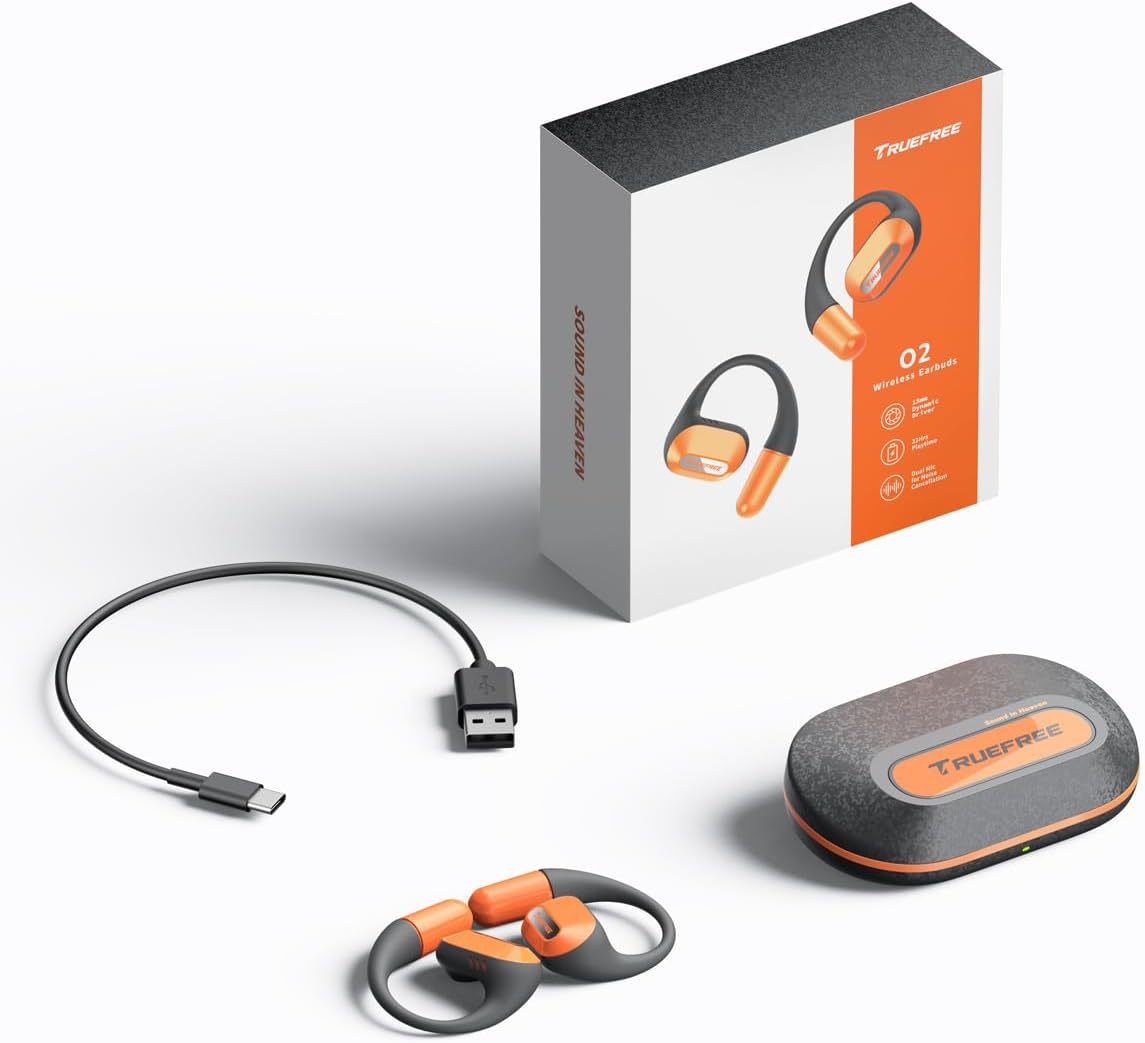
The complete package contents: two truefree O2 open ear earbuds, the charging case, a USB-C charging cable, and the user manual.
3. ຜະລິດຕະພັນເກີນview
The truefree O2 headphones feature an open-ear design for comfort and situational awareness, equipped with 15mm dynamic drivers and directional acoustics. The earbuds are ultra-lightweight (8g each) and designed with soft silicone ear hooks for a secure fit during various activities.

The truefree O2 open ear headphones and their compact charging case.
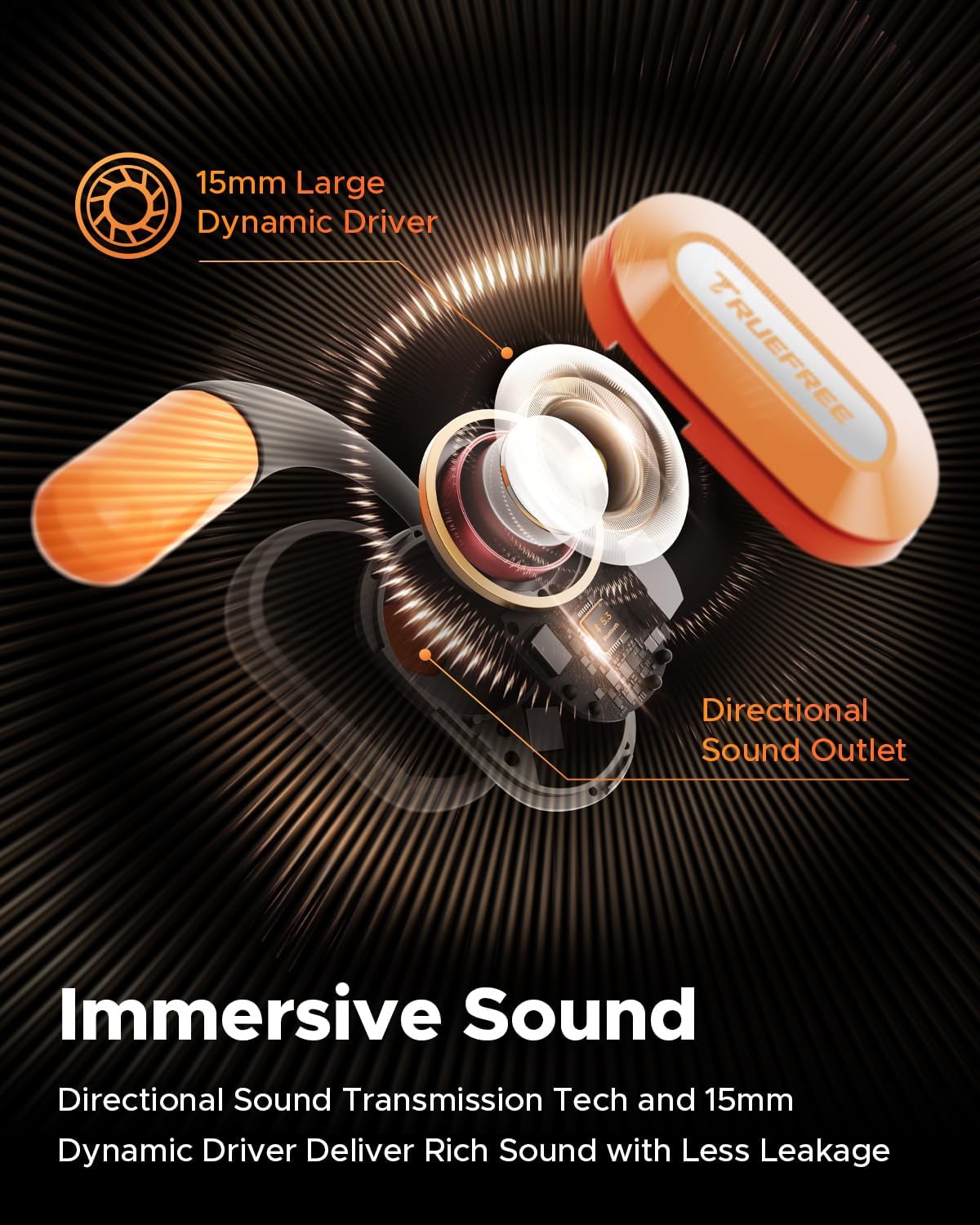
ລະເບີດຂຶ້ນ view diagram of the truefree O2 earbud, highlighting its 15mm large dynamic driver and directional sound outlet for immersive audio with minimal leakage.
4. ໃສ່ຫູຟັງ
ເພື່ອຄຸນນະພາບສຽງທີ່ດີທີ່ສຸດ ແລະຄວາມສະດວກສະບາຍ, ໃຫ້ແນ່ໃຈວ່າໃສ່ຫູຟັງເອຍບັດຢ່າງຖືກຕ້ອງ.
- ລະບຸຫູຟັງຊ້າຍ (L) ແລະຂວາ (R).
- Gently hook the earbud over your ear, positioning the speaker part towards your ear canal.
- Adjust the ear hook to fit snugly and securely around your ear. The flexible NiTi alloy memory steel wire ensures a stable fit for various ear shapes.
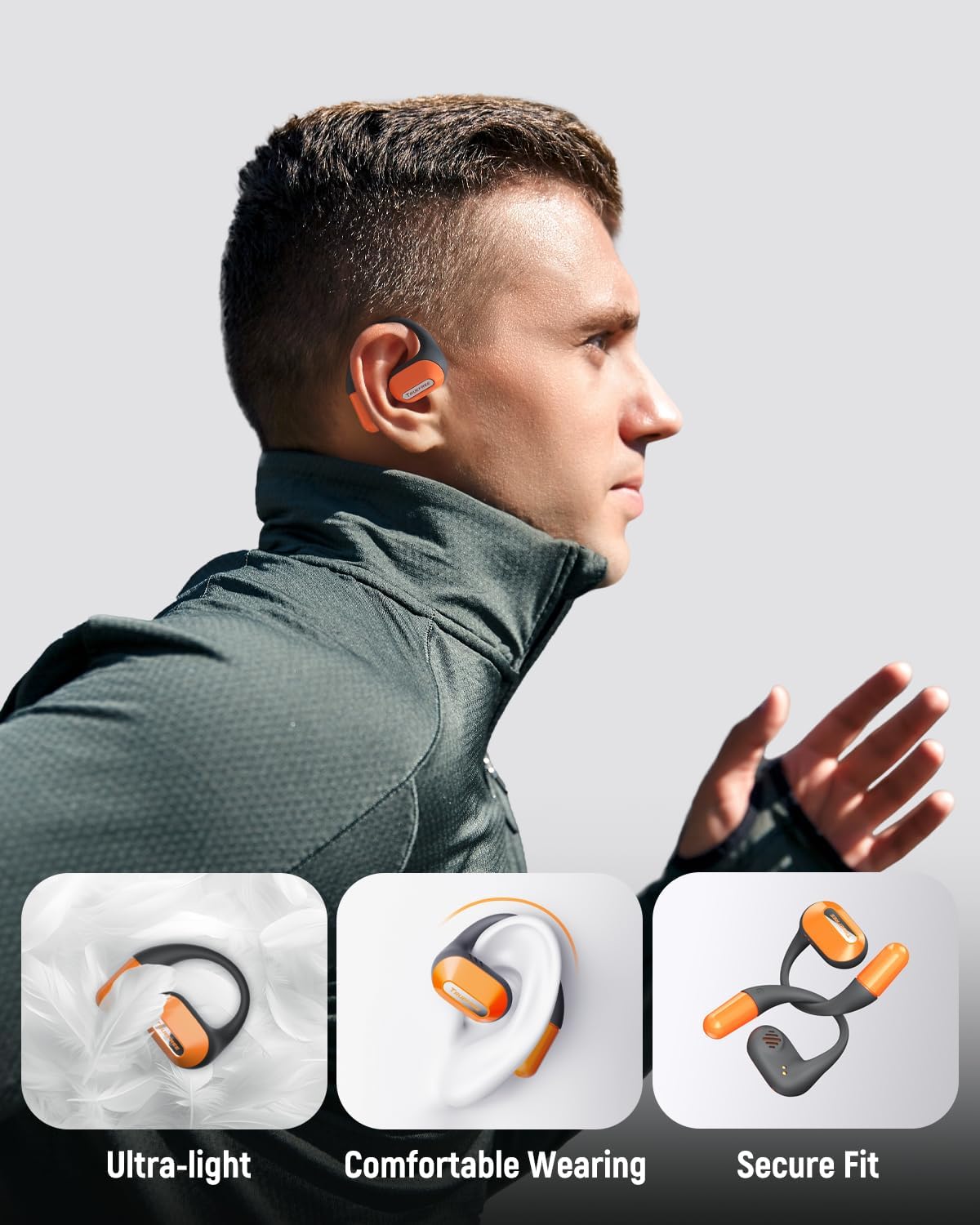
A user wearing the truefree O2 headphones, demonstrating their ultra-light design, comfortable fit, and secure ear hooks suitable for active use.
5. ການສາກໄຟ
The truefree O2 headphones and charging case are designed for efficient power management.
5.1 ກຳລັງສາກຫູຟັງ
- ວາງຫູຟັງໃສ່ກະເປົ໋າສາກໄຟ. ໃຫ້ແນ່ໃຈວ່າການຕິດຕໍ່ສາກໄຟສອດຄ່ອງກັນ.
- The indicator lights on the earbuds will show their charging status.
- ການສາກເຕັມໃຫ້ເວລາຫຼິ້ນປະມານ 6.5 ຊົ່ວໂມງ.
5.2 ການສາກໄຟ Case
- ເຊື່ອມຕໍ່ສາຍສາກ USB-C ກັບຜອດສາກໄຟຢູ່ເຄສ ແລະກັບແຫຼ່ງພະລັງງານ.
- The charging case can be fully charged in approximately 1 hour and 15 minutes.
- A fully charged case provides up to 22 hours of total playtime for the earbuds.

An illustration detailing the IPX5 waterproof rating, 6.5 hours of playtime on a single charge, 22 hours total with the charging case, and 1 hour 15 minutes fast charging via USB-C.
6. ຕັ້ງຄ່າ
6.1 ການຈັບຄູ່ Bluetooth ເບື້ອງຕົ້ນ
- ເປີດກ່ອງສາກໄຟ. ຫູຟັງເອຍບັດຈະເຂົ້າສູ່ໂໝດຈັບຄູ່ໂດຍອັດຕະໂນມັດ.
- ເປີດໃຊ້ Bluetooth ໃນອຸປະກອນຂອງທ່ານ (ໂທລະສັບສະຫຼາດ, ແທັບເລັດ, ແລັບທັອບ).
- ຊອກຫາ "truefree O2" in the list of available Bluetooth devices.
- Select "truefree O2" to connect. A voice prompt will confirm successful pairing.
6.2 ການຄວບຄຸມແອັບ
Enhance your experience by downloading the "Truefree" application from your device's app store.
- ການປັບແຕ່ງ: Adjust EQ settings, including 9 personalized presets and a customizable option.
- ການອັບເດດເຟີມແວ: ອັບເດດຫູຟັງຫູຟັງຂອງທ່ານດ້ວຍຄຸນສົມບັດ ແລະການປັບປຸງຫຼ້າສຸດ.
- ຫນ້າທີ່ພິເສດ: Control features like game mode and other settings directly from the app.
- ການເຊື່ອມຕໍ່ອຸປະກອນຄູ່: Enable multipoint connection for seamless switching between two devices.
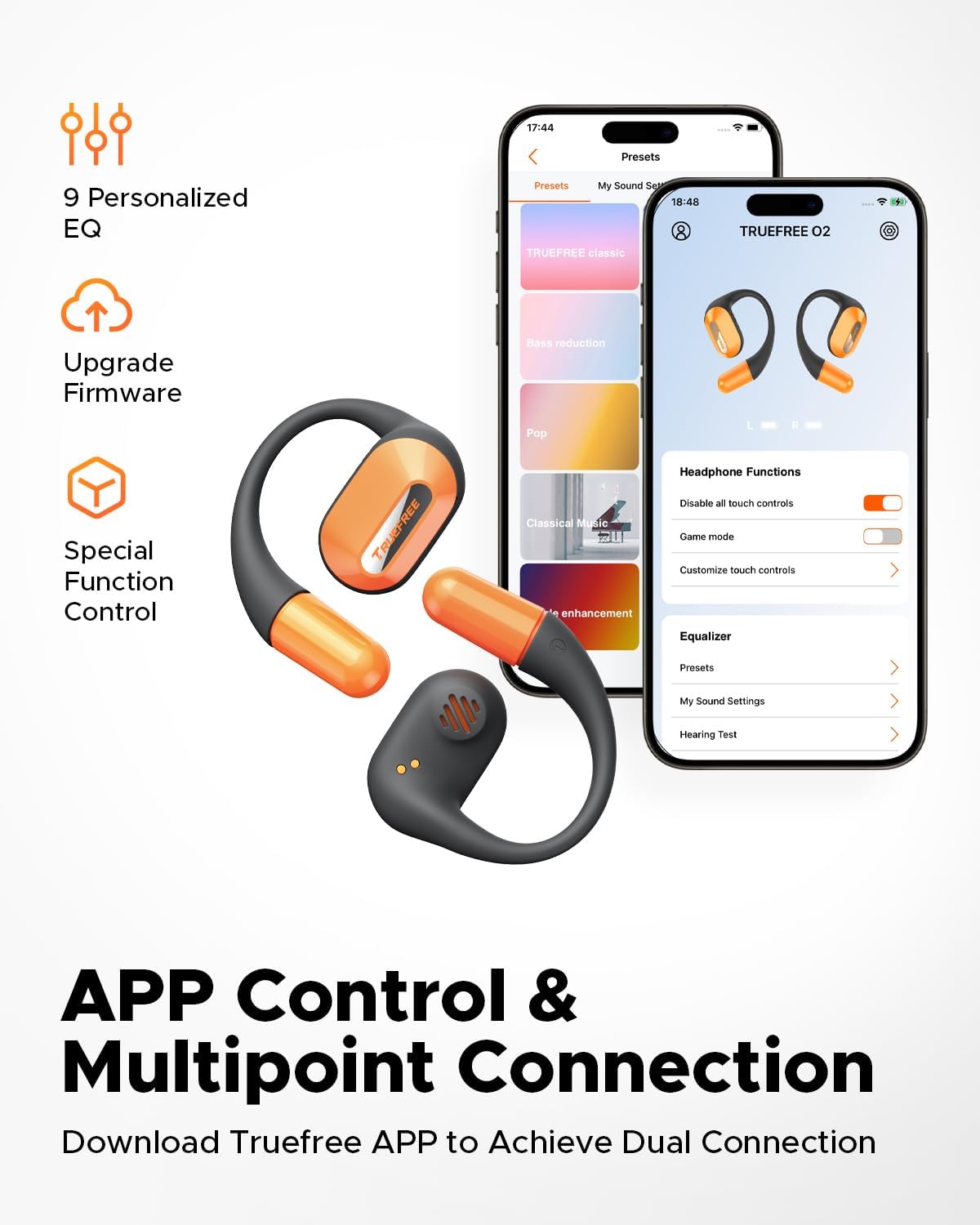
Screenshots of the Truefree mobile application, illustrating options for customizing EQ settings, game mode, and other control functions for the O2 headphones.
7. ການເຮັດວຽກ
7.1 ແຕະການຄວບຄຸມ
The truefree O2 earbuds feature intuitive touch controls on both the left (L) and right (R) earbuds.
| ການປະຕິບັດ | ຟັງຊັນ |
|---|---|
| L & R Double tap | ຫຼິ້ນ/ຢຸດ, ຕອບ/ວາງສາຍ |
| L & R Long press for 1.5s | Previous Track (L), Next Track (R), Power On/Off (when not in case) |
| L Single tap | ປະລິມານລົງ |
| R Single tap | ປະລິມານຂຶ້ນ |
| L Long press for 3s | ເປີດໃຊ້ໂໝດເກມ |
| R Long press for 3s | ເປີດໃຊ້ຜູ້ຊ່ວຍສຽງ |

A visual guide to the touch control functions on the truefree O2 earbuds.
7.2 ການເຊື່ອມຕໍ່ຫຼາຍຈຸດ
The truefree O2 supports connecting to two devices simultaneously, allowing for seamless switching between audio sources.
- Ensure the earbuds are connected to your first device.
- Put the earbuds back into the charging case, then take them out again to re-enter pairing mode.
- Connect the earbuds to your second device via Bluetooth.
- Once both devices are paired, the earbuds will intelligently switch audio based on activity (e.g., taking a call on your phone while listening to music on your laptop).

An image showing the truefree O2 headphones connected to both a laptop and a smartphone, illustrating the multipoint connection feature for seamless device switching.
7.3 ໂໝດເກມ
Activate Game Mode for reduced audio latency, providing a more synchronized audio-visual experience during gaming.
- To activate: Long press the left earbud for 3 seconds.
- To deactivate: Repeat the action.
- Game Mode can also be toggled via the Truefree app.
8. ບໍາລຸງຮັກສາ
8.1 ລະດັບກັນນ້ຳ IPX5
The truefree O2 earbuds are IPX5 waterproof, meaning they are resistant to sweat and light splashes of water. This makes them suitable for workouts and outdoor activities.
- ຢ່າເອົາຫູຟັງເອຍບັດໃສ່ນ້ຳ.
- ກວດໃຫ້ແນ່ໃຈວ່າຫູຟັງເອຍບັດແຫ້ງກ່ອນເອົາມັນກັບໃສ່ກ່ອງສາກເພື່ອປ້ອງກັນຄວາມເສຍຫາຍ.

The truefree O2 earbud with water droplets, illustrating its IPX5 waterproof rating.
8.2 ການທໍາຄວາມສະອາດ
- ເຊັດຫູຟັງເອຍບັດ ແລະກະເປົ໋າສາກໄຟດ້ວຍຜ້າອ່ອນໆ, ແຫ້ງ, ບໍ່ມີສານຂັດ.
- ຫຼີກເວັ້ນການນໍາໃຊ້ວັດສະດຸຂັດຫຼືສານເຄມີທີ່ຮຸນແຮງ.
- ເຮັດຄວາມສະອາດຈຸດສາກໄຟຢູ່ທັງຫູຟັງ ແລະ ກ່ອງເປັນປະຈຳເພື່ອຮັບປະກັນການສາກໄຟທີ່ຖືກຕ້ອງ.
9. ການແກ້ໄຂບັນຫາ
If you encounter issues with your truefree O2 headphones, refer to the following common solutions:
| ບັນຫາ | ການແກ້ໄຂ |
|---|---|
| ຫູຟັງບໍ່ຈັບຄູ່ | Ensure earbuds are charged. Turn off and on Bluetooth on your device. Forget "truefree O2" from your device's Bluetooth list and re-pair. |
| ບໍ່ມີສຽງຈາກຫູຟັງອັນໜຶ່ງ | Place both earbuds back in the case, close it, then open it again. Check device's audio balance settings. |
| ບັນຫາການສາກໄຟ | Clean charging contacts on earbuds and case. Try a different USB-C cable and power adapter. Ensure earbuds are correctly seated in the case. |
| ປະລິມານຕ່ໍາ | Adjust volume on both the earbuds and your connected device. Check EQ settings in the Truefree app. |
| ການເຊື່ອມຕໍ່ຫຼຸດລົງເລື້ອຍໆ | Ensure no obstructions between earbuds and device. Reduce distance between earbuds and device. Avoid strong electromagnetic interference. |
If the issue persists, please contact truefree customer support for further assistance.
10. ຂໍ້ມູນຈໍາເພາະ
| ຄຸນສົມບັດ | ລາຍລະອຽດ |
|---|---|
| ຊື່ຕົວແບບ | truefree O2 |
| ການເຊື່ອມຕໍ່ | Bluetooth 5.3 |
| ການຈັດວາງຫູ | ເປີດຫູ |
| ຮູບຮ່າງຫູຫູ | ຮູ |
| ການຕໍ່ຕ້ານນ້ໍາ | IPX5 |
| ອາຍຸແບັດເຕີຣີ Earbud | ສູງສຸດ 6.5 ຊົ່ວໂມງ |
| ເວລາຫຼິ້ນທັງໝົດ (ພ້ອມກໍລະນີ) | ສູງສຸດ 22 ຊົ່ວໂມງ |
| ເວລາສາກໄຟ Case | Approx. 1 hour 15 minutes (USB-C) |
| ຂະໜາດໄດເວີສຽງ | 15 ມມ |
| ນ້ ຳ ໜັກ ຕຸ້ມຫູ | 8 ກຣາມ (ແຕ່ລະອັນ) |
| ປະເພດການຄວບຄຸມ | ແຕະການຄວບຄຸມ, ການຄວບຄຸມແອັບ |
| ຄຸນນະສົມບັດພິເສດ | Multipoint Pairing, Game Mode, Dual-mic Noise Cancelling |
11. ການຮັບປະກັນແລະການສະຫນັບສະຫນູນ
truefree is committed to providing excellent customer experience. If you have any problems or suggestions regarding your truefree O2 Open Ear Headphones, please do not hesitate to contact our customer support team. We are ready to offer you a satisfactory solution.
For support, please refer to the contact information provided on the truefree official webເວັບໄຊ ຫຼືເວທີການຊື້ຂອງທ່ານ.


