1. ບົດແນະນຳ
The vretti BQ1 Bluetooth Label Printer is a compact, portable thermal label printer designed for various labeling needs in home, office, school, and small business environments. It connects wirelessly to your smartphone via Bluetooth, allowing for quick and easy label creation and printing through the dedicated "xeasy label" application.
This printer utilizes thermal printing technology, eliminating the need for ink or toner, which saves on replacement costs and maintenance. It supports label sizes from 25mm to 58mm, offering flexibility for printing address labels, price tags, food labels, clothing tags, barcodes, QR codes, and more.

Image 1.1: The vretti BQ1 Bluetooth Label Printer, highlighting its Bluetooth connectivity and compatibility with iOS and Android devices.
2. ຕັ້ງຄ່າ
2.1 ເນື້ອໃນຊຸດ
ກ່ອນທີ່ທ່ານຈະເລີ່ມຕົ້ນ, ກະລຸນາກວດສອບວ່າລາຍການທັງໝົດແມ່ນລວມຢູ່ໃນຊຸດຂອງທ່ານ:
- 1 x vretti BQ1 Label Printer
- 1 x ຄູ່ມືຜູ້ໃຊ້ (ເອກະສານນີ້)
- 1 x 50x30mm Label Paper Roll (pre-installed inside the machine)
- 1 x ສາຍສາກ USB Type-C
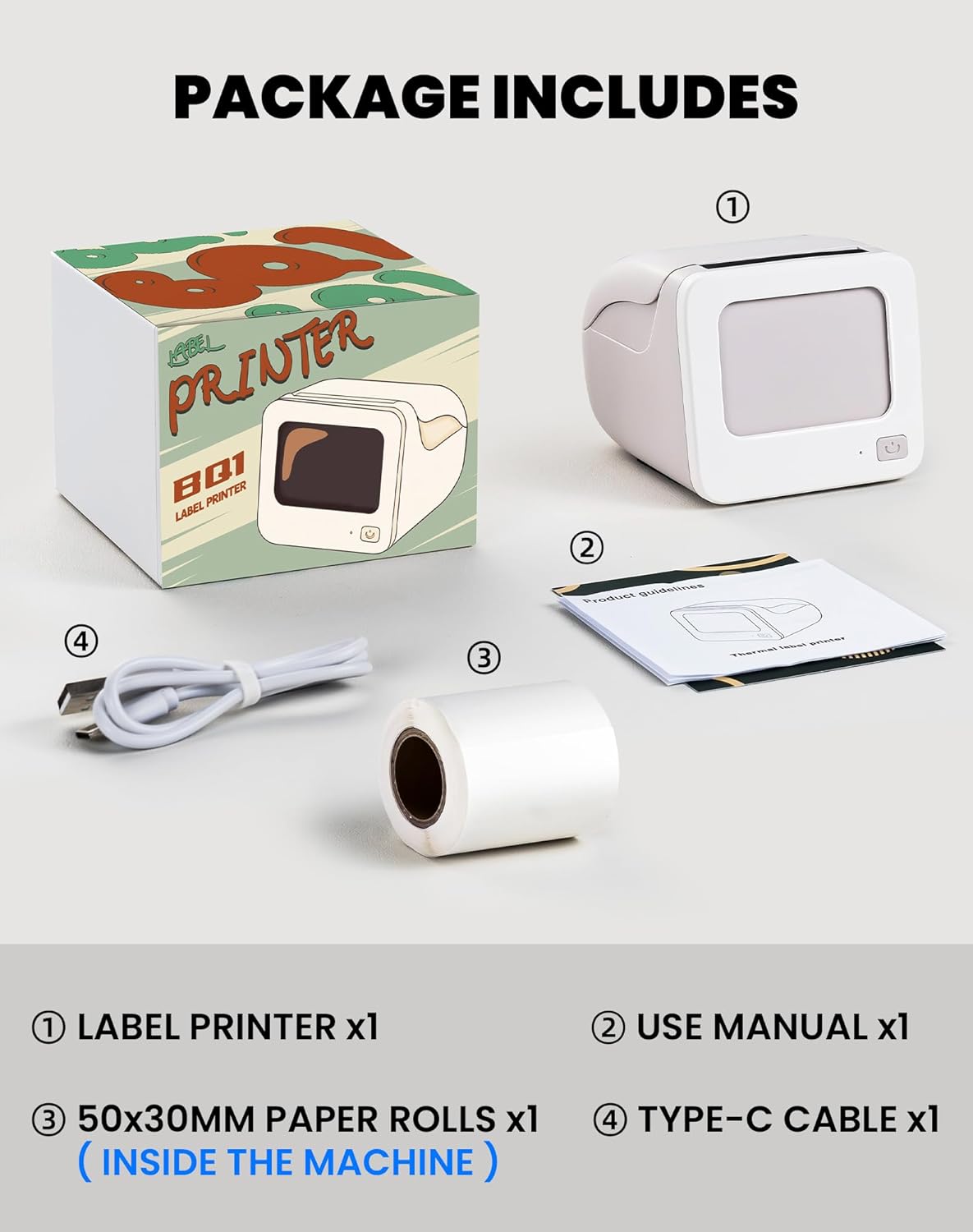
Image 2.1: Visual representation of the items included in the vretti BQ1 label printer package.
2.2 ການໂຫຼດເຈ້ຍປ້າຍຊື່
The printer comes with a label roll pre-installed. If you need to replace or load a new roll:
- ຄ່ອຍໆເປີດຝາປິດເຄື່ອງພິມ.
- Insert the new label roll into the compartment, ensuring the labels feed out smoothly. The printable side of the label should face upwards.
- ປິດຝາເຄື່ອງພິມຢ່າງປອດໄພ.

Image 2.2: Proper insertion of a label roll into the vretti BQ1 printer, demonstrating the supported label width range.
2.3 ການຕິດຕັ້ງແອັບ ແລະ ການເຊື່ອມຕໍ່ Bluetooth
To use your vretti BQ1 printer, you need to download and connect it via the "xeasy label" application.
- ດາວໂຫລດ App ໄດ້: ຊອກຫາ "xeasy label" in your smartphone's app store (Google Play Store for Android or Apple App Store for iOS) and install it.
- ເປີດ Bluetooth: ໃຫ້ແນ່ໃຈວ່າ Bluetooth ຖືກເປີດໃຊ້ຢູ່ໃນໂທລະສັບສະຫຼາດຂອງທ່ານ.
- Open the App and Connect: Open the "xeasy label" app. The app will guide you to connect to your printer. Select "BQ1" from the list of available devices.
- ເປີດ: ກົດປຸ່ມເປີດປິດເຄື່ອງພິມຄ້າງໄວ້ຈົນກວ່າໄຟສະແດງຈະສະຫວ່າງຂຶ້ນ.

Image 2.3: Step-by-step guide for downloading the "xeasy label" app, connecting to the printer via Bluetooth, and preparing to edit a label.
3. ຄໍາແນະນໍາການດໍາເນີນງານ
3.1 ການສ້າງ ແລະ ການພິມປ້າຍ
Once connected, the "xeasy label" app provides a user-friendly interface for designing and printing labels.
- Select a Template or Create New: The app offers a variety of pre-designed templates, fonts, icons, and frames. You can choose an existing template or start a new design.
- ປັບແຕ່ງປ້າຍຂອງທ່ານ: Edit text, add images, barcodes, QR codes, and adjust the layout to fit your needs. The app supports various customization options.
- ກ່ອນview ແລະພິມ: ກ່ອນທີ່ຈະພິມ, ກ່ອນview your label to ensure it looks as desired. Then, tap the print button in the app to send the design to your vretti BQ1 printer.
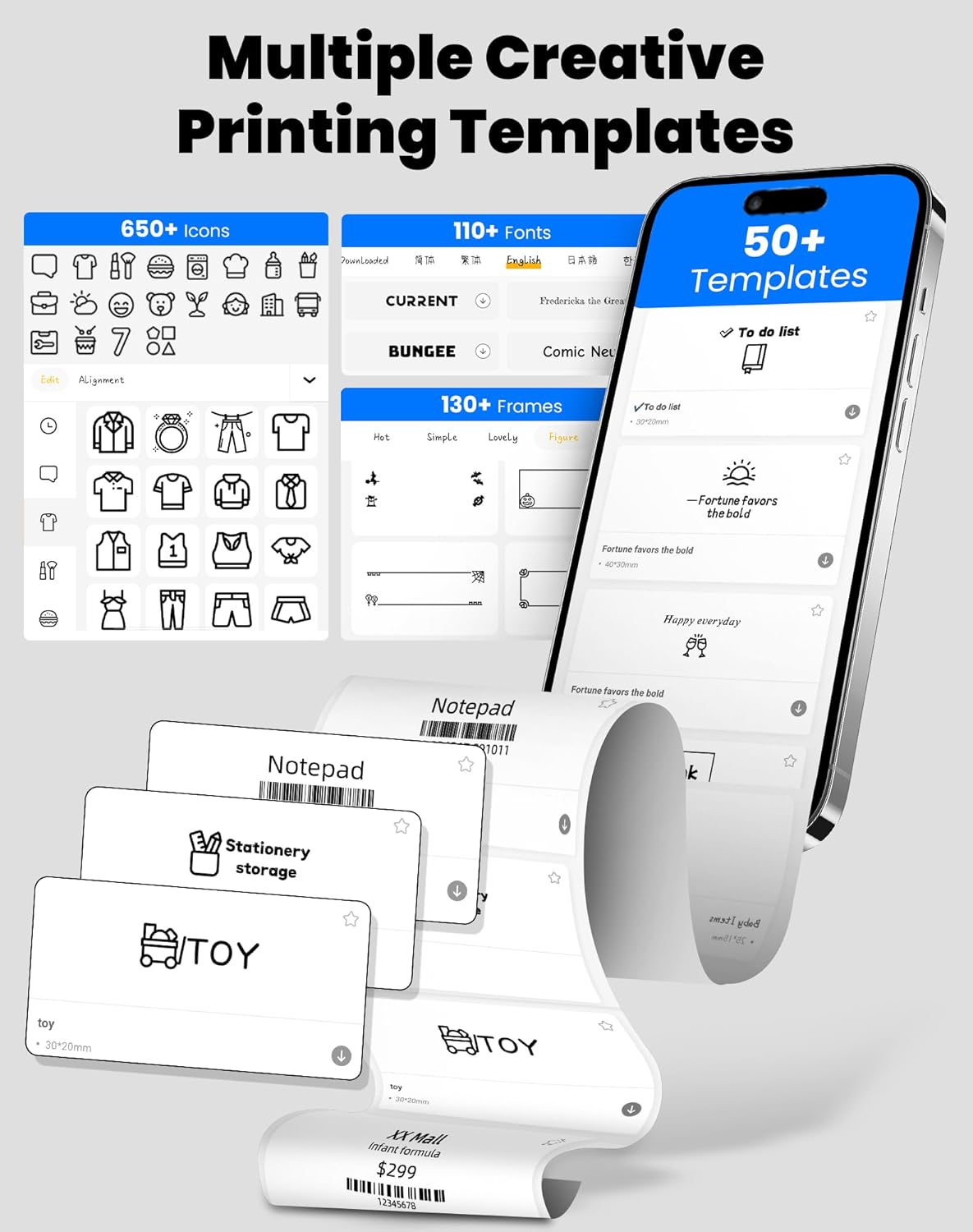
Image 3.1: The "xeasy label" app interface, showcasing a wide range of creative printing templates, icons, and fonts available for label design.

ຮູບພາບ 3.2: ຫຼາຍກວ່າview of the multi-functional applications within the "xeasy label" app, including support for barcodes, QR codes, images, various borders, font shapes, and hundreds of icons.
3.2 Common Label Applications
The vretti BQ1 printer is versatile and suitable for a wide range of applications:
- ອົງການຈັດຕັ້ງບ້ານ: Label storage bins, pantry items, spice jars, and more.
- ຫ້ອງການ ແລະ ໂຮງຮຽນ: ຈັດຕັ້ງ files, label stationery, create name tags, or mark assets.
- Retail & Small Business: ລາຄາພິມ tags, product labels, address labels for shipping, and inventory management labels.
- ການນໍາໃຊ້ສ່ວນບຸກຄົນ: Create decorative labels for gifts, DIY projects, or personal items.

ຮູບພາບ 3.3: ຕົວຢ່າງamples of the vretti BQ1 printer's versatility, showing labels used for toy classification, light switches, to-do lists, clothing, and gifts.

Image 3.4: Demonstrations of common label types that can be printed, including address labels, price labels, food labels, and customizable DIY labels.
4. ບໍາລຸງຮັກສາ
4.1 ການທໍາຄວາມສະອາດເຄື່ອງພິມ
To ensure optimal performance and print quality, regular cleaning is recommended:
- ພາຍນອກ: Wipe the exterior of the printer with a soft, dry cloth. Avoid using abrasive cleaners or solvents.
- ຫົວພິມ: If print quality degrades, gently clean the thermal print head with an alcohol swab. Ensure the printer is turned off and cooled down before cleaning.
4.2 Label Roll Storage
Store label rolls in a cool, dry place away from direct sunlight and excessive heat to preserve their adhesive properties and print quality.
5. ການແກ້ໄຂບັນຫາ
If you encounter issues with your vretti BQ1 printer, try the following steps:
- ເຄື່ອງພິມບໍ່ເປີດ: Ensure the printer is charged. Connect it to a power source using the provided Type-C cable.
- ບໍ່ສາມາດເຊື່ອມຕໍ່ຜ່ານ Bluetooth:
- ໃຫ້ແນ່ໃຈວ່າ Bluetooth ຖືກເປີດໃຊ້ຢູ່ໃນໂທລະສັບສະຫຼາດຂອງທ່ານ.
- Ensure the printer is powered on and within range.
- Restart both the printer and your smartphone.
- Try reconnecting through the "xeasy label" app.
- ຄຸນນະພາບການພິມບໍ່ດີ:
- Check if the label roll is inserted correctly and is not damaged.
- ເຮັດຄວາມສະອາດຫົວພິມຄວາມຮ້ອນຕາມທີ່ໄດ້ອະທິບາຍໄວ້ໃນພາກການບໍາລຸງຮັກສາ.
- Ensure the label type is compatible with thermal printing.
- ປ້າຍກຳກັບບໍ່ໃຫ້ອາຫານຢ່າງຖືກຕ້ອງ:
- Verify the label roll is properly seated and not jammed.
- Ensure the printer cover is fully closed.
ວິດີໂອ 5.1: ຜະລິດຕະພັນທົ່ວໄປຫຼາຍກວ່າview video for the vretti BQ1 label printer, demonstrating its features and operation. If the video does not load, please ensure your browser supports HLS streaming.
6. ຂໍ້ມູນຈໍາເພາະ
| ຍີ່ຫໍ້ | vretti |
| ຊື່ຕົວແບບ | BQ1 |
| ເຕັກໂນໂລຊີການເຊື່ອມຕໍ່ | Bluetooth |
| ເຕັກໂນໂລຊີການພິມ | ຄວາມຮ້ອນ |
| ຂະໜາດມີເດຍສູງສຸດ | 58 mm (supports 25-58mm width) |
| ຄວາມລະອຽດການພິມ | 203 dpi (ສີຂາວດຳ) |
| ອຸປະກອນທີ່ເຂົ້າກັນໄດ້ | ໂທລະສັບສະຫຼາດ (Android, iOS) |
| ອົງປະກອບລວມ | 1 Label Printer, 1 Label Roll (starter), 1 Type-C Cable |
| ຂະໜາດສິນຄ້າ | 10.3D x 10.4W x 8H ຊັງຕີແມັດ |
| ຄຸນນະສົມບັດພິເສດ | Elegant TV-like design |
7. ການຮັບປະກັນແລະການສະ ໜັບ ສະ ໜູນ
7.1 ຂໍ້ມູນການຮັບປະກັນ
The vretti BQ1 Label Printer typically comes with a ການຮັບປະກັນຫນຶ່ງປີ ນັບຈາກວັນທີ່ຊື້. ກະລຸນາເກັບຫຼັກຖານການຊື້ຂອງທ່ານໄວ້ເພື່ອການຮຽກຮ້ອງການຮັບປະກັນ. ການຮັບປະກັນກວມເອົາຂໍ້ບົກພ່ອງຈາກການຜະລິດແຕ່ບໍ່ກວມເອົາຄວາມເສຍຫາຍທີ່ເກີດຈາກການໃຊ້ຜິດ, ອຸບັດຕິເຫດ, ຫຼືການດັດແປງທີ່ບໍ່ໄດ້ຮັບອະນຸຍາດ.
7.2 ສະຫນັບສະຫນູນລູກຄ້າ
For further assistance, technical support, or warranty inquiries, please refer to the official vretti website or contact their customer service through the contact information provided on their official channels. Ensure you have your product model number (BQ1) and purchase details ready when contacting support.


