ແນະນຳ
The PeriPage P40 is a sleek, portable mini thermal printer designed for mobile and wireless printing. It utilizes Bluetooth connectivity and requires no ink, making it suitable for printing documents, photos, and even tattoo stencils directly from your Android or iOS device. This manual provides comprehensive instructions for setting up, operating, and maintaining your P40 printer.

Image: The PeriPage P40 Mini Thermal Printer, a compact white device.
ຂໍ້ມູນຄວາມປອດໄພ
- Do not disassemble, repair, or modify the printer.
- ຮັກສາເຄື່ອງພິມໃຫ້ຫ່າງຈາກນໍ້າ, ຄວາມຊຸ່ມ ແລະ ແສງແດດໂດຍກົງ.
- ໃຊ້ພຽງແຕ່ສາຍສາກ ແລະອະແດັບເຕີໄຟທີ່ລະບຸໄວ້ເທົ່ານັ້ນ.
- ຫຼີກລ່ຽງການສຳຜັດຫົວພິມທັນທີຫຼັງຈາກພິມແລ້ວ, ເພາະມັນອາດຈະຮ້ອນໄດ້.
- Store the printer and thermal paper in a cool, dry place.
- ຮັກສາໃຫ້ໄກຈາກເດັກນ້ອຍ.
ເນື້ອໃນຊຸດ
ກະລຸນາກວດເບິ່ງເນື້ອໃນຂອງແພັກເກດເມື່ອ unboxing:
- PeriPage P40 Mini Thermal Printer
- Thermal Paper Roll (Included Components: Paper)
- ສາຍສາກໄຟ USB Type-C
- ຄູ່ມືຜູ້ໃຊ້ (ເອກະສານນີ້)
ສິນຄ້າເກີນview
Familiarize yourself with the various parts of your PeriPage P40 printer.

ຮູບພາບ: ລາຍລະອຽດ view of the PeriPage P40 printer showing the Power Button with Indicator Light, Cover-open Button, Type-C Interface for charging/connection, and the internal mechanism for easy paper replacement.
- Power Button / Indicator Light: Used to turn the printer on/off and indicates status.
- Cover-open Button: ປ່ອຍຝາປິດດ້ານເທິງເພື່ອໃສ່ເຈ້ຍ.
- Type-C ການໂຕ້ຕອບ: For charging the printer and connecting to a computer (if applicable, though primarily Bluetooth).
- ຊ່ອງອອກເຈ້ຍ: Where printed paper emerges.
- ຊ່ອງໃສ່ເຈ້ຍ: Holds the thermal paper.
ຕັ້ງຄ່າ
1. ການສາກໄຟເຄື່ອງພິມ
Before first use, fully charge the printer. Connect the provided USB Type-C cable to the printer's Type-C interface and the other end to a USB power adapter (not included) or a computer's USB port. The indicator light will show charging status (e.g., red while charging, green when fully charged).
The printer features a 2600mAh battery, offering approximately 3 hours of continuous printing or up to 90 days of standby time on a full charge, capable of printing around 360 papers.
Image: Information graphic detailing the PeriPage P40's battery performance: 90 days standby, 2600mAh battery, 3 hours continuous print, and 360 papers print per full charge.
2. Installing Thermal Paper
The PeriPage P40 supports two types of thermal paper: folding paper and inner roll paper.

Image: Illustration showing the two supported paper types for the PeriPage P40: Folding Paper for automatic paging and multiple paper printing, and Inner Roll Paper for portability, free space, and customized paper length.
- Press the Cover-open Button to open the printer's top cover.
- Insert the thermal paper into the paper compartment, ensuring the printing side faces the print head. For roll paper, ensure it unwinds from the bottom. For folding paper, align it correctly.
- Pull a small amount of paper out of the paper exit slot.
- ປິດຝາປິດດ້ານເທິງໃຫ້ແໜ້ນຈົນກວ່າມັນຈະຄລິກເຂົ້າທີ່.
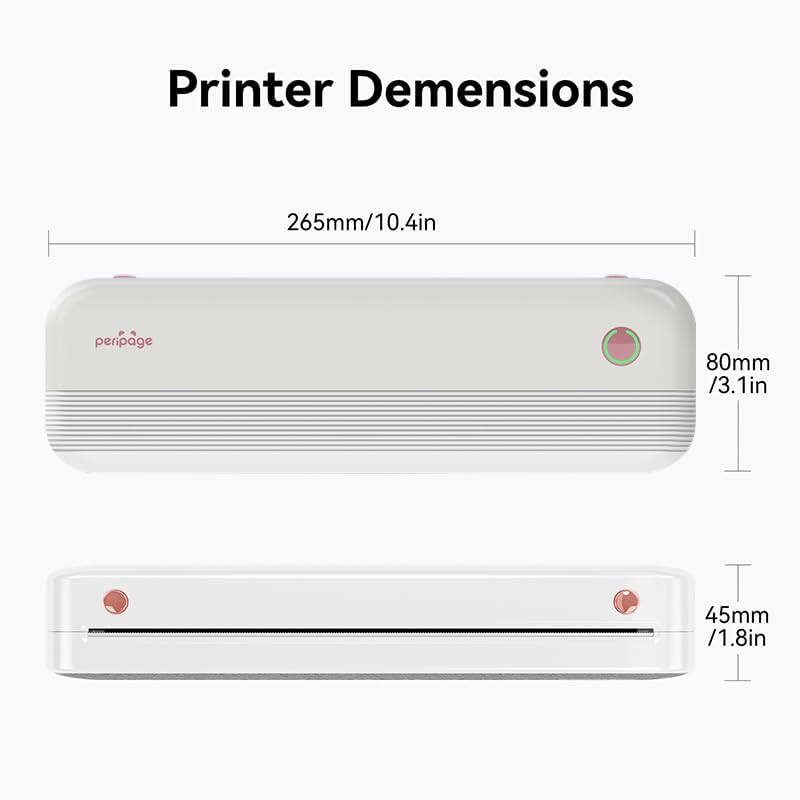
Image: The PeriPage P40 printer actively printing a document, with paper emerging from the front slot.
3. ການດາວໂຫຼດແອັບ ແລະ ການເຊື່ອມຕໍ່ Bluetooth
The PeriPage P40 printer operates via the dedicated "PeriPage" mobile application.
- ຊອກຫາ "PeriPage" in your device's APP store (Google Play Store for Android, Apple App Store for iOS) and download the official application. Alternatively, scan the QR code provided in the physical instruction manual to download the app.
- Ensure your printer is turned on and fully charged.
- ເປີດໃຊ້ Bluetooth ໃນອຸປະກອນມືຖືຂອງທ່ານ.
- Open the "PeriPage" app. The app will guide you through connecting to your printer via Bluetooth. Select "P40" from the list of available devices.
- Once connected, the indicator light on the printer may change color or status to confirm the connection.
ຄໍາແນະນໍາການດໍາເນີນງານ
ເປີດ/ປິດ
- ເພື່ອເປີດ: Press and hold the Power Button until the indicator light illuminates.
- ປິດ: Press and hold the Power Button until the indicator light turns off.
Printing from the App
Once your printer is connected to the PeriPage app:
- Open the PeriPage app on your smartphone.
- Select the type of content you wish to print (e.g., document, photo, web page, note).
- Adjust print settings such as density, size, and orientation within the app as needed.
- Confirm your selection and tap the print icon. The printer will begin printing.
ບໍາລຸງຮັກສາ
- ທໍາຄວາມສະອາດຫົວພິມ: ຖ້າຄຸນນະພາບການພິມຫຼຸດລົງ, ຄ່ອຍໆເຊັດຫົວພິມດ້ວຍສຳລີເຊັດເບົາໆ.ampened with isopropyl alcohol. Ensure the printer is off and cool before cleaning. Allow it to dry completely before use.
- ທໍາຄວາມສະອາດພາຍນອກ: Use a soft, dry cloth to wipe the printer's exterior. Do not use abrasive cleaners or solvents.
- ການເກັບຮັກສາ: When not in use for extended periods, turn off the printer and store it in a cool, dry place away from direct sunlight and extreme temperatures. Remove any paper if storing for very long durations to prevent dust accumulation.
ການແກ້ໄຂບັນຫາ
| ບັນຫາ | ສາເຫດທີ່ເປັນໄປໄດ້ | ການແກ້ໄຂ |
|---|---|---|
| ເຄື່ອງພິມເປີດບໍ່ໄດ້. | ແບັດເຕີຣີເຫຼືອໜ້ອຍ ຫຼື ບໍ່ມີສາກ. | Connect the printer to a power source and charge it fully. |
| ບໍ່ສາມາດເຊື່ອມຕໍ່ຜ່ານ Bluetooth ໄດ້. | Bluetooth is off on device; printer not in pairing mode; app issue. | Ensure Bluetooth is enabled on your phone. Restart the printer and the app. Try pairing again within the PeriPage app. |
| Poor print quality / Blank prints. | Incorrect paper loading; low battery; dirty print head; non-thermal paper. | Ensure thermal paper is loaded correctly with the print side facing up. Charge the printer. Clean the print head. Use only thermal paper. |
| ເຈ້ຍຕິດ. | ການໃສ່ເຈ້ຍບໍ່ຖືກຕ້ອງ; ມີວັດຖຸແປກປອມ. | Turn off the printer. Open the cover and carefully remove any jammed paper. Ensure paper is loaded straight. |
ຂໍ້ມູນຈໍາເພາະ

Image: Diagram illustrating the dimensions of the PeriPage P40 printer: 265mm/10.4in (length), 80mm/3.1in (width), and 45mm/1.8in (height).
| ຄຸນສົມບັດ | ລາຍລະອຽດ |
|---|---|
| ຊື່ຕົວແບບ | PeriPage-P40 |
| ເຕັກໂນໂລຊີການພິມ | ຄວາມຮ້ອນ |
| ເຕັກໂນໂລຊີການເຊື່ອມຕໍ່ | Bluetooth |
| ອຸປະກອນທີ່ເຂົ້າກັນໄດ້ | ໂທລະສັບສະຫຼາດ (Android, iOS) |
| ຄວາມລະອຽດ | 300 x 300 dpi (Max Black and White Print Resolution, Max Color Print Resolution) |
| ຂະໜາດມີເດຍສູງສຸດ | 210mm (8.26"x11.69" Sheet Size) |
| ສື່ສິ່ງພິມ | Thermal Paper (Folding Paper, Inner Roll Paper) |
| ຄວາມອາດສາມາດຂອງແຜ່ນປ້ອນຂໍ້ມູນສູງສຸດ | 10 |
| ຜົນຜະລິດເຄື່ອງພິມ | ໂມໂນໂຄມ |
| ແບັດເຕີຣີ | 2600mAh (approx. 3 hours continuous print, 90 days standby) |
| ຂະໜາດສິນຄ້າ | 2.5" ເລິກ x 11" ກວ້າງ x 4.1" ສູງ (ປະມານ 265 ມມ x 80 ມມ x 45 ມມ) |
| ນ້ໍາຫນັກລາຍການ | 2.18 ປອນ |
| ສີ | ສີຂາວ |
ການຮັບປະກັນແລະການສະຫນັບສະຫນູນ
For warranty information and technical support, please refer to the warranty card included with your product or visit the official PeriPage webເວັບໄຊ. ຮັກສາໃບຮັບເງິນການຊື້ຂອງທ່ານໄວ້ເປັນຫຼັກຖານການຊື້ສໍາລັບການຮ້ອງຂໍການຮັບປະກັນ.
For further assistance, you may contact PeriPage customer service through the contact information provided on their official website or within the PeriPage mobile application.


