1. ຜະລິດຕະພັນເກີນview
The Baseus Bowie E18 True Wireless Earphones offer a high-quality audio experience with a comfortable, ergonomic design. This section provides a visual guide to the components of your new earphones.
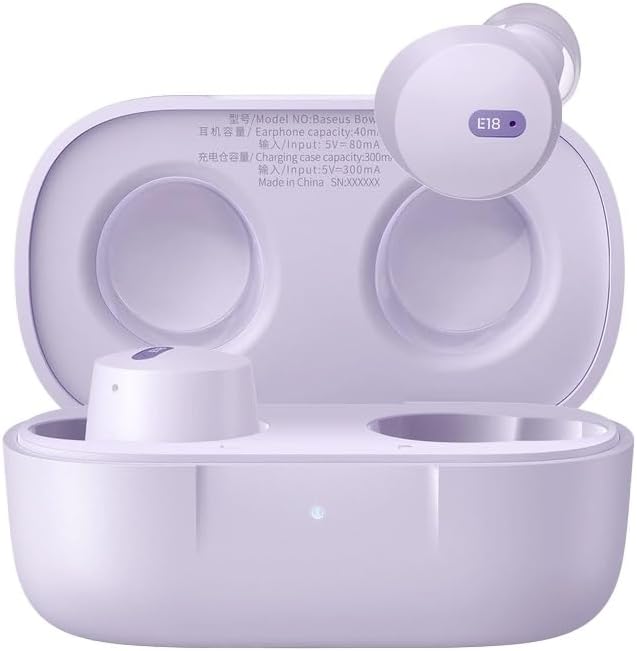
Image 1.1: Baseus Bowie E18 Earphones in their open charging case, showcasing the earbuds and charging contacts.
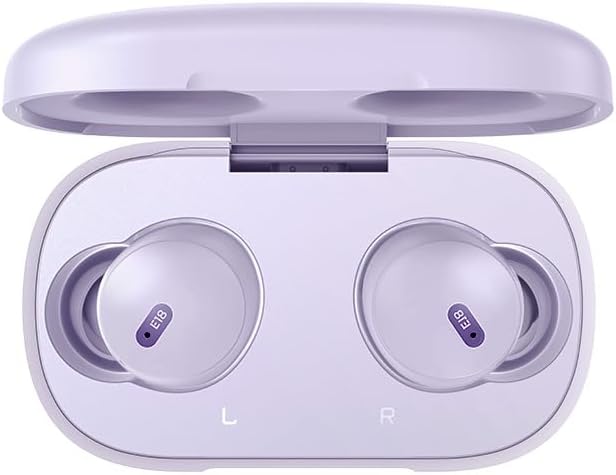
ຮູບພາບ 1.2: ເທິງລົງລຸ່ມ view of the Baseus Bowie E18 Earphones nestled in their charging case, showing the 'E18' model indicator on each earbud.
2. ການຕິດຕັ້ງແລະການນໍາໃຊ້ເບື້ອງຕົ້ນ
2.1 ການສາກຫູຟັງ ແລະ ເຄສ
ກ່ອນທີ່ຈະໃຊ້ຄັ້ງທຳອິດ, ໃຫ້ສາກຫູຟັງ ແລະ ຊ່ອງສາກໃຫ້ເຕັມ.
- ເຊື່ອມຕໍ່ກ່ອງສາກກັບແຫຼ່ງພະລັງງານໂດຍໃຊ້ສາຍ USB-C ທີ່ເຂົ້າກັນໄດ້.
- ແສງຊີ້ບອກກ່ຽວກັບກໍລະນີຈະສະແດງສະຖານະການສາກໄຟ.
- ວາງຫູຟັງໃສ່ກະເປົ໋າສາກໄຟ. ພວກເຂົາຈະເລີ່ມສາກໄຟໂດຍອັດຕະໂນມັດ.

ຮູບພາບ 2.1: ດ້ານຫລັງ view of the Baseus Bowie E18 charging case, highlighting the USB-C charging port.
2.2 ການຈັບຄູ່ Bluetooth
ເພື່ອເຊື່ອມຕໍ່ຫູຟັງຂອງທ່ານກັບອຸປະກອນ:
- ກວດໃຫ້ແນ່ໃຈວ່າໄດ້ສາກຫູຟັງ ແລະວາງໃສ່ກ່ອງສາກ.
- ເປີດຝາກະເປົ໋າສາກໄຟ. ຫູຟັງຈະເຂົ້າສູ່ໂໝດຈັບຄູ່ໂດຍອັດຕະໂນມັດ.
- ໃນອຸປະກອນຂອງທ່ານ (ໂທລະສັບສະຫຼາດ, ແທັບເລັດ, ແລະອື່ນໆ), ເປີດໃຊ້ Bluetooth.
- ຊອກຫາ ອຸປະກອນທີ່ມີຢູ່ ແລະ ເລືອກ "Baseus Bowie E18" ຈາກລາຍການ.
- ເມື່ອເຊື່ອມຕໍ່ແລ້ວ, ຫູຟັງພ້ອມໃຊ້ແລ້ວ.

Image 2.2: Visual representation of Bluetooth 5.3 technology, emphasizing stable connection and efficient power usage.
2.3 ການໃສ່ຫູຟັງ
For optimal sound quality and comfort, ensure a proper fit:
- ສຽບຫູຟັງແຕ່ລະອັນໃສ່ຊ່ອງຫູຂອງເຈົ້າຄ່ອຍໆ.
- Adjust the earbud until it feels secure and comfortable.

Image 2.3: An earbud being worn, demonstrating the intended fit for the Baseus Bowie E18.
3. ຄໍາແນະນໍາການດໍາເນີນງານ
3.1 ແຕະການຄວບຄຸມ
The Baseus Bowie E18 earphones feature intuitive touch controls for various functions:
- ຫຼິ້ນ/ຢຸດດົນຕີ: ແຕະເທື່ອດຽວໃສ່ຫູຟັງຫູຟັງ.
- ເພງຕໍ່ໄປ: ແຕະສອງເທື່ອໃສ່ຫູຟັງເບື້ອງຂວາ.
- ຕິດຕາມກ່ອນ ໜ້າ ນີ້: ແຕະສອງເທື່ອໃສ່ຫູຟັງທາງຊ້າຍ.
- ຮັບ/ສາຍໂທ: ແຕະເທື່ອດຽວໃສ່ຫູຟັງຫູຟັງລະຫວ່າງສາຍໂທເຂົ້າ.
- ປະຕິເສດການໂທ: ກົດຫູຟັງອັນໃດອັນໜຶ່ງຄ້າງໄວ້ 2 ວິນາທີໃນລະຫວ່າງສາຍໂທເຂົ້າ.
- ກະຕຸ້ນຜູ້ຊ່ວຍສຽງ: ແຕະສາມເທື່ອໃສ່ຫູຟັງຫູຟັງ.
3.2 ເປີດ/ປິດ
- ເປີດ: ເປີດຝາກະເປົ໋າສາກໄຟ, ຫຼືຖອດຫູຟັງອອກຈາກເຄສ. ພວກເຂົາເຈົ້າຈະເປີດອັດຕະໂນມັດ.
- ປິດພະລັງງານ: ວາງຫູຟັງເອຍບັດໃສ່ໃນກ່ອງສາກ ແລະປິດຝາປິດ. ພວກເຂົາເຈົ້າຈະປິດອັດຕະໂນມັດ.
4. ການບໍາລຸງຮັກສາແລະການດູແລ
ການບໍາລຸງຮັກສາທີ່ເຫມາະສົມຮັບປະກັນຄວາມທົນທານແລະປະສິດທິພາບຂອງຫູຟັງຂອງທ່ານ.
- ທໍາຄວາມສະອາດ: ໃຊ້ຜ້າແພທີ່ອ່ອນ, ແຫ້ງ, ບໍ່ມີເສັ້ນດ່າງເພື່ອທຳຄວາມສະອາດຫູຟັງຫູຟັງ ແລະ ກ່ອງສາກ. ຢ່າໃຊ້ສານເຄມີທີ່ຮຸນແຮງຫຼືວັດສະດຸຂັດ.
- ການເກັບຮັກສາ: ເມື່ອບໍ່ໄດ້ໃຊ້, ໃຫ້ເກັບຮັກສາຫູຟັງໃສ່ໃນກະເປົ໋າສາກໄຟເພື່ອປົກປ້ອງພວກມັນຈາກຝຸ່ນ ແລະຄວາມເສຍຫາຍ.
- ການດູແລຫມໍ້ໄຟ: ຫຼີກລ່ຽງການສາກແບັດເຕີຣີໃຫ້ໝົດເລື້ອຍໆ. ໃຫ້ສາກຫູຟັງເປັນປະຈຳ, ເຖິງແມ່ນວ່າຈະບໍ່ໄດ້ໃຊ້ເປັນເວລາດົນກໍຕາມ, ເພື່ອຮັກສາສຸຂະພາບຂອງແບັດເຕີຣີ.
- ຄວາມຕ້ານທານນ້ໍາ: The Baseus Bowie E18 earphones are IPX4 water resistant, meaning they are protected against splashing water from any direction. They are not designed for submersion in water or use during swimming. Avoid exposure to heavy rain or extreme moisture.

Image 4.1: Visual representation of IPX4 water resistance, indicating protection against splashes.
5. ການແກ້ໄຂບັນຫາ
If you encounter issues with your Baseus Bowie E18 earphones, try the following solutions:
- ຫູຟັງບໍ່ຈັບຄູ່:
- ກວດໃຫ້ແນ່ໃຈວ່າໄດ້ສາກຫູຟັງທັງສອງອັນແລ້ວ.
- ປິດ Bluetooth ໃນອຸປະກອນຂອງທ່ານ ແລະເປີດມັນຄືນໃໝ່.
- Delete "Baseus Bowie E18" from your device's Bluetooth list and attempt to re-pair.
- ໃສ່ຫູຟັງເອຍບັດກັບຄືນໃນກ່ອງ, ປິດຝາ, ລໍຖ້າ 10 ວິນາທີ, ຈາກນັ້ນເປີດອອກເພື່ອເຂົ້າສູ່ໂໝດຈັບຄູ່ຄືນໃໝ່.
- ບໍ່ມີສຽງຈາກຫູຟັງອັນໜຶ່ງ:
- ກວດໃຫ້ແນ່ໃຈວ່າໄດ້ສາກຫູຟັງທັງສອງອັນແລ້ວ.
- ລອງໃສ່ຫູຟັງທັງສອງຂ້າງກັບຄືນໃສ່ໃນກ່ອງ, ປິດຝາ, ແລ້ວເອົາອອກອີກຄັ້ງ.
- ຕັ້ງຄ່າໂຮງງານຄືນໃໝ່ (ອ້າງອີງເຖິງຄຳແນະນຳຂອງຜູ້ຜະລິດ) webເວັບໄຊທ໌ສຳລັບຄຳແນະນຳສະເພາະ ຖ້າບໍ່ມີລາຍລະອຽດຢູ່ນີ້).
- ບັນຫາການສາກໄຟ:
- ກວດເບິ່ງສາຍສາກແລະອະແດັບເຕີສໍາລັບຄວາມເສຍຫາຍ.
- ກວດໃຫ້ແນ່ໃຈວ່າຕົວຕິດຕໍ່ການສາກໄຟຢູ່ຫູຟັງເອຍບັດ ແລະ ພາຍໃນເຄສນັ້ນສະອາດ ແລະ ບໍ່ມີສິ່ງເສດເຫຼືອ.
- Try a different charging cable and power source.
- ຫູຟັງຫຼຸດອອກ:
- Ensure you are using the correct size ear tips for a secure fit.
- Adjust the angle of the earbuds in your ear.
6. ຂໍ້ມູນຈໍາເພາະ
Detailed technical specifications for the Baseus Bowie E18 True Wireless Earphones:
| ຄຸນສົມບັດ | ຂໍ້ມູນຈໍາເພາະ |
|---|---|
| ຊື່ຕົວແບບ | ໂບວີ E18 |
| ໝາຍເລກຕົວແບບ | A00023800537-Z1 |
| ລຸ້ນ Bluetooth | 5.0 |
| ຊ່ວງ Bluetooth | ເຖິງ 10 ແມັດ |
| ຄວາມອາດສາມາດຫມໍ້ໄຟ Earbud | Approximately 50mAh (Each Earbud) |
| ຄວາມອາດສາມາດຂອງຫມໍ້ໄຟ Case Charging | ປະມານ 500mAh |
| ເວລາການຫຼີ້ນດົນຕີ | Up to 5 Hours (Single Charge) / Up to 30 Hours (With Charging Case) |
| ເວລາສົນທະນາ | Up to 5 Hours (Single Charge) / Up to 30 Hours (With Charging Case) |
| ເວລາສາກໄຟ | ປະມານ 1.5 ຊົ່ວໂມງ |
| ນ້ຳໜັກ | Approximately 50g (Including Charging Case) |
| ໜ່ວຍຂັບຂີ່ | 10ມມ |
| ການຕອບສະໜອງຄວາມຖີ່ | 20Hz-20kHz |
| impedance | 32 ໂອມ |
| ຄວາມອ່ອນໄຫວ | 120.5 dB |
| ການຕໍ່ຕ້ານນ້ໍາ | IPX4 |
| ອົງປະກອບຂອງຈຸລັງຫມໍ້ໄຟ | ລີທຽມໄອອອນ |

Image 6.1: Illustration emphasizing the extended listening time provided by the Baseus Bowie E18 earphones with their charging case.
7. ການຮັບປະກັນແລະການສະຫນັບສະຫນູນ
7.1 ການຮັບປະກັນຂອງຜູ້ຜະລິດ
The Baseus Bowie E18 True Wireless Earphones come with a ການຮັບປະກັນຂອງຜູ້ຜະລິດ 1 ປີ ນັບຈາກວັນທີ່ຊື້. ການຮັບປະກັນນີ້ກວມເອົາຂໍ້ບົກພ່ອງຈາກການຜະລິດ ແລະ ຮັບປະກັນວ່າຜະລິດຕະພັນຕອບສະໜອງມາດຕະຖານປະສິດທິພາບທີ່ລະບຸໄວ້ພາຍໃຕ້ການນຳໃຊ້ປົກກະຕິ. ກະລຸນາເກັບຫຼັກຖານການຊື້ຂອງທ່ານໄວ້ເພື່ອການຮຽກຮ້ອງການຮັບປະກັນ.
For specific terms and conditions of the warranty, please refer to the official Baseus webເວັບໄຊ ຫຼືຕິດຕໍ່ບໍລິການລູກຄ້າຂອງເຂົາເຈົ້າ.
7.2 ສະຫນັບສະຫນູນລູກຄ້າ
If you require further assistance, have questions not covered in this manual, or need to make a warranty claim, please contact Baseus customer support through their official webເວັບໄຊ ຫຼືຮ້ານຂາຍຍ່ອຍບ່ອນທີ່ທ່ານຊື້ຜະລິດຕະພັນ.