1. ຜະລິດຕະພັນເກີນview
The ULTRAK 495 Professional 100-Lap Digital Stopwatch is designed for precise timekeeping in various sports and training activities. It features a large, easy-to-read display and multiple functions to support athletes, coaches, and referees.
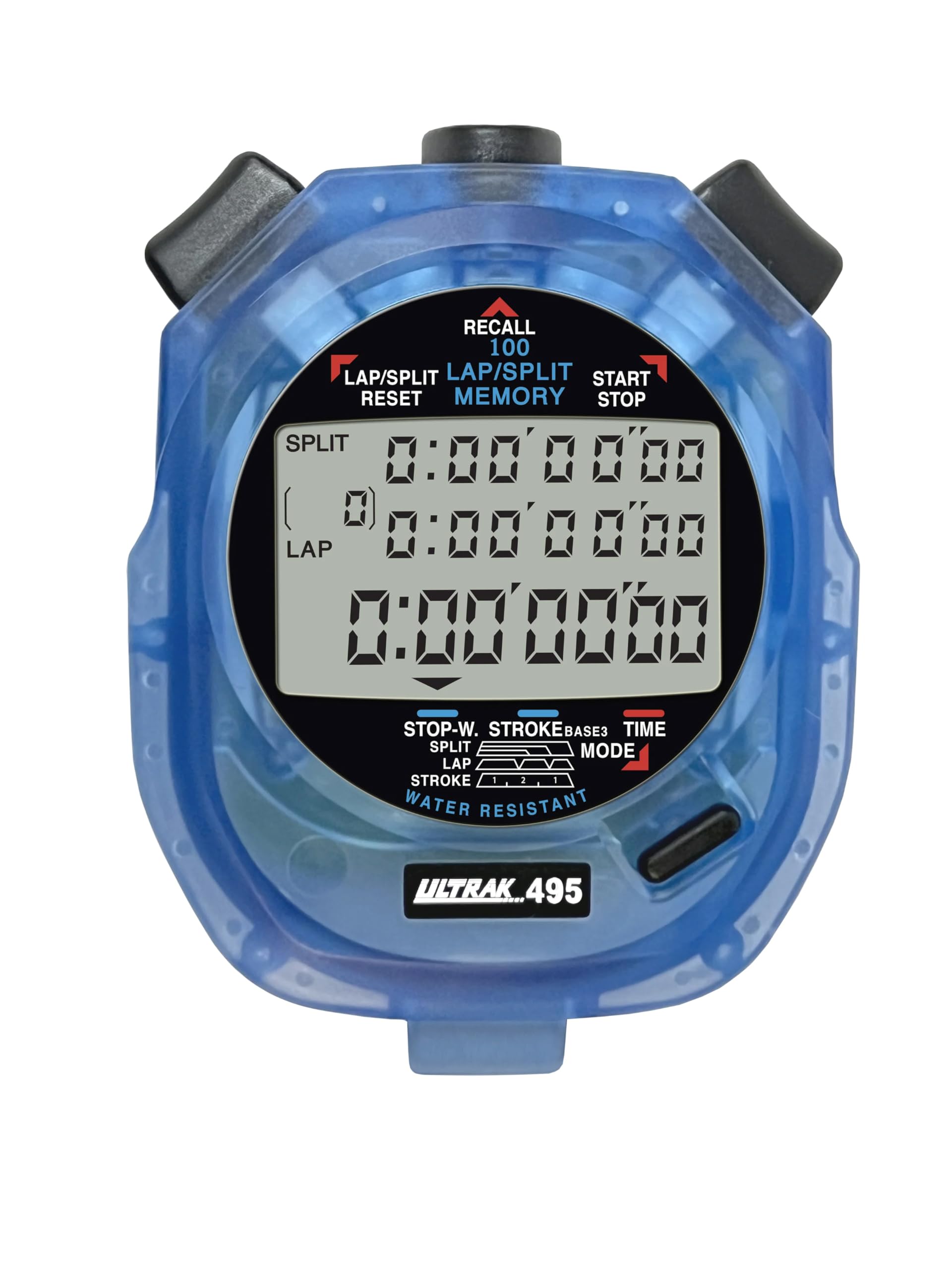
Figure 1: ULTRAK 495 Stopwatch in blue.
ຄຸນນະສົມບັດທີ່ສໍາຄັນ:
- 100 Dual Split Recallable Memory: Enhances accuracy for track and field events, ideal for athletes and coaches requiring precise timekeeping.
- ຟັງຊັນອະເນກປະສົງ: Includes stroke/frequency, time, and calendar functions, suitable for diverse sports activities.
- ການອອກແບບທີ່ທົນທານຕໍ່ນ້ໍາ: Allows for outdoor use in various weather conditions.
- Large 3-Row Display: Facilitates easy viewing of multiple lap times simultaneously.
- Durable Lithium Battery: Ensures reliability for extended use.
2. ຕັ້ງຄ່າ
2.1. ການຕິດຕັ້ງຫມໍ້ໄຟ
The ULTRAK 495 Stopwatch comes with one Lithium Metal battery pre-installed. If battery replacement is needed, refer to the Maintenance section.
2.2. ກຳນົດເວລາ ແລະວັນທີເບື້ອງຕົ້ນ
ເພື່ອ ກຳ ນົດເວລາແລະວັນທີ:
- ກົດ ໂໝດ button repeatedly until the time/calendar display mode is active.
- ກົດຄ້າງໄວ້ SET button (usually located on the top right) until the digits begin to flash.
- ໃຊ້ LAP/SPLIT/RESET button (top left) to adjust the flashing digit.
- ກົດ SET button to move to the next digit or setting (e.g., hours, minutes, seconds, month, day, year).
- ເມື່ອການຕັ້ງຄ່າທັງຫມົດຖືກຕ້ອງ, ກົດປຸ່ມ ໂໝດ ປຸ່ມເພື່ອອອກຈາກຮູບແບບການຕັ້ງຄ່າ.

Figure 2: Stopwatch displaying various modes, including Time/Calendar.
3. ການດໍາເນີນງານ
3.1. Stopwatch Mode (Standard Timing)
This mode is used for basic timing of events.
- Ensure the stopwatch is in the standard stopwatch mode (usually indicated by "STOPWATCH" on the display). If not, press ໂໝດ ຈົນກ່ວາມັນປາກົດ.
- ກົດ ເລີ່ມ/ຢຸດ (top right button) to begin timing.
- ກົດ ເລີ່ມ/ຢຸດ ອີກເທື່ອໜຶ່ງເພື່ອຢຸດໂມງຈັບເວລາໄວ້ຊົ່ວຄາວ.
- ກົດ ເລີ່ມ/ຢຸດ ເພື່ອສືບຕໍ່ເວລາ.
- To reset the timer to zero, ensure it is stopped, then press LAP/SPLIT/RESET (top left button).
3.2. Lap/Split Timing with Memory Recall
The ULTRAK 495 can record up to 100 lap and split times.
- In stopwatch mode, press ເລີ່ມ/ຢຸດ ເພື່ອເລີ່ມຕົ້ນການກໍານົດເວລາ.
- ກົດ LAP/SPLIT/RESET to record a split time. The display will momentarily show the split time while the main timer continues running in the background. The bottom row displays the running event or lap time.
- Repeat step 2 for each lap or split you wish to record.
- ກົດ ເລີ່ມ/ຢຸດ to end the timing session.
- To recall recorded times, press the ເອີ້ນຄືນ button (top center). Use the LAP/SPLIT/RESET ແລະ ເລີ່ມ/ຢຸດ buttons to navigate through the stored lap and split times.
- To exit recall mode, press ໂໝດ. To clear memory, ensure the stopwatch is stopped and not in recall mode, then press and hold LAP/SPLIT/RESET.

Figure 3: Display showing simultaneous split, lap, and total times.
3.3. ໂໝດຈັບເວລານັບຖອຍຫຼັງ
The stopwatch includes a countdown timer function.
- ກົດ ໂໝດ ຈົນກວ່າໜ້າຈໍໂມງນັບຖອຍຫຼັງຈະປາກົດຂຶ້ນ.
- ກົດຄ້າງໄວ້ SET ເພື່ອເຂົ້າສູ່ໂໝດການຕັ້ງຄ່າ.
- ໃຊ້ LAP/SPLIT/RESET to adjust the time and SET ເພື່ອຍ້າຍລະຫວ່າງຊົ່ວໂມງ, ນາທີ ແລະ ວິນາທີ.
- ເມື່ອເວລານັບຖອຍຫຼັງທີ່ຕ້ອງການຕັ້ງ, ກົດ ໂໝດ ເພື່ອອອກຈາກໂໝດການຕັ້ງຄ່າ.
- ກົດ ເລີ່ມ/ຢຸດ to begin the countdown. An alarm will sound when the timer reaches zero.
3.4. Stroke/Frequency Measuring Mode
This mode is useful for measuring stroke rates in swimming or other repetitive actions.
- ກົດ ໂໝດ until the stroke/frequency mode is displayed.
- ກົດ ເລີ່ມ/ຢຸດ to begin measuring.
- ກົດ LAP/SPLIT/RESET at the start of each stroke or cycle. The stopwatch will calculate and display the frequency.
- ກົດ ເລີ່ມ/ຢຸດ ຢຸດການວັດແທກ.
4. ບໍາລຸງຮັກສາ
4.1. ທໍາຄວາມສະອາດ
Wipe the stopwatch with a soft, dry cloth. For stubborn dirt, use a slightly damp ເຊັດຜ້າ ແລະ ສະບູ່ອ່ອນໆໃຫ້ແຫ້ງດີ. ຫຼີກລ່ຽງສານເຄມີຮຸນແຮງ ຫຼື ນໍ້າຢາທໍາຄວາມສະອາດທີ່ມີສີຂັດ.
4.2. Water Resistance
The ULTRAK 495 is water-resistant, making it suitable for use in various weather conditions. However, it is not designed for submersion. Avoid pressing buttons while the stopwatch is wet to prevent water ingress.
4.3. ການທົດແທນຫມໍ້ໄຟ
The stopwatch uses one Lithium Metal battery. When the display becomes dim or functions become erratic, it's time to replace the battery. Carefully open the battery compartment (usually on the back, secured by small screws) and replace with a new battery of the same type. Ensure proper polarity and securely close the compartment.
5. ການແກ້ໄຂບັນຫາ
- ຈໍສະແດງຜົນຫວ່າງເປົ່າ ຫຼືມືດ: ກວດເບິ່ງຫມໍ້ໄຟ. ປ່ຽນແທນຖ້າຈໍາເປັນ.
- Stopwatch resets unexpectedly during timing: This can sometimes occur due to low battery or a temporary electrical glitch. Try replacing the battery. If the issue persists, ensure buttons are not being pressed inadvertently.
- ປຸ່ມບໍ່ຕອບສະໜອງ: Ensure the stopwatch is not in a locked mode (if applicable, check manual for specific lock features). If wet, ensure it is completely dry. If still unresponsive, try replacing the battery.
- ເວລາ ຫຼື ວັນທີບໍ່ຖືກຕ້ອງ: Refer to section 2.2 to re-set the time and date.
6. ຂໍ້ມູນຈໍາເພາະ
| ຄຸນສົມບັດ | ລາຍລະອຽດ |
|---|---|
| ໝາຍເລກຕົວແບບ | 495 |
| ຄວາມຊົງຈໍາ | 100 Dual Split Recallable Laps |
| ຈໍສະແດງຜົນ | Large 3-Row Display |
| ຟັງຊັນ | Stopwatch, Lap/Split, Countdown Timer, Stroke/Frequency, Time, Calendar |
| ການຕໍ່ຕ້ານນ້ໍາ | ແມ່ນແລ້ວ (ກັນນໍ້າໄດ້) |
| ປະເພດຫມໍ້ໄຟ | 1 ແບດເຕີຣີ້ໂລຫະ Lithium (ລວມ) |
| ວັດສະດຸ | ພາດສະຕິກ |
| ຂະໜາດສິນຄ້າ | 0.2"D x 2.5"W x 3.5"H |
| ນ້ໍາຫນັກລາຍການ | 3.2 ອອນ |
7. ການຮັບປະກັນແລະການສະຫນັບສະຫນູນ
For specific warranty information and customer support, please refer to the documentation included with your product or visit the official Ultrak webເວັບໄຊ. ຮັກສາໃບຮັບເງິນການຊື້ຂອງທ່ານໄວ້ເປັນຫຼັກຖານການຊື້ສໍາລັບການຮຽກຮ້ອງການຮັບປະກັນໃດໆ.


