1. ບົດແນະນຳ
This manual provides essential instructions for the safe and efficient use of your Trevi XR 8A44 DOUBLE Portable Speaker System. Please read this manual thoroughly before operating the device and retain it for future reference.
2. ຜະລິດຕະພັນເກີນview
The Trevi XR 8A44 DOUBLE is a versatile portable speaker system designed for high-quality audio playback. It features two independent, separable speaker units that can function together as a stereo pair or individually. Each unit delivers 10W of power, totaling 20W when combined. The system supports Bluetooth 5.3, Micro SD card playback, and AUX-IN connectivity. It is also IPX5 water resistant, making it suitable for various environments.
2.1 ລັກສະນະທີ່ສໍາຄັນ
- Separable wireless speaker design, forming two independent units.
- Total output power of 2 x 10W (20W combined).
- IPX5 water resistance for protection against water jets.
- Clear sound with 2 stereo speakers and 2 passive bass radiators.
- Volume, playback, and pause controls integrated.
- Wireless audio via Bluetooth v5.3.
- Two independent MP3 players for Micro SD card playback (one per unit).
- Two AUX-IN inputs for wired connections.
- Convenient carrying strap.
- Light disc illumination for visual effects.
- ຕົວຊີ້ວັດ LED ສໍາລັບສະຖານະການສາກໄຟ.
- Rechargeable high-capacity lithium battery via TYPE-C port.
2.2 ເນື້ອໃນຊຸດ
- Trevi XR 8A44 DOUBLE Speaker Units (x2)
- ສາຍສາກ (USB Type-C)
- ຄູ່ມືຜູ້ໃຊ້ (ເອກະສານນີ້)
- ໃບຢັ້ງຢືນການຮັບປະກັນ
2.3 Product Diagram and Controls
Refer to the images below for an understanding of the speaker's physical components and controls.


3. ຕັ້ງຄ່າ
3.1 ການສາກແບັດເຕີຣີ
Before first use, fully charge both speaker units. Use the provided USB Type-C charging cable and connect it to a compatible USB power adapter (not included).
- Locate the Type-C charging port on each speaker unit.
- Connect the Type-C end of the cable to the speaker and the USB-A end to a power source.
- ຕົວຊີ້ວັດ LED ຈະສະແດງສະຖານະການສາກໄຟ. ໂດຍປົກກະຕິມັນຈະປິດ ຫຼືປ່ຽນສີເມື່ອສາກເຕັມ.
ໝາຍເຫດ: ສໍາລັບອາຍຸຫມໍ້ໄຟທີ່ດີທີ່ສຸດ, ຫຼີກເວັ້ນການຫມົດຫມໍ້ໄຟຫມົດເລື້ອຍໆ.
3.2 ການເປີດ/ປິດ
To power on or off each speaker unit:
- ເປີດ: Press and hold the Power button (usually integrated with the Play/Pause button) for a few seconds until you hear an audible prompt or see the light disc illuminate.
- ປິດພະລັງງານ: ກົດປຸ່ມເປີດປິດຄ້າງໄວ້ອີກຄັ້ງເປັນເວລາສອງສາມວິນາທີຈົນກວ່າລຳໂພງຈະປິດລົງ.
3.3 Separating and Connecting Speakers
The Trevi XR 8A44 DOUBLE consists of two units that can be magnetically connected or separated for different audio experiences.
- ແຍກ: Gently pull the two speaker units apart. They are held together by magnets.
- ເພື່ອເຊື່ອມຕໍ່: Align the magnetic ends of the two speaker units and push them together until they snap into place.

4. ຄໍາແນະນໍາການດໍາເນີນງານ
4.1 Bluetooth Pairing (Single Speaker Mode)
To connect a single speaker unit to your Bluetooth-enabled device:
- Ensure the speaker is powered on and not connected to another device. It should enter pairing mode automatically (indicated by a flashing LED or audible prompt).
- ໃນອຸປະກອນຂອງທ່ານ (ໂທລະສັບສະຫຼາດ, ແທັບເລັດ, ແລະອື່ນໆ), ເປີດໃຊ້ Bluetooth ແລະຊອກຫາອຸປະກອນທີ່ມີຢູ່.
- Select "Trevi XR 8A44 DOUBLE" from the list of found devices.
- Once connected, the speaker will provide an audible confirmation, and the LED indicator will stabilize.
4.2 True Wireless Stereo (TWS) Pairing (Two Speaker Mode)
To use both speaker units together for a stereo experience:
- Ensure both speaker units are powered on and not connected to any Bluetooth device.
- On one of the speakers (this will be the primary unit), double-press the Power/Play/Pause button. The speakers will attempt to pair with each other.
- Once successfully paired, you will hear an audible confirmation. One speaker will act as the left channel and the other as the right.
- Now, on your Bluetooth-enabled device, search for "Trevi XR 8A44 DOUBLE" and connect. Only one entry will appear for the combined system.
ໝາຍເຫດ: TWS pairing is typically automatic when speakers are separated and powered on, but manual initiation might be required if they don't connect automatically.
4.3 ການຫຼິ້ນບັດ Micro SD
Each speaker unit has an independent Micro SD card slot for MP3 playback.
- ໃສ່ບັດ Micro SD (ໂຫຼດມາກ່ອນດ້ວຍສຽງ MP3 files) into the designated slot on the speaker unit.
- The speaker should automatically switch to Micro SD playback mode.
- Use the Play/Pause and Volume (+/-) buttons to control playback.
ໝາຍເຫດ: If both speakers are in TWS mode, inserting a Micro SD card into one speaker will play audio only through that speaker, overriding the TWS Bluetooth connection for that unit. To use both speakers with Micro SD, each would need its own card and would play independently.
4.4 ການເຊື່ອມຕໍ່ AUX-IN
For wired audio playback, use the AUX-IN port on each speaker unit.
- ເຊື່ອມຕໍ່ປາຍດ້ານໜຶ່ງຂອງສາຍສຽງ 3.5 ມມ (ບໍ່ລວມຢູ່) ເຂົ້າກັບພອດ AUX-IN ເທິງລຳໂພງ.
- ເຊື່ອມຕໍ່ສົ້ນອື່ນກັບສຽງອອກຂອງອຸປະກອນຂອງທ່ານ (ເຊັ່ນ: ເຄື່ອງຫຼິ້ນ MP3, ແລັບທັອບ).
- The speaker should automatically switch to AUX-IN mode.
- Control volume from both the speaker and your connected device.
4.5 ການຄວບຄຸມລະດັບສຽງ ແລະ ການຫຼິ້ນ
The speaker units feature integrated controls:
- ຫຼິ້ນ/ຢຸດ: Short press the Power/Play/Pause button.
- ປະລິມານຂຶ້ນ: ກົດປຸ່ມ '+' ສັ້ນ.
- ປະລິມານລົງ: ກົດປຸ່ມສັ້ນ '-'.
- ເພງຕໍ່ໄປ: ກົດປຸ່ມ '+' ຄ້າງໄວ້.
- ຕິດຕາມກ່ອນ ໜ້າ ນີ້: ກົດປຸ່ມ '-' ຄ້າງໄວ້.
4.6 Light Disc Illumination
The speaker units feature an illuminated light disc. The operation of the light disc may vary:
- Toggle Lights: A dedicated button (if present) or a long press of a specific control button (e.g., Play/Pause) might cycle through light modes or turn them on/off. Refer to the quick start guide included in your package for exact button functionality.
5. ບໍາລຸງຮັກສາ
5.1 ການທໍາຄວາມສະອາດ
- ເຊັດດ້ານນອກຂອງລໍາໂພງໃຫ້ອ່ອນໆ, ງamp ຜ້າ.
- ຢ່າໃຊ້ເຄື່ອງເຮັດຄວາມສະອາດຂັດ, ເຫຼົ້າ, ຫຼືສານລະລາຍສານເຄມີ.
- ໃຫ້ແນ່ໃຈວ່າທຸກຜອດແຫ້ງກ່ອນທີ່ຈະສາກໄຟ ຫຼືເຊື່ອມຕໍ່ສາຍ.
5.2 ກັນນ້ຳ (IPX5)
The Trevi XR 8A44 DOUBLE is rated IPX5 water resistant. This means it is protected against low-pressure water jets from any direction. It is ບໍ່ designed to be submerged in water.
- Do not submerge the speakers in water.
- Ensure the charging port cover (if present) is securely closed before exposure to water.
- Dry the speakers thoroughly after exposure to water before charging.

5.3 ການດູແລຫມໍ້ໄຟ
- ສາກແບດເຕີລີ່ຢ່າງເປັນປົກກະຕິ, ເຖິງແມ່ນວ່າບໍ່ໄດ້ໃຊ້, ເພື່ອຮັກສາສຸຂະພາບຂອງມັນ.
- ເກັບຮັກສາລໍາໂພງໄວ້ໃນບ່ອນທີ່ເຢັນ, ແຫ້ງ, ຫ່າງຈາກແສງແດດໂດຍກົງແລະອຸນຫະພູມທີ່ສຸດ.
- Do not attempt to replace the battery yourself. Contact qualified service personnel.
6. ການແກ້ໄຂບັນຫາ
| ບັນຫາ | ສາເຫດທີ່ເປັນໄປໄດ້ | ການແກ້ໄຂ |
|---|---|---|
| ລຳໂພງບໍ່ເປີດ. | ແບັດເຕີຣີໝົດແລ້ວ. | ສາກລຳໂພງໃຫ້ເຕັມໂດຍໃຊ້ສາຍ Type-C ທີ່ໃຫ້ມາ. |
| ບໍ່ສາມາດຈັບຄູ່ຜ່ານ Bluetooth ໄດ້. | Speaker is not in pairing mode; device Bluetooth is off; speaker is connected to another device. | Ensure speaker is in pairing mode (flashing LED). Turn off and on Bluetooth on your device. Disconnect from other devices. Try TWS pairing steps if using two speakers. |
| ບໍ່ມີສຽງຈາກບັດ Micro SD. | ບໍ່ໄດ້ໃສ່ບັດຢ່າງຖືກຕ້ອງ; ບໍ່ຮອງຮັບ file format; card is empty or corrupted. | Re-insert Micro SD card. Ensure files are in MP3 format. Check card content on a computer. |
| ການຈັບຄູ່ TWS ລົ້ມເຫລວ. | ລຳໂພງຢູ່ໄກກັນເກີນໄປ; ລຳໂພງໜຶ່ງໄດ້ເຊື່ອມຕໍ່ກັບອຸປະກອນ Bluetooth ແລ້ວ. | ໃຫ້ແນ່ໃຈວ່າລຳໂພງຢູ່ໃກ້ກັນ. ຕັດການເຊື່ອມຕໍ່ລຳໂພງທັງສອງອັນອອກຈາກອຸປະກອນ Bluetooth ກ່ອນທີ່ຈະເລີ່ມການຈັບຄູ່ TWS. |
| Audio distortion or low volume. | Volume too low on speaker or source device; low battery; poor Bluetooth connection. | Increase volume on both speaker and source device. Charge the battery. Move source device closer to the speaker. |
7. ຂໍ້ມູນຈໍາເພາະ
| ຊື່ຕົວແບບ: | Trevi XR 8A44 DOUBLE |
| ຍີ່ຫໍ້: | Trevi |
| ພະລັງງານອອກ: | 2 x 10W (ທັງໝົດ 20W) |
| ການເຊື່ອມຕໍ່: | Bluetooth v5.3, Micro SD, AUX-IN (3.5mm) |
| ແຫຼ່ງພະລັງງານ: | Rechargeable Lithium Battery (via Type-C USB) |
| ຄວາມຕ້ານທານນ້ໍາ: | IPX5 (Protected against water jets) |
| ໂModeດອອກສຽງ: | Stereo (when TWS paired) |
| Frequency Response (Lower Limit): | 100 Hz |
| ວິທີການຄວບຄຸມ: | ແຕະປຸ່ມ |
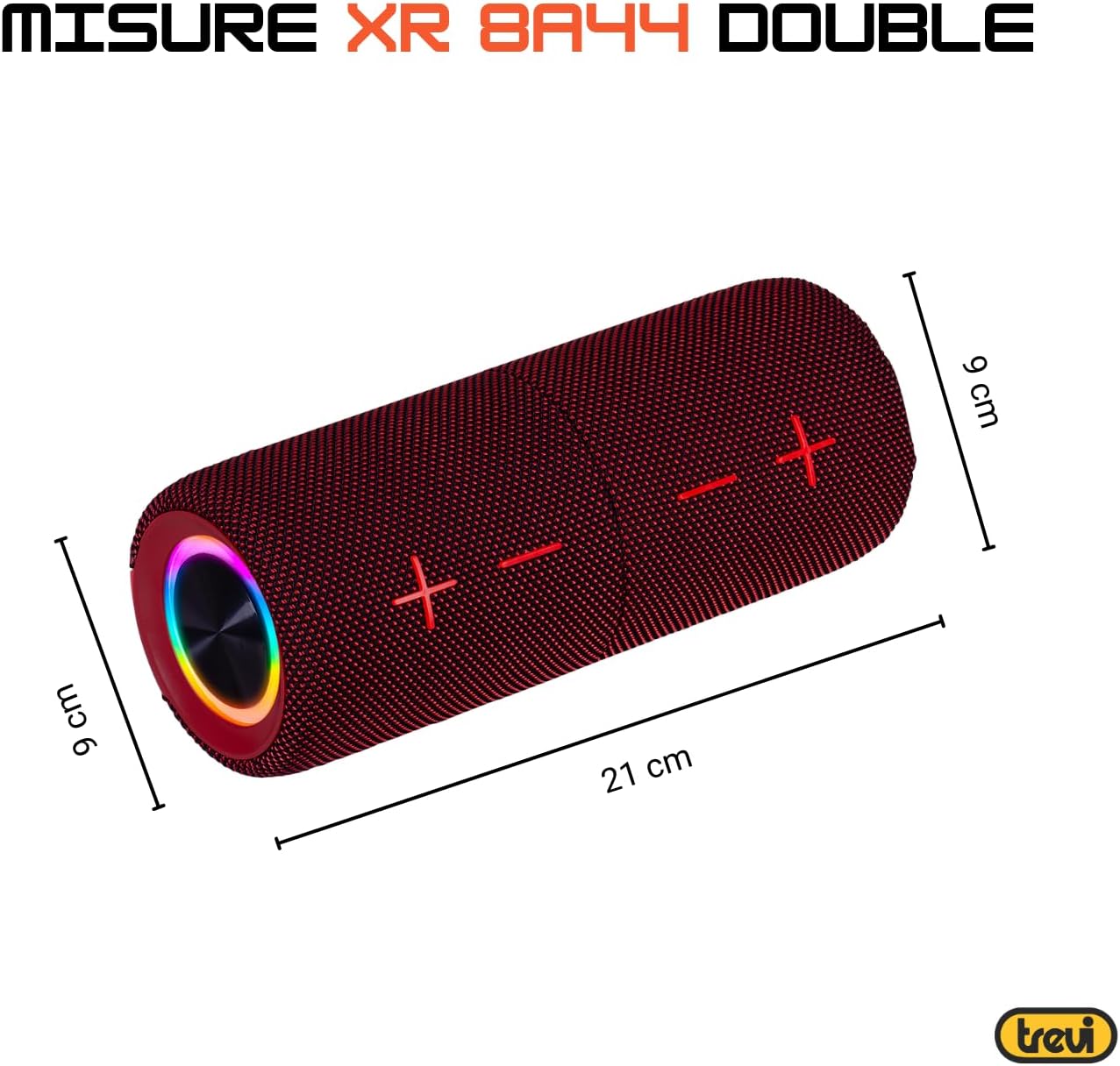
| ຂະໜາດ (ຕໍ່ຫົວໜ່ວຍ): | Approx. 8D x 21W x 8H cm (based on image: 21cm length, 9cm diameter) |
| ນ້ຳໜັກ (ຕໍ່ໜ່ວຍ): | Approx. 200 Grams |
| ວັດສະດຸ: | ສັງເຄາະ |
| ອຸປະກອນທີ່ເຂົ້າກັນໄດ້: | Laptop, MP3 Player, Smartphone, Game Console, Tablet, TV |
| ອົງປະກອບລວມ: | Speakers, Charging Cable, User Manual, Warranty Certificate |
8. ການຮັບປະກັນແລະການສະຫນັບສະຫນູນ
8.1 ການຮັບປະກັນຈໍາກັດ
Your Trevi XR 8A44 DOUBLE Portable Speaker System comes with a limited warranty. Please refer to the included warranty certificate for specific terms, conditions, and duration of coverage. Keep your proof of purchase for warranty claims.
8.2 ສະຫນັບສະຫນູນລູກຄ້າ
If you encounter any issues not covered in the troubleshooting section or require further assistance, please contact Trevi customer support. Contact information can typically be found on the official Trevi website or on the warranty certificate.
- ສະຫນັບສະຫນູນອອນໄລນ໌: Visit the official Trevi webເວັບໄຊສໍາລັບ FAQs, ການລົງທະບຽນຜະລິດຕະພັນ, ແລະລາຍລະອຽດການຕິດຕໍ່ສະຫນັບສະຫນູນ.
- ອີເມວ/ໂທລະສັບ: Refer to your warranty documentation for direct contact methods.


