ແນະນຳ
This manual provides essential information for setting up, operating, maintaining, and troubleshooting your Tecno CAMON 30 5G smartphone. Please read this manual carefully to ensure proper use and to maximize the device's capabilities.
1. ຕັ້ງຄ່າ
1.1 Unboxing ແລະ Initial Inspection
ເມື່ອເປີດຊຸດ, ກວດເບິ່ງວ່າອົງປະກອບທັງຫມົດແມ່ນປະຈຸບັນແລະບໍ່ເສຍຫາຍ. ເນື້ອໃນຊຸດມາດຕະຖານປະກອບມີ:
- Tecno CAMON 30 5G Smartphone
- 70W Flash Charger
- ສາຍ USB
- ຕົວຖອດຖາດຊິມ
- ກໍລະນີປ້ອງກັນ (ອາດຈະແຕກຕ່າງກັນໄປຕາມພາກພື້ນ)
- ຄູ່ມືເລີ່ມຕົ້ນດ່ວນ
- ບັດຮັບປະກັນ

Figure 1.1: Tecno CAMON 30 5G smartphone, showcasing ຈໍສະແດງຜົນດ້ານຫນ້າແລະໂມດູນກ້ອງຖ່າຍຮູບຫລັງຂອງມັນ.
1.2 ການໃສ່ SIM Card
To ensure network connectivity, insert your Nano-SIM card(s) into the device. The Tecno CAMON 30 5G supports dual SIM functionality.
- ຊອກຫາຖາດຊິມກາດຢູ່ດ້ານຂ້າງຂອງອຸປະກອນ.
- ສຽບເຄື່ອງມືຖອດຖາດຊິມທີ່ສະໜອງໃຫ້ເຂົ້າໄປໃນຮູນ້ອຍໆຂ້າງຖາດ ແລະກົດຄ່ອຍໆຈົນກ່ວາຖາດຈະອອກມາ.
- ດຶງຖາດຊິມອອກຢ່າງລະມັດລະວັງ.
- Place your Nano-SIM card(s) into the designated slots on the tray, ensuring the gold contacts face downwards and the cut corner aligns correctly.
- ຄ່ອຍໆຍູ້ຖາດຊິມກັບໄປໃສ່ອຸປະກອນຈົນກວ່າມັນຈະກົດໃສ່ບ່ອນ.

Figure 1.2: The SIM tray ejector tool, used for accessing the SIM card slot.
1.3 ການສາກອຸປະກອນ
Before first use, it is recommended to fully charge your device. The Tecno CAMON 30 5G supports 70W Flash Charging.
- Connect the USB cable to the 70W Flash Charger.
- ສຽບສາຍສາກໃສ່ປລັກສຽບໄຟ.
- Connect the other end of the USB cable to the USB-C port at the bottom of your phone.
- The charging indicator will appear on the screen. A full charge from 0-50% can be achieved in approximately 19 minutes.

Figure 1.3: The bottom of the Tecno CAMON 30 5G, featuring the USB-C port for charging and data transfer.
1.4 ການເປີດເຄື່ອງ ແລະ ການຕິດຕັ້ງເບື້ອງຕົ້ນ
Press and hold the Power button (located on the right side of the device) until the Tecno logo appears. Follow the on-screen instructions to complete the initial setup, which includes selecting your language, connecting to Wi-Fi, and setting up your Google account.
2. ປະຕິບັດການອຸປະກອນ
2.1 ການນໍາທາງພື້ນຖານ
The Tecno CAMON 30 5G operates on Android 14 with HiOS. Navigation is primarily touch-based:
- ແຕະ: ເລືອກລາຍການ ຫຼືເປີດແອັບພລິເຄຊັນ.
- ປັດ: ເລື່ອນຜ່ານໜ້າຈໍ, ລາຍຊື່ ຫຼືເນື້ອຫາ.
- Pinch-to-zoom: ຂະຫຍາຍ ຫຼືຫຼຸດເນື້ອຫາໃນໜ້າຈໍ.
- ກົດຄ້າງ: ເຂົ້າເຖິງເມນູບໍລິບົດ ຫຼືຍ້າຍໄອຄອນ.
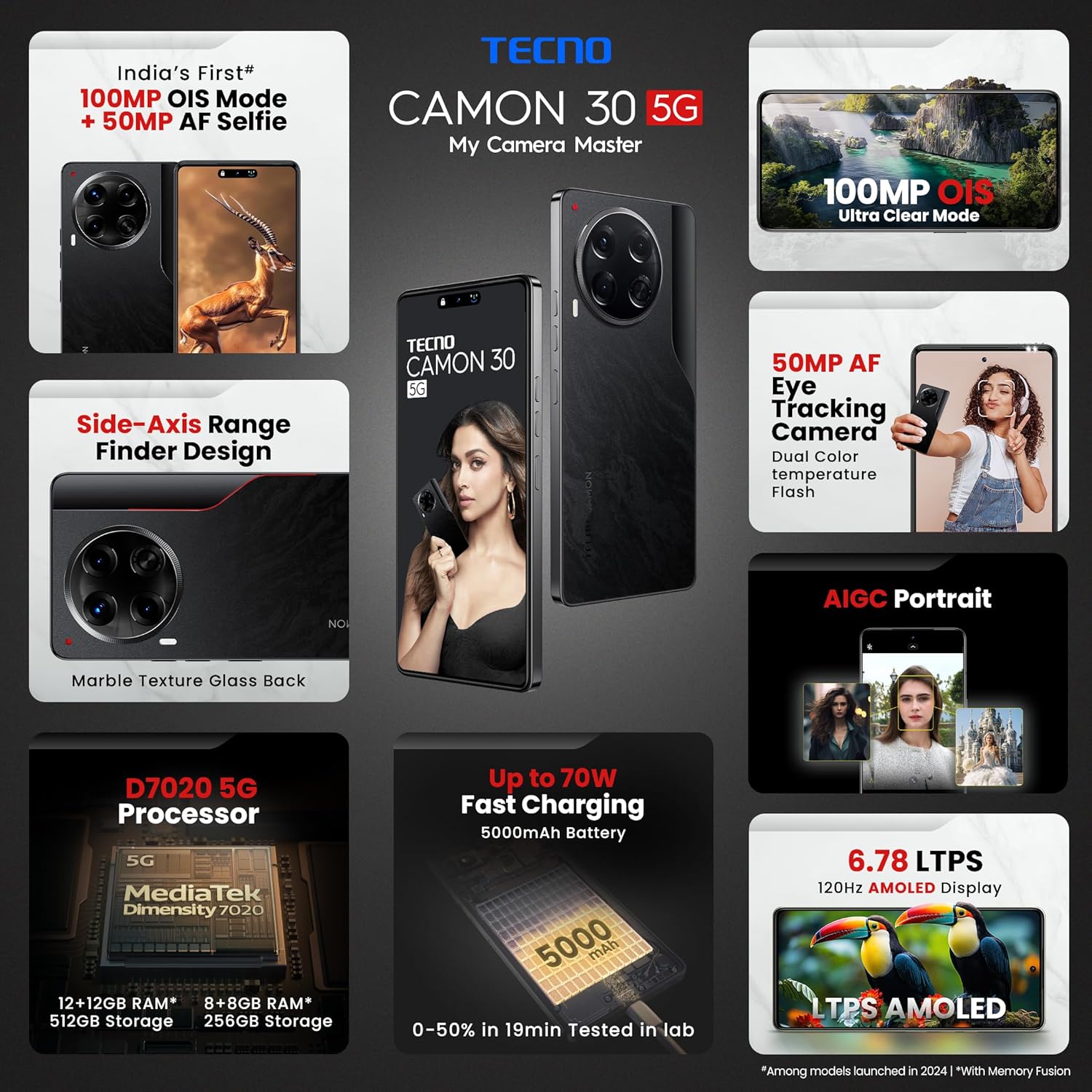
Figure 2.1: The Tecno CAMON 30 5G's vibrant LTPS AMOLED display.
2.2 ຄຸນສົມບັດການສະແດງ
The device features a 6.78-inch FHD+ LTPS AMOLED Dot-in display with a resolution of 1080 x 2436 pixels. Key display features include:
- 1300 nits Peak Brightness: Ensures clear visibility even in bright outdoor conditions.
- 120Hz Adaptive Refresh Rate: Automatically adjusts between 120Hz, 90Hz, and 60Hz for smooth scrolling and power efficiency.
- 2160Hz High-Frequency PWM Dimming: Reduces screen flicker for improved eye comfort.
- TÜV Rheinland Low Blue Light Emission Certified: Protects your eyes from harmful blue light.
- Wet Hand Touch Technology: Allows for smooth navigation even with wet hands.
ລະບົບກ້ອງ 2.3
The Tecno CAMON 30 5G is equipped with an advanced camera system for high-quality photography and videography.
- ກ້ອງຫຼັງ: 100MP OIS (Optical Image Stabilization) main sensor with a 2MP Depth Sensor. Features include Ultra Steady videos (OIS + EIS), 10X Zoom, Twinkle Portrait Filter, Super Night Photography Mode, Sky Shop, and Slow Motion Videos.
- ກ້ອງໜ້າ: 50MP Auto Focus Selfie camera with Dual Color Temperature Front Flash. Supports DSLR-level portrait system and Video HDR.
- AIGC Portrait (OTA): AI Generative Content for enhanced portrait photography.

Figure 2.2: The distinctive rear camera module of the Tecno CAMON 30 5G.
2.4 ການປະຕິບັດແລະການເກັບຮັກສາ
Powered by the MediaTek Dimensity 7020 chipset with a 6nm processor, the device offers robust performance for gaming and multitasking.
- ໜ່ວຍປະມວນຜົນ: MediaTek Dimensity 7020 (6nm) for Ultra 5G Performance.
- RAM: Up to 24GB* (12GB physical + 12GB Memory Fusion) LPDDR4x RAM.
- ການເກັບຮັກສາພາຍໃນ: 512GB UFS 3.1 Storage.
2.5 Audio and Smart Features
- Dolby Atmos: ສະໜອງປະສົບການສຽງທີ່ເລິກເຊິ່ງ.
- Ella with ChatGPT: Integrated AI assistant for various tasks.
- AI Eraser (OTA): Allows for intelligent object removal from photos.
- ການຄວບຄຸມໄລຍະໄກ Infrared: Supports control of up to 15 types of home appliances.
- Dynamic Pet AOD: Customizable Always-On Display with dynamic pet animations.
3. ບໍາລຸງຮັກສາ
3.1 ການທໍາຄວາມສະອາດອຸປະກອນຂອງທ່ານ
ເພື່ອຮັກສາຮູບລັກສະນະ ແລະການເຮັດວຽກຂອງອຸປະກອນຂອງທ່ານ:
- ໃຊ້ຜ້າແພທີ່ອ່ອນນຸ່ມ, ບໍ່ມີສານດ່າງເພື່ອເຊັດໜ້າຈໍ ແລະຮ່າງກາຍ.
- ຫຼີກເວັ້ນການໃຊ້ສານເຄມີທີ່ຮຸນແຮງ, ເຄື່ອງເຮັດຄວາມສະອາດຂັດ, ຫຼືອາກາດບີບອັດ.
- ຮັກສາທ່າເຮືອບໍ່ໃຫ້ມີຂີ້ຝຸ່ນ ແລະສິ່ງເສດເຫຼືອ.
3.2 ການປັບປຸງຊອບແວ
ກວດສອບ ແລະຕິດຕັ້ງການອັບເດດຊອບແວເປັນປະຈໍາເພື່ອຮັບປະກັນປະສິດທິພາບທີ່ດີທີ່ສຸດ, ຄວາມປອດໄພ, ແລະການເຂົ້າເຖິງຄຸນສົມບັດໃຫມ່. ໄປທີ່ ການຕັ້ງຄ່າ > ລະບົບ > ການປັບປຸງລະບົບ ເພື່ອກວດສອບການອັບເດດ.
3.3 ການດູແລຫມໍ້ໄຟ
The device is equipped with a 5000mAh battery. To prolong battery life:
- ຫຼີກເວັ້ນອຸນຫະພູມທີ່ຮຸນແຮງ.
- Use only the official Tecno charger and cable.
- ຫຼີກລ້ຽງການຫມົດຫມໍ້ໄຟເລື້ອຍໆ.
3.4 ການຄຸ້ມຄອງການເກັບຮັກສາ
Regularly manage your device's storage to ensure smooth operation. Delete unnecessary files, clear app caches, and uninstall unused applications. You can check storage usage in ການຕັ້ງຄ່າ > ບ່ອນເກັບຂໍ້ມູນ.
4. ການແກ້ໄຂບັນຫາ
This section addresses common issues you might encounter with your Tecno CAMON 30 5G.
4.1 ອຸປະກອນບໍ່ເປີດ
- ໃຫ້ແນ່ໃຈວ່າໄດ້ສາກໄຟແລ້ວ. ເຊື່ອມຕໍ່ສາຍສາກແລ້ວລໍຖ້າສອງສາມນາທີກ່ອນທີ່ຈະພະຍາຍາມເປີດເຄື່ອງ.
- ກົດປຸ່ມເປີດປິດຄ້າງໄວ້ຢ່າງໜ້ອຍ 10-15 ວິນາທີເພື່ອບັງຄັບໃຫ້ຣີສະຕາດ.
4.2 ບັນຫາການສາກໄຟ
- Verify that the charger and USB cable are securely connected to both the phone and the power outlet.
- ລອງໃຊ້ປລັກສຽບໄຟອື່ນ.
- ກວດເບິ່ງພອດສາກໄຟສໍາລັບສິ່ງເສດເຫຼືອຫຼືຄວາມເສຍຫາຍໃດໆ.
4.3 ບັນຫາການເຊື່ອມຕໍ່ເຄືອຂ່າຍ
- ກວດເບິ່ງວ່າໂໝດຢູ່ໃນຍົນຖືກເປີດໃຊ້ຫຼືບໍ່ (ປັດລົງຈາກເທິງສຸດຂອງໜ້າຈໍເພື່ອເຂົ້າເຖິງການຕັ້ງຄ່າດ່ວນ).
- ໃຫ້ແນ່ໃຈວ່າໃສ່ SIM card ຂອງທ່ານຢ່າງຖືກຕ້ອງ.
- ປິດເປີດອຸປະກອນຄືນໃໝ່.
- ໄປທີ່ ການຕັ້ງຄ່າ > ເຄືອຂ່າຍ ແລະອິນເຕີເນັດ > ເຄືອຂ່າຍມືຖື ແລະໃຫ້ແນ່ໃຈວ່າຂໍ້ມູນມືຖືຖືກເປີດໃຊ້.
4.4 ແອັບຂັດຂ້ອງ ຫຼື ຄ້າງໄວ້
- ປິດແອັບທີ່ມີບັນຫາແລ້ວເປີດມັນຄືນໃໝ່.
- ລ້າງ cache ຂອງ app (ການຕັ້ງຄ່າ > ແອັບ > [ຊື່ແອັບ] > ບ່ອນເກັບຂໍ້ມູນ ແລະແຄດ > ລຶບແຄດ).
- ກວດໃຫ້ແນ່ໃຈວ່າແອັບໄດ້ຖືກອັບເດດເປັນເວີຊັນຫຼ້າສຸດຂອງມັນ.
- ຖ້າບັນຫາຍັງຄົງຢູ່, ໃຫ້ພິຈາລະນາຖອນການຕິດຕັ້ງ ແລະຕິດຕັ້ງແອັບຄືນໃໝ່.
4.5 ຣີເຊັດເປັນຄ່າໂຮງງານ
ຖ້າທ່ານປະສົບບັນຫາຊອບແວຢ່າງຕໍ່ເນື່ອງ, ການຣີເຊັດເປັນຄ່າໂຮງງານອາດຈະແກ້ໄຂພວກມັນໄດ້. ຄຳເຕືອນ: ນີ້ຈະເປັນການລຶບຂໍ້ມູນທັງໝົດຢູ່ໃນໂທລະສັບຂອງທ່ານ. ສໍາຮອງຂໍ້ມູນທີ່ສໍາຄັນກ່ອນທີ່ຈະດໍາເນີນການ.
- ໄປທີ່ ການຕັ້ງຄ່າ > ລະບົບ > ຕົວເລືອກຣີເຊັດ.
- ເລືອກ ລຶບຂໍ້ມູນທັງໝົດ (ຣີເຊັດເປັນຄ່າໂຮງງານ).
- ຢືນຢັນການຕັດສິນໃຈຂອງທ່ານແລະໃສ່ລະຫັດ PIN / ຮູບແບບ / ລະຫັດຜ່ານຂອງທ່ານຖ້າຖືກເຕືອນ.
5. ຂໍ້ມູນຈໍາເພາະ
Below are the detailed technical specifications for the Tecno CAMON 30 5G (Model: CL7 512+12).
| ຄຸນສົມບັດ | ຂໍ້ມູນຈໍາເພາະ |
|---|---|
| ລະບົບປະຕິບັດການ | Android 14 (HiOS) |
| ໂຮງງານຜະລິດ | MediaTek Dimensity 7020 (6nm) |
| RAM | 12GB (expandable up to 24GB with Memory Fusion) |
| ການເກັບຮັກສາພາຍໃນ | 512GB UFS 3.1 |
| ຈໍສະແດງຜົນ | 6.78" FHD+ LTPS AMOLED Dot-in Display, 1080 x 2436 resolution, 120Hz Adaptive Refresh Rate, 1300 nits Peak Brightness, 2160Hz PWM Dimming |
| ກ້ອງຫຼັງ | 100MP OIS Main Camera + 2MP Depth Sensor |
| ກ້ອງໜ້າ | 50MP Auto Focus Selfie Camera |
| ແບັດເຕີຣີ | 5000mAh |
| ກຳລັງສາກໄຟ | 70W Flash Charging, 10W Reverse Charging |
| ຂະໜາດ | 16.54 x 0.76 x 0.78 cm |
| ນ້ຳໜັກ | 199 g |
| ການເຊື່ອມຕໍ່ | 5G, Wi-Fi, Bluetooth, USB Type-C |
| ເຊັນເຊີ | In-display Fingerprint Sensor, Accelerometer, Gyroscope, Proximity, Compass |
| ແມ່ນຫຍັງຢູ່ໃນກ່ອງ | SIM Tray Ejector (other accessories like charger and cable are typically included but not explicitly listed in 'Whats in the box' field) |
6. ການຮັບປະກັນແລະການສະຫນັບສະຫນູນ
6.1 ຂໍ້ມູນການຮັບປະກັນ
Your Tecno CAMON 30 5G comes with a limited manufacturer's warranty. Please refer to the warranty card included in your product package for specific terms, conditions, and duration of coverage. Keep your proof of purchase for warranty claims.
6.2 ສະຫນັບສະຫນູນລູກຄ້າ
For technical assistance, service, or any inquiries regarding your device, please contact Tecno customer support:
- ໝາຍເລກໂທຟຣີ: 18004190525
- ອີເມວ: Service.india@carlcare.com
- ຜູ້ຜະລິດ: G mobiles, Ismartu India Private Limited, D-197 and 198, Sector 63, Noida, Gautam Buddha Nagar, Uttar Pradesh 201301, India.
Tecno provides a robust after-sales service network with over 1300 service centers across more than 1000 towns in India.


