1. ບົດແນະນຳ
Thank you for choosing the Zapco ST-4XP-SQ-III 4-Channel Class AB 800W RMS Sound Quality Ampເຄື່ອງຊ່ວຍ. ຄູ່ມືນີ້ໃຫ້ຂໍ້ມູນທີ່ຈຳເປັນສຳລັບການຕິດຕັ້ງ, ການດຳເນີນງານ ແລະ ການບຳລຸງຮັກສາເຄື່ອງຂອງທ່ານຢ່າງຖືກຕ້ອງ amplifier. Please read this manual thoroughly before attempting to install or operate the unit to ensure optimal performance and safety.
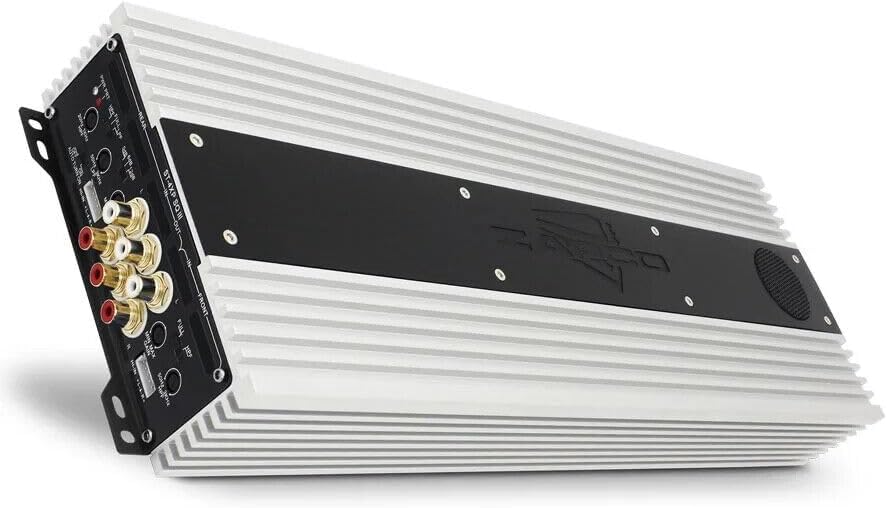
This image displays the Zapco ST-4XP-SQ-III amplifier, showcasing its sleek design and heat sink fins. The main body is silver with a black central panel featuring the Zapco logo.
2. ຂໍ້ມູນຄວາມປອດໄພ
ປະຕິບັດຕາມຄວາມລະມັດລະວັງດ້ານຄວາມປອດໄພຕໍ່ໄປນີ້ສະເໝີໃນລະຫວ່າງການຕິດຕັ້ງ ແລະ ການດໍາເນີນງານ:
- Disconnect the vehicle's negative battery terminal before any wiring.
- ຮັບປະກັນວ່າສາຍໄຟທັງໝົດໄດ້ຖືກວາງ ແລະ ຮັດແໜ້ນຢ່າງຖືກຕ້ອງເພື່ອປ້ອງກັນຄວາມເສຍຫາຍ ຫຼື ວົງຈອນສັ້ນ.
- Use appropriate gauge wiring for power, ground, and speaker connections as specified.
- ພູ ampຕິດຕັ້ງເຄື່ອງປັບອາກາດຢ່າງປອດໄພໃນສະຖານທີ່ທີ່ມີລະບາຍອາກາດພຽງພໍ ແລະ ປ້ອງກັນຈາກຄວາມຊຸ່ມຊື່ນ ແລະ ຄວາມຮ້ອນທີ່ເກີນ.
- ຢ່າປະຕິບັດການ amplifier ຖ້າມັນເສຍຫາຍຫຼືເຮັດວຽກຜິດປົກກະຕິ. ອ້າງເຖິງພາກສ່ວນການແກ້ໄຂບັນຫາ ຫຼືຕິດຕໍ່ຝ່າຍຊ່ວຍເຫຼືອ.
3. ຜະລິດຕະພັນເກີນview
The Zapco ST-4XP-SQ-III is a high-performance 4-channel Class AB amplifier designed for superior sound quality in automotive applications. Key features include:
- 4-Channel, Full Range, Class A/B operation
- Tiffany style Panel Mount RCA connectors
- Speaker Level Inputs with Auto-on functionality
- ການຄວບຄຸມການຮັບເຂົ້າຂອງຕົວປ່ຽນ
- Variable electronic crossover (HPF/LPF)
- ການຄວບຄຸມການເພີ່ມສຽງເບດທີ່ປ່ຽນແປງໄດ້
- Robust new aluminum chassis for efficient heat dissipation
ຮູບແບບແຜງຄວບຄຸມ

This image shows the input and control panel of the Zapco ST-4XP-SQ-III amplifier. Visible controls include gain adjustments, high-pass filter (HPF), low-pass filter (LPF), bass boost, and RCA input jacks for front and rear channels. Speaker level inputs and an auto-on switch are also present.
The control panel provides access to input connections and sound tuning adjustments. This includes RCA inputs, speaker level inputs, gain controls, and crossover frequency adjustments for both front and rear channels.
Power and Speaker Output Terminals

This image details the power and speaker output terminals of the Zapco ST-4XP-SQ-III amplifier. It includes connections for Ground (GND), Remote (REM), +12V Battery (Bat), and speaker outputs for front and rear channels, with bridging options indicated.
The power and speaker output panel features robust terminals for secure connections. These include connections for the main power supply (+12V Bat), ground (GND), remote turn-on (REM), and speaker outputs for the front and rear channels, with clear markings for bridging configurations.
4. ການຕິດຕັ້ງແລະການຕິດຕັ້ງ
ການຕິດຕັ້ງທີ່ເຫມາະສົມແມ່ນສໍາຄັນສໍາລັບການປະຕິບັດແລະອາຍຸຍືນຂອງເຈົ້າ ampເຄື່ອງຂະຫຍາຍສຽງ. ຖ້າທ່ານບໍ່ແນ່ໃຈກ່ຽວກັບຂັ້ນຕອນໃດໆ, ໃຫ້ປຶກສາຜູ້ຕິດຕັ້ງມືອາຊີບ.
4.1 ການຕິດຕັ້ງ
- ເລືອກສະຖານທີ່ຕິດຕັ້ງທີ່ແຫ້ງ, ມີລະບາຍອາກາດດີ, ແລະ ຫ່າງຈາກແສງແດດໂດຍກົງ ຫຼື ແຫຼ່ງຄວາມຮ້ອນ.
- ຮັບປະກັນພື້ນທີ່ພຽງພໍປະມານ amplifier ສໍາລັບການໄຫຼວຽນຂອງອາກາດ.
- ຮັບປະກັນ amplifier firmly using appropriate hardware to prevent movement during vehicle operation.
4.2 ການເຊື່ອມຕໍ່ສາຍໄຟ
Refer to the 'Power and Speaker Output Terminals' image for visual guidance.
- Power (BAT +12V): ເຊື່ອມຕໍ່ສາຍໄຟທີ່ມີຟິວໂດຍກົງຈາກຂົ້ວແບັດເຕີຣີບວກຂອງລົດເຂົ້າກັບຂົ້ວ +12V ທີ່ຢູ່ເທິງ ampເຄື່ອງເພີ່ມພະລັງງານ. ຟິວຄວນຕັ້ງຢູ່ພາຍໃນ 18 ນິ້ວຂອງແບັດເຕີຣີ.
- ດິນ (GND): Connect a ground cable of the same gauge as the power cable to a clean, unpainted metal surface on the vehicle chassis. Ensure a solid electrical connection.
- ໄລຍະໄກ (REM): ເຊື່ອມຕໍ່ສາຍເປີດທາງໄກຈາກທາງໄກຂອງຫົວຫນ່ວຍຂອງທ່ານໄປຫາເຄື່ອງ REM ຢູ່ເຄື່ອງ ampສິ່ງນີ້ເຮັດໃຫ້ amplifier on and off with your head unit. If using speaker level inputs, the amplifier features an auto-on function.
- ສັນຍານການປ້ອນຂໍ້ມູນ:
- ວັດສະດຸປ້ອນ RCA: ເຊື່ອມຕໍ່ສາຍ RCA ຈາກຫົວຫນ່ວຍຂອງທ່ານກ່ອນ.amp outputs to the corresponding RCA input jacks (Front IN, Rear IN) on the ampມີຊີວິດຊີວາ.
- ການປ້ອນຂໍ້ມູນລະດັບລຳໂພງ: If your head unit does not have RCA outputs, connect the speaker wires from the head unit to the amplifier's speaker level input terminals. Ensure correct polarity. The amplifier's auto-on feature will activate when a signal is detected.
- ລຳ ໂພງອອກ: ເຊື່ອມຕໍ່ລໍາໂພງຂອງທ່ານກັບ amplifier's speaker output terminals (Front L/R, Rear L/R). Observe correct polarity (+ to + and - to -). For bridged operation, refer to the markings on the amplifier for the correct terminals.
5. ຄໍາແນະນໍາການດໍາເນີນງານ
ເມື່ອຕິດຕັ້ງ, ປັບ ampການຕັ້ງຄ່າ lifier ສໍາລັບປະສິດທິພາບສຽງທີ່ດີທີ່ສຸດ.
5.1 ໄດ້ຮັບການຄວບຄຸມ
The variable input gain control (MIN MAX GAIN) matches the amplifier's input sensitivity to the output level of your head unit. Start with the gain set to minimum. Play a familiar track at about 75% of your head unit's maximum volume. Slowly increase the amplifier's gain until you hear slight distortion, then back off slightly. This ensures maximum clean output.
5.2 ການຕັ້ງຄ່າ Crossover
The ST-4XP-SQ-III features variable electronic crossovers for both High-Pass Filter (HPF) and Low-Pass Filter (LPF).
- HPF (High-Pass Filter): Allows frequencies ຂ້າງເທິງ the set point to pass through. Use this for full-range speakers to prevent them from playing low bass, which can cause distortion and damage.
- LPF (ຕົວກອງຕໍ່າຜ່ານ): Allows frequencies ຂ້າງລຸ່ມນີ້ the set point to pass through. Use this for subwoofers to ensure they only reproduce bass frequencies.
- ເຕັມ: Bypasses the crossover, allowing all frequencies to pass.
Adjust the HPF and LPF settings according to your speaker types and desired sound. Typical settings for full-range speakers might be an HPF between 80Hz-120Hz. For subwoofers, an LPF between 80Hz-100Hz is common.
5.3 Bass Boost
The variable bass boost control allows you to enhance low-frequency output. Use this feature sparingly, as excessive bass boost can lead to distortion and potential speaker damage. Adjust to taste, ensuring the sound remains clear.
5.4 Auto-on with Speaker Level Inputs
When using speaker level inputs, the amplifier can automatically detect an audio signal and power on. Ensure the 'AUTO TURN ON' switch is set to 'ON' if you wish to utilize this feature. If using a remote turn-on wire, set this switch to 'OFF'.
6. ບໍາລຸງຮັກສາ
The Zapco ST-4XP-SQ-III amplifier ຮຽກຮ້ອງໃຫ້ມີການບໍາລຸງຮັກສາຫນ້ອຍທີ່ສຸດເພື່ອຮັບປະກັນການປະຕິບັດໃນໄລຍະຍາວ.
- ທໍາຄວາມສະອາດ: ເຊັດເປັນໄລຍະ ampເຊັດພາຍນອກຂອງເຄື່ອງປັບອາກາດດ້ວຍຜ້າອ່ອນໆແຫ້ງເພື່ອກຳຈັດຝຸ່ນ ແລະ ສິ່ງສົກກະປົກ. ຢ່າໃຊ້ສານເຄມີທີ່ຮຸນແຮງ ຫຼື ນ້ຳຢາທຳຄວາມສະອາດທີ່ມີສີຂັດ.
- ການກວດກາ: Regularly check all wiring connections for tightness and signs of corrosion or damage. Ensure the amplifier's mounting remains secure.
- ການລະບາຍອາກາດ: ຮັບປະກັນວ່າ amplifier's heat sink fins are not obstructed, allowing for proper airflow and cooling.
7. ການແກ້ໄຂບັນຫາ
ຖ້າເຈົ້າປະສົບບັນຫາກັບເຈົ້າ ampສຳລັບຂໍ້ມູນເພີ່ມເຕີມກ່ຽວກັບຕົວຊ່ວຍ, ໃຫ້ປຶກສາຕາຕະລາງຕໍ່ໄປນີ້ກ່ອນທີ່ຈະຕິດຕໍ່ຝ່າຍຊ່ວຍເຫຼືອ.
| ບັນຫາ | ສາເຫດທີ່ເປັນໄປໄດ້ | ການແກ້ໄຂ |
|---|---|---|
| ບໍ່ມີພະລັງງານ / Amplifier ບໍ່ເປີດ |
|
|
| ບໍ່ມີສຽງອອກ |
|
|
| ສຽງບິດເບືອນ |
|
|
| Amplifier overheating |
|
|
8. ຂໍ້ມູນຈໍາເພາະ
The following are the technical specifications for the Zapco ST-4XP-SQ-III ampມີຊີວິດຊີວາ:
- ພະລັງງານ @ 4Ω: ຂະ ໜາດ 4 x 150 ວັດ RMS
- ພະລັງງານ @ 2Ω: ຂະ ໜາດ 4 x 250 ວັດ RMS
- Power Bridged @ 4Ω: ຂະ ໜາດ 2 x 500W RMS
- THD @ ລະດັບພະລັງງານ: <0.1% THD
- ອັດຕາສ່ວນສັນຍານຕໍ່ກັບສິ່ງລົບກວນ: > 95dB
- ການແຍກຊ່ອງ: >60dB
- ການຕອບສະໜອງຄວາມຖີ່: 15Hz ຫາ 30KHz ±1dB
- ຄວາມອ່ອນໄຫວການປ້ອນຂໍ້ມູນ: 0.25v ຫາ 5v
- Net Dimensions (W x H x L): 160mm x 58mm x 450mm (6.3 x 2.28 x 17.72 ນິ້ວ)
- Overall Dimensions (W x H x L): 160mm x 58mm x 475mm (6.3 x 2.28 x 18.7 ນິ້ວ)
- ນ້ໍາຫນັກລາຍການ: ປະມານ 10 ປອນ
9. ການຮັບປະກັນແລະການສະຫນັບສະຫນູນ
9.1 ຂໍ້ມູນການຮັບປະກັນ
The Zapco ST-4XP-SQ-III amplifier ມາພ້ອມກັບ a ຮັບປະກັນ 1 ປີ from the date of purchase. This warranty covers defects in materials and workmanship under normal use. It does not cover damage caused by improper installation, accident, misuse, abuse, neglect, unauthorized modification, or normal wear and tear. Please retain your proof of purchase for warranty claims.
9.2 ສະຫນັບສະຫນູນລູກຄ້າ
For technical assistance, warranty service, or general inquiries, please visit the official Zapco website or contact your authorized Zapco dealer. You can often find detailed FAQs, additional resources, and contact information on the manufacturer's webເວັບໄຊ.
Zapco Official Webເວັບໄຊ: Visit the Zapco Store on Amazon


