1. ການແນະນໍາ ແລະຫຼາຍກວ່າview
The Ditec RM-L 1370 is a universal replacement remote control designed for a wide range of Sony Bravia televisions. This remote offers direct compatibility with various Sony LCD, LED, UHD, OLED, and QLED 4K Ultra HD Smart Android TV models, eliminating the need for complex programming or pairing. It features dedicated hotkeys for popular streaming services like YouTube and Netflix for convenient access.

Image: The Ditec RM-L 1370 remote control, highlighting its compatibility as a single remote solution for Sony TVs.
2. ການຕິດຕັ້ງແລະການນໍາໃຊ້ເບື້ອງຕົ້ນ
This remote control is designed for immediate use without any setup or programming. Simply insert the required batteries, and it will be ready to operate your compatible Sony TV.
2.1 ການຕິດຕັ້ງຫມໍ້ໄຟ
- ຊອກຫາຊ່ອງໃສ່ຫມໍ້ໄຟຢູ່ດ້ານຫຼັງຂອງການຄວບຄຸມໄລຍະໄກ.
- ເລື່ອນເປີດcoverາປົກຊ່ອງຂອງbatteryໍ້ໄຟ.
- Insert two (2) AAA batteries (not included), ensuring correct polarity (+ and - terminals).
- ປິດຝາປິດຊ່ອງໃສ່ຫມໍ້ໄຟຢ່າງປອດໄພ.

ຮູບພາບ: ດ້ານຫລັງ view ຂອງຣີໂໝດຄວບຄຸມ, ເຊິ່ງສະແດງໃຫ້ເຫັນຕຳແໜ່ງຂອງຊ່ອງໃສ່ແບັດເຕີຣີ.
2.2 ການນໍາໃຊ້ຄັ້ງທໍາອິດ
Once batteries are installed, point the remote control towards your Sony TV and press the Power button. The remote should operate your TV without any further configuration.
3. ຄໍາແນະນໍາການດໍາເນີນງານ
The Ditec RM-L 1370 remote control provides all standard functions for your Sony Bravia TV, along with convenient shortcut buttons.
3.1 ຫນ້າທີ່ພື້ນຖານ
- ປຸ່ມເປີດປິດ: ເປີດ ຫຼືປິດໂທລະພາບ.
- ປຸ່ມຕົວເລກ (0-9): ສໍາລັບການເລືອກຊ່ອງທາງໂດຍກົງ.
- ປະລິມານຂຶ້ນ/ລົງ: ປັບລະດັບສຽງໂທລະພາບ.
- ຊ່ອງຂຶ້ນ/ລົງ: ປ່ຽນຊ່ອງໂທລະພາບ.
- ແຜ່ນນໍາທາງ (ຂຶ້ນ/ລົງ/ຊ້າຍ/ຂວາ/ໃສ່): ສໍາລັບການນໍາທາງເມນູແລະການເລືອກ.
- ປຸ່ມຫນ້າທໍາອິດ: Accesses the TV's Smart Home screen or main menu.
- Return/Back Button: ກັບຄືນໄປຫາໜ້າຈໍ ຫຼືເມນູກ່ອນໜ້າ.
- ປຸ່ມຕົວເລືອກ: ສະແດງຕົວເລືອກທີ່ລະອຽດອ່ອນຂອງບໍລິບົດ.
3.2 ລັກສະນະພິເສດ
- YouTube Hotkey: Directly launches the YouTube application.
- Netflix Hotkey: Directly launches the Netflix application.
The remote features an enhanced infrared sensor for a farther transmitting distance, allowing effective control up to 50 feet.

Image: The remote control demonstrating its farther distance sensor, capable of operating up to 50 feet.
4. ຄວາມເຂົ້າກັນໄດ້
The Ditec RM-L 1370 universal remote is compatible with a wide range of Sony Bravia LCD, LED, UHD, OLED, and QLED 4K Ultra HD Smart Android TVs. It is designed to replace many original Sony remote models, including but not limited to:
- RMT-TX100U, RMT-TX102U
- RMF-TX200U, RMF-TX201U, RMF-TX220U
- RMT-TX300U, RMF-TX310U
- RMT-TX500U, RMF-TX520U, RMF-TX600U
- And many other Sony TV remote models.
For a comprehensive list of compatible Sony TV remote models, please refer to the image below:
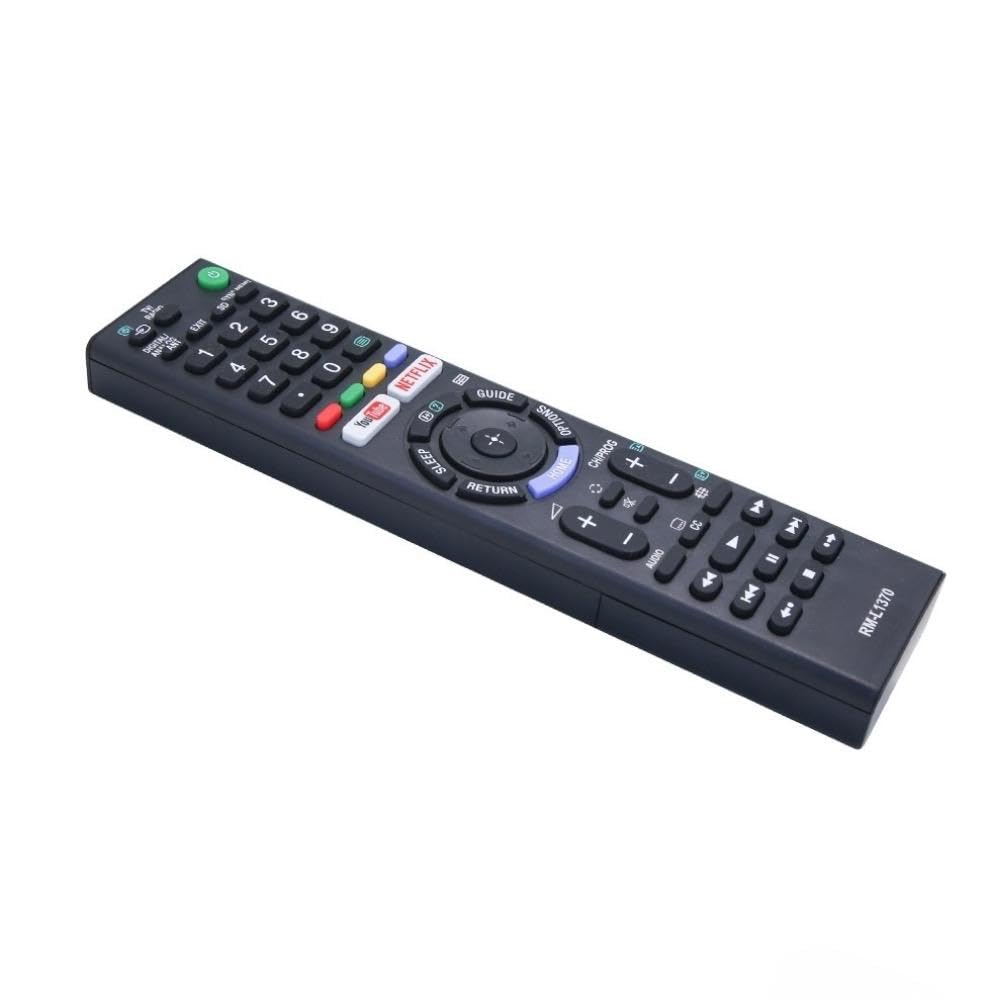
Image: A detailed list of Sony TV remote models that are compatible with the Ditec RM-L 1370.
It is recommended to compare the appearance of this remote with your original remote for visual confirmation of compatibility.
5. ບໍາລຸງຮັກສາ
5.1 ການທົດແທນຫມໍ້ໄຟ
When the remote control's performance degrades or it stops responding, replace the batteries with two new AAA alkaline batteries. Always replace both batteries at the same time. Do not mix old and new batteries or different types of batteries.
5.2 ການທໍາຄວາມສະອາດ
ເພື່ອທຳຄວາມສະອາດຣີໂໝດຄວບຄຸມ, ໃຫ້ໃຊ້ຜ້າອ່ອນໆແຫ້ງ. ຢ່າໃຊ້ນ້ຳຢາທຳຄວາມສະອາດ, ສະເປຣ, ຫຼື ວັດສະດຸຂັດ, ເພາະວ່າສິ່ງເຫຼົ່ານີ້ອາດຈະທຳລາຍພື້ນຜິວ ຫຼື ອົງປະກອບພາຍໃນຂອງຣີໂໝດໄດ້.
6. ການແກ້ໄຂບັນຫາ
- ໄລຍະໄກບໍ່ຕອບສະໜອງ:
- ກວດເບິ່ງວ່າໃສ່ແບັດເຕີລີ່ຖືກໃສ່ຢ່າງຖືກຕ້ອງກັບຂົ້ວທີ່ຖືກຕ້ອງຫຼືບໍ່.
- ປ່ຽນແບັດເກົ່າດ້ວຍອັນໃໝ່.
- ໃຫ້ແນ່ໃຈວ່າບໍ່ມີສິ່ງກີດຂວາງລະຫວ່າງການຄວບຄຸມໄລຍະໄກ ແລະເຄື່ອງຮັບອິນຟາເຣດຂອງໂທລະພາບ.
- ໃຫ້ແນ່ໃຈວ່າທ່ານຢູ່ພາຍໃນຂອບເຂດການປະຕິບັດງານທີ່ມີປະສິດທິພາບ (ສູງສຸດ 50 ຟຸດ).
- ປຸ່ມສະເພາະບໍ່ເຮັດວຽກ:
- Some advanced functions or TV-specific features might not be supported by a universal replacement remote.
- Ensure the TV is powered on and functioning correctly.
7. ຂໍ້ມູນຈໍາເພາະ
| ຄຸນສົມບັດ | ລາຍລະອຽດ |
|---|---|
| ຍີ່ຫໍ້ | ປະກາດ |
| ຕົວແບບ | RM-L 1370 |
| ອຸປະກອນທີ່ເຂົ້າກັນໄດ້ | Sony Bravia LCD, LED, UHD, OLED, QLED 4K Ultra HD Smart Android TVs |
| ປະເພດຕົວເຊື່ອມຕໍ່ | ອິນຟາເລດ (IR) |
| ຕ້ອງໃຊ້ແບັດເຕີຣີ | 2 x AAA (ບໍ່ລວມ) |
| ຄຸນນະສົມບັດພິເສດ | Ergonomic design, YouTube & Netflix Hotkeys |
| ຂະໜາດສິນຄ້າ | 3 x 3 x 12 cm |
| ນ້ໍາຫນັກລາຍການ | 80 g |
| ປະເທດຕົ້ນກໍາເນີດ | ຈີນ |
8. ສະຫນັບສະຫນູນ
For assistance with compatibility or any questions regarding your Ditec RM-L 1370 remote control, you may contact support by sending a picture of your old remote or your device's brand name and model number to +91 9924350801. This will help in verifying compatibility or addressing specific queries.

Image: Information on how to contact support for compatibility checks or questions.


