1. ຕັ້ງຄ່າ
This section guides you through the initial setup of your DOOGEE U10 tablet.
1.1 ເນື້ອໃນຊຸດ
ໃຫ້ແນ່ໃຈວ່າລາຍການທັງໝົດຢູ່ໃນກ່ອງ:
- DOOGEE U10 ແທັບເລັດ
- ສາຍ USB Type-C
- Power Adapter
- ເຄື່ອງມືຖອດ SIM (ຖ້າມີ)
- ຄູ່ມືເລີ່ມຕົ້ນດ່ວນ
- ບັດຮັບປະກັນ
1.2 ຮູບແບບອຸປະກອນ
Familiarize yourself with the physical features of your tablet.
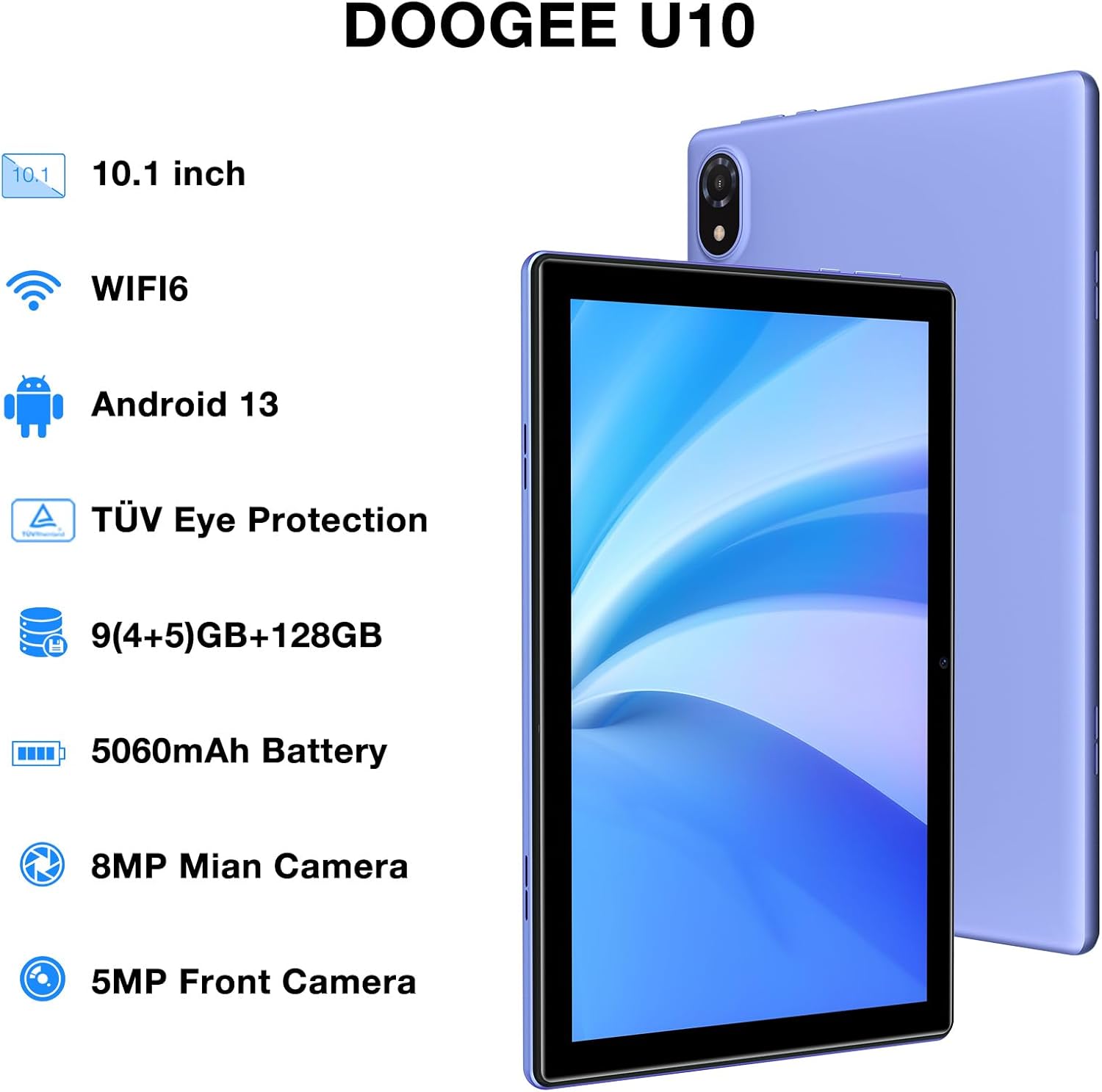
Figure 1: DOOGEE U10 Tablet Overview. This image highlights the tablet's 10.1-inch display, WiFi 6 capability, Android 13 operating system, TÜV Eye Protection, 9GB RAM, 128GB ROM, 5060mAh battery, 8MP main camera, and 5MP front camera.
- ປຸ່ມເປີດປິດ: Located on the side, press and hold to power on/off or restart.
- ປຸ່ມລະດັບສຽງ: ປັບລະດັບສຽງສື່ ແລະສຽງການແຈ້ງເຕືອນ.
- ພອດ USB Type-C: ສໍາລັບການສາກໄຟແລະການໂອນຂໍ້ມູນ.
- Jack ຫູຟັງ 3.5 ມມ: ເຊື່ອມຕໍ່ຫູຟັງແບບມີສາຍ.
- ກ້ອງໜ້າ: ສໍາລັບການໂທວິດີໂອ ແລະເຊວຟີ.
- ກ້ອງຫຼັງ: ສໍາລັບການຖ່າຍຮູບແລະວິດີໂອ.
- ລໍາໂພງ: Dual stereo speakers for audio output.
1.3 ການເປີດ ແລະສາກເບື້ອງຕົ້ນ
Before first use, fully charge your tablet. Connect the USB Type-C cable to the tablet and the power adapter to a wall outlet. The battery indicator will show charging status.
- ກົດປຸ່ມເປີດປິດຄ້າງໄວ້ຈົນກ່ວາໂລໂກ້ DOOGEE ປະກົດຂຶ້ນ.
- ປະຕິບັດຕາມຄໍາແນະນໍາໃນຫນ້າຈໍເພື່ອເລືອກພາສາຂອງທ່ານ, ເຊື່ອມຕໍ່ກັບ Wi-Fi, ແລະຕັ້ງຄ່າບັນຊີ Google ຂອງທ່ານ.
2. ປະຕິບັດການແທັບເລັດຂອງທ່ານ
Learn how to navigate and use the core features of your DOOGEE U10 tablet.
2.1 ການສະແດງແລະການນໍາທາງ
The DOOGEE U10 features a 10.1-inch IPS HD display with a resolution of 1280x800 pixels, providing clear visuals for various tasks.

Figure 2: Vivid IPS HD Display. This image illustrates the tablet's 10.1-inch screen with 800x1280 HD+ resolution, ideal for media consumption.
- ທ່າທາງສໍາຜັດ: ແຕະເພື່ອເລືອກ, ປັດເພື່ອເລື່ອນ, ແຕະເພື່ອຊູມ.
- ໜ້າຈໍຫຼັກ: ປັບແຕ່ງດ້ວຍວິດເຈັດ ແລະທາງລັດແອັບ.
- ການແຈ້ງເຕືອນ: ປັດລົງຈາກເທິງເພື່ອເຂົ້າເຖິງການແຈ້ງເຕືອນ ແລະການຕັ້ງຄ່າດ່ວນ.
- ການຮັບຮູ້ໃບ ໜ້າ: Unlock your tablet using facial recognition for convenience.
2.2 ການປະຕິບັດແລະການເກັບຮັກສາ
The tablet is powered by a Quad-Core RK3562 processor clocked at up to 2.0GHz, ensuring smooth performance. It comes with 9GB RAM (5GB physical + 4GB expansion) and 128GB internal storage, expandable up to 1TB via a microSD card.

Figure 3: Powerful Processor and Memory. This image details the tablet's Rockchip RK3562 Quad-Core processor, 9GB RAM, 128GB ROM, and support for 1TB TF card expansion.
2.3 ການເຊື່ອມຕໍ່
- Wi-Fi 6: Connect to high-speed Wi-Fi networks for faster browsing and streaming. Go to Settings > Network & internet > Wi-Fi.
- Bluetooth 5.0: Pair with wireless headphones, speakers, or other Bluetooth devices. Go to Settings > Connected devices > Bluetooth.
- OTG (On-The-Go): Connect USB peripherals like flash drives or keyboards using an OTG adapter (sold separately).
2.4 ການທໍາງານຂອງກ້ອງຖ່າຍຮູບ
The tablet is equipped with an 8MP main camera and a 5MP front camera for photos and video calls.

Figure 4: Dual Camera System. This image showcases the tablet's 8MP main camera and 5MP front camera, suitable for capturing moments and video conferencing.
- ເປີດແອັບກ້ອງຖ່າຍຮູບຈາກໜ້າຈໍຫຼັກ ຫຼືລິ້ນຊັກແອັບ.
- ແຕະປຸ່ມຊັດເຕີເພື່ອຖ່າຍຮູບ.
- ສະຫຼັບລະຫວ່າງກ້ອງໜ້າ ແລະກ້ອງຫຼັງໂດຍໃຊ້ໄອຄອນກ້ອງຖ່າຍຮູບ.
2.5 ການຄຸ້ມຄອງຫມໍ້ໄຟ
The 5060mAh battery provides extended usage. To optimize battery life, adjust screen brightness, close unused apps, and enable power-saving modes.

Figure 5: Large Capacity Battery. This image highlights the 5060mAh battery, Type-C charging, 5V2A fast charging, and 3.5mm headphone jack, along with estimated usage times for gaming, movies, and music.
2.6 Multimedia Experience
Enjoy an immersive audio experience with dual stereo speakers. The tablet supports Widevine L1, allowing for high-quality streaming from various video platforms.

Figure 6: Immersive Audio and DRM L1. This image illustrates the tablet's support for WiFi 6, Bluetooth 5.0, dual speakers, and DRM L1 for enhanced multimedia playback.
2.7 Eye Protection Mode
The DOOGEE U10 is TÜV SÜD blue light certified, reducing harmful blue light emissions to protect your eyes during prolonged use.

Figure 7: TÜV Certified Eye Protection. This image shows the TÜV Rheinland certification, indicating the tablet's low blue light feature for eye comfort.
2.8 ວິດີໂອຜະລິດຕະພັນຢ່າງເປັນທາງການ
DOOGEE U10 Tablet Showcase
ວິດີໂອນີ້ສະຫນອງການທົ່ວໄປview and showcase of the DOOGEE U10 tablet's features and design.
DOOGEE U10 Fantastic Experience for Kids
This video demonstrates how the DOOGEE U10 tablet can be used by children, highlighting its suitability for educational and entertainment purposes for younger users.
3. ບໍາລຸງຮັກສາ
ການດູແລທີ່ເຫມາະສົມເຮັດໃຫ້ແນ່ໃຈວ່າການຍາວນານແລະການປະຕິບັດທີ່ດີທີ່ສຸດຂອງເມັດຂອງທ່ານ.
3.1 ການເຮັດຄວາມສະອາດແທັບເລັດຂອງທ່ານ
- ໃຊ້ຜ້າທີ່ອ່ອນໆ, ບໍ່ມີສານດ່າງເພື່ອເຮັດຄວາມສະອາດຫນ້າຈໍແລະຮ່າງກາຍ.
- ຫຼີກລ່ຽງການໃຊ້ສານເຄມີທີ່ຮຸນແຮງ, ເຄື່ອງຂັດຂັດ, ຫຼືສີດ aerosol.
- ສໍາລັບ smudges stubborn, ເລັກນ້ອຍ dampen ຜ້າທີ່ມີນ້ໍາຫຼືເຄື່ອງເຮັດຄວາມສະອາດຫນ້າຈໍທີ່ຖືກອອກແບບມາສໍາລັບເອເລັກໂຕຣນິກ.
3.2 ການປັບປຸງຊອບແວ
ກວດສອບ ແລະ ຕິດຕັ້ງການອັບເດດຊອບແວເປັນປະຈຳເພື່ອປັບປຸງປະສິດທິພາບ, ຄວາມປອດໄພ ແລະ ເພີ່ມຄຸນສົມບັດໃໝ່ໆ.
- ໄປທີ່ Settings > System > System update.
- ເຊື່ອມຕໍ່ກັບເຄືອຂ່າຍ Wi-Fi ທີ່ໝັ້ນຄົງກ່ອນທີ່ຈະດາວໂຫຼດການອັບເດດ.
4. ການແກ້ໄຂບັນຫາ
ພາກສ່ວນນີ້ແກ້ໄຂບັນຫາທົ່ວໄປທີ່ທ່ານອາດຈະພົບກັບແທັບເລັດ DOOGEE U10 ຂອງທ່ານ.
4.1 ອຸປະກອນບໍ່ເປີດ
- ໃຫ້ແນ່ໃຈວ່າໄດ້ສາກໄຟແລ້ວ. ເຊື່ອມຕໍ່ແທັບເລັດກັບເຄື່ອງສາກເປັນເວລາຢ່າງໜ້ອຍ 30 ນາທີ.
- ກົດປຸ່ມເປີດ/ປິດຄ້າງໄວ້ປະມານ 10-15 ວິນາທີເພື່ອບັງຄັບໃຫ້ເປີດເຄື່ອງໃໝ່.
4.2 ບັນຫາການເຊື່ອມຕໍ່ (Wi-Fi/Bluetooth)
- Toggle Wi-Fi or Bluetooth off and on in Quick Settings or Settings menu.
- Restart your tablet and the router/Bluetooth device.
- ລືມເຄືອຂ່າຍ/ອຸປະກອນ ແລະເຊື່ອມຕໍ່ຄືນໃໝ່.
4.3 ແອັບຂັດຂ້ອງ ຫຼື ຄ້າງໄວ້
- ປິດແອັບທີ່ມີບັນຫາແລ້ວເປີດມັນຄືນໃໝ່.
- Clear the app's cache: Settings > Apps > [App Name] > Storage & cache > Clear cache.
- ກວດໃຫ້ແນ່ໃຈວ່າແອັບໄດ້ຖືກອັບເດດເປັນເວີຊັນຫຼ້າສຸດຂອງມັນ.
- ຖ້າບັນຫາຍັງຄົງຢູ່, ໃຫ້ພິຈາລະນາຖອນການຕິດຕັ້ງ ແລະຕິດຕັ້ງແອັບຄືນໃໝ່.
5. ຂໍ້ກໍານົດດ້ານວິຊາການ
Key technical details of the DOOGEE U10 tablet.
| ຄຸນສົມບັດ | ຂໍ້ມູນຈໍາເພາະ |
|---|---|
| ຊື່ຕົວແບບ | U10 |
| ລະບົບປະຕິບັດການ | Android 13 |
| ຂະໜາດໜ້າຈໍ | 10.1 ນິ້ວ |
| ຄວາມລະອຽດໜ້າຈໍ | 1280 x 800 ພິກເຊລ (HD+) |
| ໂຮງງານຜະລິດ | Quad-Core (Rockchip RK3562, up to 2.0GHz) |
| RAM | 9GB (5GB ທາງກາຍະພາບ + ຂະຫຍາຍ 4GB) |
| ການເກັບຮັກສາພາຍໃນ | 128GB |
| ການເກັບຮັກສາທີ່ຂະຫຍາຍໄດ້ | Up to 1TB (microSD/TF card) |
| ກ້ອງຫຼັກ | 8MP |
| ກ້ອງໜ້າ | 5MP |
| ຄວາມອາດສາມາດຫມໍ້ໄຟ | 5060mAh |
| ການເຊື່ອມຕໍ່ | Wi-Fi 6, Bluetooth 5.0, OTG |
| ຂະໜາດ (LxWxH) | 9.6 x 6.4 x 0.4 ນິ້ວ |
| ນ້ຳໜັກ | ປະມານ 1.13 lbs (427g) |
| ປ້ອງກັນຕາ | TÜV SÜD Low Bluelight Certified |
| ສະຫນັບສະຫນູນ DRM | ໄວດ໌ວາຍ L1 |
6. ການຮັບປະກັນແລະການສະຫນັບສະຫນູນ
ຂໍ້ມູນກ່ຽວກັບການຮັບປະກັນຜະລິດຕະພັນຂອງທ່ານ ແລະ ວິທີການຮັບການຊ່ວຍເຫຼືອ.
6.1 ການຮັບປະກັນຈໍາກັດ
The DOOGEE U10 tablet typically comes with a 2-year limited warranty. This warranty covers manufacturing defects and workmanship under normal use. Please refer to the warranty card included in your package for specific terms and conditions, including coverage details and exclusions.
ຮັກສາຫຼັກຖານການຊື້ຂອງທ່ານສໍາລັບການຮ້ອງຂໍການຮັບປະກັນ.
6.2 ສະຫນັບສະຫນູນລູກຄ້າ
If you encounter any issues not covered in the troubleshooting section or require further assistance, please contact DOOGEE customer support.
- ສະຫນັບສະຫນູນອອນໄລນ໌: ຢ້ຽມຢາມ DOOGEE ຢ່າງເປັນທາງການ webເວັບໄຊທ໌ສຳລັບຄຳຖາມທີ່ຖືກຖາມເລື້ອຍໆ, ຊັບພະຍາກອນສະໜັບສະໜູນ, ແລະທາງເລືອກໃນການຕິດຕໍ່.
- ສະຫນັບສະຫນູນອີເມວ: Refer to your warranty card or quick start guide for specific email addresses.
- ສູນບໍລິການ: Information on authorized service centers may be available on the DOOGEE webເວັບໄຊ.
When contacting support, please have your tablet's model number (U10) and purchase information ready.


