1. ຂໍ້ມູນຄວາມປອດໄພທີ່ສໍາຄັນ
ກະລຸນາອ່ານແລະເຂົ້າໃຈຄໍາແນະນໍາທັງຫມົດກ່ອນທີ່ຈະປະກອບແລະນໍາໃຊ້. ຮັກສາຄູ່ມືນີ້ໄວ້ສໍາລັບການອ້າງອີງໃນອະນາຄົດ.
- ອຸປະກອນຕ້ານຄໍາແນະນໍາ: Always install the anti-tip device provided to prevent serious or fatal crushing injuries.
- ຈຳກັດນ້ຳໜັກ: Do not exceed the maximum weight capacity for the top surface or drawers. Refer to the specifications section for details.
- ສະພາແຫ່ງ: Assemble the dresser on a soft, clean surface to prevent scratches. Ensure all parts are securely fastened before use.
- ຄວາມປອດໄພຂອງເດັກນ້ອຍ: Keep small parts and packaging materials away from children. Do not allow children to climb on or play with the dresser.
- ຄວາມປອດໄພທາງໄຟຟ້າ: When using the charging station, ensure cables are not pinched or damaged. Do not overload the electrical outlets.
2. ເນື້ອໃນຊຸດ
ກວດສອບວ່າອົງປະກອບທັງຫມົດແມ່ນມີຢູ່ກ່ອນທີ່ຈະເລີ່ມຕົ້ນການປະກອບ. ຖ້າພາກສ່ວນໃດຂາດຫາຍໄປຫຼືເສຍຫາຍ, ກະລຸນາຕິດຕໍ່ຝ່າຍຊ່ວຍເຫຼືອລູກຄ້າ.

ຮູບທີ 2.1: ລະເບີດ view of dresser components.
This diagram illustrates the various parts of the dresser, including the frame, 8 wooden drawers, tempered glass tabletop, built-in charging station, retro metal handles, and solid sliding rails. All necessary hardware is included for assembly.
3. ຄໍາແນະນໍາຂອງສະພາແຫ່ງ
Assembly is required for this product. Follow the step-by-step instructions provided in the included assembly guide. All parts and screws are labeled for easy identification.
- ການກະກຽມພື້ນທີ່: Clear a spacious, clean, and soft area for assembly to prevent damage to the dresser components.
- ລະບຸພາກສ່ວນ: Unpack all components and hardware. Match each part to the corresponding label in the assembly guide.
- ປະກອບກອບ: Begin by assembling the main frame of the dresser according to the diagrams. Ensure all connections are secure.
- ຕິດຕັ້ງ Drawer Slides: Attach the drawer slides to the dresser frame and to the drawer boxes as indicated.
- ປະກອບ Drawers: Construct each of the 8 drawers, ensuring the bottoms are properly seated and the handles are attached.
- Install Tempered Glass Top: Carefully place the tempered glass top onto the dresser frame.
- ເຊື່ອມຕໍ່ອຸປະກອນໄຟຟ້າ: Follow instructions to connect the LED lighting and charging station. Ensure proper power connection.
- ໃສ່ Drawers: Slide the assembled drawers into their respective slots.
- ຕິດຕັ້ງຊຸດ Anti-Tip: Secure the dresser to the wall using the provided anti-tip kit to prevent tipping.
- ກວດສອບຄັ້ງສຸດທ້າຍ: Verify that all screws are tightened and the dresser is stable before placing items inside.
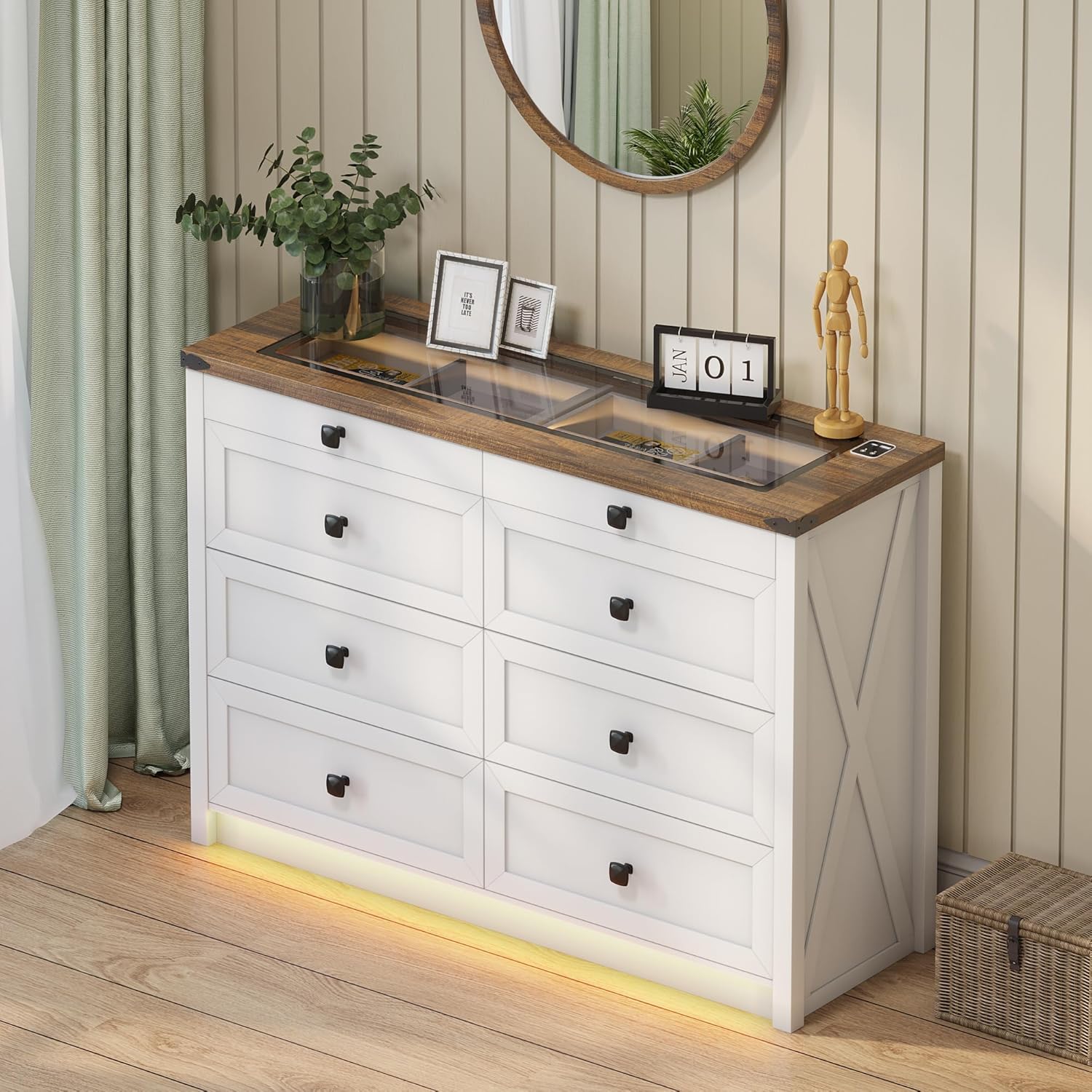
Figure 3.1: Fully assembled dresser.
This image shows the dresser fully assembled and placed in a room, ready for use. Note the integrated LED lighting at the base and the clear glass top.
4. ຄໍາແນະນໍາການດໍາເນີນງານ
4.1. ລະບົບໄຟ LED
The dresser features integrated LED lighting with customizable color and brightness settings, along with a human sensor for automatic activation.
- ເປີດ/ປິດ: Locate the touch button on the top surface near the charging station. A short press will turn the lights on or off.
- ປ່ຽນໂໝດສີ: With the lights on, short press the touch button repeatedly to cycle through the three available color modes: Warm Light, Natural Light, and White Light.
- ປັບຄວາມສະຫວ່າງ: To adjust brightness, long press the touch button. The brightness will gradually increase or decrease. Release the button when the desired brightness is reached.
- Human Sensor: The dresser is equipped with a human sensor. When activated, the lights will automatically turn on when motion is detected nearby and turn off after a period of inactivity. Refer to the specific controls on the dresser for sensor activation/deactivation.

Figure 4.1: LED lighting color options.
This image demonstrates the visual difference between the Natural, White, and Warm light settings of the integrated LED strip, along with a brightness control slider.

Figure 4.2: Tempered glass top with and without illumination.
This visual shows how the transparent black tea-tinted glass top allows visibility of stored items when the internal light is on, and provides privacy when the light is off.
4.2. ສະຖານີສາກໄຟ
The dresser is equipped with a convenient 2-in-1 charging station on its surface, featuring both USB and Type-C ports.
- ເຊື່ອມຕໍ່ພະລັງງານ: Ensure the dresser's power cord is securely plugged into a functional wall outlet.
- ອຸປະກອນສາກໄຟ: Connect your smartphone, tablet, or other electronic devices to the available USB (5V/2A) or Type-C ports using their respective charging cables.
- ການນຳໃຊ້: The charging station is designed for convenient access to power for your devices while keeping them organized on the dresser top.

Figure 4.3: Integrated charging station.
A close-up of the dresser's surface, showing the integrated USB and Type-C charging ports, ready for device connection.
5. ການດູແລແລະບໍາລຸງຮັກສາ
ການດູແລທີ່ເຫມາະສົມຈະຍືດອາຍຸແລະຮູບລັກສະນະຂອງຜູ້ແຕ່ງຕົວຂອງເຈົ້າ.
- ທໍາຄວາມສະອາດ: ເຊັດໜ້າໂຕະດ້ວຍຜ້າແຫ້ງ ແລະ ອ່ອນ. ສຳລັບຮອຍທີ່ຝັງແໜ້ນ, ໃຫ້ໃຊ້ຜ້າເຊັດໜ້າເລັກນ້ອຍ.amp ສາມາດໃຊ້ຜ້າເຊັດໄດ້, ແລະ ຕາມດ້ວຍຜ້າແຫ້ງທັນທີ. ຫຼີກລ່ຽງສານເຄມີທີ່ຮຸນແຮງ ຫຼື ນໍ້າຢາທໍາຄວາມສະອາດທີ່ມີສານຂັດ.
- ໜ້າແກ້ວ: Clean the tempered glass top with a glass cleaner and a soft, lint-free cloth.
- ຂີຸ້່ນ: ຂີ້ຝຸ່ນທຸກພື້ນຜິວເປັນປະຈຳເພື່ອປ້ອງກັນການສ້າງຕົວ.
- ຫຼີກເວັ້ນຄວາມຊຸ່ມ: Do not place hot or wet items directly on the wood or glass surfaces without protection.
- ການໄດ້ຮັບແສງແດດ: ຫຼີກເວັ້ນການສໍາຜັດກັບແສງແດດໂດຍກົງເປັນເວລາດົນເພື່ອປ້ອງກັນການຈາງຫຼືການປ່ຽນສີຂອງໄມ້.
- ການບໍາລຸງຮັກສາລິ້ນຊັກ: Periodically check drawer slides for smooth operation. If needed, a silicone-based lubricant can be applied sparingly.
6. ການແກ້ໄຂບັນຫາ
| ບັນຫາ | ສາເຫດທີ່ເປັນໄປໄດ້ | ການແກ້ໄຂ |
|---|---|---|
| ໄຟ LED ບໍ່ເປີດ. | Power cord not connected; loose connection; faulty LED strip. | Ensure power cord is securely plugged in. Check all electrical connections. If problem persists, contact customer support. |
| ສະຖານີສາກໄຟບໍ່ເຮັດວຽກ. | Power cord not connected; device cable faulty; device not compatible. | Verify dresser is plugged in. Try a different charging cable or device. Ensure device is compatible with USB/Type-C charging. |
| Drawers ມີຄວາມຫຍຸ້ງຍາກທີ່ຈະເປີດ / ປິດ. | Overloaded drawer; misaligned slides; loose hardware. | Reduce contents in the drawer. Check if drawer slides are properly aligned. Tighten any loose screws on the drawer or slides. |
| ຕູ້ເສື້ອຜ້າຮູ້ສຶກສັ່ນຄອນ. | Uneven floor; loose assembly hardware; anti-tip kit not installed. | Adjust furniture levelers if present, or place shims under the base. Retighten all assembly screws. Ensure the anti-tip kit is correctly installed and secured to the wall. |
7. ຂໍ້ມູນຈໍາເພາະຂອງຜະລິດຕະພັນ
- ຍີ່ຫໍ້: ເສລີ
- ຊື່ຕົວແບບ: BL-97022-25/29
- ຂະໜາດຜະລິດຕະພັນ: 15.75"D x 47.24"W x 33.46"H
- ສີ: ສີຂາວ
- ປະເພດການຕິດຕັ້ງ: ຊັ້ນເທິງ
- ຈໍານວນຂອງ drawers: 8
- ຄຸນນະສົມບັດພິເສດ: Ample Storage Space, Convenient 2-in-1 Charging Solution (USB & Type-C), Customizable 3-Color Lighting, Tempered Glass Top Design, Human Sensor
- ເຟີນີເຈີສໍາເລັດຮູບ: Brown (top) / White (body)
- ນ້ໍາຫນັກລາຍການ: 110.2 ປອນ
- ສະພາແຫ່ງທີ່ຕ້ອງການ: ແມ່ນແລ້ວ
- ການດູແລຜະລິດຕະພັນ: ເຊັດດ້ວຍຜ້າແຫ້ງ
- UPC: 756940843978
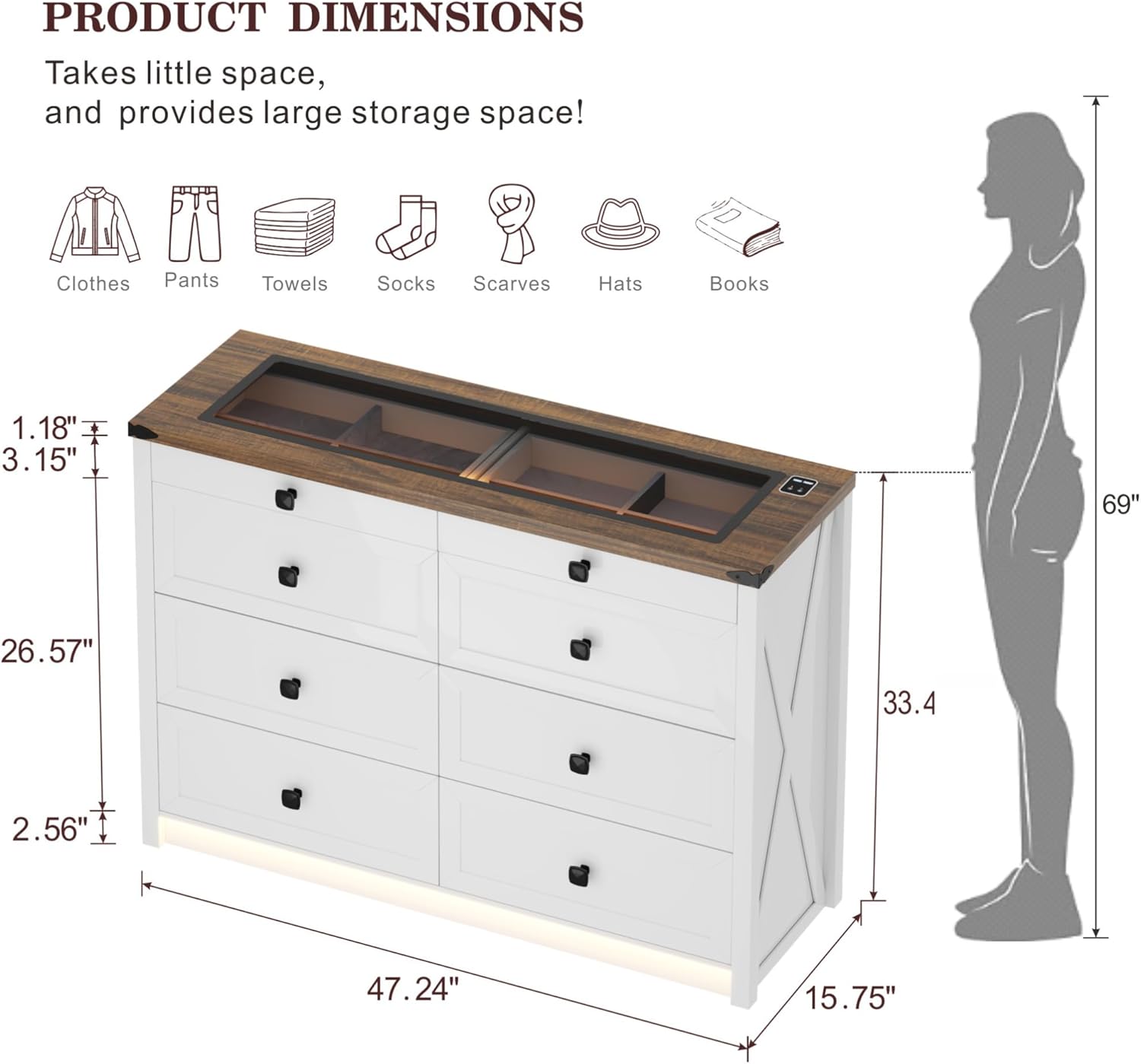
ຮູບ 7.1: ລາຍລະອຽດຂອງຂະຫນາດຜະລິດຕະພັນ.
ແຜນວາດນີ້ໃຫ້ຄວາມສົມບູນແບບview of the dresser's dimensions, including overall height, width, depth, and specific measurements for drawer height and top surface thickness.

Figure 7.2: Storage capacity illustration.
An illustrative image demonstrating the ample storage capacity of each large drawer, capable of holding approximately 20-25 t-shirts or 15-20 pairs of jeans.
8. ການຮັບປະກັນແລະການສະຫນັບສະຫນູນ
For warranty information, technical support, or to order replacement parts, please contact FREDEES customer service directly. Refer to the product packaging or the original purchase documentation for contact details.
Please have your model number (BL-97022-25/29) and purchase date available when contacting support.


