1. ບົດແນະນຳ
The MASTECH MS8236 is a versatile 2-in-1 digital multimeter and network cable track tester designed for electrical and network diagnostics. This device combines the functions of a digital multimeter for measuring electrical parameters with a network cable tester for verifying cable integrity and a tone generator for tracing wires. It is suitable for professional and DIY use in various applications.
2. ຂໍ້ມູນຄວາມປອດໄພ
Always adhere to basic safety precautions when using this device to prevent personal injury or damage to the meter or equipment under test. Read all instructions carefully before use.
- ຢ່າໃຊ້ຄ່າປ້ອນຂໍ້ມູນສູງສຸດທີ່ລະບຸໄວ້ສຳລັບແຕ່ລະຟັງຊັນ.
- ໃຫ້ລະມັດລະວັງທີ່ສຸດເມື່ອເຮັດວຽກກັບວົງຈອນທີ່ມີຊີວິດ.
- ໃຫ້ແນ່ໃຈວ່າສະວິດຟັງຊັນຢູ່ໃນຕຳແໜ່ງທີ່ຖືກຕ້ອງກ່ອນການວັດແທກ.
- ຢ່າໃຊ້ມິເຕີຖ້າມັນເບິ່ງຄືວ່າເສຍຫາຍ ຫຼື ຖ້າສາຍທົດສອບເສຍຫາຍ.
- ປ່ຽນແບັດເຕີຣີທັນທີເມື່ອໄຟສະແດງແບັດເຕີຣີຕໍ່າປະກົດຂຶ້ນເພື່ອຮັບປະກັນການອ່ານທີ່ຖືກຕ້ອງ.
- Avoid using the device in environments with high humidity, extreme temperatures, or explosive gases.
- Always disconnect power to the circuit before testing continuity or resistance.
3. ຜະລິດຕະພັນເກີນview
The MASTECH MS8236 integrates a digital multimeter with a detachable cable tracker/tone generator. The main unit features a clear digital display, function selector dial, and input jacks. The cable tracker assists in identifying and tracing network and telephone lines.
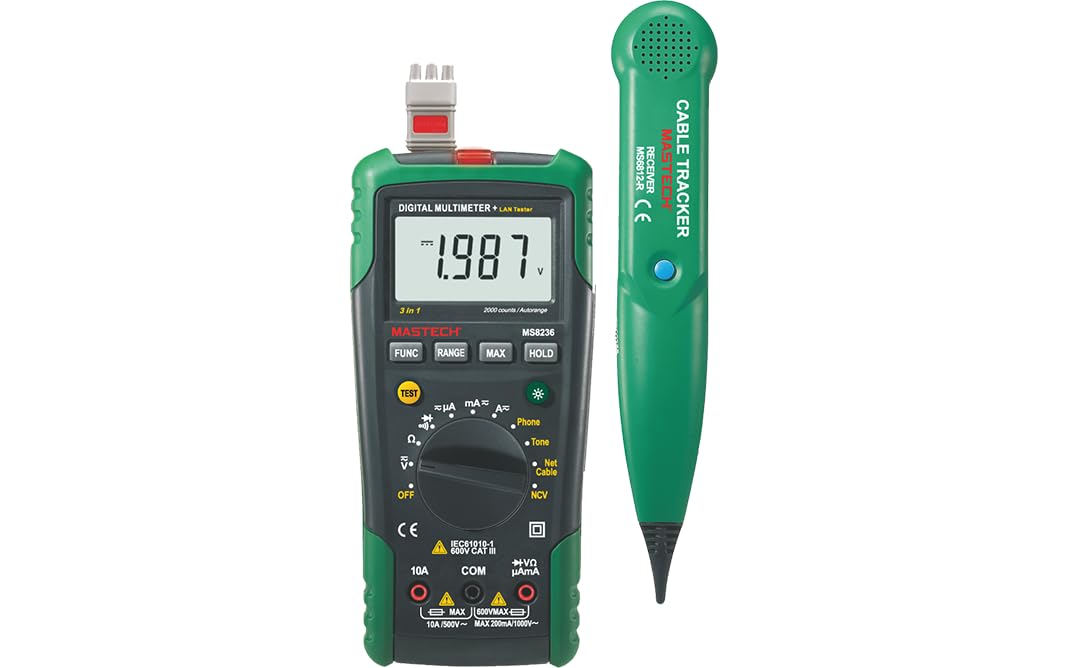
Figure 3.1: MASTECH MS8236 Digital Multimeter and Cable Tracker. The image shows the main multimeter unit on the left and the separate cable tracker unit on the right. Both are green and black.
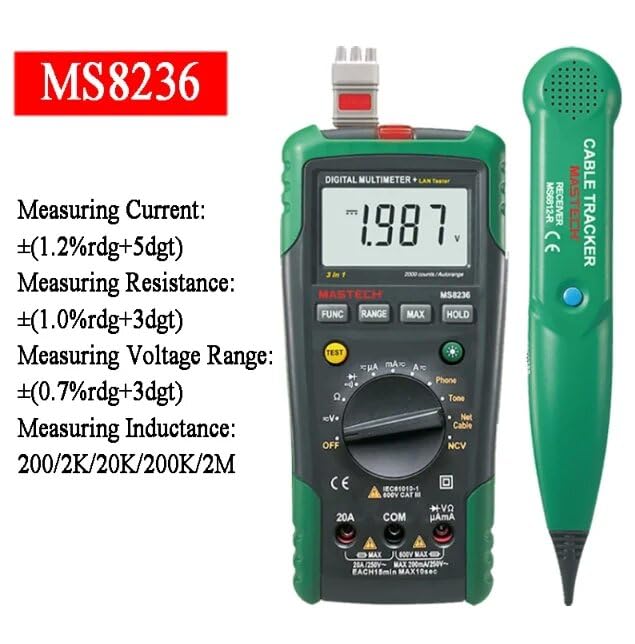
Figure 3.2: Close-up of the MASTECH MS8236 Multimeter Display and Controls. The display shows '1.987 V' and the function dial indicates various measurement modes including V, A, Ohm, Diode, Continuity, Phone, Net Cable, and NCV.
ຄຸນນະສົມບັດທີ່ສໍາຄັນ:
- ຈໍສະແດງຜົນ: 2000 ນັບ
- Ranging: Auto & Manual
- Vol-Non-Contacttage (NCV) ເຄື່ອງກວດຈັບ
- Diode ເປີດ Voltage: 1.7V
- Continuity Buzzer: Activates below 70Ω
- ຟັງຊັ່ນການຖືຂໍ້ມູນ
- ຈໍສະແດງແບັດເຕີຣີຕ່ ຳ
- ສະແດງ Backlight
- ປິດເຄື່ອງອັດຕະໂນມັດ
- Network Cable Check: Tests for open circuits, shorts, miss-wires, reversals, split pairs, and shield detection. Supports T568A, T568B, 10Base-T.
- Telephone Line Check: Identifies line states (Busy, Ringing, Clear) and continuity.
- Tone Function: For tracking cables and diagnosing break points.
4. ຕັ້ງຄ່າ
4.1. ການຫຸ້ມຫໍ່ແລະການກວດກາ
Carefully unpack the MS8236 and all accessories. Inspect the device for any signs of damage. If any damage is found, contact your supplier immediately.
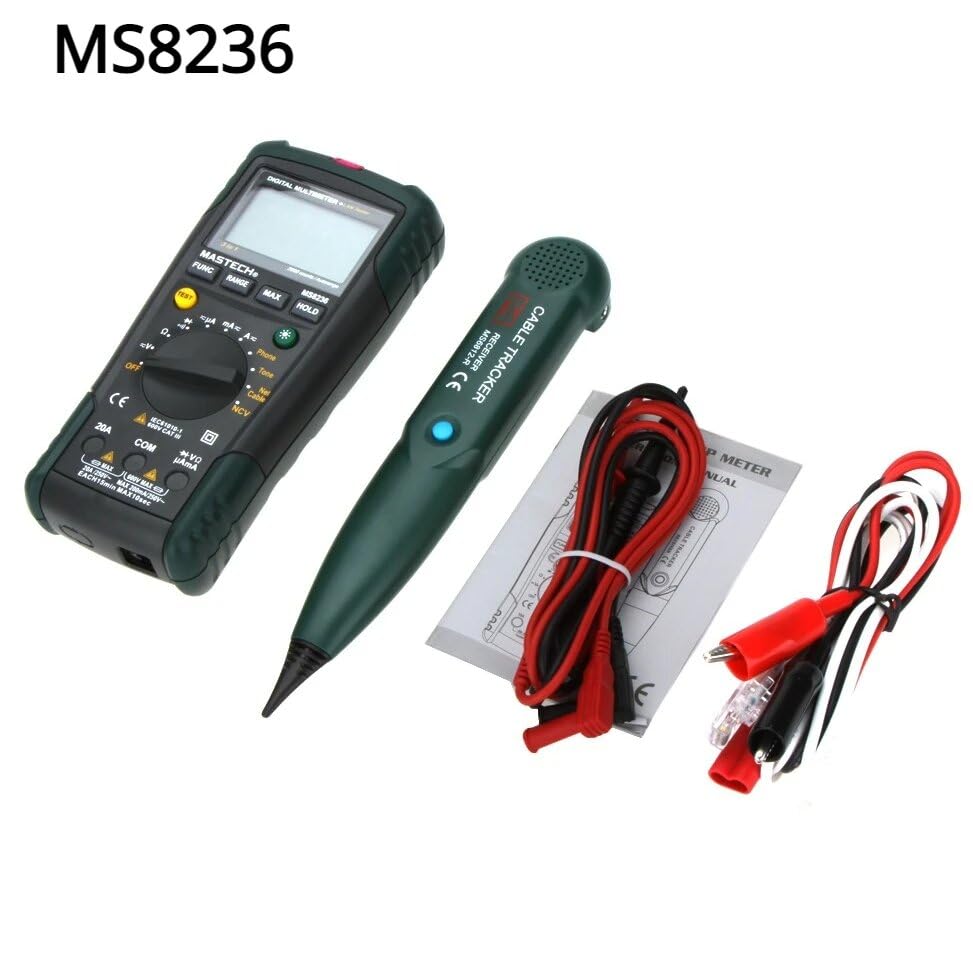
Figure 4.1: MASTECH MS8236 Kit Contents. The image displays the multimeter, cable tracker, red and black test leads, a network cable adapter, and a small instruction manual.
4.2. ການຕິດຕັ້ງຫມໍ້ໄຟ
The MS8236 requires 2 LR44 batteries, which are included. To install or replace batteries:
- Locate the battery compartment cover on the back of the multimeter unit.
- ໃຊ້ screwdriver ເພື່ອເປີດຊ່ອງຫມໍ້ໄຟ.
- Insert the 2 LR44 batteries, observing the correct polarity (+/-).
- ປິດຝາປິດຝາຫມໍ້ໄຟ.
5. ຄໍາແນະນໍາການດໍາເນີນງານ
5.1. Basic Multimeter Functions
Connect the test leads to the appropriate input jacks (COM for black lead, VΩmA for red lead for most measurements, or 20A for high current). Select the desired function using the rotary switch.
- ສະບັບtage Measurement (DCV/ACV): Turn the rotary switch to the 'V' position. Select DC or AC voltage if applicable. Connect test leads in parallel to the circuit.
- Current Measurement (DCA/ACA): Turn the rotary switch to the 'A' position. Select DC or AC current. Connect test leads in series with the circuit. Ensure the correct input jack (mA or 20A) is used.
- ການວັດແທກຄວາມຕ້ານທານ (Ω): Turn the rotary switch to the 'Ω' position. Ensure the circuit is de-energized. Connect test leads across the component.
- ການທົດສອບ Diode (→ |): Turn the rotary switch to the diode symbol. Connect the red lead to the anode and the black lead to the cathode of the diode.
- ການທົດສອບຄວາມຕໍ່ເນື່ອງ ()))): Turn the rotary switch to the continuity symbol. The buzzer will sound if the resistance is below approximately 70Ω.
5.2. Network Cable Check
This function tests the integrity of network cables (RJ45). It can detect open circuits, shorts, miss-wires, reversals, split pairs, and shield detection for T568A, T568B, and 10Base-T standards.
- Turn the rotary switch to the 'Net Cable' position.
- Connect one end of the network cable to the RJ45 port on the main multimeter unit.
- Connect the other end of the network cable to the RJ45 port on the remote cable tracker unit.
- Observe the display for test results, which will indicate the cable status. The device also features a debug mode for detailed fault identification.
5.3. Telephone Line Check
This function allows for checking the state of a working telephone line and its continuity.
- Turn the rotary switch to the 'Phone' position.
- Connect the telephone line to the appropriate port on the main unit.
- The device will identify the state of the line as Busy, Ringing, or Clear. It can also judge the continuity of the telephone cables or wires.
5.4. Tone Function
The tone function is used with the cable tracker to trace cables and wires and diagnose break points.
- Turn the rotary switch to the 'Tone' position.
- Connect the test leads or RJ11/RJ45 plug to the cable you wish to trace.
- Use the remote cable tracker unit to follow the cable. The tracker will emit an audible tone when it detects the signal from the main unit, helping to locate the cable and identify breaks.
5.5. ບໍ່ຕິດຕໍ່ Voltage (NCV) ການກວດຫາ
The NCV function allows for detecting AC voltage without direct contact with the conductor.
- Turn the rotary switch to the 'NCV' position.
- ຍ້າຍສ່ວນເທິງຂອງມັລຕິມີເຕີໃກ້ກັບແຮງດັນ AC ທີ່ມີໄຟຟ້າtage ແຫຼ່ງ.
- ອຸປະກອນຈະຊີ້ບອກເຖິງການມີຢູ່ຂອງ AC voltage through an audible alarm and/or visual indicator.
5.6. ຫນ້າທີ່ເພີ່ມເຕີມ
- ການຖືຂໍ້ມູນ: ກົດປຸ່ມ 'ຖື' ເພື່ອຢຸດການອ່ານປະຈຸບັນໃນຈໍສະແດງຜົນ. ກົດອີກຄັ້ງເພື່ອປ່ອຍ.
- ແສງຫຼັງ: Press the backlight button (often labeled with a light bulb symbol) to illuminate the display for better visibility in low-light conditions.
- ປິດເຄື່ອງອັດຕະໂນມັດ: ອຸປະກອນຈະປິດອັດຕະໂນມັດຫຼັງຈາກໄລຍະເວລາທີ່ບໍ່ມີການເຄື່ອນໄຫວເພື່ອປະຫຍັດຊີວິດຫມໍ້ໄຟ.
6. ບໍາລຸງຮັກສາ
6.1. ທໍາຄວາມສະອາດ
ເຊັດກໍລະນີທີ່ມີໂຄສະນາamp ຜ້າ ແລະ ຜົງຊັກຟອກອ່ອນໆ. ຢ່າໃຊ້ນໍ້າຢາຂັດ ຫຼື ຕົວລະລາຍ. ຮັບປະກັນວ່າອຸປະກອນແຫ້ງໝົດກ່ອນການນຳໃຊ້.
6.2. ການທົດແທນຫມໍ້ໄຟ
When the low battery indicator appears on the display, replace the batteries as described in Section 4.2. Remove batteries if the device will not be used for an extended period.
7. ການແກ້ໄຂບັນຫາ
- ບໍ່ມີການສະແດງໃຫ້ເຫັນຫຼືແຈ້ງການ: ກວດສອບການຕິດຕັ້ງແບັດເຕີຣີ ແລະ ລະດັບການສາກໄຟ. ປ່ຽນແບັດເຕີຣີຖ້າຈຳເປັນ.
- ການອ່ານບໍ່ຖືກຕ້ອງ: Ensure test leads are properly connected and the correct function is selected. Verify the circuit is de-energized for resistance/continuity tests.
- Network cable test failure: Ensure both ends of the cable are securely connected to the main unit and remote. Check for physical damage to the cable or connectors.
- No tone from cable tracker: Verify the main unit is in 'Tone' mode and properly connected to the cable. Check the cable tracker's battery.
8. ຂໍ້ມູນຈໍາເພາະ
The following table outlines the general and electrical specifications for the MASTECH MS8236.

Figure 8.1: MASTECH MS8236 Features and Specifications Table. This image provides detailed electrical specifications for DC Voltage, AC Voltage, DC Current, AC Current, and Resistance, including ranges, resolutions, and accuracies.
| ພາລາມິເຕີ | ຊ່ວງ | ຄວາມລະອຽດ | ຄວາມຖືກຕ້ອງ |
|---|---|---|---|
| ຊິງຕັນດີຊີ Voltage | 200mV/2V/20V/200V/600V | 0.1mV/1mV/10mV/100mV/1V | ±(0.5%+5) |
| AC Voltage | 200mV/2V/20V/200V/600V | 0.1mV/1mV/10mV/100mV/1V | ±(0.8%+5) |
| ກະແສໄຟຟ້າ DC | 200µA/2000µA/20mA/200mA/2A/10A | 0.1µA/1µA/10µA/0.1mA/1mA/10mA | ±(1.2%+5) ±(2.0%+10) for 10A |
| AC ປັດຈຸບັນ | 200µA/2000µA/20mA/200mA/2A/10A | 0.1µA/1µA/10µA/0.1mA/1mA/10mA | ±(1.5%+5) ±(3.0%+10) for 10A |
| ການຕໍ່ຕ້ານ | 200Ω/2kΩ/20kΩ/200kΩ/2MΩ/20MΩ | 0.1Ω/1Ω/10Ω/100Ω/1kΩ/10kΩ | ±(1.0%+5) ±(1.5%+5) for 20MΩ |
| Diode ເປີດ Voltage | 1.7V | ||
| Buzzer ຄວາມຕໍ່ເນື່ອງ | <70Ω | ||
| ຈໍສະແດງຜົນ | 2000 ນັບ | ||
| ລະດັບ | ອັດຕະໂນມັດ & ຄູ່ມື | ||
| Vol-Non-Contacttage ເຄື່ອງກວດຈັບ | ແມ່ນແລ້ວ | ||
| ປິດເຄື່ອງອັດຕະໂນມັດ | ແມ່ນແລ້ວ | ||
| ການຖືຂໍ້ມູນ | ແມ່ນແລ້ວ | ||
| ຈໍສະແດງແບັດເຕີຣີຕ່ ຳ | ແມ່ນແລ້ວ | ||
| ສະແດງ Backlight | ແມ່ນແລ້ວ | ||
| ແຫຼ່ງພະລັງງານ | ໝໍ້ໄຟ LR2 44 ອັນ (ລວມ) | ||
| ຂະໜາດສິນຄ້າ | 16 x 9 x 5 cm | ||
| ນ້ໍາຫນັກລາຍການ | 500 g | ||
| ວັດສະດຸ | Acrylonitrile Butadiene Styrene (ABS) | ||
| ການຢັ້ງຢືນ | CE, RoHS | ||
9. ການຮັບປະກັນແລະການສະຫນັບສະຫນູນ
For warranty information and technical support, please refer to the documentation provided with your purchase or contact the seller or manufacturer directly. Specific warranty terms may vary by region and retailer.