1. ບົດແນະນຳ
Thank you for choosing the Peakeep MHP6020 Small Digital Alarm Clock. This compact and versatile alarm clock is designed for convenience and reliability, featuring a large, clear display, adjustable brightness, multiple alarm volumes, and a battery backup function. This manual provides detailed instructions for setup, operation, and maintenance to ensure optimal performance.
2. ສິ່ງທີ່ຢູ່ໃນກ່ອງ
- Peakeep MHP6020 Digital Alarm Clock
- Type-C Power Adapter (USB cable and wall adapter)
- ຄູ່ມືການສອນ
3. ຜະລິດຕະພັນເກີນview
The Peakeep MHP6020 features a minimalist design with intuitive controls located on the back and a large snooze/light button on top. The display shows time in clear blue digits.

ຮູບພາບ: ດ້ານຫລັງ view of the Peakeep MHP6020 Digital Alarm Clock, highlighting the 'TIME SET', '12/24HR', 'VOLUME', 'ALARM SET ON/OFF', and 'DIMMER' buttons, along with the Type-C power input.
ປຸ່ມຄວບຄຸມ:
- SNOOZE/LIGHT Button (Top): Press to activate snooze during an alarm or to temporarily illuminate the display during a power outage.
- TIME SET Button (Back): Used to enter time setting mode.
- 12/24HR Button (Back): Toggles between 12-hour and 24-hour time formats. Also functions as '+' for adjusting values.
- VOLUME Button (Back): Adjusts alarm volume. Also functions as '-' for adjusting values.
- ALARM SET ON/OFF Button (Back): Used to set the alarm time and to turn the alarm on or off.
- DIMMER Button (Back): Adjusts the display brightness.
4. ຕັ້ງຄ່າ
4.1 ການໃຫ້ພະລັງງານແກ່ໂມງ
The Peakeep MHP6020 is primarily powered by the included Type-C adapter. It also supports battery backup for retaining settings during power outages.
- Install Battery Backup (Optional but Recommended): Open the battery compartment on the back of the clock. Insert 4 AAA batteries (not included). These batteries will save your time and alarm settings in case of a power interruption, and allow the display to light up for 20 seconds when the top button is pressed during an outage.
- ເຊື່ອມຕໍ່ອະແດບເຕີໄຟຟ້າ: Plug the Type-C cable into the 'power in' port on the back of the clock and connect the adapter to a standard electrical outlet. The display will illuminate.
Video: A demonstration of the Peakeep compact digital alarm clock, showing its features and ease of use, including setup and basic functions.
Video: This video illustrates the battery backup function of the Peakeep Small Digital Alarm Clock, demonstrating how settings are retained during a power outage.
4.2 ການ ກຳ ນົດເວລາ
- ກົດຄ້າງໄວ້ ເວລາ ກຳ ນົດ button on the back for 2 seconds until the hour digits flash.
- ໃຊ້ 12/24HR (+) or VOLUME (-) ປຸ່ມເພື່ອປັບຊົ່ວໂມງ.
- ກົດ ເວລາ ກຳ ນົດ again to confirm the hour and move to minute adjustment. The minute digits will flash.
- ໃຊ້ 12/24HR (+) or VOLUME (-) ປຸ່ມເພື່ອປັບນາທີ.
- ກົດ ເວລາ ກຳ ນົດ ອີກເທື່ອໜຶ່ງເພື່ອຢືນຢັນ ແລະ ອອກຈາກໂໝດການຕັ້ງຄ່າເວລາ.
4.3 ການຕັ້ງໂມງປຸກ
- ກົດຄ້າງໄວ້ ALARM SET ON/OFF button on the back for 2 seconds until the alarm hour digits flash.
- ໃຊ້ 12/24HR (+) or VOLUME (-) ປຸ່ມເພື່ອປັບໂມງປຸກ.
- ກົດ ALARM SET ON/OFF again to confirm the alarm hour and move to minute adjustment. The alarm minute digits will flash.
- ໃຊ້ 12/24HR (+) or VOLUME (-) ປຸ່ມເພື່ອປັບນາທີປຸກ.
- ກົດ ALARM SET ON/OFF one more time to confirm and exit alarm setting mode. The alarm icon will appear on the display, indicating the alarm is active.
5. ຄໍາແນະນໍາການດໍາເນີນງານ
5.1 Adjusting Display Brightness (Dimmer)
The clock features 5 adjustable brightness levels and an OFF setting to suit your preference.
- ກົດ ດີນ button on the back repeatedly to cycle through the 5 brightness levels (L5 being brightest, L1 being dimmest) and the OFF setting.
- Select the desired brightness level.

Image: The Peakeep MHP6020 Digital Alarm Clock display at various brightness levels (L5 to OFF), demonstrating the dimmer function.
5.2 ການປັບລະດັບສຽງເຕືອນ
The alarm offers 5 adjustable volume levels (U01 to U05) ranging from 55-90 dB.
- ໃນຂະນະທີ່ຢູ່ໃນໂຫມດສະແດງເວລາປົກກະຕິ, ກົດປຸ່ມ VOLUME (-) button on the back to cycle through the 5 alarm volume levels.
- The current volume level (U01-U05) will be displayed temporarily.

Image: The Peakeep MHP6020 Digital Alarm Clock illustrating the range of 5 alarm volumes, from 55dB for light sleepers to 90dB for heavy sleepers.
5.3 Snooze ຟັງຊັນ
ເມື່ອສຽງປຸກດັງຂຶ້ນ, ກົດປຸ່ມໃຫຍ່ ແສງ SNOOZE / LIGHT button on top to activate the 9-minute snooze function. The alarm will sound again after 9 minutes. To turn off the alarm completely, press any button on the back of the clock.
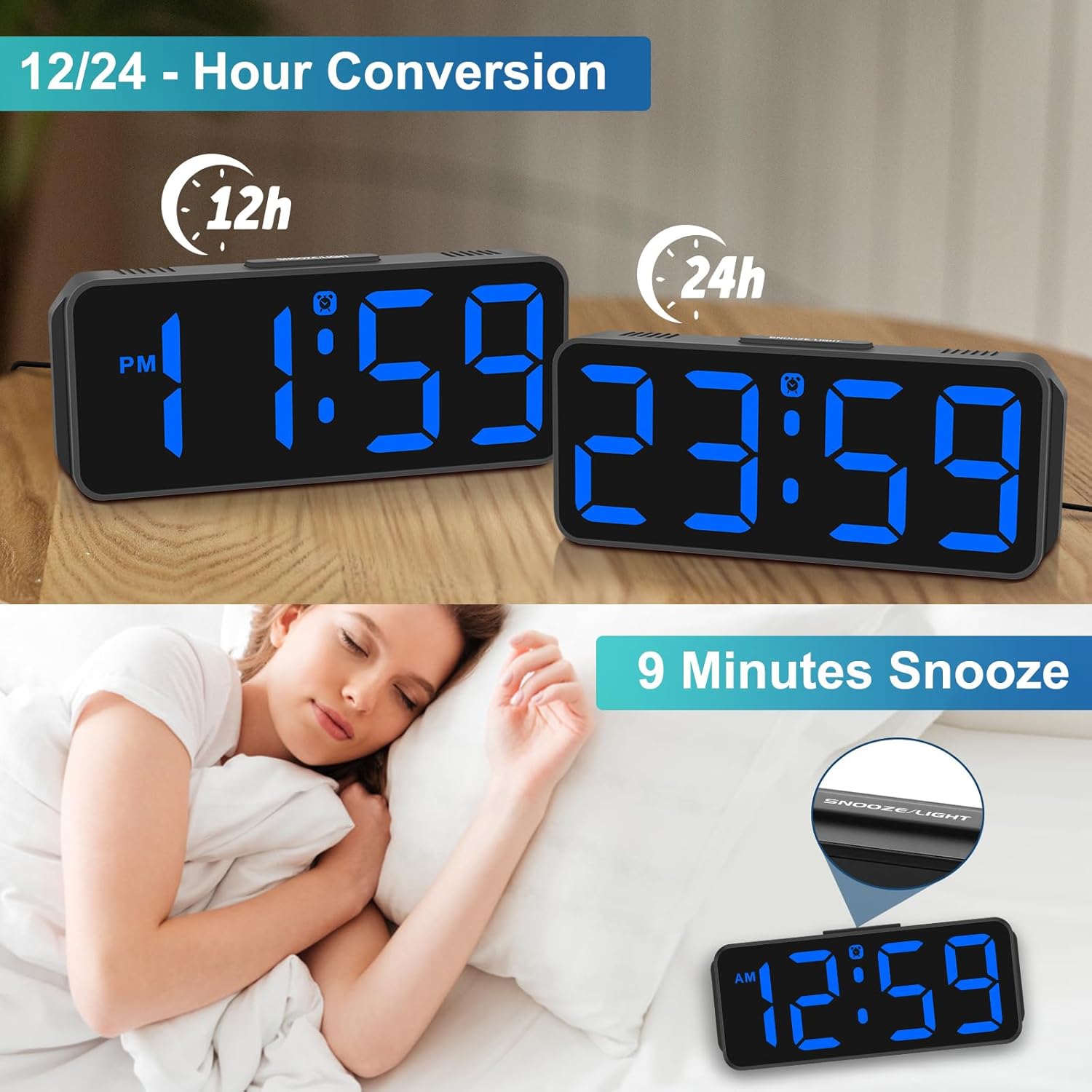
Image: The Peakeep MHP6020 Digital Alarm Clock demonstrating the 12/24 hour format conversion and the 9-minute snooze function activated by the top button.
5.4 12/24 ຮູບແບບຊົ່ວໂມງ
ໃນໂໝດສະແດງເວລາປົກກະຕິ, ກົດປຸ່ມ 12/24HR button on the back to switch between 12-hour and 24-hour time formats.
6. ບໍາລຸງຮັກສາ
- ເຮັດຄວາມສະອາດໂມງດ້ວຍຜ້າອ່ອນໆ, ແຫ້ງ. ຢ່າໃຊ້ເຄື່ອງເຮັດຄວາມສະອາດຂັດຫຼືສານລະລາຍ.
- ຫຼີກລ່ຽງການໃຫ້ໂມງຖືກອຸນຫະພູມສູງ, ແສງແດດໂດຍກົງ, ຫຼື ຄວາມຊຸ່ມສູງ.
- Ensure the clock is placed on a stable surface to prevent accidental falls.
7. ການແກ້ໄຂບັນຫາ
| ບັນຫາ | ການແກ້ໄຂ |
|---|---|
| ຈໍສະແດງຜົນຫວ່າງເປົ່າ. | Ensure the power adapter is securely plugged into both the clock and the electrical outlet. If using battery backup, check if batteries are correctly installed and not depleted. |
| ໂມງປຸກບໍ່ມີສຽງ. | Verify that the alarm is set and the alarm icon is visible on the display. Check the alarm volume setting. |
| ເວລາບໍ່ຖືກຕ້ອງຫຼັງຈາກພະລັງງານ outage. | Ensure 4 AAA batteries are installed for memory backup. If not, reset the time manually. |
| ຈໍສະແດງຜົນແມ່ນສະຫວ່າງ/ມືດເກີນໄປ. | ກົດ ດີນ button on the back to adjust the brightness level. |
8. ຂໍ້ມູນຈໍາເພາະ
| ຄຸນສົມບັດ | ລາຍລະອຽດ |
|---|---|
| ໝາຍເລກຕົວແບບ | MHP6020 |
| ຍີ່ຫໍ້ | Peakeep |
| ປະເພດການສະແດງ | LED ດິຈິຕອລ |
| ສະແດງສີ | ສີຟ້າ |
| ຂະໜາດ | 5.3"W x 2.1"H |
| ແຫຼ່ງພະລັງງານ | Corded Electric (Type-C adapter included) |
| ແບັດເຕີຣີສຳຮອງ | 4 AAA batteries required (not included) for memory backup only. |
| ລະດັບຄວາມສະຫວ່າງ | 5 ລະດັບ + ປິດ |
| ລະດັບສຽງປຸກ | 5 adjustable levels (55-90 dB) |
| ເລື່ອນໄລຍະເວລາ | 9 ນາທີ |
| ວັດສະດຸ | ພາດສະຕິກ |
| ນ້ໍາຫນັກລາຍການ | 4.64 ອອນ |
9. ການຮັບປະກັນແລະການສະຫນັບສະຫນູນ
This product comes with a limited warranty. For detailed warranty information or technical support, please refer to the contact information provided below or visit the official Peakeep webເວັບໄຊ.
ບໍລິການ Peakeep: sales@us-myhome.com


