1. ບົດແນະນຳ
This manual provides detailed instructions for the installation, operation, and maintenance of your CHACON Wi-Fi Wired Video Intercom, Model 34895. Please read this manual thoroughly before installation and use to ensure proper functionality and safety.
2. ຜະລິດຕະພັນເກີນview
The CHACON Wi-Fi Wired Video Intercom system allows you to see and communicate with visitors at your entrance via an indoor monitor or your smartphone. It features high-quality video, remote call answering, and the ability to remotely open a gate or door lock.
ຄຸນນະສົມບັດທີ່ສໍາຄັນ:
- High-quality video display on indoor monitor and smartphone.
- Remote video call answering via smartphone.
- Remote gate/door lock release (requires wired installation with a 12V electric lock or dry contact).
- Visitor message recording capability when you are absent.
- Automatic photo recording of each visitor on the monitor's internal memory.
- Standalone system, not compatible with DiO 1.0 ecosystem.
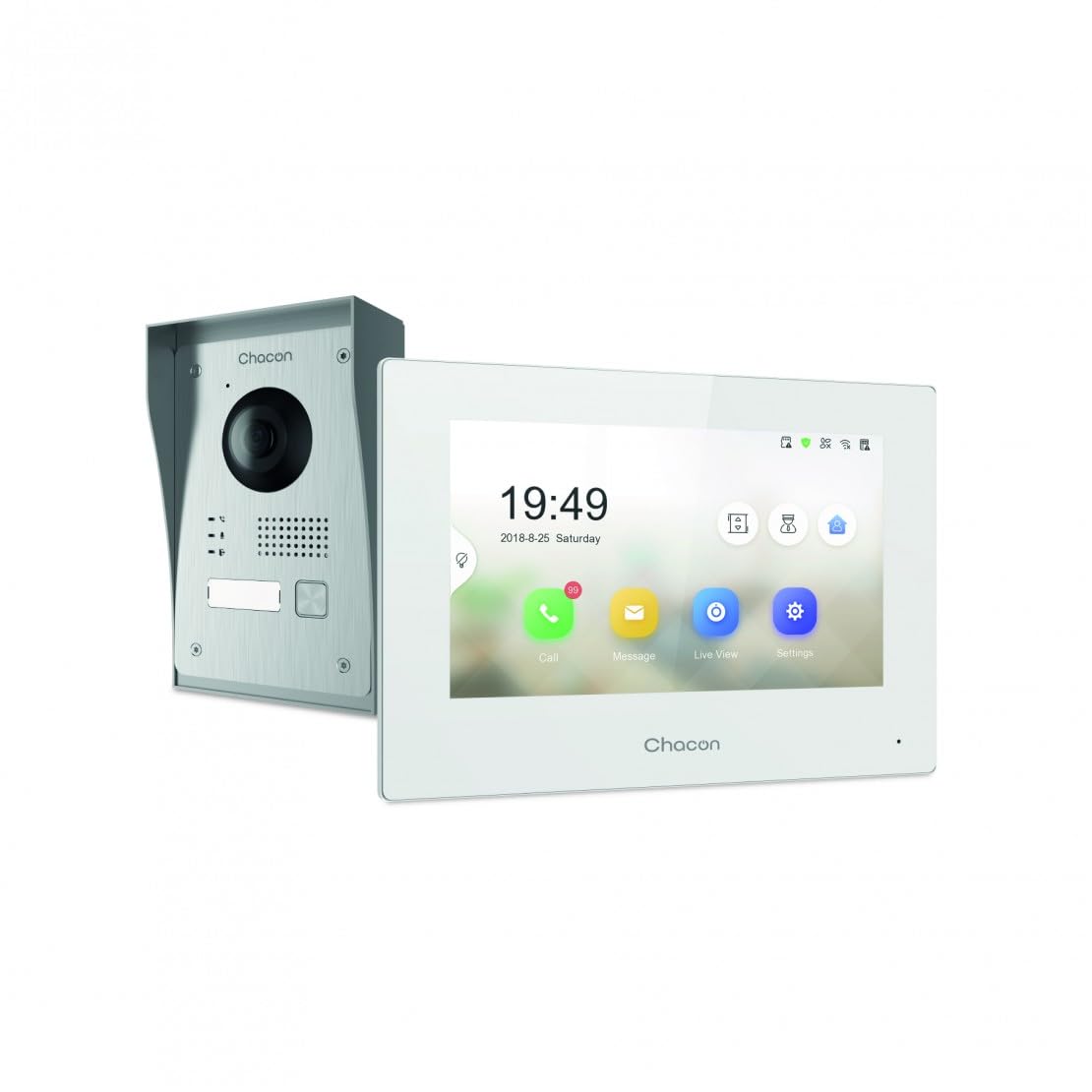
Figure 2.1: Indoor Monitor Unit. This image shows the indoor monitor with its user interface displaying time, date, and icons for call, message, live view, ແລະການຕັ້ງຄ່າ.
3. ເນື້ອໃນຊຸດ
ກະລຸນາກວດເບິ່ງຊຸດສຳລັບລາຍການຕໍ່ໄປນີ້:
- ຫນ່ວຍຕິດຕາມກວດກາພາຍໃນ
- ໜ່ວຍກະດິ່ງປະຕູນອກ
- ອຸປະກອນເສີມ (ສະກູ, ສຽບຝາ)
- Power Adapter
- ຄູ່ມືຜູ້ໃຊ້ (ເອກະສານນີ້)
- Wiring cables

Figure 3.1: Outdoor Doorbell Unit. This image displays the outdoor unit, featuring a camera lens, microphone, speaker, and doorbell button, designed for external installation.
4. ຂໍ້ມູນຄວາມປອດໄພ
Read all safety warnings and instructions carefully before installing and operating this device. Failure to follow these instructions may result in electric shock, fire, or serious injury.
- ໃຫ້ແນ່ໃຈວ່າໄຟຟ້າໄດ້ຖືກຕັດການເຊື່ອມຕໍ່ກ່ອນການຕິດຕັ້ງ ຫຼື ສາຍໄຟໃດໆ.
- Installation should be performed by a qualified electrician if you are unsure about wiring.
- Do not expose the outdoor unit to extreme temperatures, direct sunlight for prolonged periods, or heavy rain without proper protection.
- ໃຊ້ພຽງແຕ່ອະແດັບເຕີໄຟ ແລະສາຍທີ່ໃຫ້ມາເທົ່ານັ້ນ.
- ຮັກສາອຸປະກອນໃຫ້ຫ່າງຈາກນ້ໍາແລະຄວາມຊຸ່ມ.
5. ຕັ້ງຄ່າ
5.1. ການຕິດຕັ້ງຫນ່ວຍງານນອກ
The outdoor unit can be surface-mounted or flush-mounted. Ensure the unit is installed at a height that allows the camera to capture visitors clearly.
- Choose a suitable location near your entrance, protected from direct weather if possible.
- Mark drilling points using the mounting bracket as a template.
- ເຈາະຮູແລະສຽບໃສ່ຝາ.
- ຍຶດວົງເລັບຕິດ ແໜ້ນ ກັບwallາ.
- Connect the necessary wiring (power, indoor monitor, electric lock if applicable) to the outdoor unit. Refer to the wiring diagram in section 5.3.
- Attach the outdoor unit to the mounting bracket.

ຮູບທີ 5.1: ຕົວຢ່າງample of Outdoor Unit Installation. This image shows the outdoor doorbell unit mounted on a wall next to a gate, demonstrating a typical installation scenario.
5.2. ການຕິດຕັ້ງຈໍພາບພາຍໃນ
The indoor monitor should be installed in a convenient location within your home, preferably near a power outlet.
- Choose a wall location for the indoor monitor.
- Mark drilling points.
- ເຈາະຮູແລະສຽບໃສ່ຝາ.
- Secure the monitor's mounting plate to the wall.
- Connect the wiring from the outdoor unit and the power adapter to the indoor monitor.
- Mount the indoor monitor onto its plate.

Figure 5.2: Indoor Monitor in a Home Environment. This image shows the indoor monitor installed on a wall in a modern kitchen setting, illustrating its discreet integration into a living space.
5.3. ແຜນວາດສາຍໄຟ
Connect the outdoor unit to the indoor monitor using the provided 2-wire cable. If connecting an electric lock or gate opener, ensure it is a 12V electric lock or a dry contact system. Consult a professional if you are unsure about electrical wiring.
ໝາຍເຫດ:
- The system requires a wired connection for the outdoor unit to the indoor monitor.
- For remote gate/door opening, a separate wired connection from the indoor monitor to a 12V electric lock or dry contact is necessary.
5.4. Wi-Fi Connection and App Setup
To enable smartphone connectivity, connect the indoor monitor to your home Wi-Fi network and set up the CHACON app.
- Power on the indoor monitor.
- Navigate to the 'Settings' menu on the monitor.
- Select 'Wi-Fi' and choose your home network. Enter the password.
- Download the CHACON app from your smartphone's app store (iOS/Android).
- Register an account and follow the in-app instructions to add your video intercom device. This typically involves scanning a QR code displayed on the monitor or entering a device ID.
- Once connected, you can receive calls, view live feed, and control the lock remotely via the app.
6. ຄໍາແນະນໍາການດໍາເນີນງານ
6.1. ຮັບສາຍ
When a visitor presses the doorbell button on the outdoor unit:
- The indoor monitor will ring and display the visitor's video feed. Tap the 'Call' icon to answer.
- Your smartphone (if connected to Wi-Fi and the app is running) will receive a notification. Tap the notification to answer the video call.
6.2. Remote Lock Release
During an active call (either on the indoor monitor or smartphone app), you can unlock your gate or door:
- On the indoor monitor, tap the 'Unlock' icon.
- On the smartphone app, tap the corresponding 'Unlock' button.
Ensure your electric lock or gate opener is correctly wired to the system as described in Section 5.3.
6.3. ມີຊີວິດ View
ເຈົ້າສາມາດ view the outdoor camera feed at any time:
- On the indoor monitor, tap the 'Live View' icon.
- On the smartphone app, select the device and choose the 'Live View' option.
6.4. Visitor Message Recording
If you are unavailable to answer a call, visitors can leave a message:
- After a set period of no answer, the outdoor unit will prompt the visitor to leave a message.
- These messages can be accessed and played back from the 'Message' menu on the indoor monitor or via the smartphone app.
6.5. Photo Recording
The system automatically captures a photo of each visitor when the doorbell is pressed. These photos are stored in the internal memory of the indoor monitor and can be reviewed via the 'Message' or 'History' menu.
7. ບໍາລຸງຮັກສາ
- ທໍາຄວາມສະອາດ: Use a soft, dry cloth to clean the indoor monitor and outdoor unit. Do not use abrasive cleaners or solvents.
- ການປົກປ້ອງຫນ່ວຍງານກາງແຈ້ງ: Regularly check the outdoor unit for any debris or obstructions around the camera lens, microphone, and speaker.
- ອັບເດດຊອບແວ: Check the indoor monitor's settings or the smartphone app for available firmware updates to ensure optimal performance and security.
- ການກວດກາສາຍໄຟ: Periodically inspect all wiring connections for any signs of wear or damage.
8. ການແກ້ໄຂບັນຫາ
| ບັນຫາ | ສາເຫດທີ່ເປັນໄປໄດ້ | ການແກ້ໄຂ |
|---|---|---|
| ບໍ່ມີຮູບພາບຢູ່ໃນຈໍສະແດງຜົນພາຍໃນ. | Power issue, loose wiring, outdoor unit malfunction. | Check power supply to indoor monitor. Verify all wiring connections between outdoor and indoor units. Ensure outdoor unit is powered. |
| ບໍ່ມີສຽງໃນລະຫວ່າງການໂທ. | Microphone/speaker obstruction, volume too low, wiring issue. | Check for obstructions on outdoor unit's microphone/speaker. Adjust volume settings on indoor monitor. Inspect audio wiring. |
| Smartphone app not receiving calls/notifications. | No Wi-Fi connection, incorrect app settings, network issues. | Ensure indoor monitor is connected to Wi-Fi. Check smartphone's internet connection. Verify app notification settings. Restart app and monitor. |
| Remote lock release not working. | Incorrect wiring to lock, incompatible lock, power issue to lock. | Confirm electric lock/gate opener is a 12V system or dry contact. Check wiring between monitor and lock. Ensure lock has power. |
| ຄຸນນະພາບວິດີໂອບໍ່ດີ. | Dirty camera lens, poor lighting, network bandwidth. | Clean the camera lens on the outdoor unit. Ensure adequate lighting. Check Wi-Fi signal strength. |
9. ຂໍ້ມູນຈໍາເພາະ
| ຍີ່ຫໍ້ | CHACON |
| ໝາຍເລກຕົວແບບ | 34895 |
| ສີ | ສີຂາວ |
| ນ້ໍາຫນັກລາຍການ | 1.3 ກິໂລກຣາມ |
| ຂະໜາດແພັກເກັດ | 38 x 24.5 x 17 cm |
| ການເຊື່ອມຕໍ່ | Wired (2-wire), Wi-Fi |
| ລັອກເຂົ້າກັນໄດ້ | 12V Electric Lock or Dry Contact |
| ຜູ້ຜະລິດ | ຊາຄອນ |
| ປະເທດຕົ້ນກໍາເນີດ | ຈີນ |
10. ການຮັບປະກັນແລະການສະຫນັບສະຫນູນ
For warranty information and technical support, please refer to the official CHACON webເວັບໄຊ ຫຼືຕິດຕໍ່ບໍລິການລູກຄ້າຂອງເຂົາເຈົ້າໂດຍກົງ. ຮັກສາໃບຮັບເງິນການຊື້ຂອງທ່ານໄວ້ເປັນຫຼັກຖານການຊື້ສໍາລັບການຮ້ອງຂໍການຮັບປະກັນ.
ຊັບພະຍາກອນອອນໄລນ໌: Visit the CHACON official webເວັບໄຊສໍາລັບ FAQs, ຄູ່ມືການປັບປຸງ, ແລະຂໍ້ມູນການຕິດຕໍ່ສະຫນັບສະຫນູນ.
ບໍລິການລູກຄ້າ: Contact details can typically be found on the manufacturer's webສະຖານທີ່ຫຼືຢູ່ໃນການຫຸ້ມຫໍ່ຜະລິດຕະພັນ.


