ແນະນຳ
Thank you for choosing the AOC 27B3HA2 27-inch Full HD LED Monitor. This manual provides essential information for the safe and efficient use of your new monitor. Please read it thoroughly before installation and operation, and keep it for future reference.
The AOC 27B3HA2 features a 27-inch Full HD (1920 x 1080) IPS panel, offering wide viewing angles and vibrant colors. It includes a 100Hz refresh rate and 1ms MPRT response time for smooth visuals, Adaptive Sync technology, and eye-care features like Flicker-Free and Low Blue Light modes to enhance user comfort during extended use.

ຮູບ 1: ດ້ານຫນ້າ view of the AOC 27B3HA2 monitor highlighting its 27-inch size, 100Hz refresh rate, Full HD resolution, Adaptive Sync, IPS panel, and 1ms MPRT response time.
ຂໍ້ມູນຄວາມປອດໄພ
- ແຫຼ່ງພະລັງງານ: ໃຊ້ພຽງແຕ່ອະແດັບເຕີພະລັງງານທີ່ສະໜອງໃຫ້ກັບຈໍພາບເທົ່ານັ້ນ. ຮັບປະກັນວ່າປລັກສຽບໄຟມີຮາກຖານຢ່າງຖືກຕ້ອງ.
- ການຈັດວາງ: Place the monitor on a stable, flat surface. Avoid direct sunlight, heat sources, or excessive dust. Ensure adequate ventilation around the monitor.
- ຄວາມຊຸ່ມ: ຢ່າໃຫ້ຈໍພາບຖືກຝົນ ຫຼື ຄວາມຊຸ່ມຊື່ນ. ຢ່າວາງວັດຖຸທີ່ເຕັມໄປດ້ວຍຂອງແຫຼວໄວ້ເທິງຈໍພາບ.
- ທໍາຄວາມສະອາດ: ໃຫ້ຖອດສາຍໄຟອອກກ່ອນທຳຄວາມສະອາດ. ໃຊ້ຜ້າອ່ອນແລະແຫ້ງ. ຢ່າໃຊ້ນໍ້າຢາທຳຄວາມສະອາດ ຫຼື ນໍ້າຢາທຳຄວາມສະອາດແບບສີດ.
- ການລະບາຍອາກາດ: ຫ້າມກີດຂວາງການເປີດລະບາຍອາກາດ.
- ການບໍລິການ: ຢ່າພະຍາຍາມໃຫ້ບໍລິການຕິດຕາມກວດກາຕົວທ່ານເອງ. ອ້າງອີງການບໍລິການທັງໝົດໃຫ້ກັບພະນັກງານບໍລິການທີ່ມີຄຸນວຸດທິ.
ເນື້ອໃນຊຸດ
ກວດສອບວ່າລາຍການທັງຫມົດແມ່ນມີຢູ່ໃນຊຸດຂອງທ່ານ. ຖ້າລາຍການໃດຂາດຫາຍໄປ ຫຼືເສຍຫາຍ, ໃຫ້ຕິດຕໍ່ຮ້ານຂາຍຍ່ອຍຂອງເຈົ້າ.
- AOC 27B3HA2 Monitor
- Monitor Stand (ຖານ ແລະ ຄໍ)
- ສາຍໄຟ
- ສາຍ HDMI
- Quick Setup Guide
- ບັດຮັບປະກັນ
ຕັ້ງຄ່າ
1. ການປະກອບ Monitor Stand
- ວາງຈໍພາບຢ່າງລະມັດລະວັງລົງເທິງພື້ນຜິວທີ່ສະອາດ, ອ່ອນນຸ້ມເພື່ອປ້ອງກັນຮອຍຂີດຂ່ວນ.
- ແນບຄໍຂາຕັ້ງໃສ່ດ້ານຫຼັງຂອງຈໍສະແດງຜົນໂດຍການວາງແຖບນັ້ນໃຫ້ສອດຄ່ອງ ແລະກົດດັນໃຫ້ເຂົ້າກັນ.
- ແນບຖານຂາຕັ້ງໃສ່ຄໍຂາຕັ້ງ. ຮັບປະກັນມັນດ້ວຍ screw captive ທີ່ຕັ້ງຢູ່ underside ຂອງຖານ.

ຮູບ 2: ດ້ານຫລັງ view of the monitor showing the stand attachment point.
2. ສາຍເຊື່ອມຕໍ່
Ensure the monitor and your computer are turned off before making any connections.
- ການເຊື່ອມຕໍ່ພະລັງງານ: ເຊື່ອມຕໍ່ສາຍໄຟເຂົ້າກັບຊ່ອງສຽບໄຟຟ້າຂອງຈໍພາບ ແລະ ຈາກນັ້ນເຂົ້າກັບປລັກໄຟຟ້າທີ່ມີສາຍດິນ.
- ການເຊື່ອມຕໍ່ວິດີໂອ (HDMI): ເຊື່ອມຕໍ່ປາຍໜຶ່ງຂອງສາຍ HDMI ກັບຜອດ HDMI ໃນບັດກຣາບຟິກຂອງຄອມພິວເຕີຂອງທ່ານ ແລະອີກສົ້ນໜຶ່ງກັບຜອດ HDMI 1.4 ໃນຈໍພາບ.
- ການເຊື່ອມຕໍ່ວິດີໂອ (VGA): Alternatively, connect one end of the VGA cable to the VGA port on your computer and the other end to the VGA port on the monitor.
- ການປ້ອນຂໍ້ມູນສຽງ: If using VGA for video and you want audio through the monitor's speakers, connect an audio cable from your computer's audio output to the Audio In port on the monitor.
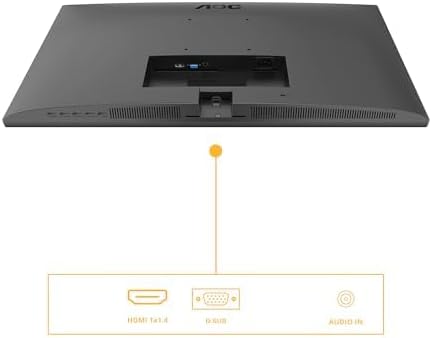
Figure 3: Diagram illustrating the available input ports on the monitor: HDMI 1.4, VGA (D-SUB), and Audio In.
3. ເປີດເຄື່ອງ
- ເປີດຄອມພິວເຕີຂອງທ່ານ.
- ກົດປຸ່ມເປີດປິດຢູ່ໃນຈໍສະແດງຜົນ. ໄຟຕົວຊີ້ວັດພະລັງງານຄວນສະຫວ່າງ.
- The monitor should automatically detect the active input signal. If not, you may need to manually select the input source using the OSD menu.
ໃຊ້ງານ Monitor
ເມນູການສະແດງຢູ່ໜ້າຈໍ (OSD).
ເມນູ OSD ຊ່ວຍໃຫ້ທ່ານສາມາດປັບການຕັ້ງຄ່າຈໍພາບຕ່າງໆ. ປຸ່ມຄວບຄຸມມັກຈະຕັ້ງຢູ່ທາງລຸ່ມ ຫຼື ດ້ານຫຼັງຂອງຈໍພາບ.
- ກົດ ເມນູ ປຸ່ມເພື່ອເປີດເມນູ OSD.
- ໃຊ້ປຸ່ມນຳທາງ (ຂຶ້ນ/ລົງ or ຊ້າຍ/ຂວາ) to browse through menu options.
- ກົດ ເລືອກ/ຕົກລົງ button to enter a sub-menu or confirm a setting.
- ກົດ ອອກໄປ button to go back to the previous menu or exit the OSD.
ການຕັ້ງຄ່າ OSD ທີ່ສໍາຄັນ
- ຄວາມສະຫວ່າງ: Adjust brightness, contrast, and gamma settings.
- ການຕັ້ງຄ່າຮູບພາບ: Fine-tune image position, clock, and phase (primarily for VGA input).
- ການຕັ້ງຄ່າສີ: Select color temperature, user color, or preset modes.
- ການຕິດຕັ້ງ OSD: Adjust OSD language, position, and transparency.
- ພິເສດ: Select input source (HDMI, VGA), reset settings, or view ຂໍ້ມູນ.
- ການຕັ້ງຄ່າເກມ: Enable or disable Adaptive Sync, adjust response time (Overdrive), and other gaming-related features.
- ແສງສີຟ້າຕ່ຳ: Activate this mode to reduce blue light emission for eye comfort.
- Flicker-Free: This technology is always active to minimize screen flickering and reduce eye strain.
ບໍາລຸງຮັກສາ
ອະນາໄມຈໍສະແດງຜົນ
- ຖອດສາຍຈໍຈາກປລັກສຽບໄຟອອກກ່ອນທຳຄວາມສະອາດທຸກຄັ້ງ.
- ໃຊ້ຜ້າແພທີ່ອ່ອນໆ ທີ່ບໍ່ມີເສັ້ນດ່າງ dampຜະສົມດ້ວຍນ້ໍາຫຼືເຄື່ອງເຮັດຄວາມສະອາດຫນ້າຈໍອ່ອນໆທີ່ບໍ່ມີການຂັດ.
- ຢ່າສີດນໍ້າສະອາດໃສ່ໜ້າຈໍໂດຍກົງ. ທາໃສ່ຜ້າກ່ອນ.
- ເຊັດໜ້າຈໍຄ່ອຍໆເພື່ອກຳຈັດຂີ້ຝຸ່ນ ແລະຮອຍເປື້ອນ.
- ສຳລັບຈໍພາບ ຄasing, use a soft, dry cloth. Avoid harsh chemicals.
ການເກັບຮັກສາ
If you need to store the monitor for an extended period, disconnect all cables, disassemble the stand if necessary, and pack it in its original packaging or a suitable protective box. Store in a cool, dry place.
ການແກ້ໄຂບັນຫາ
| ບັນຫາ | ການແກ້ໄຂທີ່ເປັນໄປໄດ້ |
|---|---|
| ບໍ່ມີຮູບພາບໃນ ໜ້າ ຈໍ |
|
| ຂໍ້ຄວາມ "ບໍ່ມີສັນຍານ". |
|
| ຮູບພາບມົວຫຼືບິດເບືອນ |
|
| ບໍ່ມີສຽງຈາກ ລຳ ໂພງ |
|
ຂໍ້ມູນຈໍາເພາະ
| ຄຸນສົມບັດ | ລາຍລະອຽດ |
|---|---|
| ໝາຍເລກຕົວແບບ | 27B3HA2 |
| ຂະໜາດໜ້າຈໍ | 27 ນິ້ວ (68.6 ຊມ) |
| ປະເພດແຜງ | IPS |
| ຄວາມລະອຽດ | 1920 x 1080 (Full HD) |
| ອັດຕາສ່ວນ | 16:9 |
| ອັດຕາການໂຫຼດຂໍ້ມູນຄືນໃໝ່ | 100 Hz |
| ເວລາຕອບສະຫນອງ | 1ms MPRT |
| ຄວາມສະຫວ່າງ | 250 cd/m² |
| ວິດີໂອປ້ອນຂໍ້ມູນ | 1x HDMI 1.4, 1x VGA (D-SUB) |
| ການປ້ອນຂໍ້ມູນສຽງ | ແມ່ນແລ້ວ |
| ຄຸນນະສົມບັດພິເສດ | Adaptive Sync, Flicker-Free, Low Blue Light |
| ຂະໜາດສິນຄ້າ (ມີຂາຕັ້ງ) | 9.06 x 24.41 x 18.11 ນິ້ວ |
| ນ້ຳໜັກສິນຄ້າ (ພ້ອມຂາຕັ້ງ) | 11.66 ປອນ |
| ຜູ້ຜະລິດ | AOC |
| Registrationາຍເລກລົງທະບຽນ EPREL | 1859411 |
For detailed product information and energy labeling, please refer to the official EPREL database:
 View ເອກະສານຂໍ້ມູນຜະລິດຕະພັນ EPREL
Figure 4: EPREL QR code and link for detailed product information.
ການຮັບປະກັນແລະການສະຫນັບສະຫນູນ
AOC monitors are manufactured to the highest quality standards. For information regarding your product's warranty, please refer to the warranty card included in your package or visit the official AOC webເວັບໄຊ.
For technical support or customer service, please contact AOC directly:
- ຜູ້ຜະລິດ: AOC International (ເອີຣົບ) BV
- ທີ່ຢູ່: Prins Bernhardplein 200 1097 JB Amsterdam, Netherlands
- ອີເມວການດູແລລູກຄ້າ: kevin.yang@tpv-tech.com
- ໂທລະສັບການດູແລລູກຄ້າ: +31 (0)20 504 6962
- ທາງການ Webເວັບໄຊ: https://eu.aoc.com
Please have your monitor's model number (27B3HA2) and serial number ready when contacting support.


