ແນະນຳ
ຂອບໃຈສໍາລັບການຊື້asing the PUREMIC S3 Portable Bluetooth Karaoke Machine. This manual provides detailed instructions for setting up, operating, and maintaining your device. Please read this manual thoroughly before use to ensure proper function and to maximize your enjoyment of the product.
ແມ່ນຫຍັງຢູ່ໃນກ່ອງ
ກວດສອບວ່າລາຍການທັງຫມົດແມ່ນມີຢູ່ໃນຊຸດ:
- ລຳໂພງ Bluetooth x 1
- UHF Wireless Microphone x 2
- Leather Bag x 1
- Speaker Charger x 1
- Microphone Charger x 1
- ຄູ່ມືຜູ້ໃຊ້ x 1

Image: All components included in the PUREMIC S3 package.
ສິນຄ້າເກີນview ແລະຄຸນສົມບັດ
The PUREMIC S3 is a portable karaoke system designed for high-quality audio and versatile use. Key features include:
- ສຽງສະແດງໃຫ້ເຫັນ: Equipped with a 5.25-inch woofer and two 1-inch tweeters for clear, powerful sound.
- ໄມໂຄຣໂຟນໄຮ້ສາຍ: Two UHF wireless microphones for singing.
- Voice Elimination: One-touch vocal elimination feature on microphones.
- ຜົນກະທົບສຽງ: Eight entertainment sound effects (Children, Monster, K.T.V., etc.).
- ແບດເຕີຣີທີ່ຍາວນານ: Built-in 10,000 mAh rechargeable battery providing up to 8 hours of playtime for the speaker and 10 hours for microphones.
- ການປະຫຍັດພະລັງງານ: Automatic power-down after 15 minutes of inactivity.
- ການເຊື່ອມຕໍ່ອະເນກປະສົງ: Bluetooth 5.0, AUX input, USB port for playback and recording.
- ແສງໄດນາມິກ: Six adjustable lighting modes with 128 LED colors that synchronize with music.
- ການພົກພາ: Lightweight, compact design with a swivel handle and included leather carrying bag.
- ຄວາມຕ້ານທານນ້ໍາ: IPX4 rated for splash resistance.
- ການເຊື່ອມຕໍ່ NFC: Quick pairing with Android devices via NFC.
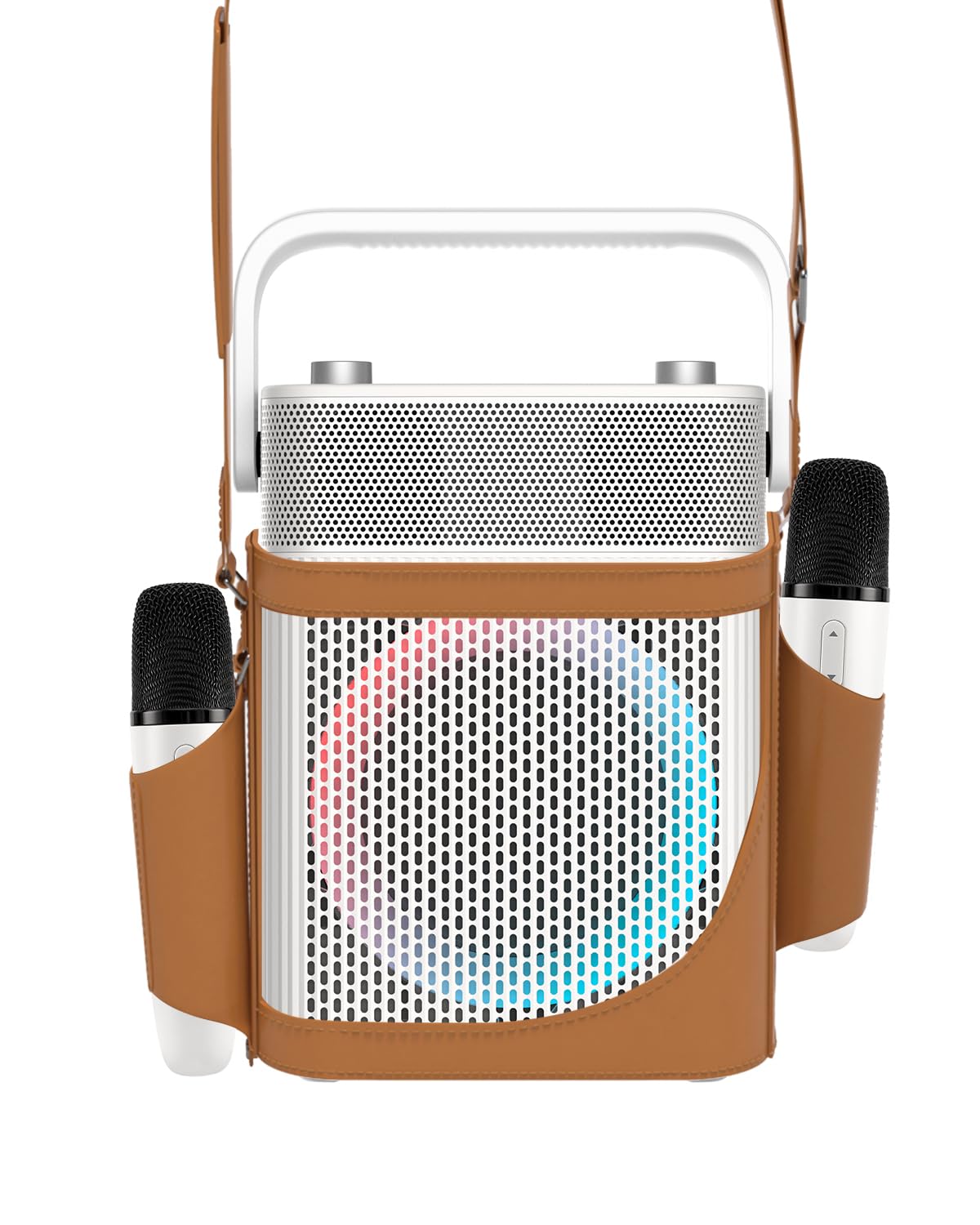
ຮູບພາບ: ທາງຫນ້າ view of the PUREMIC S3 Karaoke Machine, highlighting its design and LED lights.
ຄູ່ມືການຕິດຕັ້ງ
1. ການສາກອຸປະກອນ
ກ່ອນການນຳໃຊ້ຄັ້ງທຳອິດ, ໃຫ້ສາກໄຟລຳໂພງ ແລະ ໄມໂຄຣໂຟນໃຫ້ເຕັມ.
- ລໍາໂພງ: Connect the speaker charger to the "Charge Port" on the back of the speaker. The charging indicator will show progress.
- ໄມໂຄຣໂຟນ: Place the UHF wireless microphones into their dedicated charging holders on top of the speaker. The microphones will begin charging automatically.

Image: Close-up of the speaker's rear panel, indicating the Charge Port, Aux-in Port, and USB Port.
2. ເປີດ / ປິດພະລັງງານ
- ລໍາໂພງ: Press and hold the Power On/Off button on the control panel until the device powers on or off.
- ໄມໂຄຣໂຟນ: Press and hold the power button on each microphone to turn them on or off. They will automatically pair with the speaker when both are powered on.
ຄໍາແນະນໍາການດໍາເນີນງານ
1. ການເຊື່ອມຕໍ່ບູທູດ
- Turn on the PUREMIC S3 speaker.
- ກົດ BT button on the speaker's control panel to enter Bluetooth pairing mode. The Bluetooth indicator will flash.
- On your device (smartphone, tablet, TV, computer), enable Bluetooth and search for "PUREMIC S3".
- Select "PUREMIC S3" from the list of available devices to pair. A confirmation sound will indicate a successful connection.
NFC Pairing (Android devices only): For quick pairing, ensure NFC is enabled on your Android smartphone. Tap your phone gently against the NFC area on the speaker's control panel. Your phone will prompt you to connect to the PUREMIC S3.

Image: Demonstrates NFC pairing with an Android phone on the PUREMIC S3 speaker.
2. ເຄື່ອງປ້ອນຂໍ້ມູນ AUX
To connect devices via AUX cable:
- Connect one end of a 3.5mm AUX cable (not included) to the AUX-in port on the back of the PUREMIC S3.
- ເຊື່ອມຕໍ່ປາຍອີກດ້ານໜຶ່ງເຂົ້າກັບຊ່ອງສຽບສຽງອອກຂອງອຸປະກອນຂອງທ່ານ (ຕົວຢ່າງ, ໂທລະພາບ, ເຄື່ອງຫຼິ້ນ MP3).
- ລຳໂພງຈະປ່ຽນເປັນໂໝດ AUX ໂດຍອັດຕະໂນມັດ.

Image: PUREMIC S3 connected to a TV via AUX, showing karaoke lyrics on screen.
3. ການຫຼິ້ນ ແລະ ການບັນທຶກສຽງຜ່ານ USB
Insert a USB drive into the USB port on the back of the speaker for music playback or to record your performance.
- ຫຼິ້ນຄືນ: The speaker will automatically detect and play audio files ຈາກ USB drive.
- ການບັນທຶກ: ກົດ REC button on the control panel to start recording. Press it again to stop recording. Recordings will be saved to the USB drive.
4. ໜ້າທີ່ຂອງໄມໂຄຣໂຟນ
The wireless microphones offer several features:
- Volume/Echo: Use the dedicated knob on the speaker to adjust microphone volume and echo effect.
- Vocal Elimination: Press the designated button on the microphone for one-touch vocal elimination from music tracks.
- ຜົນກະທົບສຽງ: The microphones feature 8 different sound effects (Children, Monster, Male, Female, Original, Concert, Live, K.T.V.). Cycle through these effects using the microphone's controls.

Image: Visual representation of the 8 sound effects available on the PUREMIC S3 microphones.
5. Speaker Controls
The speaker's control panel includes:
- ເປີດ/ປິດ: ກົດຄ້າງໄວ້ເພື່ອເປີດ/ປິດ.
- Volume/Echo Knob: Rotate to adjust overall volume and microphone echo.
- BT ປຸ່ມ: ເປີດໃຊ້ໂໝດການຈັບຄູ່ Bluetooth.
- ປຸ່ມ BASS: Toggles bass sound enhancement.
- ປຸ່ມຢຸດ: Pauses/resumes playback.
- ປຸ່ມ REC: Initiates/stops recording to USB.
- Light Effect Button: Cycles through 6 different lighting modes.
- Pre/Next Song Knob: Rotate to skip tracks.

ຮູບພາບ: ລາຍລະອຽດ view of the speaker's control panel, showing all buttons and their functions.
6. TWS Pairing (True Wireless Stereo)
If you have two PUREMIC S3 speakers, you can pair them for a true wireless stereo experience:
- ກວດໃຫ້ແນ່ໃຈວ່າລຳໂພງທັງສອງເປີດຢູ່ ແລະບໍ່ໄດ້ເຊື່ອມຕໍ່ກັບອຸປະກອນ Bluetooth ໃດ.
- On one speaker, press and hold the Bluetooth button until you hear a pairing tone.
- ເຮັດຊ້ຳຂັ້ນຕອນນີ້ໃສ່ລຳໂພງທີສອງ.
- ລຳໂພງຈະເຊື່ອມຕໍ່ກັນໂດຍອັດຕະໂນມັດ. ເມື່ອຈັບຄູ່ແລ້ວ, ໃຫ້ເຊື່ອມຕໍ່ອຸປະກອນຂອງທ່ານກັບລຳໂພງໜຶ່ງຜ່ານ Bluetooth.

Image: Two PUREMIC S3 speakers set up for TWS, providing double stereo sound in a room.
ບໍາລຸງຮັກສາ
- ທໍາຄວາມສະອາດ: ເຊັດລຳໂພງ ແລະ ໄມໂຄຣໂຟນດ້ວຍຜ້າອ່ອນໆ ແລະ ແຫ້ງ. ຢ່າໃຊ້ນໍ້າຢາເຮັດຄວາມສະອາດທີ່ມີສີຂັດ ຫຼື ສານລະລາຍ.
- ການເກັບຮັກສາ: ເກັບຮັກສາອຸປະກອນໄວ້ໃນບ່ອນທີ່ເຢັນ, ແຫ້ງ, ຫ່າງຈາກແສງແດດໂດຍກົງ ແລະອຸນຫະພູມທີ່ຮ້າຍກາດ.
- ການດູແລຫມໍ້ໄຟ: To prolong battery life, fully charge the device before long periods of storage and recharge it every 3 months.
- ຄວາມຕ້ານທານນ້ໍາ: The speaker is IPX4 rated, meaning it is resistant to splashes. Do not submerge the device in water. Ensure all ports are securely covered when exposed to moisture.
ການແກ້ໄຂບັນຫາ
| ບັນຫາ | ສາເຫດທີ່ເປັນໄປໄດ້ | ການແກ້ໄຂ |
|---|---|---|
| ບໍ່ມີພະລັງງານ | ແບັດເຕີຣີໝົດ. | Charge the speaker and microphones using the provided chargers. |
| ບໍ່ສາມາດເຊື່ອມຕໍ່ຜ່ານ Bluetooth ໄດ້ | Bluetooth is not enabled on your device or speaker is not in pairing mode. Device is too far. | Ensure Bluetooth is active on your device. Press the BT button on the speaker. Move device closer to the speaker. |
| ບໍ່ມີສຽງຈາກໄມໂຄຣໂຟນ | Microphones are off or not paired. Microphone volume is too low. | Turn on microphones. Ensure they are charged. Adjust microphone volume knob on the speaker. |
| ການບິດເບືອນສຽງ | Volume is too high. Microphone is too close to the speaker. | Reduce the volume. Increase distance between microphone and speaker. |
| ການຫຼິ້ນ USB ບໍ່ເຮັດວຽກ | USB drive not formatted correctly or unsupported file ປະເພດ. | Ensure USB drive is formatted to FAT32. Use supported audio formats (e.g., MP3). |
ຂໍ້ມູນຈໍາເພາະ
| ຄຸນສົມບັດ | ລາຍລະອຽດ |
|---|---|
| ໝາຍເລກຕົວແບບ | S3 |
| ນ້ໍາຫນັກລາຍການ | 8.82 ປອນ |
| ຂະໜາດສິນຄ້າ | 5.91 x 7.72 x 10.2 ນິ້ວ |
| ປະເພດຫມໍ້ໄຟ | ແບັດເຕີຣີ Lithium Ion 1 ອັນ (ຕ້ອງການ) |
| ຄວາມອາດສາມາດຫມໍ້ໄຟ | 10,000 mAh (Speaker) |
| ເວລາຫຼິ້ນ | Up to 8 hours (Speaker), Up to 10 hours (Microphones) |
| ອຸປະກອນທີ່ເຂົ້າກັນໄດ້ | Smartphones, Televisions, iPads, Tablets, Computers |
| ປະເພດຕົວເຊື່ອມຕໍ່ | 3.5 mm Jack (AUX), USB |
| ຈຳນວນລຳໂພງ | 3 (1x 5.25-inch woofer, 2x 1-inch tweeters) |
| ຜົນຜະລິດວັດtage | 300 ວັດ |
| ແຫຼ່ງພະລັງງານ | ພະລັງງານຫມໍ້ໄຟ |
| ສະບັບtage | 5 ໂວນ (DC) |
| ການຕໍ່ຕ້ານນ້ໍາ | IPX4 |
| ຄຸນນະສົມບັດພິເສດ | Light Up Speaker, NFC |
ການຮັບປະກັນແລະການສະຫນັບສະຫນູນ
For warranty information and technical support, please refer to the warranty card included in your package or contact PUREMIC customer service through their official webເວັບໄຊທ໌ຫຼືຮ້ານຂາຍຍ່ອຍບ່ອນທີ່ຜະລິດຕະພັນໄດ້ຖືກຊື້.
ສະຫນັບສະຫນູນອອນໄລນ໌: Visit the PUREMIC Store on Amazon for additional product information and support resources: PUREMIC Store


