ແນະນຳ
Welcome to the GOBOULT UFO True Wireless Earbuds user manual. These earbuds are designed to provide a superior audio experience with features like extended playtime, low latency gaming, advanced noise cancellation, and robust bass drivers. Please read this manual carefully to ensure proper use and optimal performance of your device.
ແມ່ນຫຍັງຢູ່ໃນກ່ອງ
- GOBOULT UFO True Wireless Earbuds
- ກໍລະນີສາກໄຟໄຮ້ສາຍ
- ສາຍສາກໄວ Type-C
- ຄູ່ພິເສດຂອງ Eartips
- ຄູ່ມືຜູ້ໃຊ້
- ບັດຮັບປະກັນ
ສິນຄ້າເກີນview
The GOBOULT UFO earbuds feature a distinctive design with integrated breathing LEDs on both the earbuds and the charging case. They are equipped with 13mm drivers for rich bass and Quad Mic ENC for clear calls.

Image: GOBOULT UFO Earbuds and Charging Case. This image highlights key features such as Bluetooth 5.3 connectivity, 48 hours of playtime, Quad Mic ENC, 13mm drivers, 45ms low latency, and Type-C fast charging.
LEDs ຫາຍໃຈ
The breathing LEDs on the case and earbuds provide visual feedback for various actions, including opening/closing the case, charging, and when buds are connected.

Image: The GOBOULT UFO charging case and earbuds displaying their distinctive breathing LED lights, which indicate various operational states.
ຄຸນະພາບສຽງ
Experience high-fidelity sound with precision-tuned 13mm drivers, ensuring clear audio across all frequencies and rich bass. The Quad Mic ENC (Environmental Noise Cancellation) system ensures crystal-clear, interference-free calls.
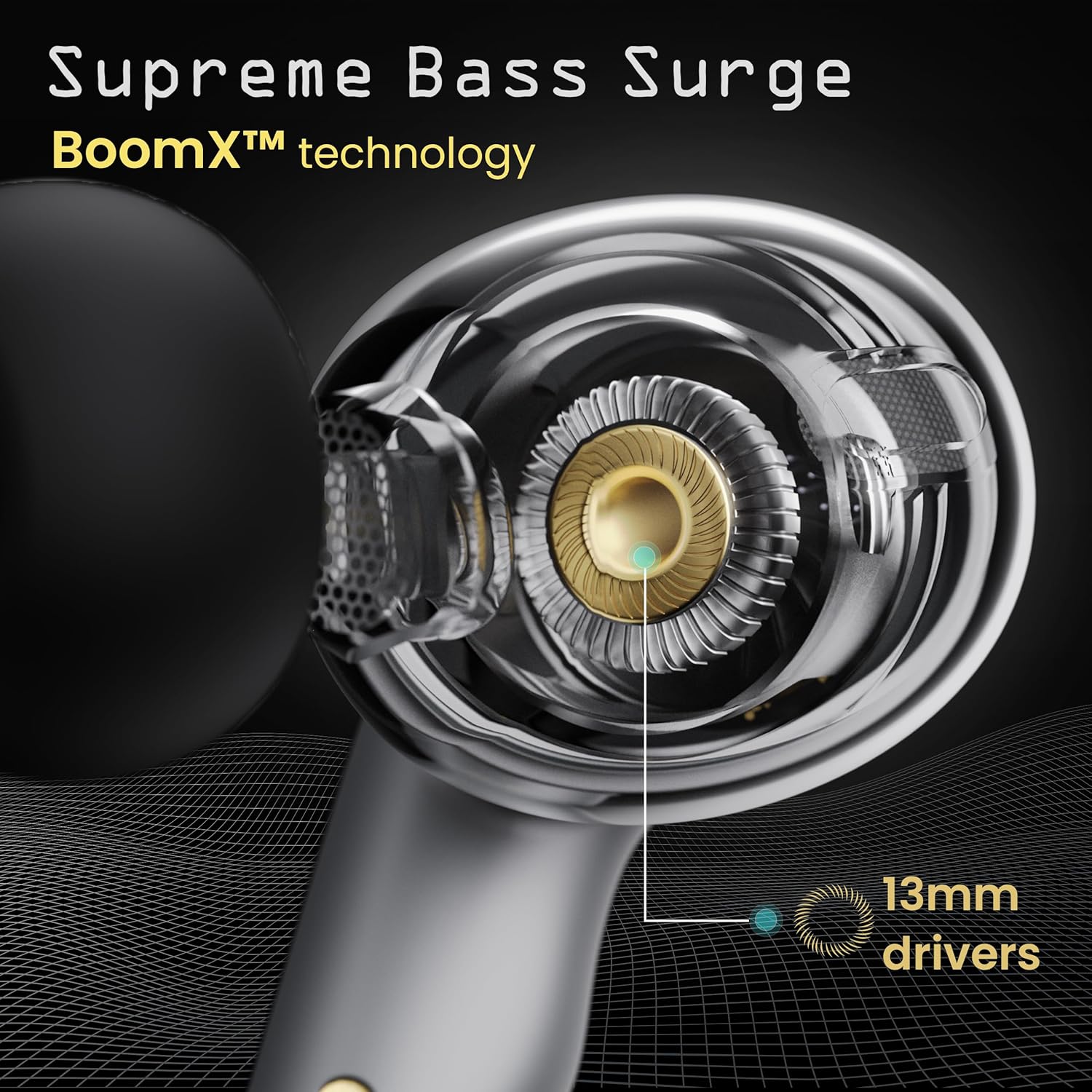
Image: A close-up of a GOBOULT UFO earbud, highlighting the 13mm drivers responsible for supreme bass surge.

ຮູບພາບ: A ລາຍລະອຽດ view of a GOBOULT UFO earbud, showcasing the AI-powered Quad Mic AI-ENC technology for high-definition call clarity and Zen™ mode for silence.
ຕັ້ງຄ່າ
ການຈັບຄູ່ເບື້ອງຕົ້ນ
- ເປີດກ່ອງສາກໄຟ. ຫູຟັງເອຍບັດຈະເຂົ້າສູ່ໂໝດຈັບຄູ່ໂດຍອັດຕະໂນມັດ.
- ໃນອຸປະກອນຂອງທ່ານ (ໂທລະສັບສະຫຼາດ, ແທັບເລັດ, ແລະອື່ນໆ), ເປີດໃຊ້ Bluetooth.
- ຊອກຫາ "GOBOULT UFO" in the list of available Bluetooth devices and select it to connect.
- Once connected, you will hear an audio prompt, and the LED indicators on the earbuds will change.
The earbuds utilize Bluetooth 5.3 for stable and efficient connection, featuring Blink & Pair™ technology for fast pairing.

Image: GOBOULT UFO Earbuds illustrating stable connectivity with Bluetooth 5.3 and fast pairing technology.
ສະຫນັບສະຫນູນ App
Enhance your experience by downloading the dedicated GOBOULT app. The app allows you to:
- Switch between 6 Equalizer Modes.
- ປັບແຕ່ງການຄວບຄຸມການສໍາພັດ.
- ປ່ຽນຊື່ຫູຟັງຂອງທ່ານ.
- ເຂົ້າເຖິງການຕັ້ງຄ່າ ແລະຄຸນສົມບັດເພີ່ມເຕີມ.
ຄໍາແນະນໍາການດໍາເນີນງານ
ແຕະການຄວບຄຸມ
The GOBOULT UFO earbuds feature intuitive touch controls on each earbud.
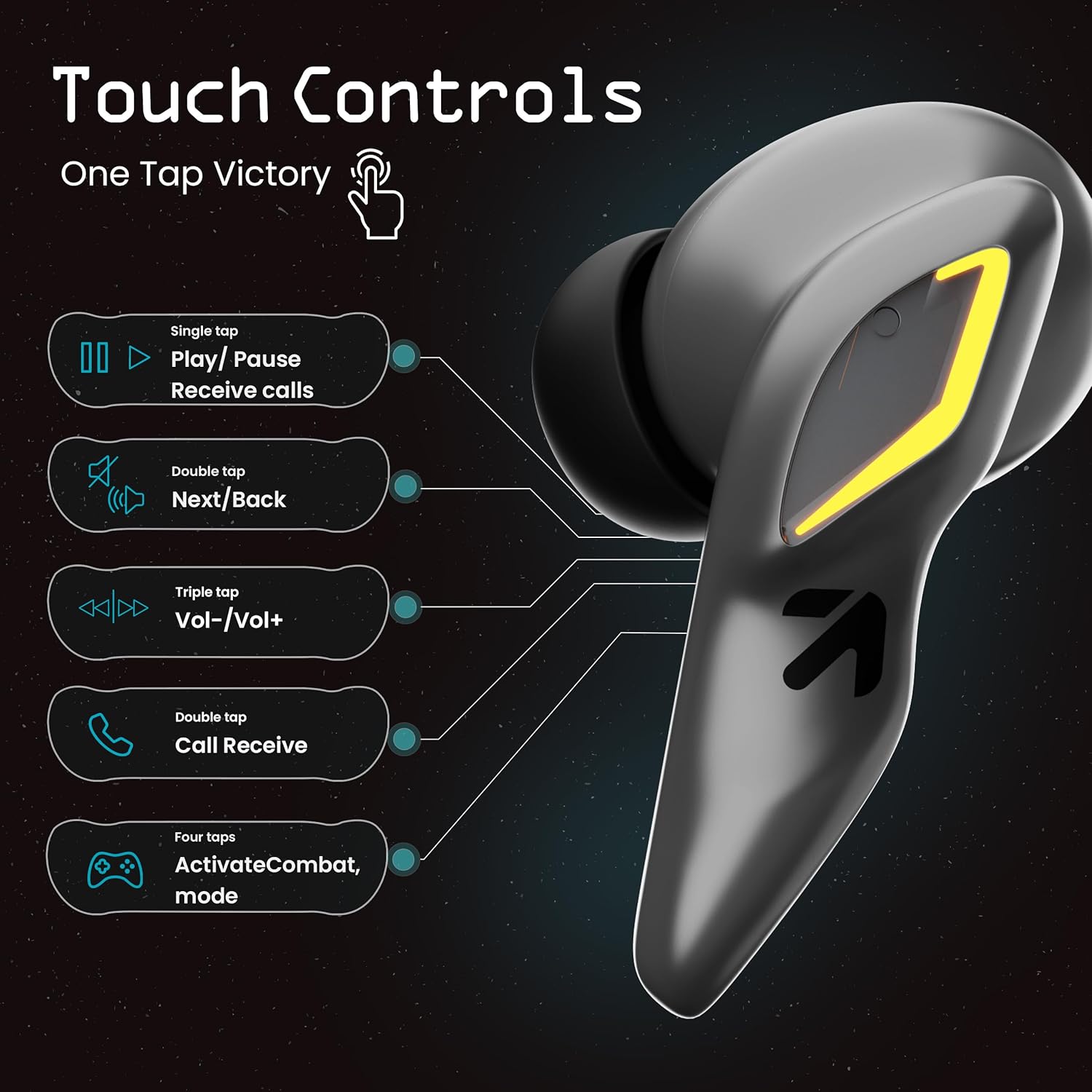
Image: A visual guide to the touch controls on the GOBOULT UFO Earbuds, detailing single, double, triple, and four-tap functions.
- ທໍ່ດຽວ: Play/Pause music, Receive calls.
- ແຕະສອງເທື່ອ: Next/Back track.
- ເທບ Triple: ປະລິມານຂຶ້ນ/ລົງ.
- ແຕະສີ່ຄັ້ງ: Activate Combat Mode (Gaming Mode).
- ຂ່າວຍາວ: Activate Voice Assistant (Google Assistant, Siri).
Gaming Mode (Combat Mode)
Activate Combat Mode for an ultra-low latency experience of 45ms, ideal for gaming. Tap the earbud four times to toggle this mode.

Image: The GOBOULT UFO Earbuds case open, highlighting the Combat Gaming Mode with 45ms ultra-low latency, activated by four taps.
ຜູ້ຊ່ວຍສຽງ
Long press the touch control area on either earbud to activate your device's voice assistant (e.g., Google Assistant, Siri).

Image: GOBOULT UFO Earbuds demonstrating the long-press gesture to activate the voice assistant feature.
ກຳລັງສາກໄຟ
The GOBOULT UFO earbuds offer up to 48 hours of total playtime with the charging case.
ສາກແບັດ ແລະຫູຟັງ
- ວາງຫູຟັງໃສ່ກະເປົ໋າສາກໄຟ. ໃຫ້ແນ່ໃຈວ່າພວກເຂົານັ່ງຢ່າງຖືກຕ້ອງ.
- Connect the Type-C fast charging cable to the charging port on the case and to a power source.
- ຕົວຊີ້ວັດ LED ໃນກໍລະນີຈະສະແດງສະຖານະການສາກໄຟ.
- A full charge for the earbuds and case takes approximately 100 minutes.
- With Type-C fast charging, a 10-minute charge can provide up to 1.5 hours of playtime.
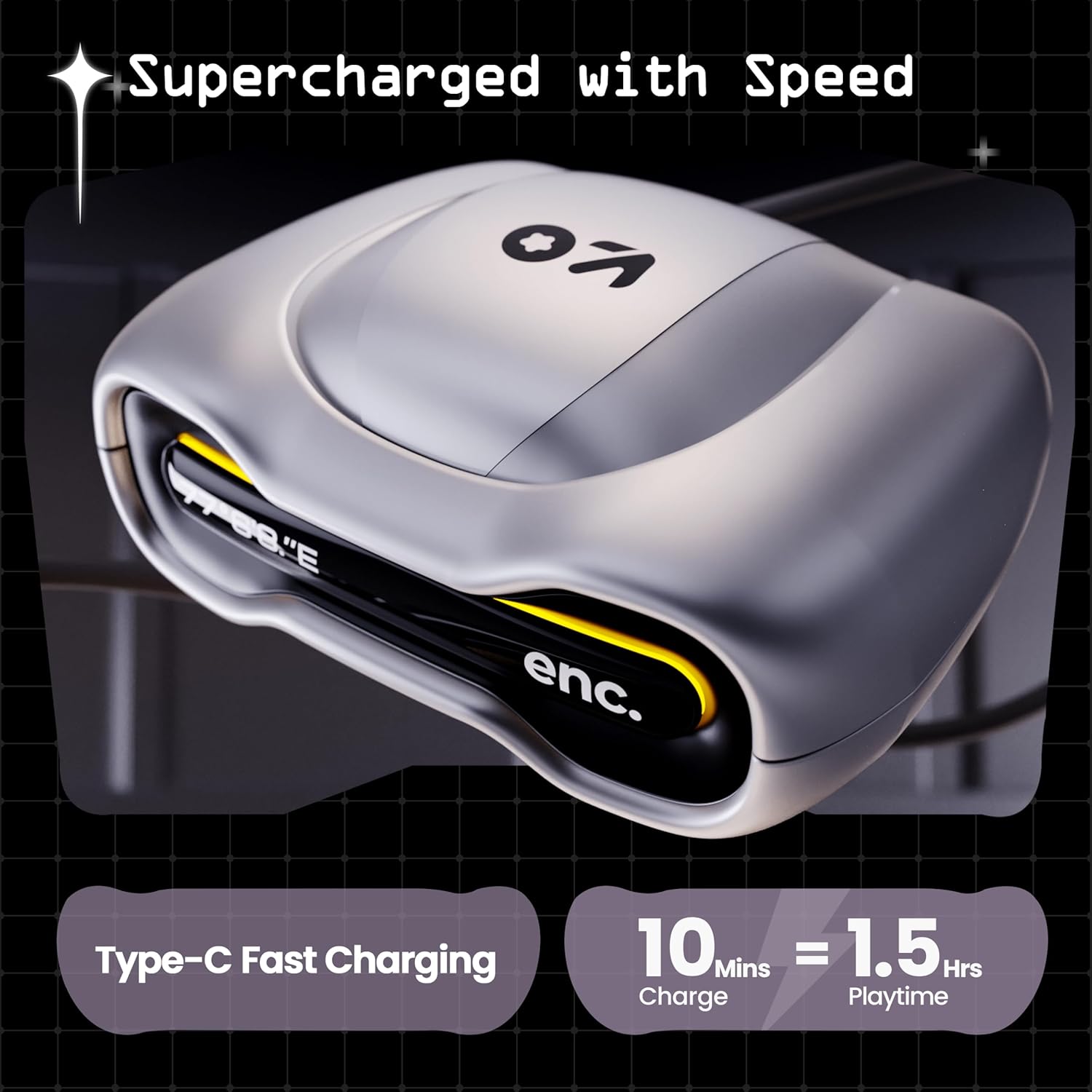
Image: The GOBOULT UFO charging case, illustrating its Type-C fast charging capability, providing 1.5 hours of playtime from a 10-minute charge.
ບໍາລຸງຮັກສາ
ການຕໍ່ຕ້ານນ້ໍາ
The GOBOULT UFO earbuds are IPX5 water-resistant, making them sweatproof, rainproof, and splashproof. This protection allows for use during workouts or in light rain.

Image: GOBOULT UFO Earbuds on a metallic surface, indicating their IPX5 water resistance, making them suitable for sweat, rain, and splashes.
ທໍາຄວາມສະອາດ
ເພື່ອຮັກສາປະສິດທິພາບ ແລະສຸຂະອະນາໄມທີ່ດີທີ່ສຸດ, ໃຫ້ອະນາໄມຫູຟັງຫູຟັງ ແລະກ່ອງສາກໄຟເປັນປະຈຳ.
- ໃຊ້ຜ້າແພທີ່ອ່ອນ, ແຫ້ງ, ບໍ່ມີເສັ້ນດ່າງເພື່ອເຊັດຫູຟັງ ແລະ ເຄສ.
- ສໍາລັບຝຸ່ນ stubborn, ເລັກນ້ອຍ dampen ຜ້າທີ່ມີນ້ໍາ. ຫຼີກເວັ້ນການນໍາໃຊ້ສານເຄມີທີ່ຮຸນແຮງຫຼືວັດສະດຸຂັດ.
- ກວດໃຫ້ແນ່ໃຈວ່າຕົວຕິດຕໍ່ການສາກໄຟຢູ່ທັງຫູຟັງເອດບັດ ແລະເຄສນັ້ນສະອາດ ແລະບໍ່ມີສິ່ງເສດເຫຼືອ.
- Allow all components to dry completely before placing earbuds back in the case or charging.
ການແກ້ໄຂບັນຫາ
If you encounter any issues with your GOBOULT UFO earbuds, please refer to the following common solutions:
- ບໍ່ມີສຽງ: Ensure earbuds are charged and properly connected to your device. Check device volume.
- ບັນຫາການຈັບຄູ່: ໃຫ້ແນ່ໃຈວ່າອຸປະກອນຂອງທ່ານເປີດໃຊ້ Bluetooth ແລ້ວ. ລອງລືມອຸປະກອນໃນການຕັ້ງຄ່າ Bluetooth ຂອງທ່ານ ແລະ ຈັບຄູ່ຄືນໃໝ່. ໃຫ້ແນ່ໃຈວ່າຫູຟັງໄດ້ສາກໄຟເຕັມແລ້ວ.
- ຫູຟັງໜຶ່ງໜ່ວຍບໍ່ເຮັດວຽກ: Place both earbuds back in the case, close it, and then open it again. This often resets the connection.
- ຄຸນນະພາບການໂທບໍ່ດີ: Ensure microphones are clean. Check for strong Bluetooth connection.
- ການຄວບຄຸມການສໍາພັດທີ່ບໍ່ຕອບສະໜອງ: ໃຫ້ແນ່ໃຈວ່ານິ້ວມືຂອງທ່ານສະອາດແລະແຫ້ງ. ລອງຣີສະຕາດຫູຟັງເອຍບັດໂດຍການວາງໃສ່ໃນກໍລະນີ ແລະຖອດມັນອອກ.
For further assistance, please contact GOBOULT customer support.
ຂໍ້ມູນຈໍາເພາະ
| ຄຸນສົມບັດ | ລາຍລະອຽດ |
|---|---|
| ຊື່ຕົວແບບ | UFO (Airbass Earbuds) |
| ລຸ້ນ Bluetooth | 5.3 |
| ເວລາຫຼິ້ນ | ດົນເຖິງ 48 ຊົ່ວໂມງ (ພ້ອມກ່ອງສາກ) |
| ຄວາມຍືດຍຸ່ນສຽງ | 45 ມິນລິວິນາທີ (ໂໝດເກມ) |
| ຄົນຂັບລົດ | 13mm Dynamic Drivers |
| ໄມໂຄຣໂຟນ | Quad Mic ENC (Environmental Noise Cancellation) |
| ການຕໍ່ຕ້ານນ້ໍາ | IPX5 (ກັນເຫື່ອ, ກັນຝົນ, ກັນນ້ຳກະເດັນ) |
| ພອດສາກໄຟ | Type-C ສາກໄວ |
| ເວລາສາກໄຟ | ປະມານ. 100 ນາທີ |
| ຊ່ວງ Bluetooth | 10 ແມັດ |
| ການຕອບສະໜອງຄວາມຖີ່ | 20 Hz |
| ຄວາມອ່ອນໄຫວ | 115 dB |
| impedance | 32 ໂອມ |
| ນ້ໍາຫນັກລາຍການ | 60 ກຣາມ |
| ຂະໜາດສິນຄ້າ | 4.7 x 9 x 10 cm |
| ວັດສະດຸ | ໂລຫະ |
ການຮັບປະກັນແລະການສະຫນັບສະຫນູນ
ຂໍ້ມູນການຮັບປະກັນ
The GOBOULT UFO True Wireless Earbuds come with a ການຮັບປະກັນຂອງຜູ້ຜະລິດ 1 ປີ from the date of purchase. Please retain your proof of purchase for warranty claims. The warranty covers manufacturing defects. It does not cover damage caused by misuse, accidents, or unauthorized modifications.
ການຊ່ວຍເຫຼືອລູກຄ້າ
For any questions, technical support, or warranty claims, please contact GOBOULT customer service.
ຜູ້ຜະລິດ: Exotic Mile Pvt. Ltd.
ທີ່ຢູ່: B67 Wazirpur Industrial Area, New Delhi 110052, India.
Please refer to the warranty card included in your product packaging for specific contact details and procedures.


