1. ຜະລິດຕະພັນເກີນview
The Motorola Solutions T802 Talkabout FRS Two-Way Radios are designed for reliable communication in various outdoor and off-grid environments. These radios offer advanced features including Bluetooth connectivity for app integration, NOAA weather alerts, and a durable, weather-resistant design. They are ideal for staying connected with travel companions when cell service is unavailable.

ຮູບພາບ: ທາງຫນ້າ view of two Motorola T802 radios, highlighting their compact design and digital display.
2. ເນື້ອໃນຊຸດ
Your Motorola Solutions T802 package includes the following items:
- 2 ວິທະຍຸ
- 2 USB-C to USB-A cables
- 2 Battery Packs (rechargeable)
- 2 ສາຍແອວ
- 16 ສະຕິກເກີການປັບແຕ່ງສ່ວນຕົວ
3. ຄຸນນະສົມບັດທີ່ສໍາຄັນ
- 22 ຊ່ອງ ແລະ 121 ລະຫັດຄວາມເປັນສ່ວນຕົວ: Offers 2,662 combinations for finding available channels.
- ການເຊື່ອມຕໍ່ Bluetooth: Connects to the TALKABOUT app and compatible audio accessories.
- Weather Proof (IP54): ອອກແບບມາໃຫ້ທົນທານຕໍ່ການສີດນ້ຳ ແລະ ຝົນຕົກເບົາໆ.
- ພະລັງງານສອງ: Operates with rechargeable NiMH battery packs (included) or 3 AA alkaline batteries (not included).
- ວິທະຍຸ ແລະ ການແຈ້ງເຕືອນສະພາບອາກາດ NOAA: Provides real-time weather updates and alerts.
- Off-Grid Group Messaging/Broadcast: Utilize the TALKABOUT app for communication without cell service.
- ໄຟສາຍແບບປະສົມປະສານ: ໄຟສາຍ LED ໃນຕົວເພື່ອຄວາມສະດວກໃນສະພາບແສງສະຫວ່າງຫນ້ອຍ.
- ແຈ້ງເຕືອນການໂທ: Notifies you of incoming transmissions.
- ແຈ້ງເຕືອນການສັ່ນສະເທືອນ: Provides discreet notification of incoming calls.
4. ການເລີ່ມຕົ້ນ
4.1 ການຕິດຕັ້ງ ແລະສາກແບັດ
- ກວດໃຫ້ແນ່ໃຈວ່າວິທະຍຸປິດຢູ່.
- ເປີດຝາປິດຊ່ອງໃສ່ຫມໍ້ໄຟຢູ່ດ້ານຫຼັງຂອງວິທະຍຸ.
- Insert the provided rechargeable NiMH battery pack, ensuring correct polarity. Alternatively, insert 3 AA alkaline batteries.
- ປິດຝາປິດຊ່ອງໃສ່ຫມໍ້ໄຟຢ່າງປອດໄພ.
- To charge, connect one of the provided USB-C to USB-A cables to the USB-C port on the radio and the other end to a compatible USB power source. Both radios can be charged simultaneously using the two cables.
4.2 ການເປີດ/ປິດ
Rotate the On/Off/Volume knob clockwise to power on the radio. Rotate it counter-clockwise until a 'click' is heard to power off.
4.3 Attaching Belt Clip
Align the belt clip with the slots on the back of the radio and slide it down until it clicks into place. To remove, lift the tab on the belt clip and slide it upwards.
5. ການດໍາເນີນງານພື້ນຖານ
5.1 ການເລືອກລະຫັດຊ່ອງທາງ ແລະ ຄວາມເປັນສ່ວນຕົວ
Use the Up/Down buttons to select one of the 22 available channels. To set a privacy code, enter the menu and navigate to the privacy code setting, then use the Up/Down buttons to select one of the 121 codes. Ensure all radios in your group are on the same channel and privacy code for communication.
5.2 Push-to-Talk (PTT)
Press and hold the large PTT button on the side of the radio to transmit your voice. Release the button to listen for incoming transmissions.
5.3 ການເຕືອນການໂທ
Press the Call button to send an audible alert tone to other radios on the same channel and privacy code.
5.4 Integrated Flashlight

Image: The integrated flashlight on top of the Motorola T802 radio.
To activate the integrated flashlight, press the dedicated flashlight button (refer to your radio's button layout for exact location). Press again to turn off.
6. ຄຸນສົມບັດຂັ້ນສູງ
6.1 NOAA Weather Radio & Alerts
The T802 radios include NOAA Weather Radio and Alert functionality. This feature allows you to receive real-time weather broadcasts and emergency alerts, keeping you informed of changing conditions, especially useful in remote areas.
6.2 Bluetooth Connectivity & TALKABOUT App

Image: User interacting with the TALKABOUT app on a smartphone, connected to the radio via Bluetooth.
The TALKABOUT T802 radios can connect to your smartphone via Bluetooth. Download the TALKABOUT app to access advanced off-grid features:
- ການຕິດຕາມສະຖານທີ່: Locate friends' campsites, share your location, and track routes.
- Off-Grid Messaging: Send messages to other app users even without cell service.
- ການຄວບຄຸມວິທະຍຸ: Adjust radio settings directly from the app.
- What3words Addresses: Communicate exact locations to other FRS users without the app.
7. ຂໍ້ມູນຂອບເຂດ
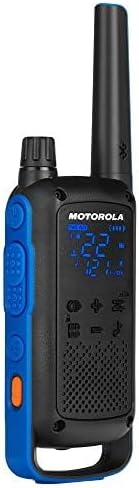
Image: Visual representation of radio range in various environments.
The communication range of the T802 radios is quoted as up to 35 miles. Actual range can vary significantly depending on terrain, weather conditions, electromagnetic interference, and obstructions. Optimal range is achieved in open, unobstructed areas. Typical ranges are:
- Mountain to Valley: ເຖິງ 35 ໄມ
- Open Water: ເຖິງ 6 ໄມ
- Neighborhood/Urban: ເຖິງ 2 ໄມ
8. ການດູແລແລະບໍາລຸງຮັກສາ
8.1 ການທໍາຄວາມສະອາດ
ເຮັດຄວາມສະອາດວິທະຍຸດ້ວຍສຽງອ່ອນ, ງamp ຜ້າ. ຢ່າໃຊ້ເຄື່ອງເຮັດຄວາມສະອາດຂັດຫຼືສານລະລາຍ. ໃຫ້ແນ່ໃຈວ່າການປົກຫຸ້ມຂອງພອດທັງຫມົດຖືກປິດຢ່າງປອດໄພກ່ອນທີ່ຈະທໍາຄວາມສະອາດ.
8.2 ການຕໍ່ຕ້ານນ້ໍາ
The T802 radios are rated IP54 weather-proof, meaning they are protected against dust and splashing water from any direction. They are not designed to be submerged in water. Always ensure the USB-C port cover and battery compartment are securely sealed to maintain water resistance.
8.3 ການດູແລຫມໍ້ໄຟ
To maximize battery life, fully charge the NiMH battery packs before initial use and after extended storage. Store batteries in a cool, dry place. If using AA alkaline batteries, replace them when power is low.
9. ການແກ້ໄຂບັນຫາ
- ບໍ່ມີພະລັງງານ: Check if the battery pack is correctly installed and charged. If using AA batteries, ensure they are fresh and correctly inserted.
- ບໍ່ສາມາດສົ່ງ/ຮັບ: Verify that both radios are on the same channel and privacy code. Check battery levels. Ensure you are within range.
- ຄຸນະພາບສຽງບໍ່ດີ: Move closer to the other radio. Check for obstructions. Ensure the volume is adjusted appropriately.
- ບັນຫາການເຊື່ອມຕໍ່ Bluetooth: Ensure Bluetooth is enabled on both the radio and your smartphone. Try restarting both devices.
10. ຂໍ້ກໍານົດດ້ານວິຊາການ
- ໝາຍເລກຕົວແບບ: T802
- ຂະໜາດຜະລິດຕະພັນ: 1.28 x 2.2 x 7.52 ນິ້ວ
- ນ້ໍາຫນັກລາຍການ: 7.2 ອອນ
- ຈຳນວນຊ່ອງ: 22
- ລະຫັດຄວາມເປັນສ່ວນຕົວ: 121
- ຊ່ວງຄວາມຖີ່: 400-470 MHz
- ໄລຍະການເວົ້າສູງສຸດ: 35 ໄມລ໌ (ຂຶ້ນກັບພື້ນທີ່)
- ລະດັບຄວາມຕ້ານທານນ້ໍາ: ທົນທານຕໍ່ສະພາບອາກາດ IP54
- ແຫຼ່ງພະລັງງານ: Rechargeable NiMH Battery Pack (included) or 3 AA batteries (not included)
- ການສາກໄຟ: USB-C
- ຄຸນນະສົມບັດພິເສດ: Call Alert, Integrated Flashlight, Rechargeable, Weather Alert, Bluetooth Connectivity
11. ການຮັບປະກັນແລະການສະຫນັບສະຫນູນ
Motorola Solutions typically offers a 2-year warranty on their two-way radios. For detailed warranty information, technical support, or service inquiries, please refer to the official Motorola Solutions webເວັບໄຊ ຫຼືຕິດຕໍ່ບໍລິການລູກຄ້າຂອງເຂົາເຈົ້າໂດຍກົງ. ຮັກສາຫຼັກຖານການຊື້ຂອງທ່ານສໍາລັບການຮ້ອງຂໍການຮັບປະກັນ.


