1. ບົດແນະນຳ
This manual provides detailed instructions for the safe and efficient operation, setup, and maintenance of your SINGER SC220 Sewing Machine. The SC220 is a versatile computerized sewing machine featuring 200 stitch applications, built-in lettering, a one-step buttonhole, and a built-in needle threader, designed to enhance your sewing projects.
2. ຄໍາແນະນໍາຄວາມປອດໄພ
- Always unplug the machine from the electrical outlet immediately after using, before cleaning, or when making any user servicing adjustments mentioned in this instruction manual.
- ເອົານິ້ວມືຫ່າງຈາກທຸກໆສ່ວນທີ່ເຄື່ອນຍ້າຍ. ຕ້ອງມີການດູແລພິເສດຮອບເຂັມຂັດຂອງເຄື່ອງຫຍິບ.
- ໃຊ້ແຜ່ນເຂັມທີ່ຖືກຕ້ອງ. ແຜ່ນທີ່ບໍ່ຖືກຕ້ອງສາມາດເຮັດໃຫ້ເຂັມແຕກໄດ້.
- ຢ່າດຶງ ຫຼື ຍູ້ຜ້າໃນຂະນະທີ່ກຳລັງຫຍິບ. ນີ້ອາດຈະເຮັດໃຫ້ເຂັມຫັນໄປທາງຂ້າງ ແລະ ເຮັດໃຫ້ມັນຫັກ.
- Always use genuine SINGER accessories and parts to ensure optimal performance and safety.
- Never operate the machine with any air openings blocked. Keep ventilation openings of the sewing machine and foot controller free from lint, dust, and loose cloth.
3. ການກໍານົດຊິ້ນສ່ວນ
Familiarize yourself with the main components of your SINGER SC220 sewing machine.
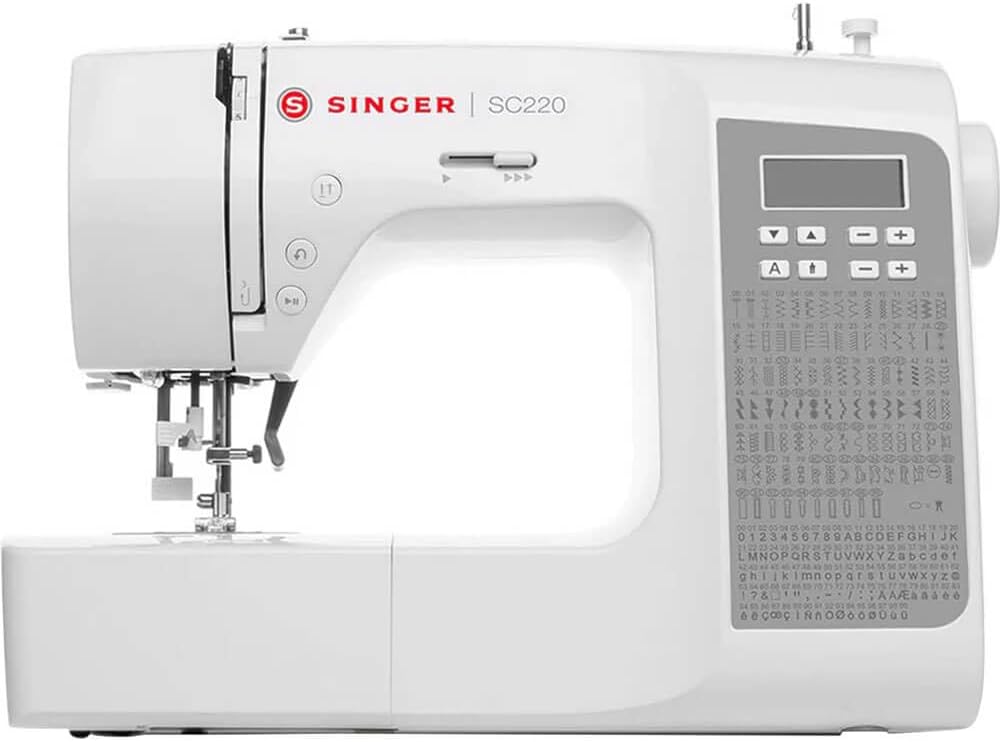
ຮູບທີ 3.1: ດ້ານໜ້າ view of the SINGER SC220 Sewing Machine, showing the main body, needle area, control panel, and extension table.
- Spool Pins: ຖືລູກດ້າຍຂອງມ້ວນ.
- ຄູ່ມືກະທູ້: Directs the thread path.
- ແຖບຄວາມເຄັ່ງຕຶງ: Adjusts upper thread tension.
- ເຂັມ Clamp: Secures the needle.
- ຕີນກົດ: Holds fabric against the feed dogs.
- ແຜ່ນເຂັມ: Metal plate under the needle, with seam guidelines.
- ໃຫ້ອາຫານໝາ: Moves fabric under the presser foot.
- ຝາປິດກະບອກສູບ: Transparent cover for the top drop-in bobbin.
- ກະດານຄວບຄຸມ: Digital display and buttons for stitch selection and adjustments.
- Handwheel: ຍົກ ແລະ ຫຼຸດເຂັມດ້ວຍຕົນເອງ.
- ສັບປ່ຽນພະລັງງານ: ເປີດ/ປິດເຄື່ອງ.
- Foot Controller Jack: Connects the foot controller.
4. ຕັ້ງຄ່າ
4.1 ການຫຸ້ມຫໍ່ແລະການຈັດວາງ
Carefully remove the machine from its packaging. Place the machine on a stable, level surface. Ensure there is adequate space around the machine for comfortable operation.
4.2 ການເຊື່ອມຕໍ່ພະລັງງານ
Insert the machine plug into the machine's power socket and then into a suitable electrical outlet. Connect the foot controller plug into the foot controller jack on the machine.
4.3 ການຕິດອຸປະກອນເສີມ
Your SINGER SC220 comes with various accessories to enhance your sewing experience. These include different presser feet, bobbins, needles, and tools.

ຮູບທີ 4.1: Various accessories included with the SINGER SC220, such as different presser feet, bobbins, needles, and a seam ripper.
To attach a presser foot, align the pin on the foot with the groove on the presser foot holder and lower the presser foot lever until it snaps into place.
5. ຄໍາແນະນໍາການດໍາເນີນງານ
5.1 Winding the Bobbin ໄດ້
- ວາງ bobbin ເປົ່າໃສ່ spindle bobbin winder.
- ວາງ spool ຂອງ thread ສຸດ pin spool ໄດ້.
- ນຳພາເສັ້ນດ້າຍຜ່ານຄູ່ມືດຶງເສັ້ນດ້າຍມ້ວນຂອງກະບອກ.
- Wrap the thread clockwise around the bobbin a few times.
- ຍູ້ spindle winder bobbin ໄປທາງຂວາ.
- Press the foot controller or start/stop button to begin winding. The machine will stop automatically when the bobbin is full.
- ຕັດດ້າຍແລະຍູ້ແກນຂອງເຄື່ອງມ້ວນດ້າຍກັບຄືນໄປທາງຊ້າຍ.
5.2 Inserting the Top Drop-In Bobbin

ຮູບທີ 5.1: ໃກ້ຊິດ view of the top drop-in bobbin area, showing the transparent cover and the bobbin in place.
- Remove the transparent bobbin cover plate.
- Insert the full bobbin into the bobbin case with the thread running counter-clockwise.
- Guide the thread through the tension spring and into the thread guide channel.
- ປ່ຽນແຜ່ນປົກກະບະ.
5.3 ການໃສ່ກະທູ້ເທິງ
The SINGER SC220 features a built-in needle threader for convenience.

ຮູບທີ 5.2: Close-up of the needle and presser foot area, highlighting the needle threader mechanism.
- ຍົກເຄື່ອງຍົກຕີນຂອງນັກກົດຂື້ນ.
- ວາງ spool ຂອງ thread ສຸດ pin spool ໄດ້.
- Follow the numbered thread path guides on the machine, ensuring the thread is securely seated in each guide.
- ຜ່ານກະທູ້ຜ່ານ lever ເອົາຂຶ້ນຈາກຂວາຫາຊ້າຍ.
- Thread the needle using the built-in needle threader. If threading manually, thread from front to back.
- ດຶງເສັ້ນດ້າຍຂອງກະບອກເຂັມຂຶ້ນຜ່ານຊ່ອງເປີດແຜ່ນເຂັມໂດຍການໝຸນລໍ້ມືມາທາງທ່ານເພື່ອຫຼຸດ ແລະ ຍົກເຂັມຂຶ້ນ.
5.4 Stitch Selection and Adjustments
The SC220 offers 200 stitch applications, including utility, decorative, and lettering stitches. Use the control panel to select your desired stitch.

ຮູບທີ 5.3: ລະອຽດ view of the control panel with digital display and stitch selection buttons, alongside the comprehensive stitch chart.
- ການຄັດເລືອກ Stitch: Use the arrow buttons on the control panel to navigate through the stitch options displayed on the LCD screen. Refer to the stitch chart on the machine for available patterns.
- Stitch Length/Width: Adjust stitch length and width using the dedicated buttons on the control panel. The maximum adjustable stitch width is 7mm.
- Built-In Lettering: Select the lettering function from the stitch menu to sew letters and numbers.
- ຮູກະດຸມຂັ້ນຕອນດຽວ: Attach the buttonhole foot and select the buttonhole stitch. The machine will automatically size and sew the buttonhole.
5.5 ການຫຍິບ

ຮູບທີ 5.4: A user sewing fabric on the SINGER SC220, demonstrating the machine in active use.
- ການຄວບຄຸມຄວາມໄວ: Use the speed control slider to adjust the sewing speed.
- ປຸ່ມເລີ່ມ/ຢຸດ: Press to start or stop sewing without the foot controller.
- ປຸ່ມປີ້ນກັບ: Press to sew in reverse, useful for securing stitches.
- Tie-Off Button: Automatically ties off stitches at the beginning or end of a seam.
- ການໃຫ້ອາຫານແບບຖິ້ມ: Engage the drop feed lever for free-motion sewing or darning.
- Extra High Pressure Foot Lifter: Provides additional clearance for thicker fabrics or multiple layers.
- Variable Needle Positions: Adjust the needle position for precise topstitching or zipper insertion.
- Twin-Needle Function: Use a twin needle for decorative stitching or hemming. Ensure to select the appropriate stitch and reduce stitch width to prevent needle breakage.
6. ບໍາລຸງຮັກສາ
6.1 ການທໍາຄວາມສະອາດ
- ການກຳຈັດຂີ້ເທົ່າ: Regularly remove lint and dust from the bobbin area and feed dogs using the brush provided. Unplug the machine before cleaning.
- Machine Surface: ເຊັດດ້ານນອກຂອງເຄື່ອງດ້ວຍຜ້າອ່ອນໆແລະແຫ້ງ. ຢ່າໃຊ້ສານເຄມີທີ່ຮຸນແຮງ ຫຼື ນໍ້າຢາເຮັດຄວາມສະອາດທີ່ມີສີຂັດ.
6.2 ການທົດແທນເຂັມ
Replace the needle regularly, especially after sewing thick fabrics or if it becomes bent or dull. Use only SINGER brand needles suitable for your machine.
- ປິດເຄື່ອງແລະຖອດມັນອອກ.
- ພວນເຂັມ clamp ສະກູ.
- ເອົາເຂັມເກົ່າອອກ.
- ໃສ່ເຂັມໃໝ່ໂດຍໃຫ້ດ້ານຮາບພຽງຫັນໄປທາງຫຼັງຂອງເຄື່ອງ, ຍູ້ມັນຂຶ້ນເທົ່າທີ່ຈະໄປໄດ້.
- Tighten ເຂັມ clamp screw ຢ່າງປອດໄພ.
7. ການແກ້ໄຂບັນຫາ
ພາກສ່ວນນີ້ແກ້ໄຂບັນຫາທົ່ວໄປທີ່ທ່ານອາດຈະພົບໃນລະຫວ່າງການປະຕິບັດງານ.
| ບັນຫາ | ສາເຫດທີ່ເປັນໄປໄດ້ | ການແກ້ໄຂ |
|---|---|---|
| ຂ້າມ Stitches | ເຂັມບໍ່ຖືກຕ້ອງ, ເຂັມງໍ, ເກຍບໍ່ຖືກຕ້ອງ. | Replace needle with correct type/size. Re-thread machine correctly. |
| ການແຕກຫັກຂອງເສັ້ນດ້າຍ (ດ້ານເທິງ) | Incorrect threading, too much upper tension, damaged needle, poor quality thread. | Check threading path. Adjust tension. Replace needle. Use good quality thread. |
| ການແຕກຫັກຂອງດ້າຍ (ຫຼອດ) | Improperly wound bobbin, bobbin inserted incorrectly, lint in bobbin case. | Re-wind bobbin evenly. Re-insert bobbin correctly. Clean bobbin area. |
| ຜ້າບໍ່ໃຫ້ອາຫານ | Presser foot not lowered, feed dogs lowered, lint under needle plate. | Lower presser foot. Raise feed dogs. Clean under needle plate. |
| ເຄື່ອງບໍ່ເລີ່ມຕົ້ນ | Power cord not plugged in, foot controller not connected, power switch off. | Check all power connections. Ensure power switch is ON. |
8. ຂໍ້ມູນຈໍາເພາະ
- ຕົວແບບ: SC220
- ຍີ່ຫໍ້: SINGER
- ຄໍາຮ້ອງສະຫມັກ Stitch: 200
- ຄວາມກວ້າງຂອງຕອດ: Adjustable, up to 7mm
- ປະເພດ Bobbin: Top Drop-In
- ເຄື່ອງຕອກເຂັມ: ໃນຕົວ
- Buttonhole Type: One-Step
- ລະບົບອາຫານ: Drop Feed capability
- ການຄວບຄຸມຄວາມໄວ: ຕົວເລື່ອນ
- ນ້ຳໜັກ: ປະມານ 15.15 ປອນ
- ສີ: ສີຂາວ
- ຜູ້ຜະລິດ: SINGER
- UPC: 840163302159
9. ການຮັບປະກັນແລະການສະຫນັບສະຫນູນ
For warranty information and customer support, please refer to the warranty card included with your product or visit the official SINGER website. You can also find additional resources, FAQs, and contact information for technical assistance there.
SINGER Official Webເວັບໄຊ: www.singer.com


