ແນະນຳ
The Waveform QuadMini is a 4x4 MIMO low-profile external antenna kit designed to enhance 4G/5G cellular signal reception for compatible routers and gateways. This manual provides detailed instructions for setting up, operating, and maintaining your QuadMini antenna to ensure optimal performance with services like T-Mobile Home Internet, Verizon, and AT&T.
The QuadMini offers up to 5.2 dBi gain with an ultra-thin and lightweight profile, significantly improving cell signal to routers with four antenna ports. Its omnidirectional design simplifies placement, as no precise aiming is required; simply position it on the side of your house that receives the best signal.
ແມ່ນຫຍັງຢູ່ໃນກ່ອງ
The complete Waveform QuadMini kit includes all necessary components for installation and connectivity:
- Waveform QuadMini 4x4 MIMO Antenna
- 10' UltraFlex-Quad Cables (Low-Loss Quad-195, SMA Female to Male)
- ສາຍເຂົ້າປ່ອງຢ້ຽມ
- 4x U.FL Adapters
- Desktop ຕັ້ງ
- Suction Cups for window attachment
- Pole Mount Bracket with Zip Ties
- Wall Screws & Anchors
- Weatherproofing Boots
- ຄູ່ມືຜູ້ໃຊ້
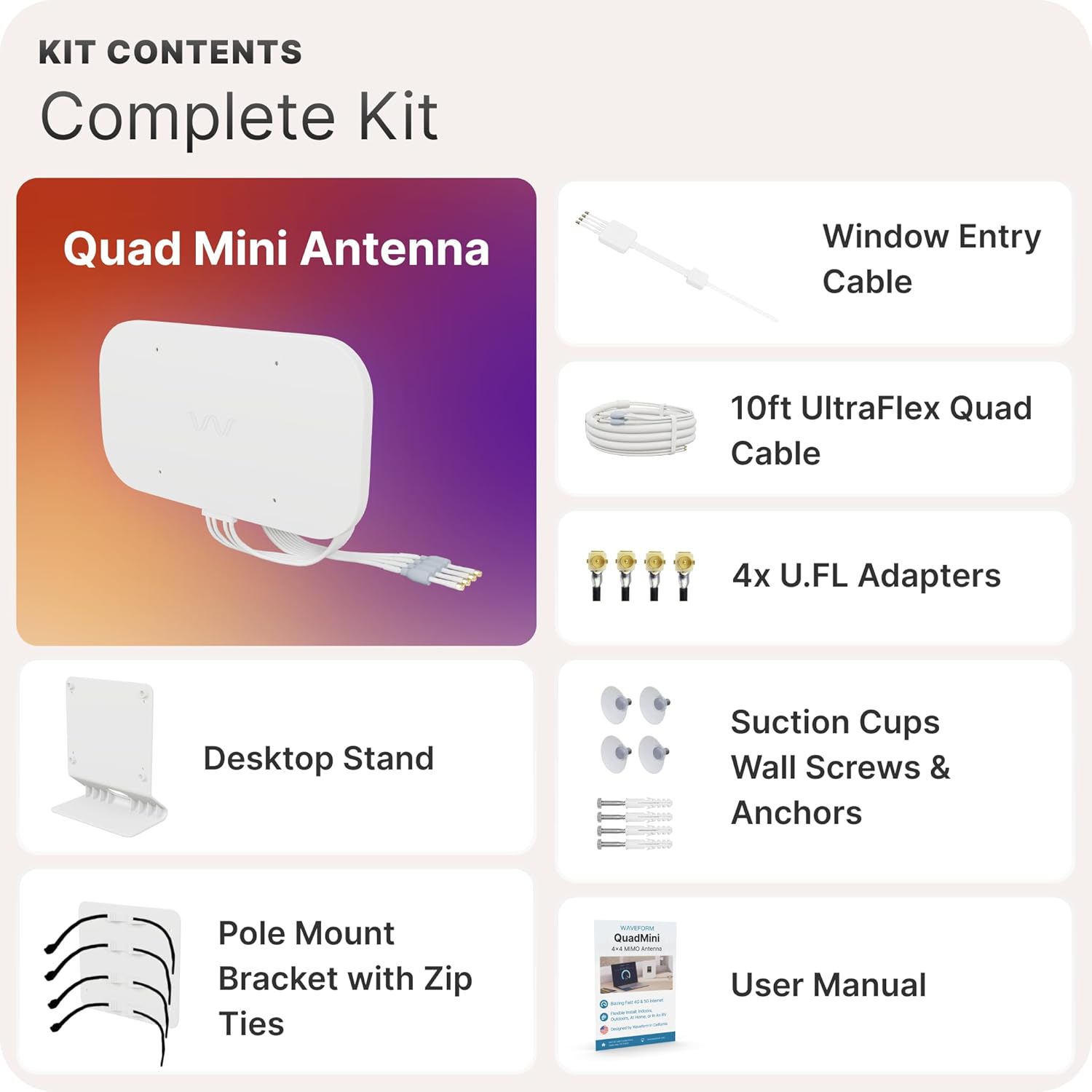
Image: All components included in the Waveform QuadMini kit, laid out on a surface.
ວິດີໂອ: ການແກະກ່ອງ ແລະ ການເຮັດຕໍ່view of the Waveform QuadMini 4x4 MIMO External Antenna, demonstrating the contents and initial setup steps.
ຂໍ້ມູນຈໍາເພາະ
| ຂໍ້ມູນຈໍາເພາະ | ມູນຄ່າ |
|---|---|
| ຂະໜາດສິນຄ້າ | 12.8 x 0.6 x 7.1 ນິ້ວ |
| ນ້ໍາຫນັກລາຍການ | 8.01 ປອນ |
| ຜູ້ຜະລິດ | ຮູບແບບຄື້ນ |
| ໝາຍເລກຕົວແບບ | WF-QMIN-1 |
| ປະເພດເສົາອາກາດ | ວິທະຍຸ |
| ຍີ່ຫໍ້ | ຮູບແບບຄື້ນ |
| ສີ | ສີຂາວ |
| ຈໍານວນຊ່ອງ | 1 |
| impedance | 50 ໂອມ |
| ຂອບເຂດສູງສຸດ | 25 ໄມ |
ການຕິດຕັ້ງແລະການຕິດຕັ້ງ
Proper setup of your QuadMini antenna is crucial for maximizing signal improvement. The kit provides multiple mounting options and accessories to suit various installation scenarios.
1. Mount Your QuadMini Antenna
The QuadMini can be mounted indoors or outdoors. Outdoor mounting generally provides optimal performance, while indoor mounting offers easier installation. Choose the best location based on signal strength and convenience.
- ການຕິດຕັ້ງກາງແຈ້ງ: Use the pole mount adapter or direct wall mounting options. Secure the antenna firmly to a pole or wall on the side of your house that receives the strongest cellular signal.
- Indoor Mounting: Utilize the desktop stand for placement near a window or use the strong suction cups to attach the antenna directly to a window pane.

Image: Diagram illustrating various mounting options for the QuadMini antenna, including wall mount, pole mount, window mount with suction cups, and desktop stand.
2. ແລ່ນສາຍໄຟພາຍໃນ
The kit includes a Window Entry Cable to route the UltraFlex-Quad cables indoors without drilling holes. This thin, flat cable allows you to close a window over it without damaging the cables.
- Connect the UltraFlex-Quad cables from the antenna to one end of the Window Entry Cable.
- Place the flat section of the Window Entry Cable across the window sill and close the window.
- Connect the other end of the Window Entry Cable to the U.FL Adapters, which will then connect to your router.

Image: Diagram showing how to use the Window Entry Cable to route antenna cables through a closed window without drilling.
3. Connect Your 5G Gateway
Connect the U.FL Adapters from the UltraFlex-Quad cables to the external antenna ports on your 5G gateway or router. Ensure all connections are secure. Some gateways may require light modifications to access internal U.FL ports.
After connecting, reboot your 5G gateway or router to allow it to recognize the new external antenna. Monitor your signal strength and data rates to confirm improved performance.

Image: Diagram illustrating the connection of the QuadMini cables via U.FL adapters to a 5G gateway's external antenna ports.
ຄໍາແນະນໍາການດໍາເນີນງານ
The Waveform QuadMini is designed for continuous operation. Once installed and connected, it will passively enhance your router's ability to receive and transmit cellular signals. Its omnidirectional nature means it does not require re-orientation unless your primary cellular tower changes or you move the antenna to a new location.
For optimal performance, ensure your router is powered on and functioning correctly. The antenna works in conjunction with your router's internal modem to improve signal quality and data throughput.
ບໍາລຸງຮັກສາ
The QuadMini antenna requires minimal maintenance. Periodically inspect the antenna and cables for any visible damage or wear, especially if installed outdoors. Ensure all connections remain tight and weatherproof boots are properly seated to prevent moisture ingress.
Clean the antenna's surface with a soft, damp cloth if it accumulates dirt or debris. Avoid using harsh chemicals or abrasive materials that could damage the casing.
ການແກ້ໄຂບັນຫາ
If you experience issues with your QuadMini antenna, consider the following:
- ບໍ່ມີການປັບປຸງສັນຍານ: Verify all cable connections are secure. Ensure your router is configured to use external antennas if applicable. Try repositioning the antenna to a different side of your house or a slightly different height to find a stronger signal.
- ການເຊື່ອມຕໍ່ແບບບໍ່ຢຸດຢັ້ງ: Check for loose cable connections. Ensure the weatherproofing boots are correctly installed to protect against moisture.
- Router Not Recognizing Antenna: Reboot your 5G gateway/router after connecting the antenna. Consult your router's manual for specific external antenna settings.
For further assistance, refer to the detailed manuals provided with your kit or contact Waveform's support team.
ການຮັບປະກັນແລະການສະຫນັບສະຫນູນ
Every Waveform QuadMini comes with a comprehensive manual and step-by-step installation guides. Waveform offers direct access to their support team seven days a week for any installation or performance questions. For specific warranty information, please refer to the documentation included with your product or visit the official Waveform webເວັບໄຊ.
Waveform has helped hundreds of thousands of customers improve their 5G internet experience and brings that expertise to every QuadMini installation.


