1. ບົດແນະນຳ
Thank you for choosing the ABSOSO Single Din Wireless CarPlay Stereo. This manual provides essential information for the proper installation, operation, and maintenance of your new car stereo system. Please read this manual thoroughly before use to ensure optimal performance and safety.
2. ຂໍ້ມູນຄວາມປອດໄພ
- ໃຫ້ໃຊ້ອຸປະກອນຢ່າງມີຄວາມຮັບຜິດຊອບ ແລະ ສອດຄ່ອງກັບກົດໝາຍຈະລາຈອນໃນທ້ອງຖິ່ນສະເໝີ. ການຂັບຂີ່ທີ່ບໍ່ມີສະມາທິສາມາດນໍາໄປສູ່ອຸບັດຕິເຫດໄດ້.
- Do not attempt to install or repair the unit yourself if you are not qualified. Improper installation can cause damage to the unit or your vehicle.
- ໃຫ້ແນ່ໃຈວ່າສາຍໄຟທັງໝົດຖືກເຊື່ອມຕໍ່ຢ່າງຖືກຕ້ອງເພື່ອປ້ອງກັນການເກີດໄຟຟ້າລັດວົງຈອນ ຫຼື ອັນຕະລາຍຈາກໄຟຟ້າ.
- ຮັກສາໜ້າຈໍໃຫ້ສະອາດ ແລະ ບໍ່ມີສິ່ງກີດຂວາງເພື່ອຮັກສາການເບິ່ງເຫັນທີ່ຊັດເຈນ.
- ຫຼີກລ້ຽງການເປີດເຄື່ອງໃຫ້ຢູ່ໃນອຸນຫະພູມທີ່ຮ້າຍແຮງ, ແສງແດດໂດຍກົງເປັນເວລາດົນນານ, ຫຼືຄວາມຊຸ່ມເກີນໄປ.
3. ສິ່ງທີ່ຢູ່ໃນກ່ອງ
ກວດສອບວ່າອົງປະກອບທັງຫມົດແມ່ນມີກ່ອນທີ່ຈະສືບຕໍ່ການຕິດຕັ້ງ:
- Single Din CarPlay Stereo Unit
- Dual USB Cable
- GPS Antenna
- ສາຍກ້ອງຖ່າຍຮູບສຳຮອງ
- Wiring Harness & Wires
- ຊຸດຕິດຕັ້ງ
- ຄູ່ມືຜູ້ໃຊ້ (ເອກະສານນີ້)
4. ຜະລິດຕະພັນເກີນview
The ABSOSO Single Din Wireless CarPlay Stereo features a 10.1-inch rotatable touchscreen designed for enhanced in-car entertainment and navigation. It supports wireless Apple CarPlay and Android Auto, Bluetooth connectivity, AM/FM radio, and includes GPS navigation capabilities.
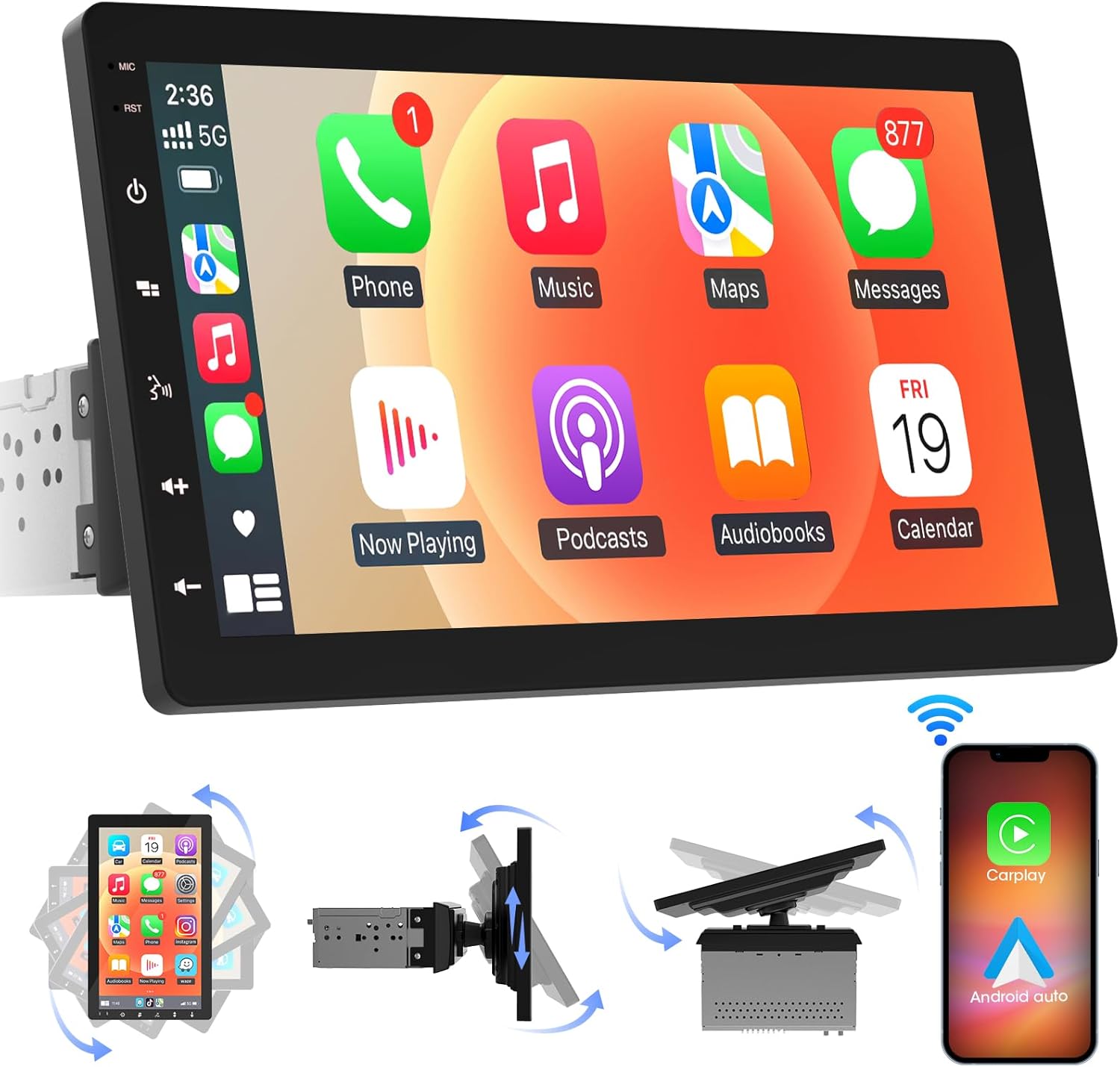
ຮູບພາບ 4.1: ດ້ານຫນ້າ view of the ABSOSO Single Din Wireless CarPlay Stereo displaying the Apple CarPlay interface.
5. ການຕິດຕັ້ງແລະການຕິດຕັ້ງ
This unit is designed for standard single DIN dash openings. Professional installation is recommended to ensure correct wiring and functionality. Refer to the wiring diagram provided with the unit for specific connections.
5.1 ການຕິດຕັ້ງຫນ່ວຍງານ
The modular design allows for flexible installation. The main unit fits into a single DIN slot, and the 10.1-inch screen can be adjusted for optimal viewing.

Image 5.1: Visual comparison of a car dashboard before and after the installation of the ABSOSO 10.1-inch rotatable car stereo, highlighting the integrated appearance.
5.2 ການເຊື່ອມຕໍ່ສາຍໄຟ
Connect the power, speaker, and accessory wires according to your vehicle's wiring harness and the provided diagram. Ensure the backup camera input cable is routed correctly if you plan to use a rearview ກ້ອງຖ່າຍຮູບ.
5.3 ການຕິດຕັ້ງເສົາອາກາດ GPS
ຕິດເສົາອາກາດ GPS ໃນສະຖານທີ່ທີ່ມີຄວາມຊັດເຈນ view of the sky, typically on the dashboard or under the windshield, to ensure accurate satellite reception.
6. ຄໍາແນະນໍາການດໍາເນີນງານ
6.1 ເປີດ/ປິດ
The unit will power on automatically with the vehicle's ignition. To manually power off, press and hold the power button on the unit.
CarPlay ໄຮ້ສາຍ 6.2 ແລະ Android Auto
This stereo supports wireless Apple CarPlay and Android Auto. To connect, enable Bluetooth and Wi-Fi on your smartphone and follow the on-screen prompts to pair with the stereo. Once connected, you can access navigation, music, messages, and voice assistants directly from the stereo's display.

Image 6.1: The ABSOSO car stereo showcasing its wireless connectivity features, including Apple CarPlay, Android Auto, and MirrorLink, with various app interfaces.
6.3 HD Touchscreen Operation
The 10.1-inch HD IPS display offers a responsive touch interface. Navigate through menus and applications by tapping, swiping, and pinching. Five capacitive touch buttons are located along the left edge for quick access to common functions.

Image 6.2: The 10.1-inch screen of the ABSOSO car stereo, emphasizing its HD resolution, sleek touch buttons, and 178-degree viewing angle for optimal clarity.
6.4 ໜ້າທີ່ຂອງ Mirrorlink
Mirrorlink allows you to display your smartphone's screen directly onto the stereo. This feature is useful for viewing navigation, videos, or other content from your phone on a larger display.
6.5 ການເຊື່ອມຕໍ່ Bluetooth
Pair your smartphone via Bluetooth for hands-free calling and wireless audio streaming. Access your phone's contacts and call history directly from the stereo.
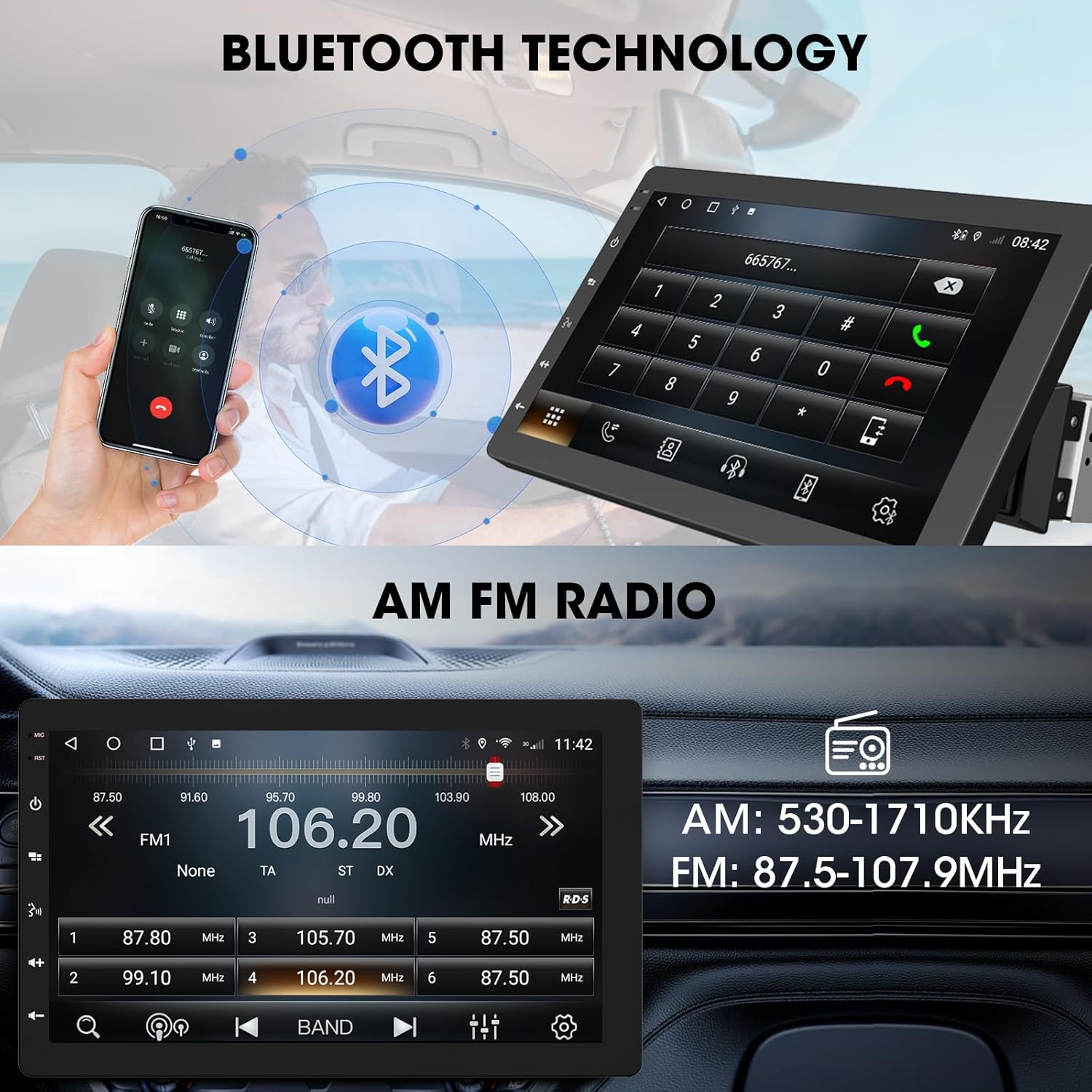
Image 6.3: The ABSOSO car stereo illustrating Bluetooth technology for hands-free calls and the interface for AM/FM radio tuning.
6.6 ວິທະຍຸ FM/AM
Tune into your favorite FM and AM radio stations. The unit features 30 station memory presets for quick access to sports, news, and music.
6.7 GPS Navigation & WiFi Hotspot
The stereo includes built-in GPS navigation with support for offline maps (2G RAM + 64GB ROM storage). Connect to a 2.4 GHz or 5 GHz Wi-Fi hotspot for online navigation and app downloads.
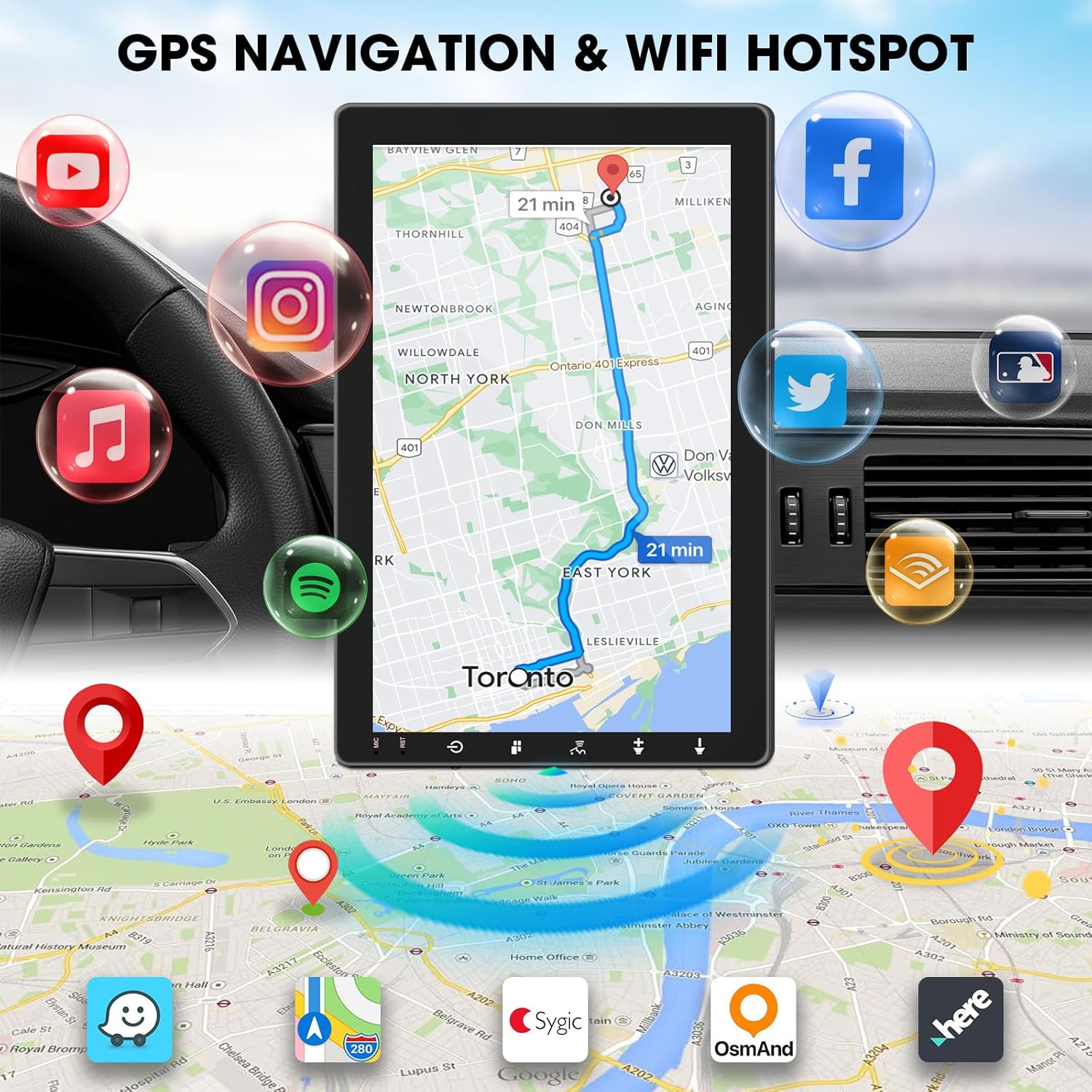
Image 6.4: The ABSOSO car stereo screen showing GPS navigation with a map, surrounded by icons representing various applications accessible via WiFi hotspot.
6.8 Adjustable Floating Screen
The 10.1-inch display is rotatable by 360 degrees and can be adjusted vertically and tilted to achieve optimal viewing angles, reducing glare and improving visibility.
6.9 Sound Tuning
Customize your audio experience with preset equalizer settings. The unit delivers a maximum power output of 200W and includes pre-amp and subwoofer outputs for enhanced sound quality.
6.10 ຂາເຂົ້າກ້ອງຖອຍຫຼັງ
Connect a compatible backup camera (sold separately) to the RCA input. The stereo will automatically display the rearview camera feed when the vehicle is in reverse, aiding in accurate parking and maneuvering.

Image 6.5: Illustration of the backup camera input connection to the ABSOSO car stereo, showing how the camera feed is displayed on the screen when reversing.
7. ບໍາລຸງຮັກສາ
7.1 ການທໍາຄວາມສະອາດຫນ້າຈໍ
ໃຊ້ຜ້າແພທີ່ອ່ອນນຸ່ມ, ບໍ່ມີສານດ່າງເພື່ອເຊັດໜ້າຈໍສຳຜັດຄ່ອຍໆ. ສໍາລັບ smudges stubborn, ເລັກນ້ອຍ dampໃສ່ຜ້າດ້ວຍນ້ໍາຫຼືເຄື່ອງເຮັດຄວາມສະອາດຫນ້າຈໍທີ່ປອດໄພ. ຫຼີກລ້ຽງການວັດສະດຸຂັດຫຼືສານເຄມີທີ່ຮ້າຍແຮງ.
7.2 ການເບິ່ງແຍງທົ່ວໄປ
Keep the unit free from dust and debris. Ensure proper ventilation around the unit to prevent overheating. Do not block any vents or openings.
8. ການແກ້ໄຂບັນຫາ
- ບໍ່ມີພະລັງງານ: ກວດສອບສາຍເຊື່ອມຕໍ່ໄຟຟ້າ ແລະ ຟິວທັງໝົດ. ຮັບປະກັນວ່າລະບົບຈູດໄຟຂອງລົດເປີດຢູ່.
- ບໍ່ມີສຽງ: ຢືນຢັນການເຊື່ອມຕໍ່ລໍາໂພງ. ກວດເບິ່ງລະດັບສຽງ ແລະການຕັ້ງຄ່າປິດສຽງ. ໃຫ້ແນ່ໃຈວ່າເລືອກແຫຼ່ງສຽງທີ່ຖືກຕ້ອງ.
- ບັນຫາການເຊື່ອມຕໍ່ Bluetooth/CarPlay/Android Auto: Ensure your phone's Bluetooth and Wi-Fi are enabled. Try restarting both the stereo and your phone. Forget and re-pair the device.
- ການສູນເສຍສັນຍານ GPS: ໃຫ້ແນ່ໃຈວ່າເສົາອາກາດ GPS ມີຄວາມຊັດເຈນ view ຂອງທ້ອງຟ້າ. ກວດສອບການເຊື່ອມຕໍ່ຂອງເສົາອາກາດ.
- ໜ້າຈໍບໍ່ຕອບສະໜອງ: ລອງຣີສະຕາດໜ່ວຍ. ຖ້າບັນຫາຍັງຄົງຢູ່, ໃຫ້ຕິດຕໍ່ຝ່າຍຊ່ວຍເຫຼືອລູກຄ້າ.
9. ຂໍ້ມູນຈໍາເພາະ
- ຂະໜາດຜະລິດຕະພັນ: 6.4"D x 9.8"W x 5.9"H
- ນ້ໍາຫນັກລາຍການ: 4.73 ປອນ
- ຈໍສະແດງຜົນ: 10.1 Inch HD IPS Touchscreen (1280*720P)
- ການເຊື່ອມຕໍ່: Bluetooth, USB, Wi-Fi (2.4 GHz & 5 GHz)
- ຄຸນນະສົມບັດພິເສດ: 360° Rotatable Floating Touchscreen, Wireless Android Auto, Apple CarPlay, Mirrorlink, GPS Navigation (Online/Offline Maps), AM/FM Radio, AV Input, Rearview Camera Input, USB Charging, Voice Control, Preset EQ, Video Output, Amplifier/Subwoofer Output
- ໜ່ວຍຄວາມຈຳ: ແຣມ 2G + ຣອມ 64GB
- ໂModeດອອກສຽງ: ສະເຕຣິໂອ
- ການຕັ້ງຄ່າຊ່ອງສຽງອ້ອມຮອບ: 4
- ການເຂົ້າລະຫັດວິດີໂອ: H.264, H.265/HEVC
10. ການຮັບປະກັນແລະການສະຫນັບສະຫນູນ
For warranty information and technical support, please refer to the documentation included with your purchase or contact ABSOSO customer service directly. Keep your purchase receipt as proof of purchase for any warranty claims.
For further assistance, visit the official ABSOSO webເວັບໄຊ ຫຼືຕິດຕໍ່ຊ່ອງທາງການຊ່ວຍເຫຼືອຂອງເຂົາເຈົ້າ.


