1. ບົດແນະນຳ
The HIKMICRO ECO-V Handheld Thermography Camera is a versatile thermal imaging device designed for various professional applications. It offers thermal, bi-spectrum image fusion, and visible light modes to meet diverse business needs. This manual provides essential information for the safe and effective operation of your ECO-V camera.
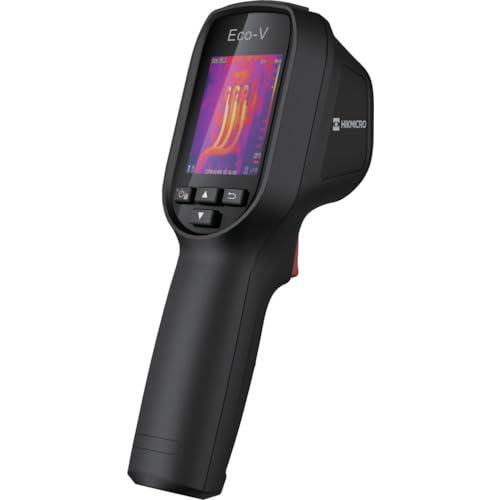
Figure 1: HIKMICRO ECO-V Handheld Thermography Camera
2. ຂໍ້ມູນຄວາມປອດໄພ
ກະລຸນາອ່ານ ແລະ ເຂົ້າໃຈຄຳເຕືອນ ແລະ ຄຳແນະນຳດ້ານຄວາມປອດໄພທັງໝົດກ່ອນທີ່ຈະໃຊ້ຜະລິດຕະພັນນີ້. ການບໍ່ປະຕິບັດຕາມຄຳແນະນຳເຫຼົ່ານີ້ອາດຈະເຮັດໃຫ້ເກີດໄຟຟ້າຊັອດ, ໄຟໄໝ້ ຫຼື ການບາດເຈັບສາຫັດ.
ຂໍ້ຄວນລະວັງຄວາມປອດໄພທົ່ວໄປ
- ຫ້າມໃຊ້ງານອຸປະກອນໃນບັນຍາກາດທີ່ລະເບີດໄດ້ ເຊັ່ນ: ໃນບ່ອນທີ່ມີຂອງແຫຼວໄວໄຟ, ອາຍແກັສ ຫຼື ຝຸ່ນ.
- ຮັກສາອຸປະກອນໃຫ້ຫ່າງຈາກນ້ໍາແລະຂອງແຫຼວອື່ນໆ.
- ຢ່າພະຍາຍາມເປີດ ຫຼືແກ້ໄຂອຸປະກອນ. ອ້າງອີງການບໍລິການທັງໝົດໃຫ້ກັບບຸກຄະລາກອນທີ່ມີຄຸນວຸດທິ.
- Use only HIKMICRO-approved accessories.
- Avoid direct exposure of the thermal lens to strong light sources (e.g., sun, laser) as this may damage the detector.
ຄວາມປອດໄພຫມໍ້ໄຟ
- The device contains a built-in Lithium-ion battery. Do not expose the battery to excessive heat, direct sunlight, or fire.
- ຫ້າມເຈາະ, ເປີດ ຫຼື ຖອດແບັດເຕີຣີອອກ.
- Charge the battery only with the provided USB cable and a compatible power adapter.
- ຖິ້ມແບດເຕີລີ່ຕາມກົດລະບຽບທ້ອງຖິ່ນ.
3. ເນື້ອໃນຊຸດ
The HIKMICRO ECO-V package includes the following items:
- HIKMICRO Handheld Thermography Camera ECO-V
- ສາຍ USB Type-C
- Quick Start Guide (not explicitly mentioned but standard)
- Calibration Certificate (not explicitly mentioned but standard)
Video 3.1: Unboxing the HIKMICRO M-Series (similar to ECO-V, showing typical package contents and device appearance).
4. ອຸປະກອນເກີນview
Familiarize yourself with the physical components and interface of your HIKMICRO ECO-V camera.
ຮູບລັກສະນະແລະການໂຕ້ຕອບ
The ECO-V features a compact, ergonomic design for comfortable handheld use. Key components include the thermal lens, optical lens, laser indicator, white light, trigger button, navigation buttons, and a 2.4-inch display.
Video 4.1: This video demonstrates the physical appearance and interface of a HIKMICRO M-Series camera, which shares similar design elements and interface components with the ECO-V.
5. ຕັ້ງຄ່າ
5.1 ການສາກອຸປະກອນ
Before initial use, fully charge the device's built-in Lithium-ion battery.
- ເຊື່ອມຕໍ່ສາຍ USB Type-C ທີ່ໃຫ້ມາກັບພອດ USB ຂອງອຸປະກອນ.
- Connect the other end of the USB cable to a compatible power adapter (5V2A recommended) and plug it into a power outlet.
- The charging indicator will show red during charging and turn green when fully charged.
Video 5.1: This HIKMICRO ECO operation video demonstrates the charging process for the device.
5.2 ເປີດ/ປິດ
To power on the device, press and hold the power button for more than 6 seconds. To power off, press and hold the power button again until the device shuts down.
Video 5.2: This HIKMICRO ECO operation video demonstrates how to power on the device.
6. ຄໍາແນະນໍາການດໍາເນີນງານ
This section covers the basic and advanced operational features of your ECO-V camera.
6.1 Image Capture and Display
To capture a thermal image, aim the camera at the target and press the trigger button. The captured image will be saved to the internal EMMC storage. To view saved images, navigate to the 'Albums' section in the menu.
Video 6.1: This HIKMICRO ECO operation video demonstrates image capture and viewing saved snapshots.
6.2 ເຄື່ອງມືວັດແທກ
The ECO-V provides various measurement tools to analyze thermal images:
- ຈຸດຮ້ອນ: Automatically identifies and displays the highest temperature point.
- ຈຸດໜາວ: Automatically identifies and displays the lowest temperature point.
- ຈຸດສູນກາງ: ສະແດງອຸນຫະພູມຢູ່ກາງໜ້າຈໍ.
Video 6.2: This HIKMICRO ECO operation video demonstrates the use of measurement tools like hot, cold, and center spots.
6.3 SuperIR Image Enhancement
SuperIR technology enhances the thermal image resolution, providing more detail for analysis. You can enable or disable this feature in the settings menu.
Video 6.3: This HIKMICRO ECO operation video demonstrates how to enable and use the SuperIR image enhancement feature.
6.4 ໂໝດຮູບພາບ
The ECO-V supports multiple image modes for different inspection needs:
- ຄວາມຮ້ອນ: Displays only the thermal image.
- ຟິວຊັນ: Blends the thermal and visible light images for enhanced detail.
- PIP (ພາບໃນຮູບ): Overlays a smaller thermal image on a visible light image.
- Optical: Displays only the visible light image.
Video 6.4: This HIKMICRO B10S product video demonstrates switching between different image modes, including Thermal, Fusion, PIP, and Optical.
6.5 Parallax Correction
When using fusion modes, adjust the parallax correction based on the distance to the target to ensure accurate alignment between thermal and visible images.
Video 6.5: This HIKMICRO B10S product video demonstrates how to adjust parallax correction for accurate image fusion.
6.6 Palette Adjustment
Select from various color palettes (e.g., White Hot, Black Hot, Rainbow, Ironbow) to visualize temperature differences more effectively. This can be adjusted in the settings menu.
Video 6.6: This HIKMICRO B10S product video demonstrates how to adjust color palettes.
6.7 Emissivity and Distance Settings
For accurate temperature measurements, it is crucial to set the correct emissivity value for the target material and the distance to the target. Refer to the general emissivity reference table in the specifications section.
Video 6.7: This HIKMICRO ECO operation video demonstrates setting emissivity and distance for accurate temperature readings.
6.8 ຕົວຊີ້ເລເຊີ
The built-in laser pointer helps to precisely identify the measurement target. It can be enabled or disabled in the settings menu.
Video 6.8: This HIKMICRO ECO operation video demonstrates how to enable and use the laser pointer.
6.9 ປຸກອຸນຫະພູມສູງ
Set a high temperature alarm threshold to be notified when temperatures exceed a predefined limit. This feature is useful for identifying potential overheating issues.
Video 6.9: This HIKMICRO B10S product video demonstrates how to set a high temperature alarm.
6.10 Hotspot Connection
The ECO-V can connect to a mobile device via Wi-Fi hotspot for live viewing and data transfer. Enable the Wi-Fi hotspot function in the device settings and connect your mobile device.
Video 6.10: This HIKMICRO M-Series video demonstrates how to establish a hotspot connection with a mobile device.
6.11 HIKMICRO Viewer App Connection
ດາວໂຫລດ HIKMICRO Viewer app on your mobile device to access live view, manage images and videos, and generate reports. Connect the device to your phone via Wi-Fi.
Video 6.11: This HIKMICRO Pocket series video demonstrates connecting the device to the HIKMICRO Viewer app for various functions.
7. ບໍາລຸງຮັກສາ
7.1 ການທໍາຄວາມສະອາດ
- Wipe the device body with a soft, damp ຜ້າ. ຢ່າໃຊ້ເຄື່ອງເຮັດຄວາມສະອາດຂັດຫຼືສານລະລາຍ.
- Gently clean the lenses with a lens cleaning cloth. Avoid touching the lens surface with bare hands.
7.2 ການເກັບຮັກສາ
- ເກັບຮັກສາອຸປະກອນໄວ້ໃນບ່ອນທີ່ເຢັນ, ແຫ້ງ, ຫ່າງຈາກແສງແດດໂດຍກົງ ແລະອຸນຫະພູມທີ່ຮ້າຍກາດ.
- ຖ້າເກັບຮັກສາໄວ້ເປັນເວລາດົນ, ໃຫ້ຮັບປະກັນວ່າແບັດເຕີຣີໄດ້ຖືກສາກໄຟບາງສ່ວນແລ້ວ (ປະມານ 50%) ແລະ ສາກໄຟຄືນໃໝ່ທຸກໆສອງສາມເດືອນເພື່ອຮັກສາສຸຂະພາບຂອງແບັດເຕີຣີ.
8. ການແກ້ໄຂບັນຫາ
If you encounter issues with your HIKMICRO ECO-V, refer to the following common problems and solutions:
| ບັນຫາ | ສາເຫດທີ່ເປັນໄປໄດ້ | ການແກ້ໄຂ |
|---|---|---|
| ອຸປະກອນບໍ່ເປີດ | ຫມໍ້ໄຟຕ່ໍາ; ອຸປະກອນຜິດປົກກະຕິ | Charge the battery; Contact support |
| ການອ່ານອຸນຫະພູມບໍ່ຖືກຕ້ອງ | Incorrect emissivity/distance settings; Dirty lens | Adjust emissivity/distance; Clean the lens |
| Cannot connect to Wi-Fi hotspot | Incorrect password; Hotspot not enabled | Verify password; Enable hotspot in settings |
9. ຂໍ້ມູນຈໍາເພາະ
Detailed technical specifications for the HIKMICRO ECO-V camera:
| ຄຸນສົມບັດ | ຂໍ້ມູນຈໍາເພາະ |
|---|---|
| ຕົວແບບ | ECO-V |
| ຂອບເຂດອຸນຫະພູມການວັດແທກ | -20°C ເຖິງ 550°C |
| Minimum Temperature Display | 0.1°C |
| ພາກສະຫນາມຂອງ View (FOV) | 50° × 50° |
| ຄວາມລະອຽດທາງພື້ນທີ່ (IFOV) | 8.89 mr |
| ຊ່ວງອຸນຫະພູມປະຕິບັດການ | -10°C ເຖິງ 50°C |
| ຊ່ວງອຸນຫະພູມການເກັບຮັກສາ | -40°C ເຖິງ 70°C |
| ຂະຫນາດຈໍສະແດງຜົນ | 2.4 ນິ້ວ |
| ແຫຼ່ງພະລັງງານ | ແບດເຕີລີ່ Lithium-ion ໃນຕົວ |
| ເວລາປະຕິບັດການຫມໍ້ໄຟ | 8 ຊົ່ວໂມງ |
| Wi-Fi | ບໍ່ມີໃຫ້ |
| ລະດັບການປົກປ້ອງ | IP54 |
| ການໂຕ້ຕອບ | USB Type-C |
| Pixel Pitch | 12μm |
| Measuring Wavelength | 7.5-14μm |
| NETD | < 40 mK (@ 25°C, F#=1.0) |
| ຄວາມຍາວໂຟກັສ | 1.35 ມມ |
| ຮູຮັບແສງ | F1.0 |
| ໄລຍະຫ່າງຈຸດສຸມຕ່ ຳ ສຸດ | 0.1m (0.33ft) |
| ອັດຕາເຟຣມ | 25Hz |
| ລະບົບຈຸດສຸມ | ສຸມໃສ່ບໍ່ເສຍຄ່າ |
| ສື່ບັນທຶກ | EMMC (4GB) |
| ຄວາມອາດສາມາດເກັບຮັກສາຮູບພາບ | 30,000 ຮູບ |
| ຮູບພາບ File ຮູບແບບ | BMP (includes measurement data) |
| ຄວາມລະອຽດຮູບພາບຄວາມຮ້ອນ | 96×96 (9,216 pixels) |
| Visible Image Resolution | 640×480 |
| ຄວາມຖືກຕ້ອງ | ±2°C or ±2% (whichever is greater), when ambient temperature is 15°C to 35°C and target temperature is 0°C or above. |
| ວັດສະດຸ | Polycarbonate, ຢາງ ABS |
| ນ້ຳໜັກ | 360g |
General Emissivity Reference
| ວັດສະດຸ | ການເຜີຍແຜ່ |
|---|---|
| ຜິວຫນັງຂອງມະນຸດ | 0.98 |
| PCB | 0.91 |
| ຊີມັງຊີມັງ | 0.95 |
| ເຊລາມິກ | 0.92 |
| ຢາງ | 0.95 |
| ສີ | 0.93 |
| ໄມ້ | 0.85 |
| ດິນຈີ່ | 0.96 |
| ຊາຍ | 0.90 |
| ດິນ | 0.92 |
| ຝ້າຍ | 0.98 |
| ແຜ່ນເຈ້ຍ | 0.90 |
| ເຈ້ຍຂາວ | 0.96 |
| ນ້ໍາ | 0.96 |
10. ການຮັບປະກັນແລະການສະຫນັບສະຫນູນ
HIKMICRO products are covered by a limited warranty. For detailed warranty terms and conditions, please refer to the official HIKMICRO webສະຖານທີ່ຫຼືຕິດຕໍ່ຜູ້ຈັດຈໍາຫນ່າຍທ້ອງຖິ່ນຂອງທ່ານ.
ການຊ່ວຍເຫຼືອລູກຄ້າ
If you require technical assistance, troubleshooting, or have questions about your ECO-V camera, please contact HIKMICRO customer support through their official webເວັບໄຊ ຫຼືຂໍ້ມູນການຕິດຕໍ່ທີ່ສະໜອງໃຫ້ຢູ່ໃນການຫຸ້ມຫໍ່ຜະລິດຕະພັນຂອງທ່ານ.


