1. ບົດແນະນຳ
This manual provides detailed instructions for the installation, operation, and maintenance of your ABSOSO Single Din Car Radio Receiver. Please read this manual thoroughly before using the product to ensure proper function and to prevent damage. Keep this manual for future reference.
2. ສິ່ງທີ່ຢູ່ໃນກ່ອງ
- Single Din Car Audio Unit
- Wireless IR Remote Control
- Mounting Kits & Harness
- ຄູ່ມືຜູ້ໃຊ້ (ເອກະສານນີ້)
3. ຄຸນລັກສະນະຂອງຜະລິດຕະພັນ
The ABSOSO Single Din Car Radio Receiver offers a range of features designed to enhance your in-car audio experience:
- Bluetooth Audio & Calling: Connect your smartphone for hands-free calls and music streaming from apps like Spotify and Pandora.
- ວິທະຍຸ AM/FM: Tune into 30 preset AM/FM radio stations with automatic and manual search options for news, weather, and music.
- ຜົນຜະລິດພະລັງງານສູງ: Delivers 4 channels x 75 watts (300W total) built-in power audio amplifier for robust sound.
- LCD Display & Physical Buttons: Features an HD digital LCD screen and illuminated buttons/knob for comfortable viewing and easy control.
- Multiple Music Modes Input: Supports 3.5mm AUX-input, SD card, and dual USB ports (one for up to 64GB flash drive, the other for 2.1A quick charge).
- ການສະຫນັບສະຫນູນຮູບແບບສຽງ: Compatible with MP3, WAV, and WMA music formats.
- ID3 Tag ຈໍສະແດງຜົນ: Shows additional data like title and artist for audio files.
- Preset EQ Configuration: Access various music styles such as Rock, POP, and Jazz for high-quality sound.
4. ການຕິດຕັ້ງແລະການຕິດຕັ້ງ
Proper installation is crucial for optimal performance. It is recommended to have this unit installed by a qualified professional.
4.1. ແຜນວາດສາຍໄຟ
Refer to the diagram below for correct power and speaker connections. Ensure all connections are secure to prevent short circuits or damage to the unit and vehicle's electrical system.

Figure 4.1: Wire Connection Diagram. This diagram illustrates the power cable connections (A) including +12V Constant Power Supply, Ground Wire, +12V Ignition Switch, and Antenna. It also shows the speaker cable connections (B) for 4-channel speaker output, including Rear Right, Front Right, Front Left, and Rear Left speakers. The rear panel of the unit is shown with Radio Antenna, SUB, Audio RCA, External Mic, Fuse (15A), and Power port.
4.2. ການຕິດຕັ້ງ
The unit is designed for a standard single DIN opening. Secure the unit using the provided mounting kits. Ensure adequate ventilation around the unit to prevent overheating.

Figure 4.2: Rear Panel with RCA Outputs. This image displays the rear of the car radio, showing the various ports including RCA outputs for subwoofer (SUB-1, SUB-2), rear left (R-L), rear right (R-R), front left (F-L), and front right (F-R) channels, indicating its 300W high power and pre-amp ຄວາມສາມາດ.
5. ຄໍາແນະນໍາການດໍາເນີນງານ
5.1. ການຄວບຄຸມທົ່ວໄປ
The front panel features an LCD display, a rotary knob, and various buttons for control. The rotary knob typically controls volume and can be pressed for menu selections. Buttons are illuminated for visibility.

Figure 5.1: LCD Display and Rotary Knob. This image highlights the digital LCD screen and the central rotary knob, which features dynamic color-changing illumination, providing a comfortable viewing experience and matching various car interior styles.
5.2. ການຈັບຄູ່ Bluetooth
ເພື່ອເຊື່ອມຕໍ່ອຸປະກອນມືຖືຂອງທ່ານຜ່ານ Bluetooth:
- ໃຫ້ແນ່ໃຈວ່າ Bluetooth ຖືກເປີດໃຊ້ງານຢູ່ໃນອຸປະກອນມືຖືຂອງທ່ານ.
- Select the Bluetooth source on the car radio. The display will show 'BT'.
- ຊອກຫາ available devices on your mobile phone and select 'ABSOSO Car Audio' (or similar name).
- ເມື່ອຈັບຄູ່ແລ້ວ, ທ່ານສາມາດໂທແບບແຮນຟຣີ ແລະຖ່າຍທອດສຽງໄດ້.

Figure 5.2: Hands-Free Calling & Wireless Streaming. This image shows the car radio installed in a dashboard, with a smartphone displaying music playback, illustrating the seamless Bluetooth connectivity for hands-free calls and wireless music streaming.
5.3. ການໃຊ້ງານວິທະຍຸ AM/FM
Press the 'BAND' button to switch between AM and FM bands. Use the seek buttons to automatically search for stations or manually tune using the rotary knob.
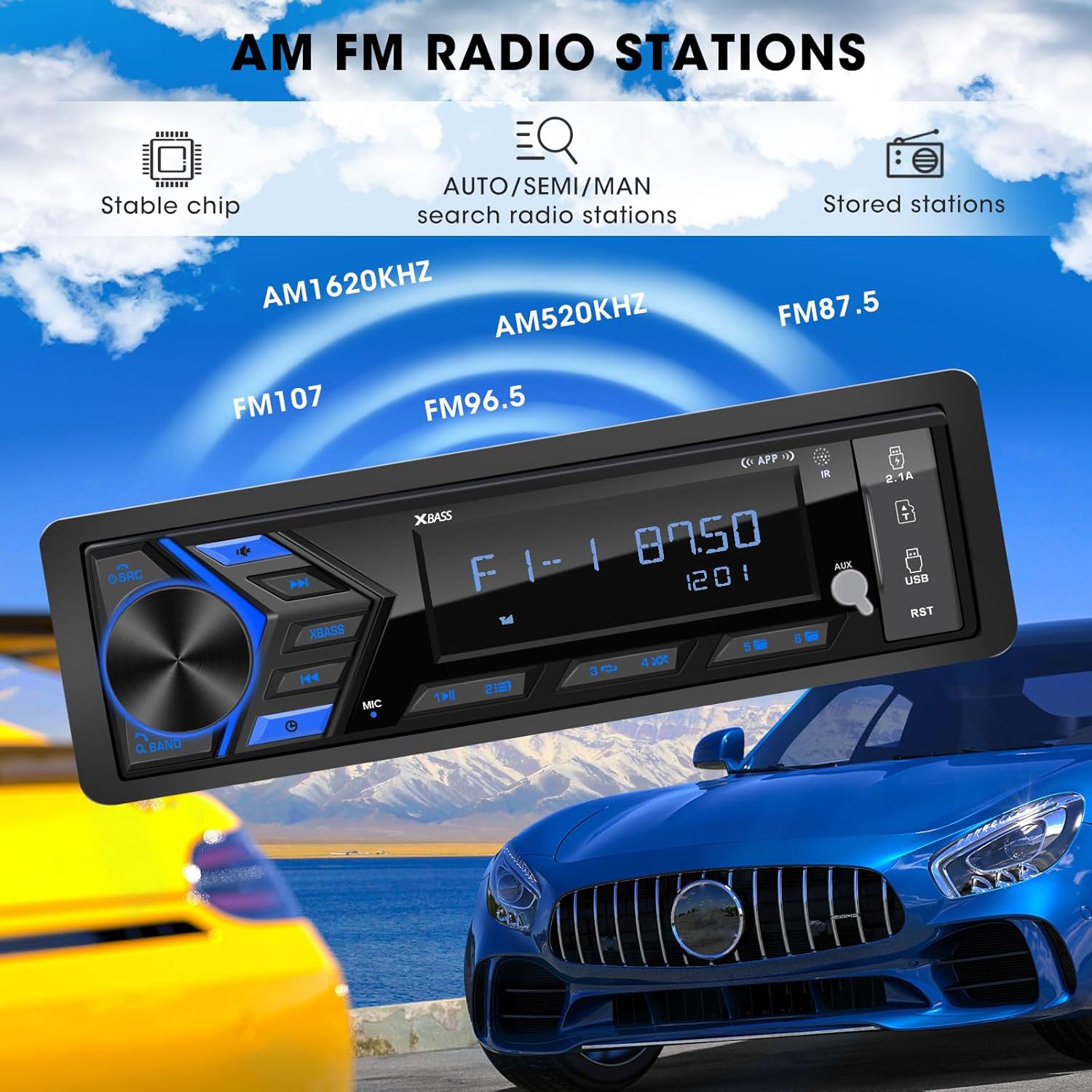
Figure 5.3: AM/FM Radio Stations. This image shows the car radio displaying a radio frequency (FM 87.50), with visual cues indicating its capability to receive AM (520KHz, 1620KHz) and FM (96.5, 107) radio stations, supported by a stable chip for auto/semi/manual search and stored stations.
5.4. Media Playback (USB, SD, AUX)
Insert a USB flash drive or SD card into the respective ports. The unit will automatically switch to the corresponding mode and begin playback. Connect external audio devices via the 3.5mm AUX-input.

Figure 5.4: SD USB AUX-IN for Media Play. This image focuses on the front panel of the car radio, clearly labeling the 3.5mm Aux-in, 32GB SD Port, 64GB USB Flash Drive port, and a 2.1A Fast Charge USB port, indicating support for MP3/WAV/WMA music formats.
5.5. ການຕັ້ງຄ່າສຽງ (EQ)
Access the equalizer settings through the menu to adjust audio output. Choose from preset EQ modes (Rock, POP, Jazz) or customize bass and treble levels to your preference.

Figure 5.5: Customizable EQ. This image shows the car radio's display with 'X-BASS ON' and 'BASS' settings, accompanied by a vibrant graphic of equalizer bars, illustrating the customizable sound settings available.
6. ບໍາລຸງຮັກສາ
To ensure the longevity and optimal performance of your car radio, follow these maintenance guidelines:
- ທໍາຄວາມສະອາດ: Use a soft, dry cloth to clean the unit's surface. For stubborn dirt, slightly dampen ຜ້າທີ່ມີນ້ໍາ. ຫຼີກເວັ້ນການໃຊ້ສານເຄມີທີ່ຮຸນແຮງ, ສານລະລາຍ, ຫຼືເຄື່ອງເຮັດຄວາມສະອາດຂັດ.
- ການປ້ອງກັນຂີ້ຝຸ່ນ: Keep the unit free from dust and debris, especially around the ports and ventilation areas.
- ອຸນຫະພູມ: ຫຼີກລ້ຽງການເປີດອຸນຫະພູມທີ່ຮ້າຍແຮງ, ແສງແດດໂດຍກົງສໍາລັບໄລຍະເວລາດົນນານ, ຫຼືຄວາມຊຸ່ມຊື່ນສູງ.
- ການເຊື່ອມຕໍ່: ກວດເບິ່ງທຸກສາຍເຊື່ອມຕໍ່ແຕ່ລະໄລຍະເພື່ອຮັບປະກັນວ່າພວກມັນປອດໄພ ແລະ ບໍ່ມີການກັດກ່ອນ.
7. ການແກ້ໄຂບັນຫາ
If you encounter issues with your ABSOSO Car Radio Receiver, refer to the table below for common problems and their solutions:
| ບັນຫາ | ສາເຫດທີ່ເປັນໄປໄດ້ | ການແກ້ໄຂ |
|---|---|---|
| ບໍ່ມີພະລັງງານ | ຟິວເປົ່າ; ສາຍໄຟບໍ່ຖືກຕ້ອງ; ການເຊື່ອມຕໍ່ພະລັງງານວ່າງ. | Check and replace fuse (15A); Verify wiring according to diagram; Secure power connections. |
| ບໍ່ມີສຽງ | Volume too low; Mute function active; Incorrect speaker wiring; Faulty speakers. | Increase volume; Deactivate mute; Check speaker connections; Test with different speakers. |
| Bluetooth ບໍ່ເຊື່ອມຕໍ່ | ບໍ່ໄດ້ເປີດໃຊ້ Bluetooth ໃນອຸປະກອນ; ເຄື່ອງບໍ່ໄດ້ຢູ່ໃນໂໝດຈັບຄູ່; ການລົບກວນ. | Ensure Bluetooth is on; Put unit in pairing mode; Move closer to unit; Restart both devices. |
| ການຮັບວິທະຍຸບໍ່ດີ | Antenna not connected; Weak signal area; Interference. | Check antenna connection; Try in a different location; Avoid strong electromagnetic fields. |
| USB/SD ບໍ່ຫຼິ້ນ | ບໍ່ຮອງຮັບ file ຮູບແບບ; ສື່ທີ່ເສຍຫາຍ; ໃສ່ບໍ່ຖືກຕ້ອງ. | ຮັບປະກັນ files are MP3/WAV/WMA; Try different media; Reinsert or reformat media. |
8. ຂໍ້ມູນຈໍາເພາະ
| ຄຸນສົມບັດ | ຂໍ້ມູນຈໍາເພາະ |
|---|---|
| ຂະໜາດສິນຄ້າ | 1.9"D x 7.4"W x 4.5"H (4.8 x 18.8 x 11.4 cm) |
| ນ້ໍາຫນັກລາຍການ | 1.28 ປອນ (0.58 ກິໂລ) |
| ພະລັງງານຜົນຜະລິດ | 300 ວັດ (ສູງສຸດ) |
| ການຕັ້ງຄ່າຊ່ອງສຽງອ້ອມຮອບ | 4 ຊ່ອງ |
| ຮູບແບບການອອກສຽງ | ສະເຕຣິໂອ |
| ເຕັກໂນໂລຊີການເຊື່ອມຕໍ່ | ຕົວຊ່ວຍ, Bluetooth, USB |
| ອຸປະກອນທີ່ເຂົ້າກັນໄດ້ | Amplifier, MP3, Smartphone, Speaker |
| ໝາຍເລກຕົວແບບ | Single Din Car Radio Receiver |
| ຜູ້ຜະລິດ | ABSOSO |
9. ການຮັບປະກັນແລະການສະຫນັບສະຫນູນ
For warranty information and technical support, please refer to the documentation included with your purchase or contact ABSOSO customer service through the retailer where the product was purchased. Keep your proof of purchase for warranty claims.


