1. ບົດແນະນຳ
Thank you for choosing the XPR3SS HCT378 3-Outlet Garden Automatic Irrigation Water Timer. This device is designed to simplify your garden watering tasks by providing precise and programmable control over your irrigation system. With its independent zone control and user-friendly interface, you can ensure your plants receive optimal hydration with minimal effort.
This manual provides detailed instructions for the setup, operation, maintenance, and troubleshooting of your new water timer. Please read it thoroughly before use to ensure proper functionality and longevity of the product.
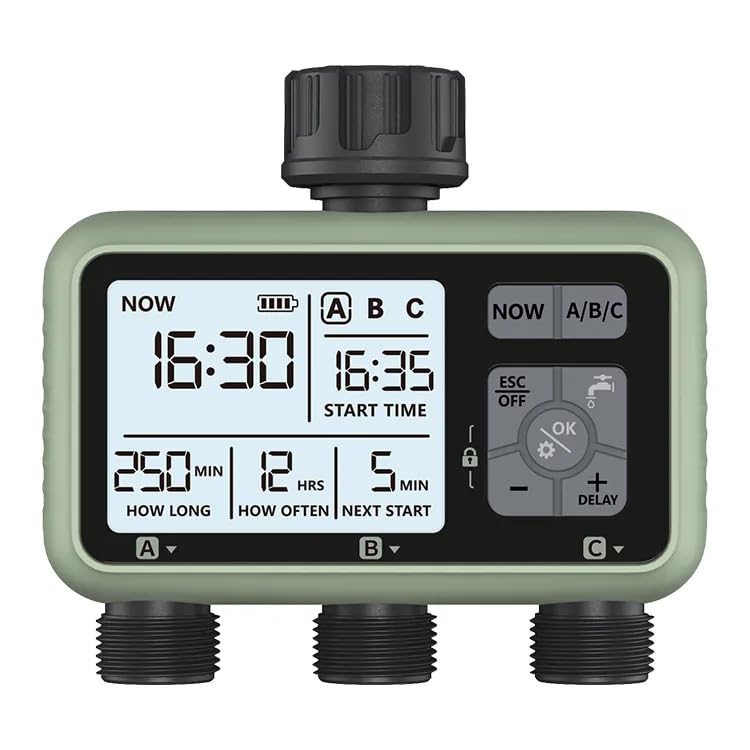
Figure 1: XPR3SS HCT378 Water Timer
ຮູບພາບນີ້ສະແດງໃຫ້ເຫັນທາງຫນ້າ view of the XPR3SS HCT378 water timer, highlighting its large LCD screen and control buttons. The three independent outlets are visible at the bottom.
2. ຂໍ້ມູນຄວາມປອດໄພ
- Do not immerse the timer in water. The unit is IPX5 water-resistant, meaning it can withstand water jets, but not submersion.
- Use only 1.5V 'AA' alkaline batteries. Do not mix old and new batteries, or different types of batteries.
- ໃຫ້ແນ່ໃຈວ່າການເຊື່ອມຕໍ່ທັງຫມົດແຫນ້ນແຫນ້ນເພື່ອປ້ອງກັນການຮົ່ວໄຫຼ.
- Do not expose the timer to extreme temperatures (below 1°C or above 45°C).
- Keep out of reach of children to prevent accidental operation. The child lock feature should be utilized.
- Disconnect the timer from the tap and drain it before freezing temperatures to prevent damage.
3. ຄຸນລັກສະນະຂອງຜະລິດຕະພັນ
- 3 Independent Outlets: Allows for separate watering schedules for different garden zones (A, B, C).
- Large LCD with Backlight: Provides clear visibility of settings and current status, even in low light.
- Programmable Watering: Set watering duration from 1 second to 99 minutes, and frequency from 1 hour to 15 days.
- ການຫົດນ້ ຳ ຄູ່ມື: Initiate immediate watering without affecting programmed schedules.
- ຟັງຊັນການລ່າຊ້າຝົນ: Postpone watering for a set period (e.g., 24, 48, 72 hours) to conserve water during rainy weather.
- ຄຸນນະສົມບັດການລັອກເດັກນ້ອຍ: ປ້ອງກັນການປ່ຽນແປງການຕັ້ງຄ່າໂດຍບັງເອີນ.
- ຕົວຊີ້ບອກແບັດເຕີຣີຕໍ່າ: ແຈ້ງເຕືອນທ່ານເມື່ອແບັດເຕີຣີຕ້ອງການປ່ຽນແທນ.
- ການກໍ່ສ້າງທົນທານ: Made with ABS+Nylon+Brass materials for longevity.
- IPX5 Waterproof Level: Resistant to water splashes and jets.
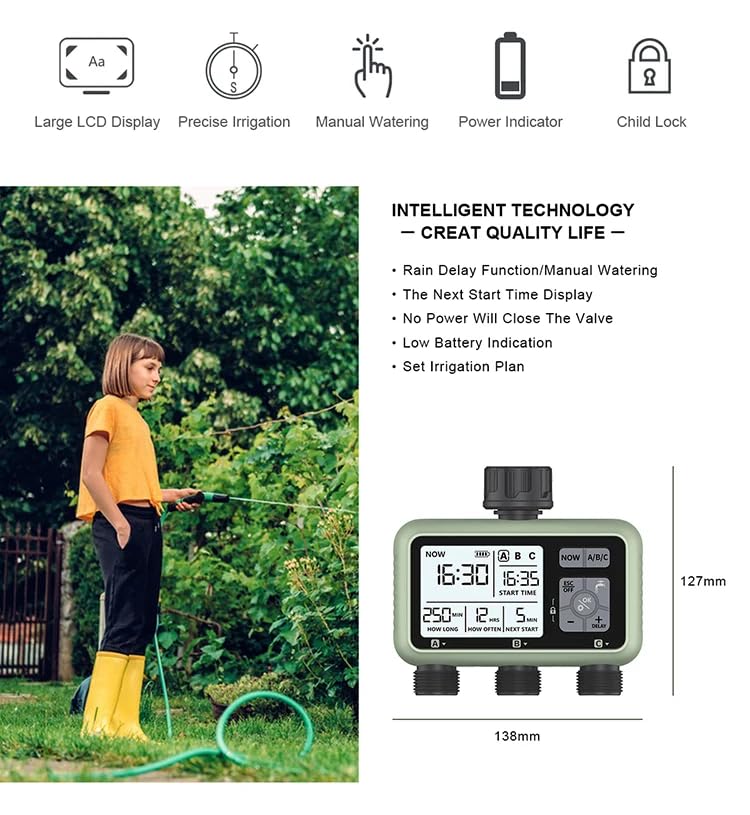
ຮູບທີ 2: ລັກສະນະທີ່ສໍາຄັນຫຼາຍກວ່າview
This diagram illustrates the main features of the XPR3SS HCT378 water timer, including its large LCD display, precise irrigation capabilities, manual watering option, battery indicator, and child lock function. Product dimensions are also shown.
4. ເນື້ອໃນຊຸດ
ເມື່ອເປີດຊຸດ, ກະລຸນາຮັບປະກັນວ່າມີລາຍການຕໍ່ໄປນີ້ທັງໝົດ:
- 1 x XPR3SS HCT378 Water Timer
- 1 x ຄູ່ມືຜູ້ໃຊ້ (ເອກະສານນີ້)
- Accessories (e.g., adapters for different tap sizes)
- ບັດຮັບປະກັນ
- Note: Wifi Gateway is not included with this model (HCT378) as per product description, but listed in generic "Included Components". Batteries are NOT included.
5. ຜະລິດຕະພັນເກີນview ແລະອົງປະກອບ
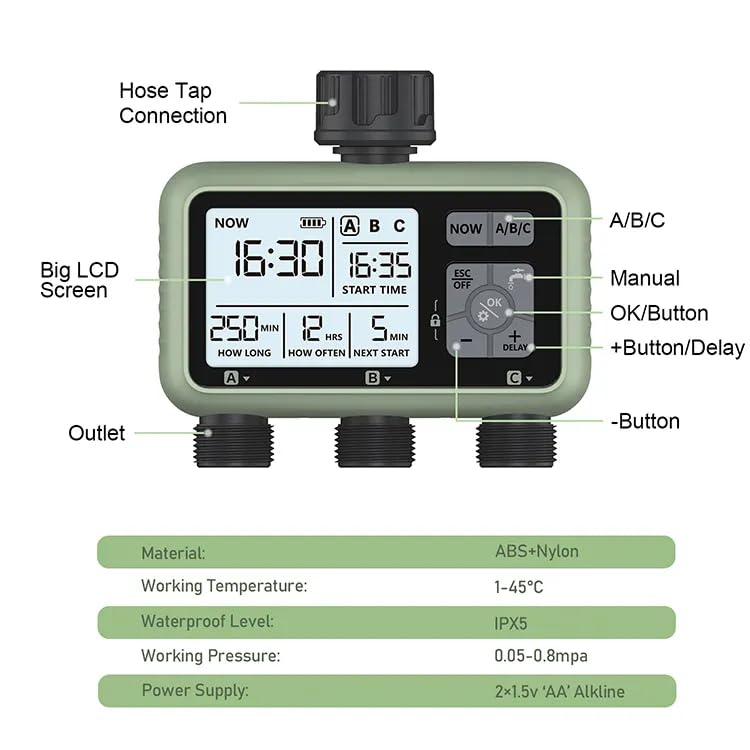
Figure 3: Water Timer Components
ຮູບພາບນີ້ໃຫ້ລາຍລະອຽດ view of the XPR3SS HCT378 water timer with its key components labeled, including the hose tap connection, big LCD screen, A/B/C zone buttons, Manual button, OK/Button, +Button/Delay, -Button, and the three outlets.
Familiarize yourself with the main components of the water timer:
- ການເຊື່ອມຕໍ່ທໍ່ທໍ່: Connects the timer to your outdoor water tap (1/2" or 3/4" BS&NH).
- ຈໍ LCD ໃຫຍ່: Displays time, watering schedules, battery status, and other settings.
- A/B/C Buttons: Used to select and program individual watering zones.
- ESC/OFF Button: Exits current menu or turns the timer off.
- ປຸ່ມຕົກລົງ: Confirms selections and enters programming modes.
- +/- ປຸ່ມ: Adjust values and navigate through options. The '+' button also functions as the Delay button.
- ປຸ່ມຄູ່ມື: Activates manual watering mode.
- Outlets (A, B, C): Three independent threaded outlets for connecting irrigation hoses or drip lines (3/4" BS&NH).
6. ຕັ້ງຄ່າ
6.1 ການຕິດຕັ້ງຫມໍ້ໄຟ
- ຊອກຫາຊ່ອງໃສ່ຫມໍ້ໄຟຢູ່ດ້ານຫຼັງຂອງເຄື່ອງຈັບເວລາ.
- ເປີດຝາປິດຫມໍ້ໄຟ.
- Insert two (2) new 1.5V 'AA' alkaline batteries, ensuring correct polarity (+/-).
- Close the battery cover securely to maintain water resistance.
- The LCD screen will light up, indicating the timer is powered on.
6.2 Connecting the Water Timer
- Ensure your outdoor tap is turned off.
- Screw the timer's inlet connection (top) onto your outdoor tap. Hand-tighten firmly. Use the appropriate adapter if your tap size differs.
- Connect your irrigation hoses, drip lines, or sprinklers to the three independent outlets (A, B, C) at the bottom of the timer. Ensure these connections are also hand-tightened securely to prevent leaks.
- Turn on your outdoor tap fully. The timer is designed to operate under water pressure.
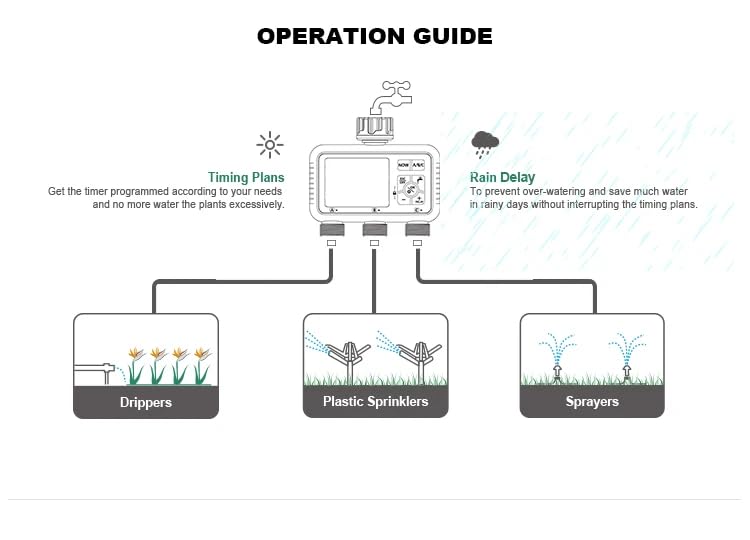
ຮູບທີ 4: ການເຊື່ອມຕໍ່ Examples
This diagram illustrates how the XPR3SS HCT378 water timer can be connected to various irrigation systems, including drippers, plastic sprinklers, and sprayers, demonstrating its versatility for different garden watering needs.
6.3 ການກໍານົດເວລາປະຈຸບັນ
Before programming, set the current time on the timer:
- ກົດ OK ເພື່ອເຂົ້າສູ່ໂໝດຕັ້ງເວລາ. ຕົວເລກຊົ່ວໂມງຈະກະພິບ.
- ໃຊ້ + or - ປຸ່ມເພື່ອປັບຊົ່ວໂມງ.
- ກົດ OK ເພື່ອຢືນຢັນຊົ່ວໂມງແລະຍ້າຍໄປນາທີ.
- ໃຊ້ + or - ປຸ່ມເພື່ອປັບນາທີ.
- ກົດ OK to confirm the minutes and exit time setting mode.
7. ຄໍາແນະນໍາການດໍາເນີນງານ
The XPR3SS HCT378 allows for independent programming of three zones (A, B, C).
7.1 Programming Watering Schedules (Zones A, B, C)
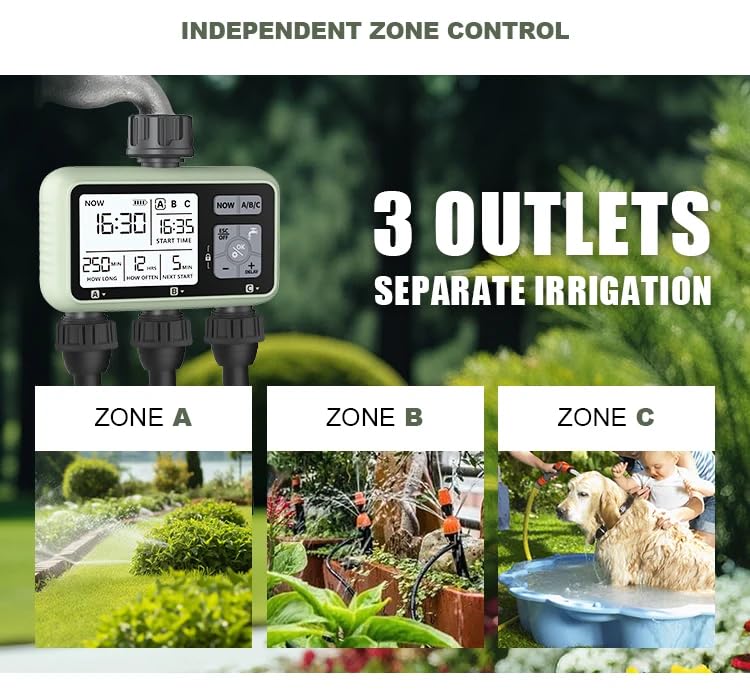
Figure 5: Independent Zone Control
This image highlights the independent control capabilities of the three outlets (Zone A, Zone B, Zone C), allowing for customized watering for different areas like lawns, drip irrigation systems, or even pet bathing areas.
To program a watering schedule for a specific zone:
- ກົດ A, B, ຫຼື C ເພື່ອເລືອກເຂດທີ່ຕ້ອງການ.
- ກົດ OK to enter programming mode for that zone.
- ຕັ້ງເວລາເລີ່ມຕົ້ນ: The start time digits will flash. Use + or - to adjust, then OK ເພື່ອຢືນຢັນ.
- Set Watering Duration ("How Long"): The duration digits will flash. Use + or - to set the watering time (1 second to 99 minutes). Press OK.
- Set Watering Frequency ("How Often"): The frequency digits will flash. Use + or - to set how often watering occurs (1 hour to 15 days). Press OK.
- The program for the selected zone is now set. Repeat for other zones as needed.
7.2 ການຫົດນໍ້າດ້ວຍມື
To water immediately without affecting your programmed schedules:
- ກົດ ຄູ່ມື ປຸ່ມ.
- ໃຊ້ + or - to set the desired manual watering duration (e.g., 5 minutes).
- ກົດ OK to start manual watering. The timer will display "ON" and count down.
- ເພື່ອຢຸດການຫົດນໍ້າດ້ວຍມືກ່ອນໄວ, ກົດ ESC/ປິດ.
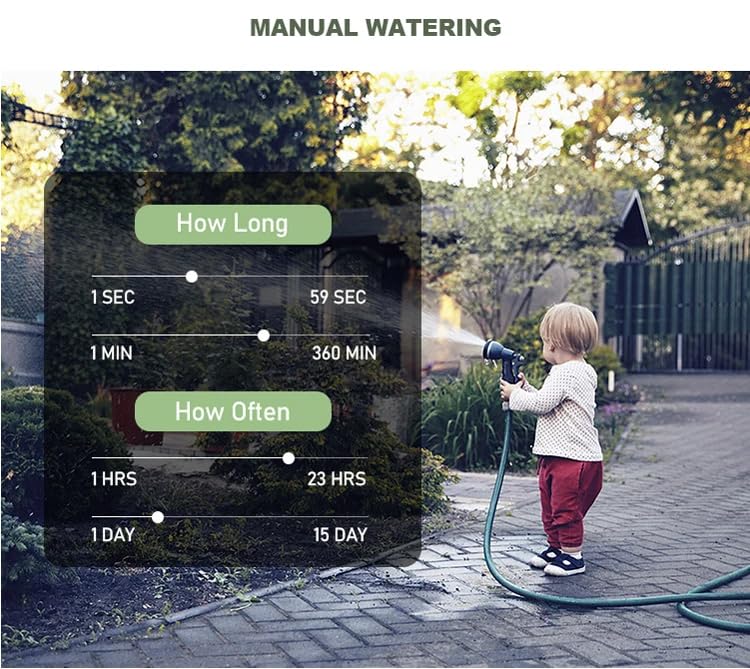
Figure 6: Manual Watering Settings
This image illustrates the range of settings available for manual watering, showing options for "How Long" (1 second to 360 minutes) and "How Often" (1 hour to 15 days), providing flexibility for immediate watering needs.
7.3 ຟັງຊັນການເລື່ອນຝົນ
To pause watering during rainy periods and conserve water:
- ກົດ + / ຊັກຊ້າ ປຸ່ມ.
- ໃຊ້ + or - to select the desired delay duration (e.g., 24H, 48H, 72H).
- ກົດ OK to activate the rain delay. The timer will display the remaining delay time.
- Watering will resume automatically after the delay period. To cancel the delay, press ESC/ປິດ.
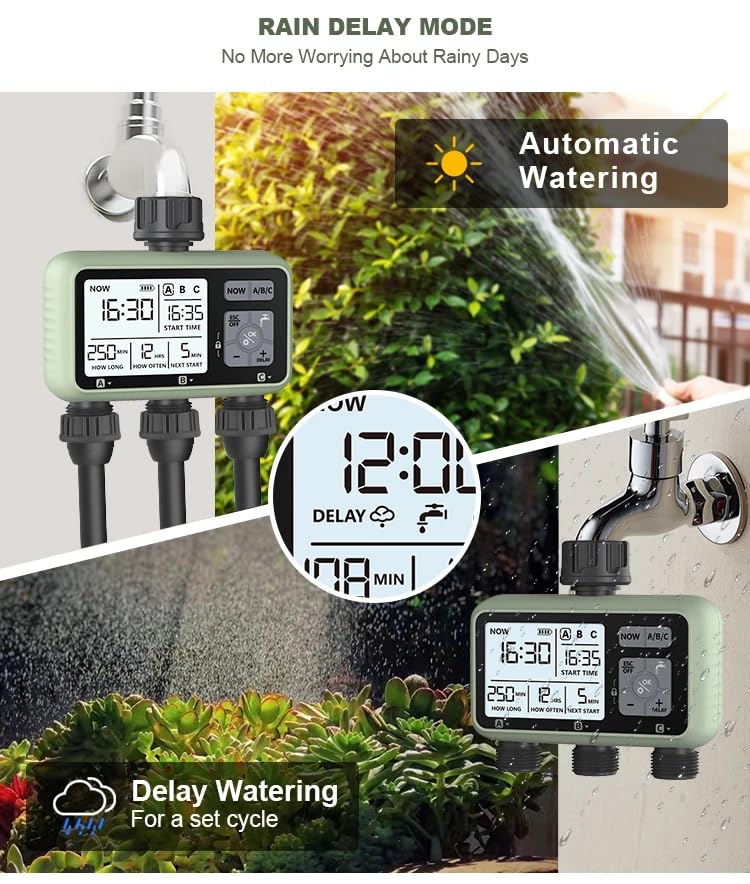
Figure 7: Rain Delay in Action
This image demonstrates the rain delay feature, showing the timer's display indicating a delay, and contrasting it with automatic watering. It highlights how the feature helps prevent over-watering during rainy conditions.
7.4 ຄຸນສົມບັດການລັອກເດັກ
ເພື່ອປ້ອງກັນການປ່ຽນແປງການຕັ້ງຄ່າໂດຍບັງເອີນ:
- ເພື່ອເປີດໃຊ້ງານ: ກົດຄ້າງໄວ້ OK button for 3 seconds until a lock icon appears on the screen.
- ເພື່ອປິດໃຊ້ງານ: ກົດຄ້າງໄວ້ OK button for 3 seconds until the lock icon disappears.
7.5 ໂໝດປິດ
To stop all timing plans for an extended period:
- ກົດຄ້າງໄວ້ ESC/ປິດ button for 3 seconds. The screen will display "OFF".
- To resume programmed watering, press and hold the ESC/ປິດ ກົດປຸ່ມອີກເທື່ອຫນຶ່ງສໍາລັບ 3 ວິນາທີ.
8. ບໍາລຸງຮັກສາ
8.1 ການທົດແທນຫມໍ້ໄຟ
When the low battery indicator appears on the LCD screen, replace the batteries promptly to ensure continuous operation. Follow the steps in Section 6.1 Battery Installation.
8.2 ການທໍາຄວາມສະອາດ
Periodically check the inlet filter washer for debris. If clogged, remove and rinse it under running water. Clean the exterior of the timer with a damp ຜ້າ. ຢ່າໃຊ້ເຄື່ອງເຮັດຄວາມສະອາດຂັດຫຼືສານລະລາຍ.
8.3 ລະດູໜາວ
Before the first frost, disconnect the water timer from the tap and hoses. Drain any remaining water from the unit. Store the timer indoors in a dry, frost-free location. Remove batteries if storing for an extended period.
9. ການແກ້ໄຂບັນຫາ
| ບັນຫາ | ສາເຫດທີ່ເປັນໄປໄດ້ | ການແກ້ໄຂ |
|---|---|---|
| Timer not turning on / LCD blank | ແບັດເຕີຣີຕາຍ ຫຼື ຕິດຕັ້ງບໍ່ຖືກຕ້ອງ. | Replace batteries with new 1.5V 'AA' alkaline batteries. Check polarity. |
| ບໍ່ມີນ້ໍາໄຫຼ | Tap is off; low water pressure; clogged filter; timer in OFF mode. | Ensure tap is fully open. Check water pressure. Clean inlet filter. Take timer out of OFF mode. |
| ການຮົ່ວໄຫຼຂອງນໍ້າຈາກຈຸດເຊື່ອມຕໍ່ | Loose connections; missing or damaged washers. | Tighten all connections. Check and replace rubber washers if damaged or missing. |
| ໂມງຈັບເວລາບໍ່ໄດ້ຫົດນ້ຳຕາມເວລາທີ່ກຳນົດໄວ້ | Incorrect program settings; current time not set; rain delay active; child lock active. | Verify program start time, duration, and frequency. Set current time. Cancel rain delay. Deactivate child lock. |
| ຈໍ LCD ມືດ ຫຼືກະພິບ | ແບັດເຕີຣີຕໍ່າ. | ປ່ຽນແບັດ. |
10. ຂໍ້ມູນຈໍາເພາະ
| ຄຸນລັກສະນະ | ມູນຄ່າ |
|---|---|
| ໝາຍເລກຕົວແບບ | HCT378 |
| ຂະໜາດສິນຄ້າ | 13.6D x 12.2W x 5.5H ຊມ |
| ນ້ໍາຫນັກລາຍການ | 475 ກຣາມ |
| ວັດສະດຸ | ABS+Nylon+Brass |
| ສີ | ດຳ, ເທົາ |
| ລະດັບກັນນໍ້າ | IPX5 |
| ຄວາມກົດດັນການເຮັດວຽກ | 0.05 - 0.8 MPa |
| ອຸນຫະພູມເຮັດວຽກ | 1 to 45 Celcius |
| ການສະຫນອງພະລັງງານ | 2 x 1.5V 'AA' Alkaline Batteries (not included) |
| ນ້ຳເຂົ້າ | 1/2", 3/4" BS&NH |
| ປ້ຳນ້ຳ | 3/4" BS&NH |
| ຜູ້ຜະລິດ | Eshine Technology (Ningbo) Co., Ltd |
| ປະເທດຕົ້ນກໍາເນີດ | ຈີນ |
11. ການຮັບປະກັນແລະການສະຫນັບສະຫນູນ
Your XPR3SS HCT378 Water Timer comes with a manufacturer's warranty. Please refer to the included Warranty Card for specific terms and conditions, including warranty period and coverage details.
For technical support, troubleshooting assistance, or warranty claims, please contact XPR3SS customer service through the contact information provided on your warranty card or the official XPR3SS webເວັບໄຊ.