1. ບົດແນະນຳ
Thank you for choosing TTQ Open Ear Headphones, Model CT26. These true wireless sports earbuds are designed to provide a comfortable listening experience while allowing you to remain aware of your surroundings. Featuring Bluetooth 5.3 connectivity, IPX7 waterproofing, and crystal-clear call quality, they are ideal for various activities including running, cycling, workouts, and driving. This manual will guide you through the setup, operation, and maintenance of your new headphones.
2. ເນື້ອໃນຊຸດ
ກະລຸນາກວດສອບວ່າລາຍການທັງໝົດມີຢູ່ໃນຊຸດຂອງທ່ານ:
- TTQ Open Ear Headphones (Left and Right Earbuds)
- ກ່ອງສາກ
- ສາຍສາກ USB-C
- ຄູ່ມືຜູ້ໃຊ້

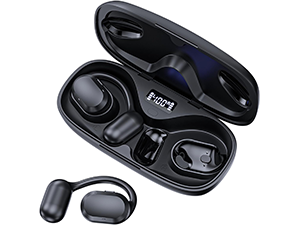
ຮູບພາບ: The TTQ Open Ear Headphones, Model CT26, displayed within their open charging case. The case features an LED digital power display indicating the battery level of both the case and the individual earbuds.
3. ຜະລິດຕະພັນເກີນview
The TTQ CT26 headphones feature an innovative open-ear design with flexible earhooks, ensuring comfort and stability during extended use. This design allows ambient sounds to be heard, enhancing safety in outdoor environments.

ຮູບພາບ: A person wearing the TTQ Open Ear Earbuds, demonstrating how the open-ear design sits comfortably outside the ear canal, allowing for situational awareness.

ຮູບພາບ: Two individuals cycling outdoors, both wearing TTQ Open Ear Headphones. This illustrates the product's suitability for sports and activities where awareness of surroundings is crucial for safety.
4. ຕັ້ງຄ່າ
4.1 ການສາກຫູຟັງ ແລະ ເຄສ
Before first use, fully charge the headphones and the charging case. Connect the provided USB-C charging cable to the charging port on the case and a power source. The LED display on the charging case will show the battery percentage, and individual earbud charge indicators will light up during charging.
- A full charge provides up to 8 hours of music playtime or 9 hours of call time for the earbuds.
- The charging case extends total playtime to up to 36 hours.

ຮູບພາບ: The TTQ charging case with its lid open, showcasing the digital LED display that indicates the battery percentage of the case and the charging status of the earbuds. A USB-C charging port is visible at the front.
4.2 ການຈັບຄູ່ກັບອຸປະກອນຂອງທ່ານ
- ກວດໃຫ້ແນ່ໃຈວ່າໄດ້ສາກຫູຟັງແລ້ວ.
- Open the charging case. The earbuds will automatically enter pairing mode, indicated by a flashing light (if applicable, refer to product specific light indicators).
- ໃນອຸປະກອນຂອງທ່ານ (ໂທລະສັບສະຫຼາດ, ແທັບເລັດ, ຄອມພິວເຕີ), ໄປທີ່ການຕັ້ງຄ່າ Bluetooth ແລະເປີດ Bluetooth.
- ຊອກຫາ available devices and select "CT26" from the list.
- ເມື່ອເຊື່ອມຕໍ່ແລ້ວ, ຫູຟັງຫູຟັງຈະຊີ້ບອກການຈັບຄູ່ສຳເລັດຜົນ (ເຊັ່ນ: ການເຕືອນດ້ວຍສຽງ ຫຼືແສງສະໝໍ່າສະເໝີ).
ຫູຟັງຈະເຊື່ອມຕໍ່ຄືນໃໝ່ໂດຍອັດຕະໂນມັດກັບອຸປະກອນທີ່ຈັບຄູ່ຄັ້ງສຸດທ້າຍເມື່ອເອົາອອກຈາກກ່ອງ, ຖ້າເປີດໃຊ້ Bluetooth ໃນອຸປະກອນ.

ຮູບພາບ: A visual representation of Bluetooth 5.3 technology, showing a smartphone's Bluetooth settings screen with 'CT26' listed as a connected device, illustrating the stable and fast connection capability.
5. ຄໍາແນະນໍາການດໍາເນີນງານ
The TTQ CT26 headphones feature a physical button for easy control of various functions.
ຮູບພາບ: A diagram illustrating the single button controls on the earbud, detailing actions for pause/play, answer/hang up, rejection, volume adjustment, switching songs, and activating Siri.
5.1 ການຫລີ້ນດົນຕີ
- ຫຼິ້ນ/ຢຸດ: Press the button once (x1).
- ເພງຕໍ່ໄປ: Press the button twice (x2).
- ເພງກ່ອນໜ້າ: Press the button three times (x3).
- ປະລິມານຂຶ້ນ/ລົງ: Press and hold the button for 2 seconds (Hold 2s).
5.2 ການຄຸ້ມຄອງການໂທ
- ຮັບ/ສາຍໂທ: Press the button once (x1).
- ປະຕິເສດການໂທ: Press and hold the button for 2 seconds (Hold 2s).
The headphones feature dual-mic noise-cancelling technology for clearer calls by reducing environmental noise.

ຮູບພາບ: A man wearing TTQ Open Ear Headphones while holding a smartphone, illustrating the intelligent noise cancellation feature that boosts human voice and reduces environmental noise for clearer calls.
5.3 ຜູ້ຊ່ວຍສຽງ
- ເປີດໃຊ້ຜູ້ຊ່ວຍສຽງ (Siri, Google Assistant, ແລະອື່ນໆ): Press the button three times (x3).
6. ບໍາລຸງຮັກສາ
To ensure the longevity and optimal performance of your TTQ Open Ear Headphones, follow these maintenance guidelines:
- ທໍາຄວາມສະອາດ: ເຊັດຫູຟັງຫູຟັງ ແລະ ກະເປົ໋າສາກໄຟເປັນປະຈຳດ້ວຍຜ້າອ່ອນໆ, ແຫ້ງ, ບໍ່ມີຜ້າປູ. ຫຼີກເວັ້ນການນໍາໃຊ້ວັດສະດຸຂັດຫຼືສານເຄມີທີ່ຮຸນແຮງ.
- ຄວາມຕ້ານທານນ້ໍາ: The headphones are IPX7 waterproof, meaning they can withstand submersion in up to 1 meter of water for 30 minutes. They are resistant to sweat and rain, making them suitable for workouts. However, they are not designed for swimming or prolonged submersion. Ensure the charging port is dry before charging.
- ການເກັບຮັກສາ: ເມື່ອບໍ່ໄດ້ໃຊ້, ໃຫ້ເກັບຮັກສາຫູຟັງໃສ່ໃນກະເປົ໋າສາກໄຟເພື່ອປົກປ້ອງພວກມັນຈາກຝຸ່ນ ແລະຄວາມເສຍຫາຍ. ເກັບຮັກສາໄວ້ໃນບ່ອນທີ່ເຢັນ, ແຫ້ງ, ຫ່າງຈາກອຸນຫະພູມທີ່ສຸດ.

ຮູບພາບ: TTQ Open Ear Headphones and their charging case on a wet surface with water splashes, demonstrating their IPX7 waterproof rating, indicating resistance to rain and sweat.
7. ການແກ້ໄຂບັນຫາ
If you encounter issues with your TTQ Open Ear Headphones, please refer to the following common solutions:
- ບໍ່ມີສຽງ/ສຽງຕ່ຳ:
- ກວດໃຫ້ແນ່ໃຈວ່າໄດ້ຈັບຄູ່ຫູຟັງຢ່າງຖືກຕ້ອງ ແລະເຊື່ອມຕໍ່ກັບອຸປະກອນຂອງທ່ານ.
- ກວດເບິ່ງລະດັບສຽງໃນທັງຫູຟັງ ແລະອຸປະກອນທີ່ເຊື່ອມຕໍ່ຂອງທ່ານ.
- ກວດໃຫ້ແນ່ໃຈວ່າໄດ້ສາກຫູຟັງແລ້ວ.
- ບັນຫາການຈັບຄູ່:
- ໃຫ້ແນ່ໃຈວ່າ Bluetooth ຖືກເປີດໃຊ້ຢູ່ໃນອຸປະກອນຂອງທ່ານ.
- Ensure the headphones are in pairing mode (flashing indicator).
- ປິດ Bluetooth ໃນອຸປະກອນທີ່ຢູ່ໃກ້ຄຽງອື່ນໆທີ່ອາດຈະພະຍາຍາມເຊື່ອມຕໍ່.
- Forget/remove "CT26" from your device's Bluetooth list and try pairing again.
- Restart both your device and the headphones (by placing them back in the case and taking them out).
- ບັນຫາການສາກໄຟ:
- ໃຫ້ແນ່ໃຈວ່າສາຍສາກໄດ້ເຊື່ອມຕໍ່ຢ່າງປອດໄພກັບທັງກໍລະນີ ແລະແຫຼ່ງພະລັງງານ.
- ລອງໃຊ້ສາຍ USB-C ແລະອະແດັບເຕີໄຟອື່ນ.
- ໃຫ້ແນ່ໃຈວ່າຈຸດເຊື່ອມຕໍ່ການສາກໄຟຢູ່ຫູຟັງ ແລະ ໃນເຄສສະອາດ ແລະ ບໍ່ມີສິ່ງເສດເຫຼືອ.
- ການເຊື່ອມຕໍ່ແບບບໍ່ຢຸດຢັ້ງ:
- Ensure your device is within the Bluetooth range (up to 10 meters/33 feet).
- ຫຼີກເວັ້ນການຂັດຂວາງທາງຮ່າງກາຍລະຫວ່າງຫູຟັງແລະອຸປະກອນຂອງທ່ານ.
- ຫຼຸດຜ່ອນການລົບກວນຈາກອຸປະກອນໄຮ້ສາຍອື່ນໆ.
ຖ້າບັນຫາຍັງຄົງຢູ່ຫຼັງຈາກພະຍາຍາມຂັ້ນຕອນເຫຼົ່ານີ້, ກະລຸນາຕິດຕໍ່ຝ່າຍຊ່ວຍເຫຼືອລູກຄ້າ.
8. ຂໍ້ມູນຈໍາເພາະ
| ຄຸນສົມບັດ | ຂໍ້ມູນຈໍາເພາະ |
|---|---|
| ຊື່ຕົວແບບ | CT26 |
| ເຕັກໂນໂລຊີການເຊື່ອມຕໍ່ | ໄຮ້ສາຍ (Bluetooth) |
| ເຕັກໂນໂລຊີການສື່ສານໄຮ້ສາຍ | Bluetooth 5.3 |
| ຊ່ວງ Bluetooth | 10 ແມັດ (33 ຕີນ) |
| ລະດັບຄວາມຕ້ານທານນ້ໍາ | ກັນນໍ້າ IPX7 |
| ການຈັດວາງຫູ | ເປີດຫູ |
| ປັດໄຈແບບຟອມ | True Wireless |
| ອາຍຸແບັດເຕີຣີ (ຫູຟັງ) | 8 Hours (Music) / 9 Hours (Calls) |
| ເວລາຫຼິ້ນທັງໝົດກັບກ່ອງສາກ | ສູງສຸດ 36 ຊົ່ວໂມງ |
| ປະເພດໄດເວີສຽງ | ໄດນາມິກໄດເວີ |
| ຂະໜາດໄດເວີສຽງ | 16.2 ມິນລິແມັດ |
| ຊ່ວງຄວາມຖີ່ | 20 Hz - 20,000 Hz |
| ການຄວບຄຸມສິ່ງລົບກວນ | Active Noise Cancellation (ສໍາລັບການໂທ) |
| ວິທີການຄວບຄຸມ | ປຸ່ມທາງດ້ານຮ່າງກາຍ |
| ພອດສາກໄຟ | USB-C |
| ນ້ໍາຫນັກລາຍການ | 7.8 ອອນສ໌ (0.22 ກິໂລກຣາມ) |
| ວັດສະດຸ | ພາດສະຕິກ |
| UPC | 717977781312 |
9. ການຊ່ວຍເຫຼືອລູກຄ້າ
For any questions, concerns, or if you receive a defective product, please do not hesitate to contact TTQ customer support. We are committed to providing solutions within 24 hours.
Please visit the official TTQ store on Amazon for more information and support resources: TTQ Store