ແນະນຳ
This manual provides detailed instructions for the setup, operation, and maintenance of your Rapoo M300G Silent Wireless Mouse. Please read this manual thoroughly to ensure proper use and to maximize the performance of your device.
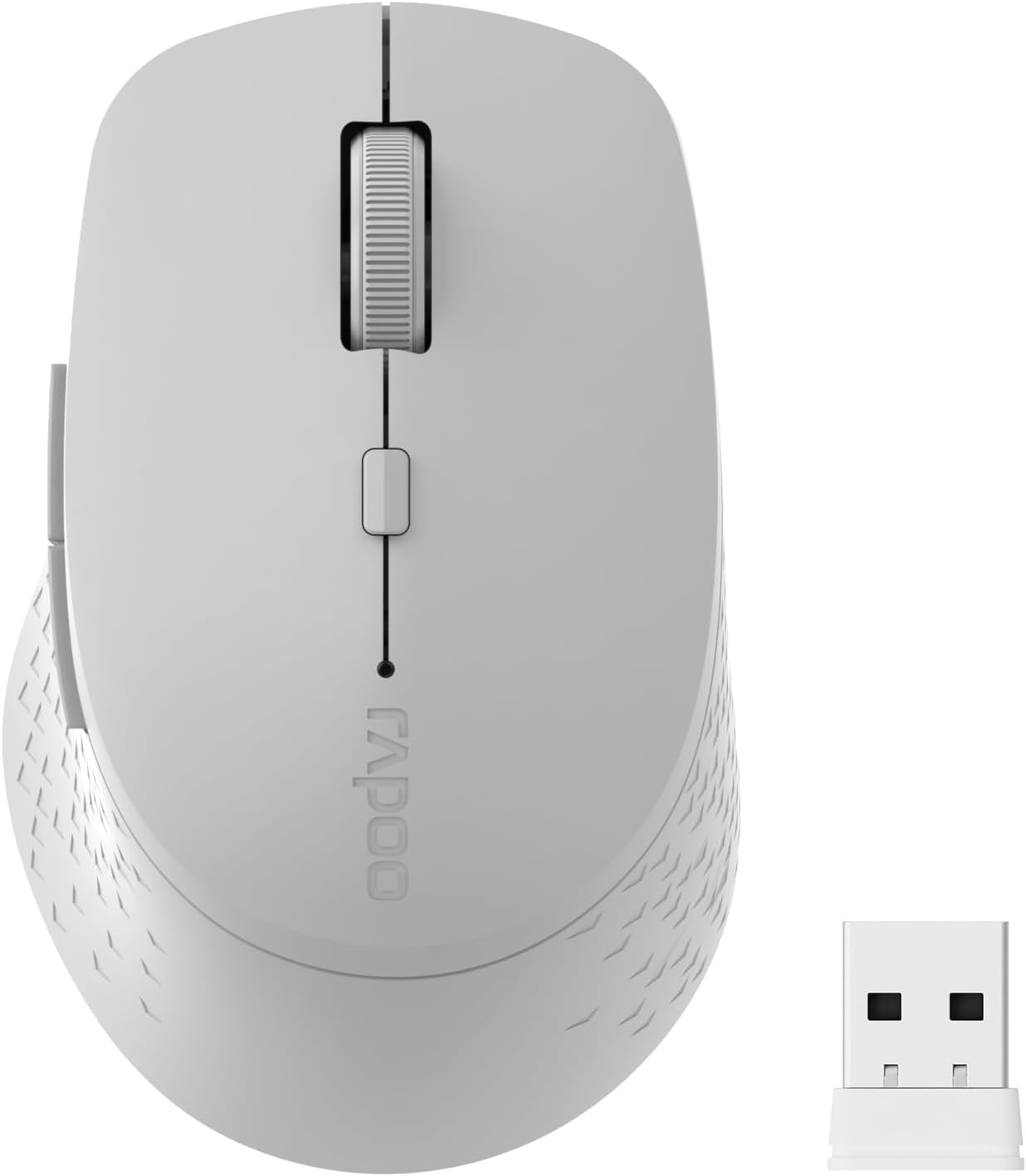
Image: The Rapoo M300G Silent Wireless Mouse in light grey, shown with its accompanying USB receiver.
ເນື້ອໃນຊຸດ
ກວດສອບວ່າລາຍການທັງຫມົດແມ່ນມີຢູ່ໃນຊຸດ:
- Rapoo M300G Wireless Mouse (x1)
- USB Receiver (x1)
- ແບັດເຕີຣີ AA (x1)
- Product Manual (x1)
ສິນຄ້າເກີນview
Familiarize yourself with the components of your Rapoo M300G mouse.
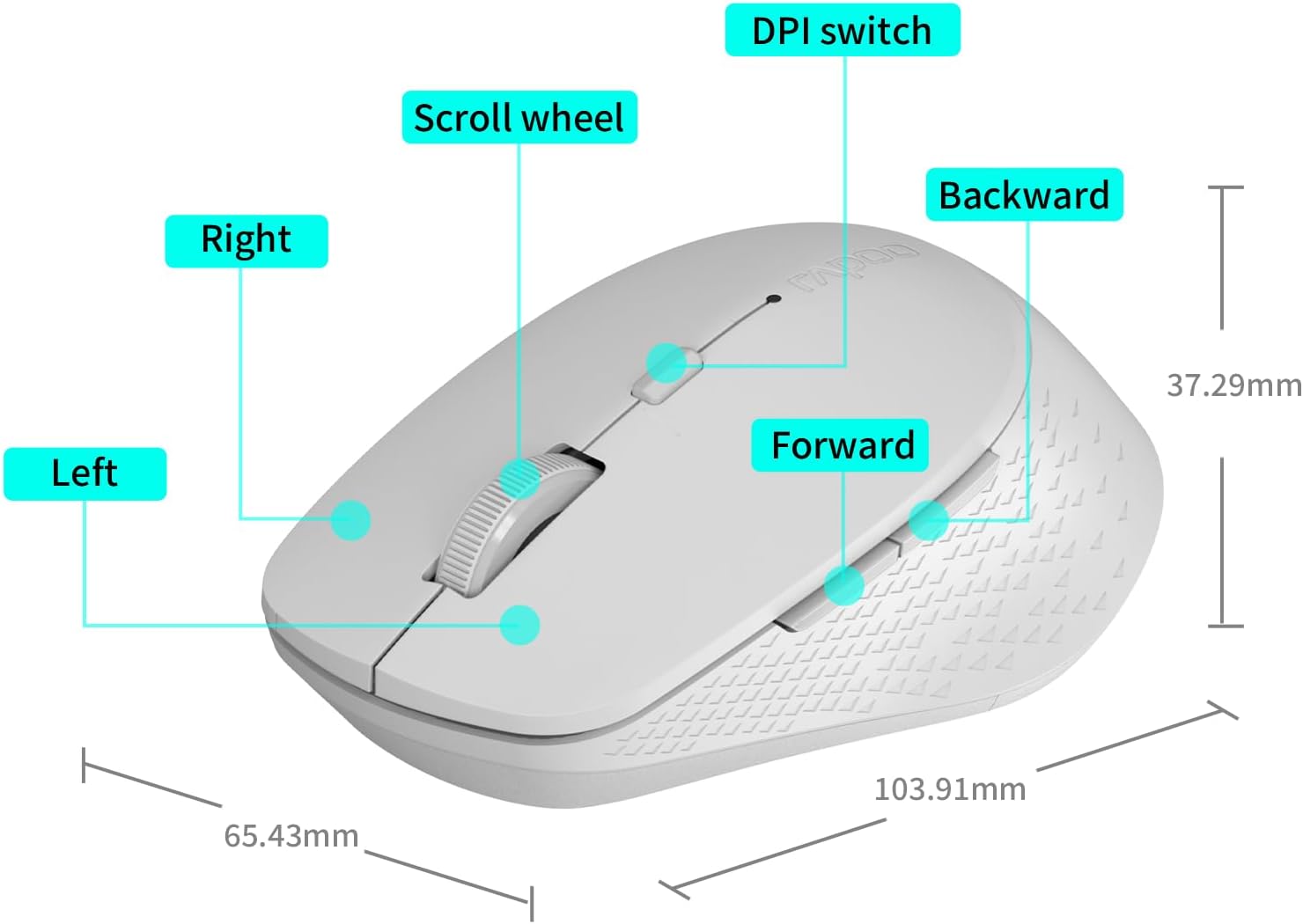
Image: A diagram illustrating the various parts of the Rapoo M300G mouse, including the left and right click buttons, scroll wheel, DPI switch, and forward/backward side buttons.
- ປຸ່ມຊ້າຍ: ຟັງຊັນຄລິກມາດຕະຖານ.
- ປຸ່ມຂວາ: ຟັງຊັນເມນູສະພາບການ.
- ລໍ້ເລື່ອນ: ສຳລັບການເລື່ອນແນວຕັ້ງ ແລະ ຄລິກກາງ.
- DPI Switch: ປັບຄວາມອ່ອນໄຫວຂອງຕົວກະພິບ.
- ປຸ່ມສົ່ງຕໍ່: ນຳທາງໄປຂ້າງໜ້າ web ຕົວທ່ອງເວັບຫຼື file ນັກສຳຫຼວດ.
- ປຸ່ມກັບຄືນ: ນຳທາງກັບຄືນໃນ web ຕົວທ່ອງເວັບຫຼື file ນັກສຳຫຼວດ.
ຄໍາແນະນໍາການຕິດຕັ້ງ
The Rapoo M300G mouse supports both 2.4GHz wireless and Bluetooth connectivity. Choose the method that best suits your device.
1. ການຕິດຕັ້ງຫມໍ້ໄຟ
Open the battery compartment on the underside of the mouse. Insert the provided AA battery, ensuring correct polarity. Close the compartment.

Image: Illustration of the mouse's underside, highlighting the battery compartment and the integrated USB receiver storage slot.
2. Connecting via 2.4GHz Wireless Mode
- Locate the USB receiver inside the mouse's battery compartment.
- Remove the USB receiver and plug it into an available USB port on your computer.
- ເປີດເມົ້າໂດຍໃຊ້ສະວິດໄຟຢູ່ດ້ານລຸ່ມ.
- The mouse should automatically connect to your computer. No additional drivers are typically required.
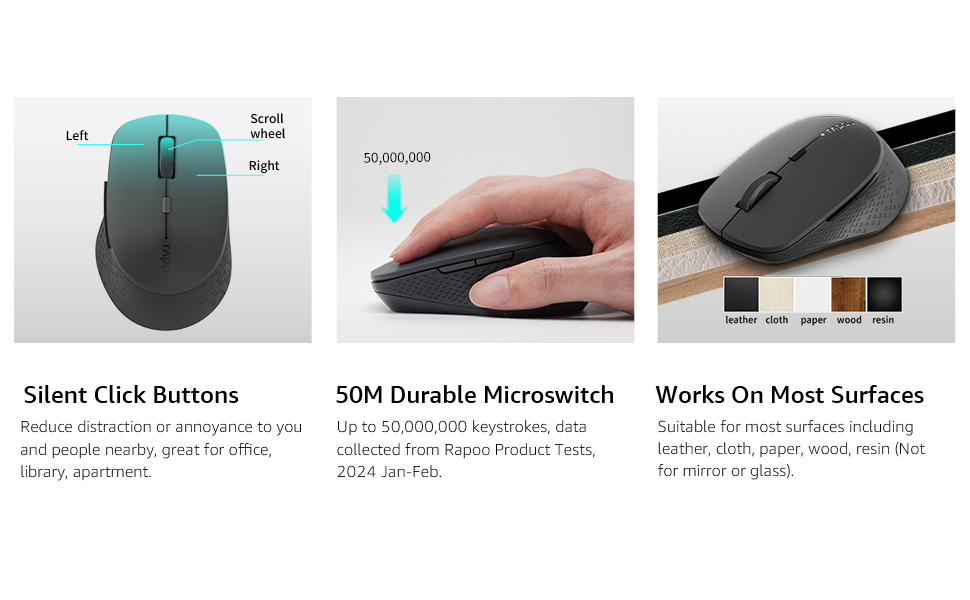
Image: Visual guide for connecting the mouse. The 2.4GHz mode shows the USB receiver being inserted into a computer.
3. ການເຊື່ອມຕໍ່ຜ່ານໂໝດ Bluetooth
The mouse supports Bluetooth 5.0 and 4.0.
- ເປີດເມົ້າໂດຍໃຊ້ສະວິດໄຟຢູ່ດ້ານລຸ່ມ.
- Press and hold the multifunction button on the underside of the mouse for 3-5 seconds until the indicator light flashes slowly. This indicates pairing mode.
- ໃນຄອມພິວເຕີ ຫຼືອຸປະກອນຂອງທ່ານ, ເປີດການຕັ້ງຄ່າ Bluetooth.
- ຊອກຫາ new devices and select "Rapoo M300G" (or similar) from the list.
- ປະຕິບັດຕາມຄຳແນະນຳໃນໜ້າຈໍເພື່ອເຮັດສຳເລັດຂະບວນການຈັບຄູ່. ໄຟສັນຍານຈະຢຸດກະພິບເມື່ອເຊື່ອມຕໍ່ແລ້ວ.

Image: Diagram detailing the multifunction button on the mouse's underside, explaining its use for DPI adjustment (short press) and Bluetooth pairing (long press).
Image: Visual guide for connecting the mouse. The Bluetooth mode shows the mouse pairing with a laptop.
ຄໍາແນະນໍາການດໍາເນີນງານ
1. Switching Between Devices (Multi-Mode)
The Rapoo M300G can connect to two devices simultaneously (one via 2.4GHz, one via Bluetooth). To switch between connected devices, briefly press the multifunction button on the underside of the mouse. The indicator light will change to confirm the active connection mode.

Image: The Rapoo M300G mouse demonstrating its ability to connect to two devices simultaneously, one via 2.4GHz and another via Bluetooth.
2. ການປັບ DPI (ຄວາມອ່ອນໄຫວ)
The mouse offers 5 adjustable DPI levels: 800, 1000, 1200, 1600, and 2400. To change the DPI, press the DPI switch button located on the top of the mouse, below the scroll wheel. Each press cycles through the available DPI settings.

Image: A visual representation of the mouse's adjustable DPI settings, ranging from 800 to 2400, with an arrow pointing to the DPI switch button.
3. Silent Click ຄຸນນະສົມບັດ
The Rapoo M300G features silent click buttons, reducing operational noise by 90%. This design is intended for quiet environments, minimizing disturbance to others.

Image: The Rapoo M300G mouse, emphasizing its silent click functionality, suitable for quiet environments.

ຮູບພາບ: ລາຍລະອຽດ view of the mouse's silent click buttons, durable microswitches, and its ability to function on various surfaces.
4. ຄວາມເຂົ້າກັນໄດ້ຂອງພື້ນຜິວ
The advanced optical tracking engine allows the mouse to operate effectively on various surfaces, including leather, cloth, paper, wood, and resin, without requiring a mouse pad. Performance may vary on glass or mirrored surfaces.

Image: The Rapoo M300G mouse positioned on different materials, highlighting its capability to track on diverse surfaces.
ບໍາລຸງຮັກສາ
1. ການທົດແທນຫມໍ້ໄຟ
When the mouse performance degrades or the indicator light signals low battery, replace the AA battery. The mouse is designed for low power consumption, offering up to 12 months of battery life under normal conditions.

Image: An illustration emphasizing the Rapoo M300G mouse's extended battery life of up to 12 months.
2. ທໍາຄວາມສະອາດ
ເພື່ອເຮັດຄວາມສະອາດຫນູ, ໃຫ້ໃຊ້ຜ້າອ່ອນ, ແຫ້ງ. ສໍາລັບຝຸ່ນ stubborn, a ເລັກນ້ອຍ damp ຜ້າສາມາດນໍາໃຊ້ໄດ້, ຮັບປະກັນວ່າບໍ່ມີຄວາມຊຸ່ມຊື່ນເຂົ້າໄປໃນອົງປະກອບພາຍໃນ. ຫຼີກເວັ້ນການນໍາໃຊ້ສານເຄມີທີ່ຮຸນແຮງຫຼືວັດສະດຸຂັດ.
ການແກ້ໄຂບັນຫາ
ເມົາສ໌ບໍ່ຕອບສະໜອງ
- ກວດສອບຫມໍ້ໄຟ: ໃຫ້ແນ່ໃຈວ່າຫມໍ້ໄຟ AA ໄດ້ຖືກຕິດຕັ້ງຢ່າງຖືກຕ້ອງແລະມີການສາກໄຟພຽງພໍ. ປ່ຽນແທນຖ້າຈໍາເປັນ.
- ສັບປ່ຽນພະລັງງານ: Verify the mouse is turned on.
- USB Receiver (2.4GHz Mode): ກວດໃຫ້ແນ່ໃຈວ່າໄດ້ສຽບຕົວຮັບ USB ເຂົ້າໄປໃນພອດ USB ທີ່ເຮັດວຽກໄດ້ຢ່າງປອດໄພ. ລອງໃຊ້ພອດ USB ອື່ນ.
- Bluetooth Connection (Bluetooth Mode):
- ໃຫ້ແນ່ໃຈວ່າ Bluetooth ຖືກເປີດໃຊ້ຢູ່ໃນອຸປະກອນຂອງທ່ານ.
- Re-enter pairing mode on the mouse (long press multifunction button) and re-pair with your device.
- ເອົາເມົາສ໌ອອກຈາກລາຍຊື່ Bluetooth ຂອງອຸປະກອນຂອງທ່ານ ແລະ ລອງຈັບຄູ່ອີກຄັ້ງ.
- ແຊກແຊງ: ເລື່ອນເມົ້າໄປໃກ້ຕົວຮັບ/ອຸປະກອນ. ຫຼີກເວັ້ນການໃຊ້ຫນູຢູ່ໃກ້ກັບອຸປະກອນໄຮ້ສາຍອື່ນໆທີ່ອາດຈະເຮັດໃຫ້ເກີດການລົບກວນ.
ການເຄື່ອນໄຫວຕົວກະພິບແມ່ນຜິດພາດ
- ເຊັນເຊີສະອາດ: Ensure the optical sensor on the underside of the mouse is clean and free from dust or debris.
- ພື້ນຜິວ: Try using the mouse on a different surface. While the mouse works on many surfaces, some highly reflective or uneven surfaces may affect tracking.
- ການຕັ້ງຄ່າ DPI: Adjust the DPI setting using the DPI switch button to see if a different sensitivity improves performance.
ຂໍ້ມູນຈໍາເພາະ
| ຕົວແບບ | M300G |
| ເຕັກໂນໂລຊີການເຊື່ອມຕໍ່ | Bluetooth 5.0, Bluetooth 4.0, 2.4GHz Wireless |
| ເຕັກໂນໂລຍີກວດຈັບການເຄື່ອນໄຫວ | Optical |
| ດັດປັບ DPI | 800/1000/1200/1600/2400. |
| ຄຸນນະສົມບັດພິເສດ | Silent Clicks, Multi-Device Switching, Portable, Ergonomic Design |
| ປະເພດຫມໍ້ໄຟ | ແບັດເຕີຣີ 1 x AA (ລວມ) |
| ຊີວິດຫມໍ້ໄຟ | ເຖິງ 12 ເດືອນ |
| ຂະໜາດສິນຄ້າ | 4.09 x 2.57 x 0.04 ນິ້ວ (103.91 x 65.43 x 37.29 ມມ) |
| ນ້ໍາຫນັກລາຍການ | 3.52 ອອນສ໌ (100g) |
| ຄວາມເຂົ້າກັນໄດ້ | Windows, Mac OS, Linux, iOS, Android, Chrome OS |
ການຮັບປະກັນແລະການສະຫນັບສະຫນູນ
Your Rapoo M300G Silent Wireless Mouse comes with a ການຮັບປະກັນຫນຶ່ງປີ ນັບຈາກວັນທີຊື້. ນອກຈາກນັ້ນ, a 30-day return and refund or replacement policy is offered. For warranty claims, technical support, or product inquiries, please contact your retailer or visit the official Rapoo webເວັບໄຊສໍາລັບການຊ່ວຍເຫຼືອ.
ສຳລັບຂໍ້ມູນເພີ່ມເຕີມ, ທ່ານສາມາດເຂົ້າເບິ່ງໄດ້ທີ່ Rapoo Brand Store on Amazon.


