ສິນຄ້າເກີນview
The DYNAVIN D9-DMI Ultra Flex is an advanced Android car radio navigator designed to upgrade your in-car entertainment and navigation experience. It features a 6.5-inch high-resolution anti-glare touchscreen, integrated GPS navigation, wireless CarPlay, and Android Auto compatibility. This unit seamlessly integrates with your vehicle's existing systems, including steering wheel controls, climate control, and parking sensors, for a cohesive user experience.
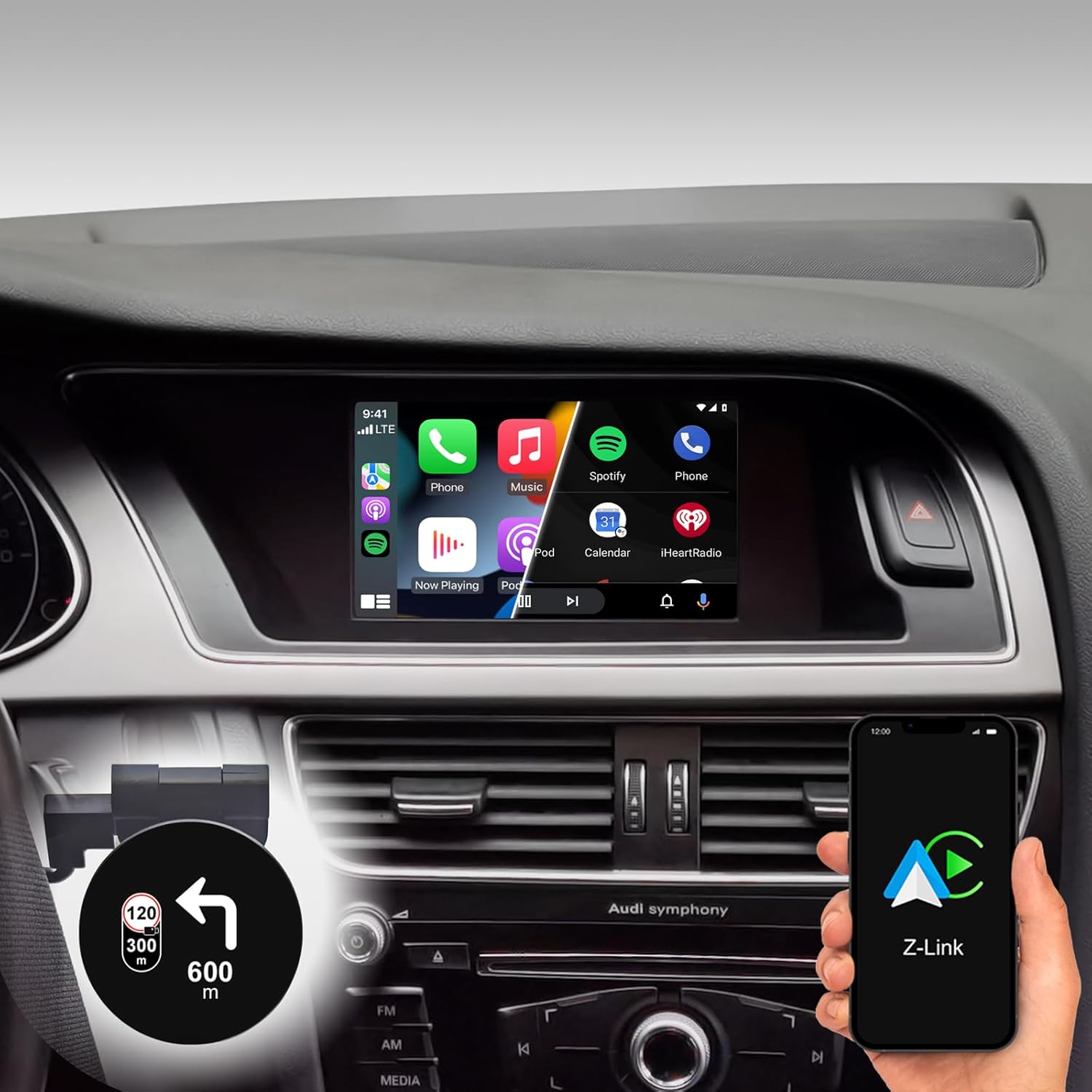
Figure 1: DYNAVIN D9-DMI Ultra Flex Car Radio Navigator installed in an Audi dashboard, showcasing its CarPlay interface and integration with navigation features.
ຄວາມເຂົ້າກັນໄດ້
This Android Navi Radio is specifically designed for Audi vehicles equipped with a Concert or Symphony radio. Please verify your vehicle's radio type before installation to ensure compatibility.
- Audi A4: 2007–2015
- Audi A5: 2007–2016
- Audi Q5: 2008–2017
- Audi S4: 2009–2016
- Audi S5: 2009–2016
The unit is compatible with the original AUDI sound system and can receive the AUDI vehicle menu.

Figure 2: Compatible Audi Concert and Symphony radio units.

Figure 3: How to check your car's system version for compatibility.
ຄຸນນະສົມບັດທີ່ສໍາຄັນ
- ຈໍສະແດງຜົນ: 6.5-inch high-resolution (1024 x 600 pixels) anti-glare touchscreen.
- ລະບົບປະຕິບັດການ: Android 11 OS with quad-core CPU and 4 GB RAM.
- ການເຊື່ອມຕໍ່: Wireless CarPlay, Android Auto, and Smartphone Mirroring.
- ການນໍາທາງ: Integrated GPS navigation with Dynaway app (31-day trial, activation code required), including speed camera information.
- ສຽງ: Highly sensitive FM-RDS tuner with 15 presets for clear, noise-free playback. Supports audio streaming via smartphone/USB.
- ໄມໂຄຣໂຟນ: Compact digital dual microphone with noise reduction for excellent call quality.
- ການປະສົມປະສານ: Integrated CANBUS solution for seamless control via steering wheel, air conditioning display, and parking sensor information.
- Head-up Display (HUD): Included HUD shows navigation directions, vehicle speed, and speed camera alerts.
- Dynapp Pack: Access to Google Playstore, third-party app installation, and display of speed limits (31-day trial, activation code required).

Figure 4: DYNAVIN's commitment to quality and experience.

Figure 5: The innovative Dynavin Digital Dual-Microphone.

Figure 6: Upgrade your Audi system with the DYNAVIN DMI Ultra Flex.
ການຕິດຕັ້ງແລະການຕິດຕັ້ງ
Installation of the DYNAVIN D9-DMI Ultra Flex requires careful attention to detail. It is recommended to have the installation performed by a qualified professional. The unit integrates with your vehicle's existing wiring and CAN-BUS system.
ອົງປະກອບລວມ:
Ensure all components listed below are present in your package before beginning installation.

Figure 7: Complete list of accessories included in the package.
- Dynavin Radio Unit
- ສາຍເຊື່ອມຕໍ່
- ເສົາອາກາດ DAB
- DAB / CAN Interface
- ສາຍກ້ອງຫຼັງ
- GPS Antenna
- ສາຍສົ່ງເສີມ USB
- ອະແດບເຕີເສົາອາກາດ
- ໄມໂຄຣໂຟນ
- Climate Control Cable
- HUD 150 (Head-up Display)
- ເສົາອາກາດ BT/Wi-Fi
- ເຄື່ອງມື disassembly
- ຄູ່ມືດ່ວນ
ຂັ້ນຕອນການຕິດຕັ້ງ (ທົ່ວໄປ):
Refer to the included Quick Guide for detailed, step-by-step installation instructions specific to your Audi model. Professional installation is highly recommended.
- ການກະກຽມ: Disconnect the vehicle's battery. Use the provided disassembly tools to carefully remove the original radio unit and trim.
- ສາຍໄຟ: Connect the Dynavin radio unit using the supplied connection cables, ensuring all connections are secure. Integrate the DAB/CAN interface and connect the GPS antenna, DAB antenna, and BT/Wi-Fi antenna.
- ການຕິດຕັ້ງໄມໂຄຣໂຟນ: Install the compact digital dual microphone in a suitable location, typically near the rearview mirror or steering column, for optimal call quality.
- Head-up Display Installation: Mount the HUD 150 unit on your dashboard or windshield as per the instructions, ensuring it does not obstruct your view.
- CAN-BUS Integration: Ensure the CAN-BUS connections are correctly made to enable steering wheel control, climate display, and parking sensor integration.
- ການທົດສອບ: Reconnect the vehicle's battery. Power on the unit and perform initial function tests for radio, navigation, CarPlay/Android Auto, and vehicle system integration.
- ປະກອບຄືນໃໝ່: ປະກອບສ່ວນປະກອບຂອງແຜງໜ້າປັດຄືນໃໝ່ຢ່າງລະມັດລະວັງ.
ຄໍາແນະນໍາການດໍາເນີນງານ
ການດໍາເນີນງານພື້ນຖານ:
- ເປີດ/ປິດ: The unit typically powers on and off with the vehicle's ignition.
- ການຄວບຄຸມຫນ້າຈໍສໍາຜັດ: Navigate menus and select functions using the responsive 6.5-inch touchscreen.
- ການຄວບຄຸມພວງມາໄລ: Utilize your vehicle's existing steering wheel controls for volume, track skipping, and call management, thanks to CAN-BUS integration.
ລະບົບນໍາທາງ:
The integrated GPS navigation system uses the Dynaway app. A 31-day trial is included, after which an activation code must be purchased.
- ການປ້ອນຂໍ້ມູນປາຍທາງ: Enter destinations via the touchscreen.
- ການແນະນຳສຽງ: Follow clear voice instructions for turn-by-turn navigation.
- ຄຳແນະນຳເສັ້ນທາງ: Select preferred route options (e.g., fastest, shortest).
- ການແຈ້ງເຕືອນກ້ອງຖ່າຍຮູບຈັບຄວາມໄວ: The navigation software includes alerts for speed cameras.
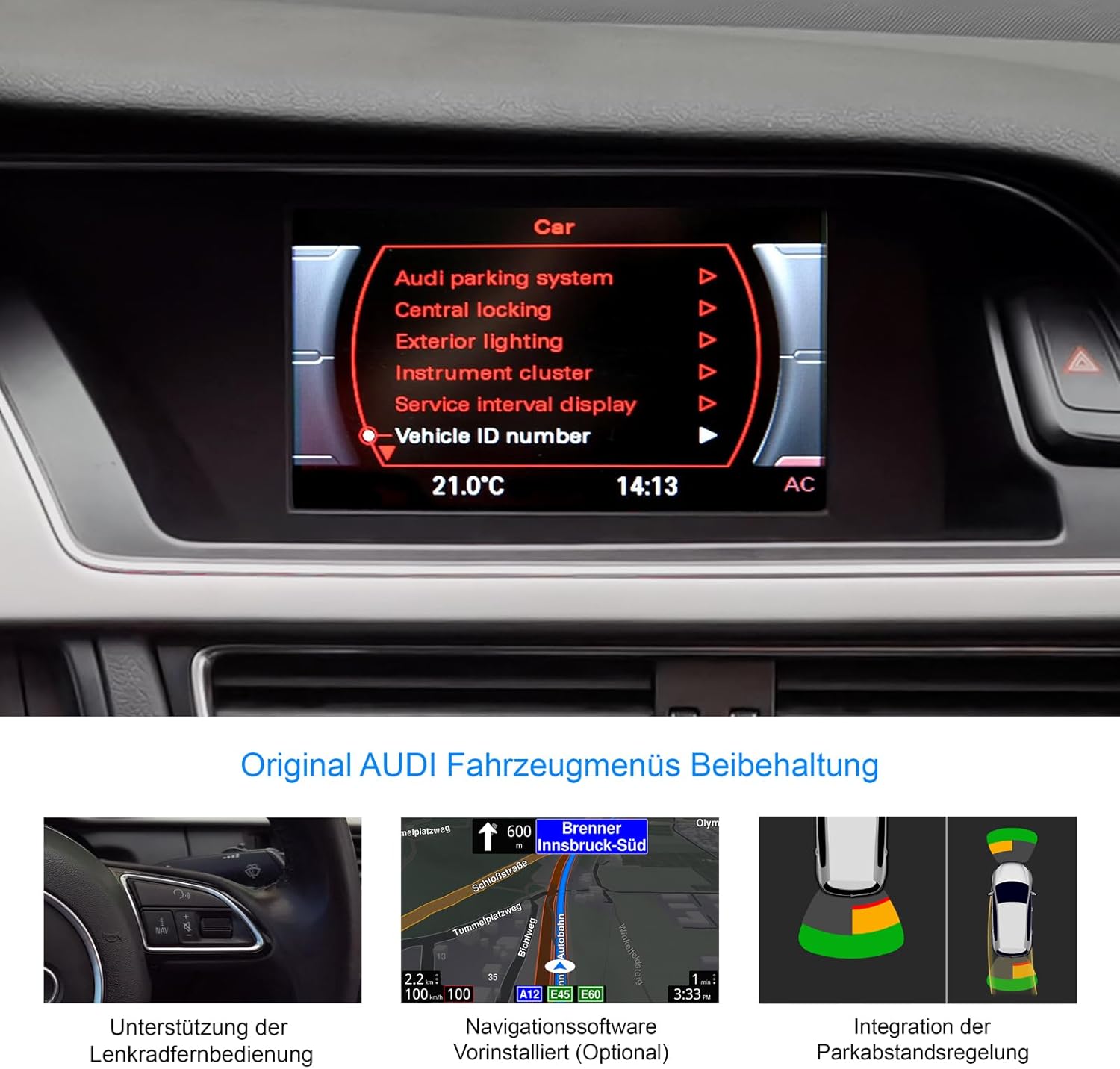
Figure 8: Retention of original Audi vehicle menus and integrated features.
CarPlay ແລະ Android Auto:
Connect your smartphone wirelessly to access CarPlay (for iOS devices) or Android Auto (for Android devices). A 31-day trial is included, after which an activation code must be purchased.
- ການເຊື່ອມຕໍ່ໄຮ້ສາຍ: Pair your phone via Bluetooth and follow the on-screen prompts to establish a wireless CarPlay or Android Auto connection.
- ການເຂົ້າເຖິງແອັບ: Use compatible apps for navigation (Apple Maps, Google Maps), music streaming (Spotify, Apple Music), messaging, and calls directly from the unit's display.
Head-up Display (HUD):
The included HUD 150 projects key information onto your windshield, allowing you to keep your eyes on the road.
- Information Displayed: Navigation directions (from Dynaway, Apple Maps, Google Maps), vehicle speed, and Blitzer.de speed camera information.
- ການຈັດວາງ: Position the HUD unit to ensure clear visibility without obstructing your driving view.

Figure 9: Head-up Display in action, showing navigation and time.
ບໍາລຸງຮັກສາ
To ensure the longevity and optimal performance of your DYNAVIN D9-DMI Ultra Flex, follow these maintenance guidelines:
- ທໍາຄວາມສະອາດຫນ້າຈໍ: ໃຊ້ຜ້າອ່ອນໆທີ່ບໍ່ມີຂົນທີ່ອອກແບບມາສະເພາະສຳລັບໜ້າຈໍເອເລັກໂຕຣນິກ. ຢ່າໃຊ້ນໍ້າຢາເຮັດຄວາມສະອາດທີ່ມີຮອຍຂີດຂ່ວນ ຫຼື ຕົວລະລາຍ. ເຊັດໜ້າຈໍຄ່ອຍໆເພື່ອເອົາຝຸ່ນ ແລະ ລາຍນິ້ວມືອອກ.
- ອັບເດດຊອບແວ: Periodically check for software updates from DYNAVIN to ensure the system runs efficiently and has the latest features and bug fixes. Updates can typically be performed via Wi-Fi or USB.
- ການດູແລທົ່ວໄປ: ຫຼີກລ້ຽງການເປີດເຄື່ອງໃຫ້ຢູ່ໃນອຸນຫະພູມທີ່ຮ້າຍແຮງ, ແສງແດດໂດຍກົງເປັນເວລາດົນນານ, ຫຼືຄວາມຊຸ່ມເກີນໄປ.
- ການເຊື່ອມຕໍ່ສາຍ: Ensure all cables remain securely connected. Avoid pulling on cables forcefully.
ການແກ້ໄຂບັນຫາ
This section addresses common issues you might encounter with your DYNAVIN D9-DMI Ultra Flex. For more complex problems, contact customer support.
| ບັນຫາ | ສາເຫດທີ່ເປັນໄປໄດ້ | ການແກ້ໄຂ |
|---|---|---|
| ຫນ່ວຍບໍລິການບໍ່ເປີດ. | ການເຊື່ອມຕໍ່ພະລັງງານວ່າງ, ຟິວທີ່ເປົ່າ, ບັນຫາຫມໍ້ໄຟລົດ. | Check all power cables and connections. Inspect vehicle fuses. Ensure vehicle battery is charged. |
| ບໍ່ມີສຽງອອກ. | Volume too low, mute activated, incorrect audio source selected, wiring issue. | ເພີ່ມລະດັບສຽງ. ກວດສອບວ່າປິດສຽງເປີດໃຊ້ງານຢູ່ຫຼືບໍ່. ເລືອກແຫຼ່ງສຽງທີ່ຖືກຕ້ອງ. ກວດສອບການເຊື່ອມຕໍ່ສາຍໄຟລຳໂພງ. |
| CarPlay/Android Auto ບໍ່ເຊື່ອມຕໍ່. | Bluetooth not paired, Wi-Fi disabled, trial period expired, activation code not entered. | Ensure Bluetooth and Wi-Fi are enabled on both devices. Re-pair the phone. Check trial status and enter activation code if necessary. |
| ສັນຍານ GPS ເສຍ ຫຼືບໍ່ຖືກຕ້ອງ. | ເສົາອາກາດ GPS ຖືກກີດຂວາງ ຫຼື ຕັດການເຊື່ອມຕໍ່, ການຮັບສັນຍານດາວທຽມບໍ່ດີ. | ໃຫ້ແນ່ໃຈວ່າເສົາອາກາດ GPS ຖືກຕິດຕັ້ງຢ່າງຖືກຕ້ອງ ແລະ ມີມຸມທີ່ຊັດເຈນ view ຂອງທ້ອງຟ້າ. ກວດສອບການເຊື່ອມຕໍ່ຂອງເສົາອາກາດ. ຍ້າຍອອກໄປໃນພື້ນທີ່ໂລ່ງແຈ້ງ. |
| ການຄວບຄຸມພວງມາໄລບໍ່ເຮັດວຽກ. | CAN-BUS connection issue, incorrect vehicle configuration. | Verify CAN-BUS wiring. Check unit settings for correct vehicle model configuration. |
ຂໍ້ມູນຈໍາເພາະ
| ຄຸນສົມບັດ | ລາຍລະອຽດ |
|---|---|
| ຍີ່ຫໍ້ | ດິນາວິນ |
| ຕົວແບບ | D9-DMI Ultra Flex |
| ຍານພາຫະນະທີ່ເຂົ້າກັນໄດ້ | Audi A4 (2007-2015), A5 (2007-2016), Q5 (2008-2017), S4 (2009-2016), S5 (2009-2016) with Concert/Symphony radio |
| ຂະໜາດໜ້າຈໍ | 6.5 ນິ້ວ |
| ປະເພດການສະແດງ | LCD, Anti-glare |
| ຄວາມລະອຽດ | 1024 x 600 ພິກເຊລ |
| ລະບົບປະຕິບັດການ | Android 11 |
| CPU | Quad-core |
| RAM | 4 GB |
| ການເຊື່ອມຕໍ່ | Wireless CarPlay, Android Auto, Bluetooth, USB |
| ຮູບແບບການອອກສຽງ | ສະເຕີລິໂອ (ຊ່ອງ 2.0) |
| ເຄື່ອງຮັບສັນຍານວິທະຍຸ | FM-RDS with 15 presets |
| ຄຸນນະສົມບັດພິເສດ | Integrated GPS Navigation, Head-up Display (HUD), CAN-BUS Integration (steering wheel, climate, parking sensors), Digital Dual Microphone |
| ຂະໜາດແພັກເກັດ | 28 x 23 x 10 cm |
| ນ້ໍາຫນັກລາຍການ | 2 ກິໂລ |
| ASIN | B0CS67GQKN |
ການຮັບປະກັນແລະການສະຫນັບສະຫນູນ
For warranty information, please refer to the documentation provided with your purchase or contact DYNAVIN customer service directly. DYNAVIN offers customer support for product inquiries, technical assistance, and troubleshooting.
For the Dynapp package, CarPlay, and Android Auto features, a 31-day trial phase is included. An activation code must be purchased online to continue using these features after the trial period.
Please visit the official DYNAVIN website or contact your retailer for the most up-to-date support information and contact details.


