ແນະນຳ
This manual provides essential information for setting up, operating, and maintaining your HP 17.3 Inch Laptop. Designed for productivity and entertainment, this laptop features a 13th Gen Intel Core i7 processor, a vibrant 17.3-inch HD+ touchscreen, 36GB RAM, and a 1TB SSD, running on Windows 11 Pro.
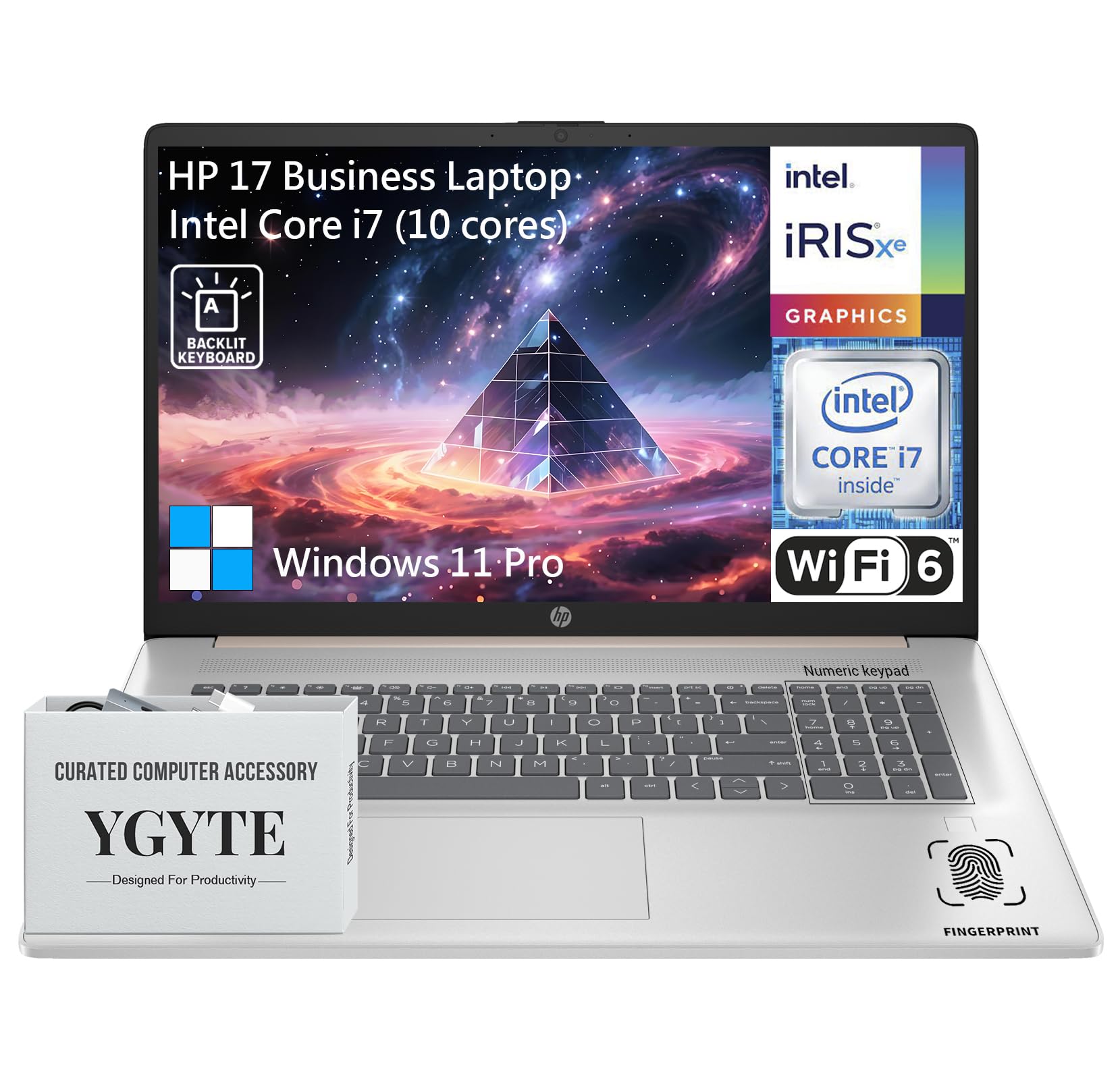
ນາຍພົນ view of the HP 17.3 Inch Laptop, showcasing its design and large display.

ເກີນview of the HP 17.3 Inch Laptop, highlighting its core components: Intel Core i7 processor, Intel Iris Xe Graphics, and Windows 11 Pro operating system.
ແມ່ນຫຍັງຢູ່ໃນກ່ອງ
Upon unpacking your HP 17.3 Inch Laptop, ensure all the following items are present:
- HP 17.3 Inch Laptop
- ເຄື່ອງປັບໄຟຟ້າ AC
- ເອກະສານ (ຄູ່ມືເລີ່ມຕົ້ນດ່ວນ, ຂໍ້ມູນການຮັບປະກັນ)
ຕັ້ງຄ່າ
1. ການເປີດເຄື່ອງ ແລະ ການສາກໄຟເບື້ອງຕົ້ນ
- ເຊື່ອມຕໍ່ອະແດບເຕີໄຟຟ້າ: Plug the AC power adapter into the laptop's power port and then into a wall outlet.
- ສາກແບັດເຕີຣີ: ອະນຸຍາດໃຫ້ແລັບທັອບສາກໄຟຢ່າງໜ້ອຍ 30 ນາທີກ່ອນການໃຊ້ງານໃນເບື້ອງຕົ້ນ, ຫຼືຈົນກວ່າຕົວຊີ້ບອກແບັດເຕີຣີສະແດງໃຫ້ເຫັນການສາກພຽງພໍ.
- ເປີດ: ເປີດຝາແລັບທັອບ ແລະກົດປຸ່ມເປີດປິດ, ໂດຍປົກກະຕິແລ້ວຕັ້ງຢູ່ເທິງແຖບແປ້ນພິມ.
2. Windows 11 Pro Setup
Follow the on-screen instructions to complete the Windows 11 Pro setup process. This includes:
- ການເລືອກພາກພື້ນ ແລະຮູບແບບແປ້ນພິມຂອງທ່ານ.
- ກຳລັງເຊື່ອມຕໍ່ກັບເຄືອຂ່າຍ Wi-Fi.
- ເຂົ້າສູ່ລະບົບດ້ວຍ ຫຼືສ້າງບັນຊີ Microsoft.
- ຕັ້ງຄ່າ PIN ຫຼືລະຫັດຜ່ານ.
- ກຳລັງຕັ້ງຄ່າຄວາມເປັນສ່ວນຕົວ.
3. ການເຊື່ອມຕໍ່ເຄືອຂ່າຍ
Your laptop supports Wi-Fi 6 for fast wireless connectivity. During Windows setup, you will be prompted to connect to a Wi-Fi network. If you need to connect later:
- ຄລິກໄອຄອນ Wi-Fi ໃນແຖບໜ້າວຽກ.
- ເລືອກເຄືອຂ່າຍທີ່ທ່ານຕ້ອງການຈາກບັນຊີລາຍຊື່.
- ໃສ່ກະແຈຄວາມປອດໄພເຄືອຂ່າຍ (ລະຫັດຜ່ານ) ຖ້າຖືກຖາມ.
- ກົດ ເຊື່ອມຕໍ່.
ການປະຕິບັດແລັບທັອບຂອງທ່ານ
ຈໍສະແດງຜົນ
The HP 17.3 Inch Laptop features a 17.3-inch HD+ (1600 x 900) BrightView Touchscreen. This display offers crisp details and vibrant colors, providing ample space for multitasking and immersive viewໃນປະສົບການ.

The 17.3-inch HD+ touchscreen display offers a resolution of 1600x900 pixels with BrightView technology for enhanced visual clarity.
ການປະຕິບັດ
Your laptop is equipped with a 13th Gen Intel Core i7 processor (10 cores, 12 threads, up to 5.0GHz) and Intel Iris Xe Graphics. This configuration provides robust performance for demanding applications, multitasking, and immersive entertainment.

Details of the Intel Core i7-1355U processor, including its 10 cores, 12 threads, 12MB cache, and a maximum turbo frequency of 5.0 GHz, designed for fast response and processing speed.
Storage and Multitasking
With 36GB of high-bandwidth DDR4 RAM, the laptop allows for seamless switching between applications. The 1TB high-speed SSD provides rapid boot times, quick application loading, and ample ການເກັບຮັກສາຂອງທ່ານ files.

The laptop features 36GB DDR4 RAM for swift multitasking efficiency, a 1TB SSD for fast access and ample storage, and Wi-Fi 6 for faster wireless connectivity.
ການເຊື່ອມຕໍ່
The HP 17.3 Inch Laptop offers a range of ports and wireless technologies to keep you connected:
- USB-C: SuperSpeed USB-C (5Gbps signaling rate) for data transfer and power delivery.
- USB-A: Two SuperSpeed USB-A ports (5Gbps signaling rate).
- HDMI 1.4b: ສໍາລັບການເຊື່ອມຕໍ່ກັບຈໍສະແດງຜົນພາຍນອກ.
- Wi-Fi 6: Advanced wireless networking for faster and more reliable internet.
- Bluetooth: For connecting wireless peripherals.
- ຫູຟັງ/ໄມໂຄຣໂຟນ Combo Jack: ສໍາລັບການປ້ອນຂໍ້ມູນສຽງແລະຜົນຜະລິດ.
- AC Smart Pin: ສຳລັບການເຊື່ອມຕໍ່ອະແດບເຕີໄຟຟ້າ.

ດ້ານຂ້າງfile of the HP 17.3 Inch Laptop illustrating the placement of USB Type-A, HDMI 1.4b, headphone/microphone combo, USB Type-C, and AC smart pin ports, along with its dimensions and weight.
ສຽງ ແລະກ້ອງຖ່າຍຮູບ
Engage in clear video calls and enjoy immersive audio with the integrated features:
- HP Wide Vision 720p HD Camera: Provides clear visuals for video conferencing.
- Dual Array Digital Microphones: ຮັບປະກັນວ່າສຽງຂອງທ່ານຈະຖືກບັນທຶກຢ່າງຊັດເຈນ.
- B&O Dual Speakers: Delivers rich, authentic audio tuned by Bang & Olufsen.

The HP 17.3 Inch Laptop features an HP True Vision 720p HD camera, dual array digital microphones, and B&O dual speakers for enhanced communication and audio experience.
ແປ້ນພິມ ແລະ Touchpad
The full-size backlit keyboard includes a 10-key number pad for comfortable and efficient typing. The larger trackpad provides precise navigation.
ເຄື່ອງອ່ານລາຍນິ້ວມື
For enhanced security and quick login, utilize the integrated fingerprint reader. You can set this up through Windows Hello in your laptop's settings.
ບໍາລຸງຮັກສາ
Proper maintenance ensures the longevity and optimal performance of your HP laptop:
- ທໍາຄວາມສະອາດ: ໃຊ້ຜ້າແພທີ່ອ່ອນນຸ່ມ, ບໍ່ມີສານດ່າງເພື່ອເຮັດຄວາມສະອາດໜ້າຈໍ ແລະ ພາຍນອກ. ສໍາລັບ smudges stubborn, ງampໃສ່ຜ້າດ້ວຍນ້ໍາຫຼືເຄື່ອງເຮັດຄວາມສະອາດຫນ້າຈໍ. ຫຼີກເວັ້ນການສານເຄມີທີ່ຮຸນແຮງ.
- ອັບເດດຊອບແວ: ກວດສອບ ແລະ ຕິດຕັ້ງອັບເດດ Windows ແລະ ອັບເດດໄດຣເວີ HP ເປັນປະຈຳເພື່ອຮັບປະກັນຄວາມໝັ້ນຄົງ ແລະ ຄວາມປອດໄພຂອງລະບົບ.
- ການດູແລຫມໍ້ໄຟ: To prolong battery life, avoid extreme temperatures. If storing the laptop for an extended period, charge the battery to about 50-70%.
- ການລະບາຍອາກາດ: ໃຫ້ແນ່ໃຈວ່າຊ່ອງລະບາຍອາກາດຂອງແລັບທັອບບໍ່ຖືກກີດຂວາງເພື່ອປ້ອງກັນຄວາມຮ້ອນເກີນໄປ. ໃຊ້ແລັບທັອບໃນພື້ນທີ່ຮາບພຽງ.
- ການສໍາຮອງຂໍ້ມູນ: ສຳຮອງຂໍ້ມູນທີ່ສຳຄັນໄປໃສ່ໄດຣຟ໌ພາຍນອກ ຫຼືບ່ອນເກັບຂໍ້ມູນຄລາວເປັນປະຈຳເພື່ອປ້ອງກັນການສູນເສຍຂໍ້ມູນ.
ການແກ້ໄຂບັນຫາ
ນີ້ແມ່ນບາງບັນຫາທົ່ວໄປ ແລະວິທີແກ້ໄຂຂອງເຂົາເຈົ້າ:
| ສະບັບ | ການແກ້ໄຂ |
|---|---|
| ແລັບທັອບບໍ່ເປີດ. | ໃຫ້ແນ່ໃຈວ່າອະແດບເຕີໄຟຟ້າໄດ້ເຊື່ອມຕໍ່ກັບທັງຄອມພິວເຕີໂນດບຸກ ແລະ ປລັກໄຟທີ່ໃຊ້ງານໄດ້ຢ່າງແໜ້ນໜາ. ກວດສອບວ່າປລັກໄຟໃຊ້ງານໄດ້ຫຼືບໍ່. ລອງໃຊ້ປລັກອື່ນ. |
| ໜ້າຈໍຫວ່າງເປົ່າ ຫຼື ດຳ. | Press the power button to ensure the laptop is on. Connect an external monitor to check if the display output is working. Adjust screen brightness using function keys. |
| ບັນຫາການເຊື່ອມຕໍ່ Wi-Fi. | Ensure Wi-Fi is enabled in Windows settings. Restart your router and modem. Check for updated Wi-Fi drivers. Try connecting to a different network if available. |
| ການປະຕິບັດຊ້າ. | ປິດແອັບພລິເຄຊັນທີ່ບໍ່ຈໍາເປັນ. ກວດເບິ່ງຂະບວນການພື້ນຖານທີ່ບໍລິໂພກຊັບພະຍາກອນສູງ (Task Manager). ໃຫ້ແນ່ໃຈວ່າ Windows ແລະໄດເວີແມ່ນອັບເດດແລ້ວ. ດໍາເນີນການທໍາຄວາມສະອາດແຜ່ນ. |
| ແປ້ນພິມ ຫຼື touchpad ບໍ່ຕອບສະໜອງ. | Restart the laptop. Check for any physical obstructions. Ensure drivers are updated. |
ຂໍ້ມູນຈໍາເພາະ
| ຄຸນສົມບັດ | ລາຍລະອຽດ |
|---|---|
| ຍີ່ຫໍ້ | HP |
| ຊື່ຕົວແບບ | Essential 17 (HP 17) |
| ຂະໜາດໜ້າຈໍ | 17.3 ນິ້ວ |
| ຄວາມລະອຽດໜ້າຈໍ | 1600 x 900 ພິກເຊລ (HD+) |
| ໂຮງງານຜະລິດ | 13th Gen Intel Core i7 (10 Cores, up to 5.0 GHz) |
| RAM | 36 GB DDR4 |
| ການເກັບຮັກສາ | 1 TB SSD (PCIe x 16 interface) |
| Graphics Coprocessor | Intel Iris Xe Graphics (ປະສົມປະສານ) |
| ລະບົບປະຕິບັດການ | Windows 11 Pro |
| ປະເພດໄຮ້ສາຍ | 802.11ax (Wi-Fi 6) |
| ການເຊື່ອມຕໍ່ | USB-C (5Gbps), 2x USB-A (5Gbps), HDMI 1.4b, Headphone/Microphone Combo |
| ຄຸນນະສົມບັດພິເສດ | Backlit Keyboard, Fingerprint Reader, Touchscreen |
| ນ້ໍາຫນັກລາຍການ | 4.61 ປອນ |
| ຂະໜາດສິນຄ້າ (LxWxH) | 15.78 x 10.15 x 0.78 ນິ້ວ |
| ສີ | Rose Gold |
| ໝໍ້ໄຟ | ແບັດເຕີຣີ Lithium Ion 1 ອັນ (ລວມ) |
ການຮັບປະກັນແລະການສະຫນັບສະຫນູນ
Your HP 17.3 Inch Laptop comes with a standard manufacturer's warranty. For detailed warranty terms and conditions, please refer to the documentation included with your product or visit the official HP support webເວັບໄຊ.
ສໍາລັບການຊ່ວຍເຫຼືອດ້ານວິຊາການ, ການດາວໂຫຼດໄດເວີ, ຫຼືການຊ່ວຍເຫຼືອເພີ່ມເຕີມ, ກະລຸນາເຂົ້າໄປທີ່ການຊ່ວຍເຫຼືອຂອງ HP ຢ່າງເປັນທາງການ webເວັບໄຊ:
You may also find helpful resources and community forums on the HP webເວັບໄຊ.