ແນະນຳ
Welcome to the user manual for your new Amazon Fire TV Stick HD. This guide provides detailed instructions on how to set up, operate, maintain, and troubleshoot your device, ensuring you get the most out of its streaming and smart home capabilities.

Image: The Amazon Fire TV Stick HD and its accompanying Alexa Voice Remote. The stick is compact and plugs directly into an HDMI port, while the remote features dedicated buttons for navigation, voice control, and popular streaming services.
ແມ່ນຫຍັງຢູ່ໃນກ່ອງ
Upon unboxing your Fire TV Stick HD, you should find the following components:
- ອຸປະກອນ Fire TV Stick HD
- Alexa ສຽງຫ່າງໄກສອກຫຼີກ
- ສາຍໄຟ ແລະ ອະແດບເຕີໄຟ
- ເຄື່ອງຂະຫຍາຍ HDMI
- 2 AAA batteries (for the remote)
- ຄູ່ມືເລີ່ມຕົ້ນດ່ວນ

Image: The retail packaging for the Amazon Fire TV Stick HD, showing the device, remote, and box. This illustrates all the items included in the product package.
ຄູ່ມືການຕິດຕັ້ງ
Follow these steps to set up your Fire TV Stick HD:
- ເຊື່ອມຕໍ່ Fire TV Stick: Plug the Fire TV Stick HD directly into an available HDMI port on your high-definition television. If space is limited or for better Wi-Fi reception, use the included HDMI extender.
- ເປີດ: Connect the power cable to the Fire TV Stick and then plug the power adapter into a wall outlet.
- ໃສ່ແບັດເຕີຣີໃສ່ຣີໂໝດ: Open the battery compartment on the back of the Alexa Voice Remote and insert the two AAA batteries, ensuring correct polarity.
- ເລືອກ HDMI Input: Turn on your TV and select the correct HDMI input source where the Fire TV Stick is connected.
- ປະຕິບັດຕາມຄໍາແນະນໍາໃນຫນ້າຈໍ: The Fire TV Stick will guide you through the initial setup process, including connecting to your Wi-Fi network and logging into your Amazon account.
- Pair Remote (if necessary): If your remote does not automatically pair, press and hold the Home button on the remote for 10 seconds until it pairs with your Fire TV Stick.
Operating Your Fire TV Stick HD
ການຄວບຄຸມສຽງດ້ວຍ Alexa
The Alexa Voice Remote allows you to control your Fire TV Stick using voice commands. Press and hold the microphone button on the remote, then speak your command. You can search for content, launch apps, control playback, and more.

Image: The Alexa Voice Remote, highlighting its voice control button and dedicated app buttons for services like Prime Video and Netflix. This remote simplifies content discovery and access.
ການຖ່າຍທອດເນື້ອຫາ
Access a vast library of movies, TV shows, and live TV from various streaming services. The Fire TV Stick HD supports Full HD (1080p) resolution for a clear viewປະສົບການ.
- ຮູບເງົາ ແລະລາຍການໂທລະພາບ: Stream from popular services like Netflix, Prime Video, Disney+, Vix, and many more. Subscription fees may apply for certain services.
- ເນື້ອໃນຟຣີ: Enjoy over 50,000 free movies and TV episodes from ad-supported streaming apps such as Vix, Tubi, and Pluto TV.
- ດົນຕີ: Listen to millions of songs from Amazon Music, Spotify, Pandora, and other music streaming platforms.
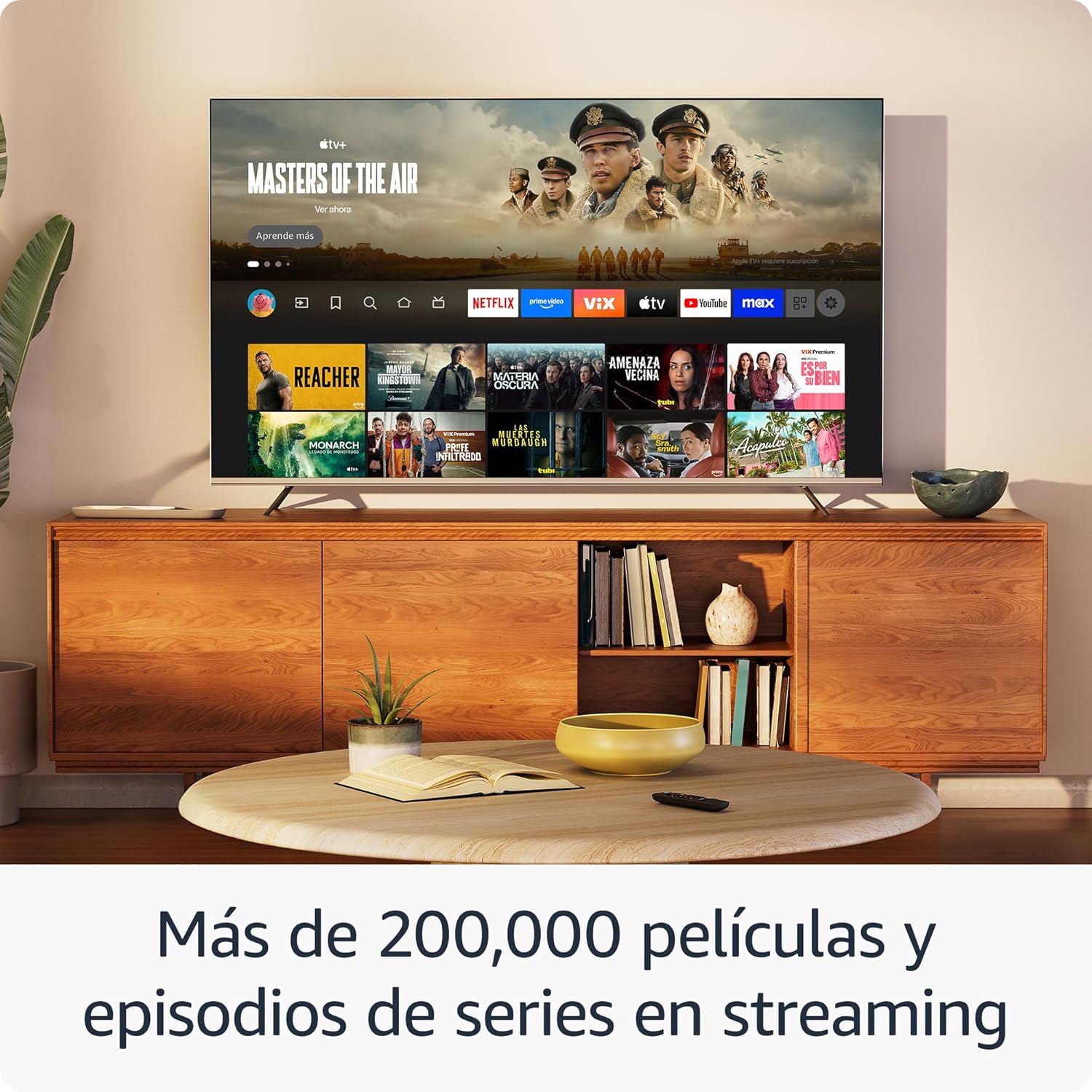
ຮູບພາບ: ໜ້າຈໍໂທລະພາບasing the Fire TV interface with various streaming applications like Netflix, Prime Video, and Disney+. This demonstrates the wide range of entertainment options available.

Image: A visual comparison illustrating the difference in picture quality between Standard Definition (SD), High Definition (HD), and 4K resolution. The Fire TV Stick HD delivers content in crisp HD.
ການຄວບຄຸມເຮືອນອັດສະລິຍະ
Use your Fire TV Stick HD and Alexa Voice Remote to control compatible smart home devices. You can ask Alexa to check the weather, dim lights, view live camera feeds, and more.

Image: A television screen displaying the smart home control dashboard, showing icons for thermostat, smart camera, and light. This illustrates how the Fire TV Stick can integrate with and manage smart home devices.
ບໍາລຸງຮັກສາ
To ensure the longevity and optimal performance of your Fire TV Stick HD:
- ທໍາຄວາມສະອາດ: Gently wipe the device and remote with a soft, dry, lint-free cloth. Avoid using liquid cleaners or aerosols.
- ສະພາບແວດລ້ອມ: Keep the device in a well-ventilated area, away from direct sunlight, heat sources, and moisture.
- ອັບເດດຊອບແວ: The device automatically receives software security updates. Ensure your device is connected to the internet to receive these updates.
ການແກ້ໄຂບັນຫາ
If you encounter issues with your Fire TV Stick HD, try the following solutions:
- ບໍ່ມີພະລັງງານ / ບໍ່ມີຈໍສະແດງຜົນ:
- Ensure the power cable is securely connected to both the Fire TV Stick and the power adapter, and the adapter is plugged into a working wall outlet.
- Verify your TV is on the correct HDMI input channel.
- Try a different HDMI port on your TV.
- ໄລຍະໄກບໍ່ຕອບສະໜອງ:
- ປ່ຽນແບັດ AAA ໃນຣີໂໝດ.
- ຈັບຄູ່ຣີໂມດຄືນໃໝ່ໂດຍການກົດປຸ່ມໜ້າຫຼັກຄ້າງໄວ້ 10 ວິນາທີ.
- ໃຫ້ແນ່ໃຈວ່າບໍ່ມີສິ່ງກີດຂວາງລະຫວ່າງຣີໂໝດ ແລະ Fire TV Stick.
- ບັນຫາການເຊື່ອມຕໍ່ Wi-Fi:
- ຣີສະຕາດເລົາເຕີ Wi-Fi ແລະໂມເດັມຂອງທ່ານ.
- Go to Settings > Network on your Fire TV Stick and try reconnecting to your Wi-Fi network.
- Ensure your Fire TV Stick is within range of your Wi-Fi router.
- Partial Incompatibility with Roku TVs (as reported by some users):
- Some Roku TV models may not automatically switch to the Fire TV Stick's HDMI input upon power-on. You may need to manually select the HDMI input using your Roku TV's remote.
ຂໍ້ມູນຈໍາເພາະ
| ຄຸນສົມບັດ | ຂໍ້ມູນຈໍາເພາະ |
|---|---|
| Dimensions (Stick) | 86 x 30 x 13 ມມ (3.4” x 1.2” x 0.5”) |
| ນ້ຳໜັກ (ຕິດ) | 32.0 g (1.1 ອໍ) |
| ໂຮງງານຜະລິດ | Quad-Core 1.7 GHz |
| ການເກັບຮັກສາພາຍໃນ | 8 GB |
| ການເຊື່ອມຕໍ່ Wi-Fi | Dual-band, dual-antenna Wi-Fi (MIMO) compatible with 802.11a/b/g/n/ac |
| Bluetooth | Bluetooth 5.0 and Bluetooth Low Energy |
| ຄວາມເຂົ້າກັນໄດ້ຂອງສຽງ | Alexa Voice Remote (included) or free Fire TV app |
| ການຄວບຄຸມອຸປະກອນ IR | Controls TV, soundbar, AV receiver (power, volume) via included Alexa Voice Remote |
| Cloud Storage | ບ່ອນເກັບຂໍ້ມູນໃນຄລາວຟຣີສຳລັບເນື້ອຫາດິຈິຕອນທີ່ຊື້ຈາກ Amazon |
| ທ່າເຮືອ | HDMI output; Micro USB for power only |
| ສະຫນັບສະຫນູນສຽງ | Dolby encoded audio (AC-3, E-AC-3) HDMI pass-through |
| ຮູບແບບວິດີໂອ | HDR10, HDR10+, HLG, H.265, H.264, Vp9 |
| ຄວາມລະອຽດຜົນຜະລິດ | 1080p and 720p up to 60 fps |
| ຄວາມຕ້ອງການລະບົບ | HD TV with HDMI input, Wi-Fi internet connection, power outlet |
| ໂທລະພາບທີ່ເຂົ້າກັນໄດ້ | HD TVs with HDMI and 1080p or 720p at 60/50 Hz capability |
| ຄຸນນະສົມບັດການເຂົ້າເຖິງ | ສຽງView screen reader, Closed Captions (not for all content) |
| ຂະໜາດໄລຍະໄກ | 38.68 x 141.3 x 17.6 ມມ |
| ນ້ຳໜັກໄລຍະໄກ | 45 g (ບໍ່ມີຫມໍ້ໄຟ) |
| ແບດເຕີລີ່ໄລຍະໄກ | ໝໍ້ໄຟ AAA 2 ອັນ (ລວມ) |
| ຄວາມເຂົ້າກັນໄດ້ທາງໄກ | Fire TV Stick HD, Fire TV Stick 4K (1st Gen and later) |
ການຮັບປະກັນແລະການສະຫນັບສະຫນູນ
Your Amazon Fire TV Stick HD comes with a ຮັບປະກັນ 1 ປີຈໍາກັດ and included service. For detailed terms and conditions regarding the use of your Fire TV Stick, please refer to the official Amazon webເວັບໄຊ.
ອັບເດດຄວາມປອດໄພຊອບແວ: This device is guaranteed to receive software security updates for at least four years after it is no longer available for purchase as a new unit on Amazon websites. For more information on your specific device's updates, you can check your Amazon account's "Manage Your Content and Devices" section.
For further assistance or support, please visit the official Amazon support pages or contact Amazon customer service.


