ແນະນຳ
This manual provides detailed instructions for the installation, operation, and maintenance of your CAMECHO 10.1 Inch HD CCTV Monitor (Model K0202). Please read this manual thoroughly before using the product to ensure proper function and longevity. Keep this manual for future reference.
ສິນຄ້າເກີນview
ຄຸນນະສົມບັດທີ່ສໍາຄັນ
- 10.1-inch Portable Monitor: Features built-in speakers, 1024x600 RGB high resolution, and a 16:9 aspect ratio. Supports 9-30V DC power input (12V AC adapter recommended).
- Multifunctional Mini Screen: Compatible with VGA, AVI, HDMI, DVD, PC, CCTV, and TV systems. Suitable for security monitoring, vehicle displays, reversing camera systems, and general computer use. Note: Not designed for advanced gaming applications (e.g., 3A Masterpieces).
- Multi-Input Modes: Offers 4 input modes (HDMI, VGA, AV1, AV2). Easily switch between modes using a cable connection and the AV1/AV2 button.
- Two-Channel Video Input: Supports two external P&HD cameras. When the car reverses, it automatically switches to the rear camera screen. When reversing is finished, the device switches back to DVD/VCD video. Supports PAL/NTSC video systems.
- ການຕິດຕັ້ງງ່າຍດາຍ: The adjustable stand allows for flexible viewing angles and screen rotation. Portable design for use at home, in the car, or while traveling. Note: If used for video games, this power supply should not operate for a long period.
ເນື້ອໃນຊຸດ
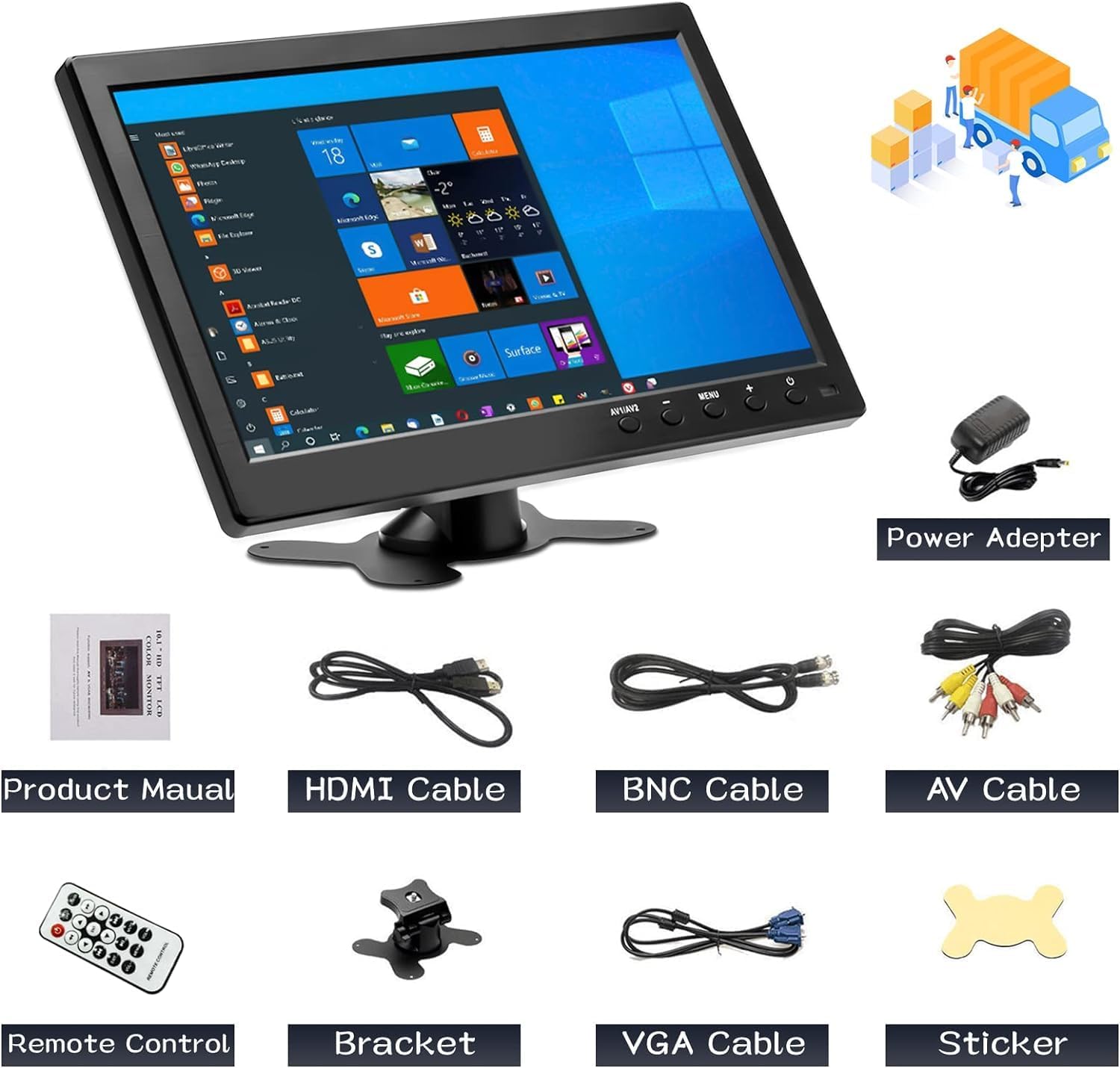
ຮູບທີ 1: ເນື້ອໃນຊຸດ
The package includes the CAMECHO 10.1 inch monitor, power adapter, product manual, HDMI cable, BNC cable, AV cable, remote control, bracket, VGA cable, and a sticker.
ກະລຸນາກວດສອບວ່າລາຍການທັງຫມົດທີ່ລະບຸໄວ້ຂ້າງລຸ່ມນີ້ແມ່ນລວມຢູ່ໃນຊຸດຂອງທ່ານ:
- CAMECHO 10.1 Inch Monitor
- Power Adapter
- ຄູ່ມືຜະລິດຕະພັນ (ເອກະສານນີ້)
- ສາຍ HDMI
- ສາຍ BNC
- ສາຍ AV
- ການຄວບຄຸມໄລຍະໄກ
- ວົງເລັບປັບໄດ້
- ສາຍ VGA
- ສະຕິກເກີ
ຕັ້ງຄ່າ
ການເຊື່ອມຕໍ່ Monitor
The monitor supports multiple input interfaces for versatile connectivity. Refer to the diagram below for port identification.

Figure 2: Rear Panel Connections and Input Types
The monitor features Power, VGA, HDMI, AV (Audio/Video), USB, and BNC input ports. Connect your devices accordingly.
- ການເຊື່ອມຕໍ່ພະລັງງານ: Connect the provided power adapter to the "Power" port on the monitor and then to a suitable power outlet (9-30V DC input, 12V AC adapter).
- Video Input:
- HDMI: Use the HDMI cable to connect to devices like Raspberry Pi, game consoles, or other HDMI-enabled sources.
- VGA: Use the VGA cable to connect to laptops or desktop computers.
- AV (Audio/Video): Use the AV cable to connect to devices such as DVRs.
- BNC: Connect security cameras directly using a BNC cable.
- USB: For connecting USB devices like U-disks or card readers.
- ການຕິດຕັ້ງ: Attach the adjustable bracket to the monitor and secure it on a flat surface. Adjust the viewມຸມຕາມຄວາມຕ້ອງການ.
ຄໍາແນະນໍາການດໍາເນີນງານ
ເປີດ/ປິດ
ກົດ ພະລັງງານ button on the monitor or the remote control to turn the device on or off.
ກຳລັງປ່ຽນໂໝດປ້ອນຂໍ້ມູນ
The monitor supports multiple input sources. To switch between them:
- ກົດ AV1/AV2 button on the monitor or the remote control to cycle through HDMI, VGA, AV1, and AV2 inputs.
- For two-channel video input (e.g., car reversing cameras), the monitor will automatically switch to the rear camera view when reversing is detected and return to the previous video source once reversing is complete.
Display Modes (When connected to a PC/Laptop)
When connected to a computer, the monitor can operate in different display modes:
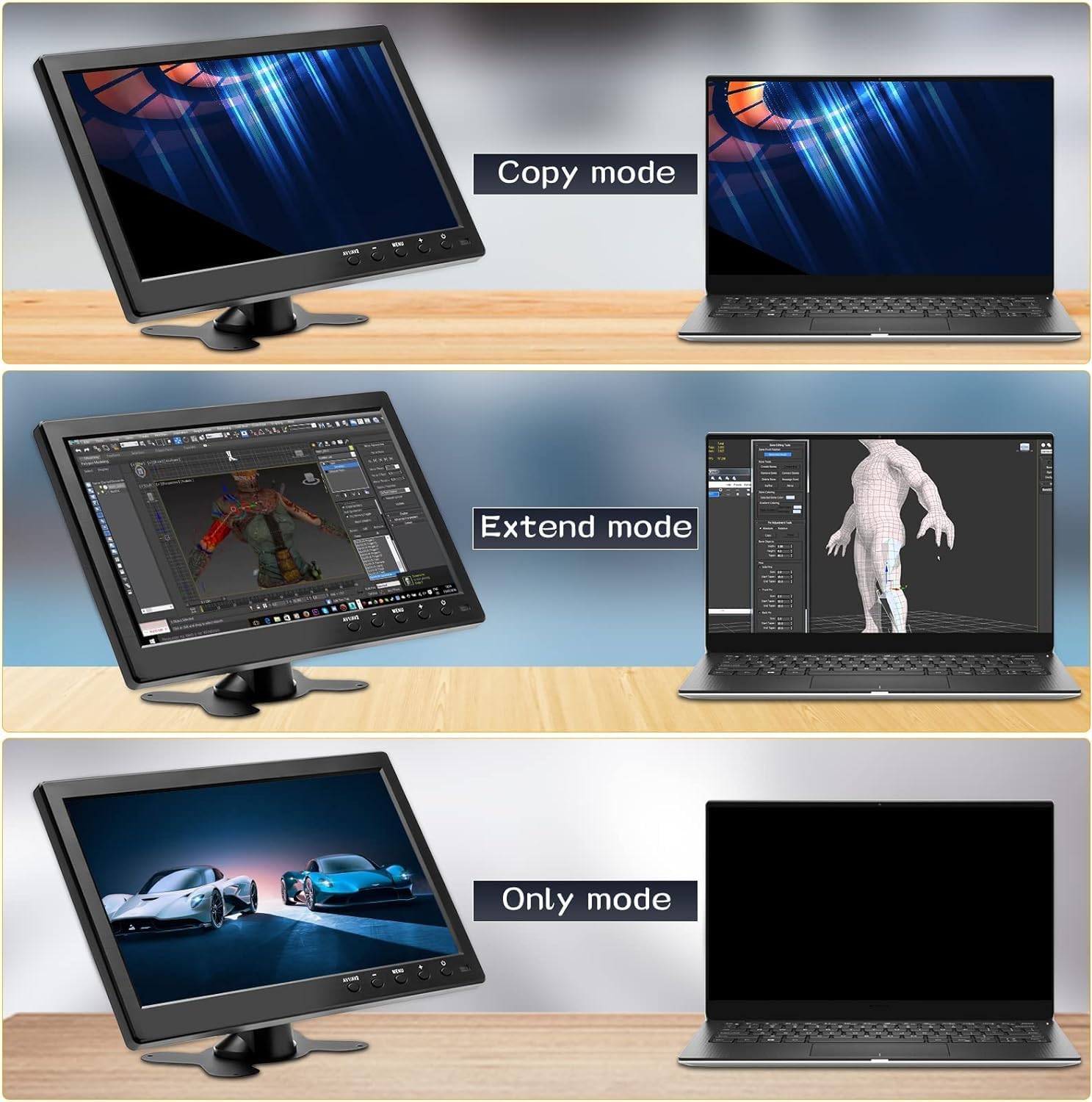
Figure 3: Display Modes
The monitor supports Copy, Extend, and Only modes when connected to a computer.
- ໂໝດສຳເນົາ: Duplicates the content of your primary display.
- ຂະຫຍາຍໂໝດ: Extends your desktop across both displays, providing more screen real estate.
- Only Mode: Uses only the CAMECHO monitor as the display, turning off the primary display (e.g., laptop screen).
These modes are typically configured through your computer's display settings.
ການນໍາໃຊ້ການຄວບຄຸມໄລຍະໄກ
The included remote control allows for convenient operation of the monitor's functions. Refer to the diagram for button layout.

Figure 4: Monitor Dimensions and Remote Control Layout
The remote control provides access to power, input selection, menu navigation, volume control, and media playback functions.
- ພະລັງງານ: ເປີດ ຫຼືປິດຈໍສະແດງຜົນ.
- USB: ເລືອກໂໝດການປ້ອນຂໍ້ມູນ USB.
- ຂຶ້ນ/ລົງ/ຊ້າຍ/ຂວາ: ນຳທາງຜ່ານຕົວເລືອກເມນູ.
- ENT (ໃສ່): ຢືນຢັນການເລືອກໃນເມນູ.
- ເມນູ: ເປີດເມນູການສະແດງຜົນເທິງໜ້າຈໍ (OSD).
- VOL+/VOL-: ປັບລະດັບສຽງ.
- ອອກ: ອອກຈາກເມນູຫຼືຟັງຊັນປະຈຸບັນ.
- PLAY/PAUSE, Fast Forward, Fast Backward, Next, Previous: Media playback controls (functionality depends on the connected device and input mode).
ລຳໂພງໃນຕົວ
The monitor features built-in dual speakers for audio output, primarily active in HDMI, AV, and USB signal modes.

Figure 5: Built-in Dual Speakers
The monitor includes integrated speakers for audio playback from HDMI, AV, and USB sources.
ຄໍາຮ້ອງສະຫມັກ
The CAMECHO 10.1 Inch HD CCTV Monitor is designed for a variety of uses:

Figure 6: Monitor Applications
The monitor is suitable for business meetings, gaming, security monitoring, and entertainment.
- Business & Productivity: Ideal as a secondary display for laptops during meetings or for extending your workspace.
- ເກມ: Connect game consoles via HDMI for a compact gaming experience.
- ການຕິດຕາມຄວາມປອດໄພ: Directly connect CCTV cameras via BNC for surveillance.
- ບັນເທີງ: Watch movies or TV shows by connecting DVD players or other media sources via HDMI or AV.
- ການນໍາໃຊ້ຍານພາຫະນະ: Functions as a backup camera monitor or for in-car entertainment.
ບໍາລຸງຮັກສາ
ເພື່ອຮັບປະກັນອາຍຸຍືນ ແລະປະສິດທິພາບທີ່ດີທີ່ສຸດຂອງຈໍພາບຂອງທ່ານ, ປະຕິບັດຕາມຄໍາແນະນໍາການບໍາລຸງຮັກເຫຼົ່ານີ້:
- ທໍາຄວາມສະອາດ: ໃຊ້ຜ້າອ່ອນໆແລະແຫ້ງເພື່ອທຳຄວາມສະອາດໜ້າຈໍ ແລະ ພາຍນອກ. ສຳລັບຮອຍທີ່ຝັງແໜ້ນ, ໃຫ້ເຊັດເບົາໆ.ampໃສ່ຜ້າດ້ວຍນ້ໍາຫຼືການແກ້ໄຂການທໍາຄວາມສະອາດທີ່ປອດໄພຫນ້າຈໍ. ຫຼີກເວັ້ນການສານເຄມີທີ່ຮຸນແຮງຫຼືວັດສະດຸຂັດ.
- ປິດພະລັງງານ: Always power off the monitor and disconnect it from the power source before cleaning or when not in use for extended periods.
- ການລະບາຍອາກາດ: ໃຫ້ແນ່ໃຈວ່າຊ່ອງລະບາຍອາກາດຂອງຈໍສະແດງຜົນບໍ່ໄດ້ຖືກບລັອກເພື່ອປ້ອງກັນຄວາມຮ້ອນເກີນໄປ.
- ການເກັບຮັກສາ: ເກັບຮັກສາຈໍພາບໄວ້ໃນບ່ອນທີ່ເຢັນ, ແຫ້ງ, ຫ່າງຈາກແສງແດດໂດຍກົງ ແລະອຸນຫະພູມທີ່ຮຸນແຮງ.
- ການຈັດການ: Handle the monitor with care to avoid physical damage.
ການແກ້ໄຂບັນຫາ
If you encounter issues with your CAMECHO monitor, refer to the following common troubleshooting steps:
| ບັນຫາ | ສາເຫດທີ່ເປັນໄປໄດ້ | ການແກ້ໄຂ |
|---|---|---|
| ບໍ່ມີຮູບພາບໃນ ໜ້າ ຈໍ |
|
|
| ບໍ່ມີສຽງ |
|
|
| ຮູບພາບ flickering ຫຼືບໍ່ຫມັ້ນຄົງ |
|
|
| ການຄວບຄຸມໄລຍະໄກບໍ່ເຮັດວຽກ |
|
|
ຂໍ້ມູນຈໍາເພາະ
| ຄຸນສົມບັດ | ລາຍລະອຽດ |
|---|---|
| ຍີ່ຫໍ້ | CAMECHO |
| ຕົວແບບ | K0202 |
| ຂະໜາດໜ້າຈໍ | 10.1 ນິ້ວ |
| ເຕັກໂນໂລຊີຫນ້າຈໍ | ຈໍ LCD |
| ຄວາມລະອຽດ | 1024x600 (ຄວາມລະອຽດສູງ) |
| ອັດຕາສ່ວນ | 16:9 |
| ຄວາມສະຫວ່າງ | 400 cd/m² |
| ອັດຕາສ່ວນກົງກັນຂ້າມ | 500:1 |
| ເວລາຕອບສະຫນອງ | 10 ມິນລິວິນາທີ |
| ອັດຕາການໂຫຼດຂໍ້ມູນຄືນໃໝ່ | 60 Hz |
| Viewໃນມຸມ | 170 ອົງສາ (ຕົວຈິງ) / 85 ອົງສາ (ລະບຸໄວ້) |
| ການໂຕ້ຕອບຮາດແວ | HDMI, USB, VGA, BNC, AV |
| ພອດ USB ທັງໝົດ | 1 |
| ການປ້ອນຂໍ້ມູນ Voltage | 12 Volts (DC 9-30V compatible) |
| ຄຸນສົມບັດເພີ່ມເຕີມ | Built-in Speakers, Portable |
| ຂະໜາດສິນຄ້າ | 41 x 7 x 32 cm |
| ນ້ໍາຫນັກລາຍການ | 1.12 ກິໂລກຣາມ |
| ປະເພດການຕິດຕັ້ງ | ໂຕະ |
| ອຸປະກອນຕໍ່ພ່ວງທີ່ເຂົ້າກັນໄດ້ | Wide range of devices with VGA, USB, HDMI, BNC, or AV output |
ຂໍ້ມູນພະລັງງານ

Figure 7: Energy Data Sheet
Detailed energy consumption and technical specifications for the monitor.

ຮູບທີ 8: ປ້າຍກຳກັບປະສິດທິພາບພະລັງງານ
The monitor has an energy efficiency class of E, consuming 7 kWh per 1000 hours.
ສຳລັບຂໍ້ມູນພະລັງງານລະອຽດເພີ່ມເຕີມ, ກະລຸນາອ້າງອີງເຖິງຖານຂໍ້ມູນ EPREL ຢ່າງເປັນທາງການ: https://eprel.ec.europa.eu/qr/1438817
ການຮັບປະກັນແລະການສະຫນັບສະຫນູນ
CAMECHO is committed to providing high-quality products and customer support.

Figure 9: CAMECHO Support Commitment
CAMECHO offers 24-hour support, high-quality products, and technical assistance.

Figure 10: Customer Support Contact
For assistance or user manual inquiries, please contact CAMECHO customer support.
For technical support, warranty claims, or any questions regarding your CAMECHO monitor, please contact us at:
Spare parts are guaranteed to be available for a minimum of 1 year from the date of product discontinuation.


