ແນະນຳ
Welcome to your XPR3SS IK10PW Smart WiFi Automatic Irrigation Water Timer. This device is designed to simplify your garden and agriculture watering needs through intelligent scheduling and remote control. Please read this manual carefully to ensure proper installation, operation, and maintenance of your device.
ສິນຄ້າເກີນview
ສ່ວນປະກອບລວມ:
- ເຄື່ອງຈັບເວລານ້ໍາ
- ຕົວເຊື່ອມຕໍ່
- 10m Pipe
- Drop Emitter
- ການກັ່ນຕອງ
- Barb Fitting
ຄຸນນະສົມບັດທີ່ສໍາຄັນ:
- ການເຊື່ອມຕໍ່ WiFi: Control your irrigation system from anywhere using the Tuya Smart Life App.
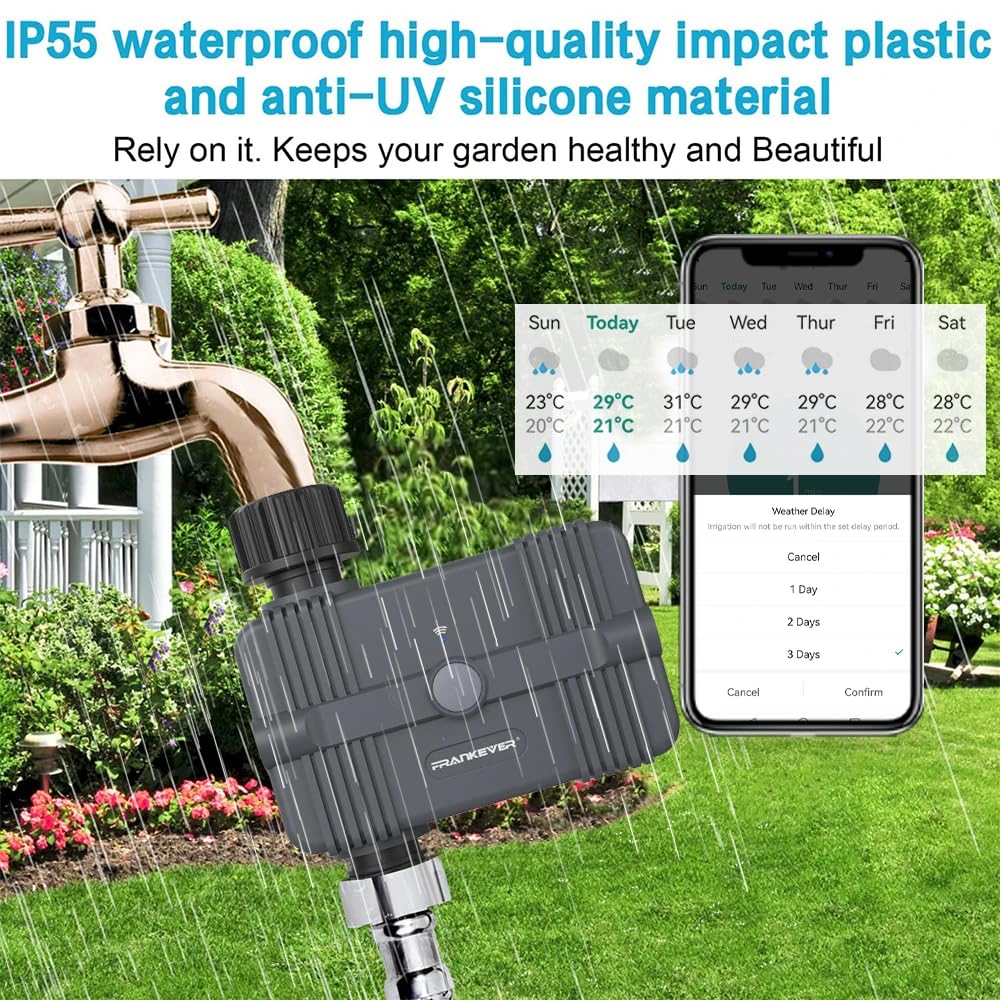
- ສະພາບອາກາດຊັກຊ້າ: Postpone watering schedules for 24, 48, or 72 hours in anticipation of rain.
- ການແຈ້ງເຕືອນແບັດເຕີຣີຕໍ່າ: Receive notifications when battery levels drop below 5%, with automatic shutdown to prevent over-watering.
- Multi-function Scheduling: Set watering durations as short as 1 minute, ideal for drip irrigation. Supports both timing and cycle timing options.
- ການຄວບຄຸມດ້ວຍສຽງ: Seamlessly integrate with Amazon Alexa and Google Assistant for hands-free operation.
- ຄຸນະພາບທີ່ເຊື່ອຖືໄດ້: Features a magnetic valve for superior sealing performance, ensuring no water leakage and stable operation.


ຄູ່ມືການຕິດຕັ້ງ
1. ການຕິດຕັ້ງຫມໍ້ໄຟ
- The XPR3SS IK10PW requires four (4) AA batteries (not included).
- ຊອກຫາຊ່ອງໃສ່ຫມໍ້ໄຟຢູ່ດ້ານຫຼັງຂອງອຸປະກອນ.
- Insert the batteries, ensuring correct polarity as indicated inside the compartment.
- ປິດຝາປິດແບັດເຕີຣີໃຫ້ແໜ້ນເພື່ອຮັກສາປະທັບຕາກັນນ້ຳ.
2. ການຕິດຕັ້ງທາງດ້ານຮ່າງກາຍ
- Attach the water timer to your outdoor faucet or hose connection. Ensure the connection is hand-tight to prevent leaks.
- Connect your irrigation system (e.g., 10m pipe, drop emitters, filter, barb fittings) to the water outlet of the timer.
3. ການຕິດຕັ້ງແອັບ ແລະ ການເຊື່ອມຕໍ່ WiFi
- Download the "Tuya Smart Life" app from your smartphone's app store (available on iOS and Android).
- Register or log in to your existing Tuya Smart Life account.
- In the app, tap "Add Device" or the "+" icon to begin the pairing process.
- Press and hold the WiFi Connect Button on the timer until the indicator light flashes rapidly, indicating it is in pairing mode.
- Follow the on-screen instructions in the app to connect the timer to your 2.4GHz WiFi network.

ຄໍາແນະນໍາການດໍາເນີນງານ
1. Scheduling Watering
Open the Tuya Smart Life app and select your XPR3SS IK10PW device to access scheduling options.
- ຕາຕະລາງປົກກະຕິ: Set specific start times and durations for watering on selected days of the week.
- ຮອບວຽນ ແລະແຊ່: Configure advanced watering cycles with intermittent soak times to allow for better water absorption and reduce runoff.
- Adjust watering duration as needed, with options down to 1 minute, suitable for precise drip irrigation.
2. ການດໍາເນີນງານຄູ່ມື
- On-Device: Press the Manual Start Button on the timer for immediate watering. Press again to stop.
- ຜ່ານ App: Use the app to manually start or stop watering at any time, overriding the set schedule temporarily.
3. Weather Delay Function
- In the Tuya Smart Life app, locate the Weather Delay option.
- Select to delay your watering schedule for 24, 48, or 72 hours if rain is expected or if your garden has received sufficient natural watering.
- The set schedule will automatically resume after the chosen delay period expires.
4. ການຄວບຄຸມສຽງ
- Integrate the Tuya Smart Life app with your Amazon Alexa or Google Assistant device.
- Once linked, you can use voice commands to control your water timer (e.g., "Alexa, start watering the garden for 10 minutes" or "Hey Google, turn off the garden timer").

ບໍາລຸງຮັກສາ
ການປ່ຽນແບັດ
- When the app indicates a low battery alert (below 5%), replace all four (4) AA batteries promptly to ensure continuous operation.
- Ensure the battery compartment is sealed tightly after replacement to maintain the IP67 waterproof rating.
ທໍາຄວາມສະອາດ
- Periodically inspect and clean the internal filter to prevent blockages and ensure optimal water flow.
- ເຊັດດ້ານນອກຂອງອຸປະກອນດ້ວຍການໂຄສະນາamp cloth to remove dirt and debris. Do not use harsh chemicals.
ລະດູ ໜາວ
- Before the onset of freezing temperatures, disconnect the timer from the faucet.
- Drain any remaining water from the device to prevent damage from freezing.
- Store the timer indoors in a dry, frost-free location until the next watering season.
ການແກ້ໄຂບັນຫາ
- ບໍ່ມີນ້ໍາໄຫຼ:
• Check battery level and replace if low.
• Ensure the outdoor faucet is fully open.
• Inspect the internal filter for any blockages and clean if necessary.
• Verify that the timer is securely attached to the faucet and irrigation system, with no leaks. - ບັນຫາການເຊື່ອມຕໍ່ແອັບ:
• Confirm your home WiFi network is active and providing a strong 2.4GHz signal at the timer's location.
• Restart the timer by temporarily removing and reinserting the batteries.
• If connection is lost, attempt to re-pair the device with the Tuya Smart Life app following the setup instructions. - Inaccurate Watering Times:
• Double-check your schedule settings within the Tuya Smart Life app for any incorrect configurations.
• Verify if the Weather Delay function is currently active, which would temporarily pause scheduled watering. - ນ້ຳຮົ່ວ:
• Ensure all connections (faucet to timer, timer to irrigation system) are tight and properly sealed. Use thread tape if necessary.
• Inspect rubber washers for any signs of damage or wear and replace them if needed.
ຂໍ້ມູນຈໍາເພາະ
| ຄຸນສົມບັດ | ຂໍ້ມູນຈໍາເພາະ |
|---|---|
| ວັດສະດຸ | ພາດສະຕິກ ABS |
| ການປະເມີນກັນນ້ໍາ | IP67 |
| ການສະຫນອງພະລັງງານ | 4 x AA batteries (NOT INCLUDED) |
| ປະລິມານການເຮັດວຽກ | 500-1700 ລິດ/ຊມ |
| ອຸນຫະພູມເຮັດວຽກ | 0-60℃ |
| ກະແສສະແຕນບາຍ | 30uA |
| ຮູບແບບການສື່ສານ | WiFi |
| ຂະໜາດ (LxWxH) | 7.6 x 7.2 x 6.6 ຊັງຕີແມັດ |
| ນ້ໍາຫນັກລາຍການ | 450 ກຣາມ |
| ໝາຍເລກຕົວແບບ | IK10PW |
ການຮັບປະກັນແລະການສະຫນັບສະຫນູນ
For product support, troubleshooting assistance, or warranty inquiries, please contact XPR3SS customer service. Refer to your purchase documentation or the XPR3SS official webເວັບໄຊສໍາລັບເງື່ອນໄຂການຮັບປະກັນສະເພາະແລະຂໍ້ມູນຕິດຕໍ່.

