ແນະນຳ
This manual provides comprehensive instructions for the installation, operation, and maintenance of the Zapco HB-410-ADSP 10-Channel DSP / 8-Channel Class D Amplifier. The HB-410-ADSP is designed to integrate advanced digital sound processing with efficient amplification, offering a versatile solution for car audio systems. Please read this manual thoroughly before using the device to ensure proper functionality and longevity.

ຮູບພາບ: ດ້ານໜ້າ view of the Zapco HB-410-ADSP amplifier, showcasinການອອກແບບທີ່ກະທັດຮັດ ແລະ ການສ້າງຍີ່ຫໍ້ຂອງມັນ.
ຄຸນນະສົມບັດແລະຂໍ້ມູນຈໍາເພາະ
ຄຸນນະສົມບັດທີ່ສໍາຄັນ:
- 10-Channel Digital Sound Processor (DSP): Equipped with a 31-band equalizer for precise audio tuning.
- 8-Channel Class D Ampມີຊີວິດຊີວາ: Delivers 70 Watts (Max) per channel.
- ຕົວເລືອກການປ້ອນຂໍ້ມູນ: Includes 4-channel high-level inputs and 2-channel RCA inputs for versatile source connectivity.
- ຕົວເລືອກຜົນຜະລິດ: Features 10-channel RCA outputs for system expansion.
- ຄວາມເຂົ້າກັນໄດ້ຂອງປລັກ ແລະຫຼິ້ນ: Designed for straightforward integration into existing audio systems.
- Bluetooth 5.1 Streaming: Enables wireless audio playback from compatible devices.
- Integrated Music Player: Supports various audio formats including MP2, MP3, MP4, WMA, APE, FLAC, AAC, M4A, WAV, AIF, and AIFC.
- DSP Control Tools: Accessible via PC software and a dedicated mobile application.
ຂໍ້ມູນຈໍາເພາະທາງວິຊາການ:
| ໝາຍເລກຕົວແບບ | HB-410-ADSP |
| Ampພະລັງງານຊີວິດ | 8 x 70 ວັດ (ສູງສຸດ) |
| ຈໍານວນຊ່ອງ | 10 (DSP), 8 (Ampຊີວິດ) |
| ຂະໜາດສິນຄ້າ (L x W x H) | 160 ມມ x 115 ມມ x 45 ມມ (6.3 x 4.53 x 1.77 ນິ້ວ) |
| ນ້ຳໜັກ | ປະມານ 6 ປອນ |
| ປະເພດການຕິດຕັ້ງ | Surface Mount |
| ລຸ້ນ Bluetooth | 5.1 |
| ຮູບແບບສຽງທີ່ຮອງຮັບ | MP2, MP3, MP4, WMA, APE, FLAC, AAC, M4A, WAV, AIF, AIFC |
ການຕິດຕັ້ງແລະການຕິດຕັ້ງ
Proper installation is crucial for optimal performance. It is recommended that installation be performed by a qualified professional. Ensure the vehicle's battery is disconnected before beginning any wiring.
ການເຊື່ອມຕໍ່ຫຼາຍກວ່າview:
- ການເຊື່ອມຕໍ່ໄຟຟ້າ: Connect the +12V, GND, and REM (Remote Turn-On) wires to the appropriate terminals.
- ວັດສະດຸປ້ອນລະດັບສູງ: Use the 4-channel high-level inputs for direct connection to factory head unit speaker outputs.
- ວັດສະດຸປ້ອນ RCA: Utilize the 2-channel RCA inputs for aftermarket head units or other audio sources.
- ຜົນອອກຂອງ RCA: The 10-channel RCA outputs allow for connection to additional amplifiers or external audio processors.
- ລຳ ໂພງອອກ: Connect your speakers to the designated speaker output terminals.
- PC USB: Connect to a computer for DSP software control and configuration.

ຮູບພາບ: ລະອຽດ view of the Zapco HB-410-ADSP's input and output terminals, including RCA, high-level, power, and USB connections.
ຄໍາແນະນໍາການດໍາເນີນງານ
The HB-410-ADSP offers extensive control over your audio system through its Digital Sound Processor and integrated features.
Digital Sound Processor (DSP) Control:
The DSP can be configured using either a PC application or a mobile application. Both interfaces provide access to the 31-band equalizer and other DSP tools for fine-tuning your audio.
- ຊອບແວ PC: ເຊື່ອມຕໍ່ amplifier to your computer via the PC USB port. Install the Zapco DSP software to access the full graphical user interface (GUI) for detailed adjustments.
- ແອັບຯມືຖື: Download the Zapco Harmony DSP mobile application from your device's app store. Connect via Bluetooth to control basic DSP functions and the integrated music player.
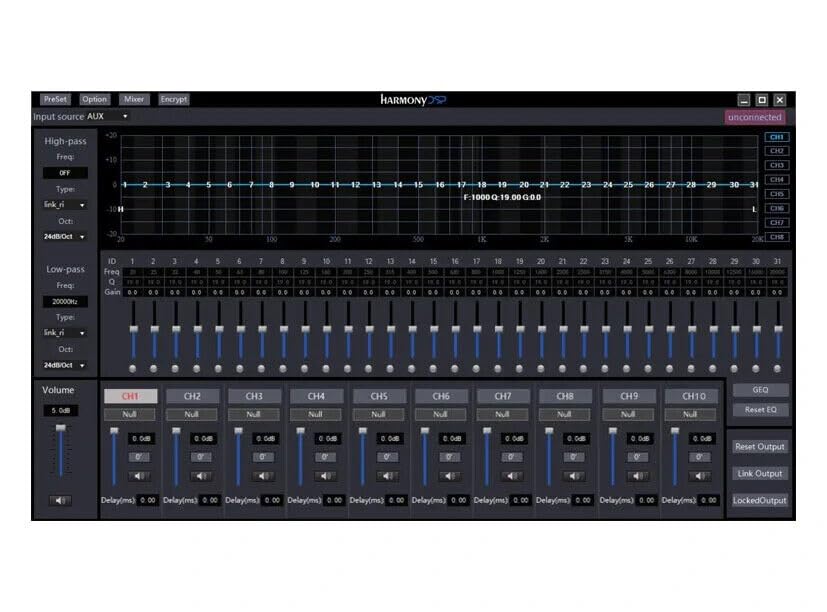
ຮູບພາບ: Screenshot of the Zapco Harmony DSP PC software, showing the 31-band equalizer and channel controls for precise audio tuning.
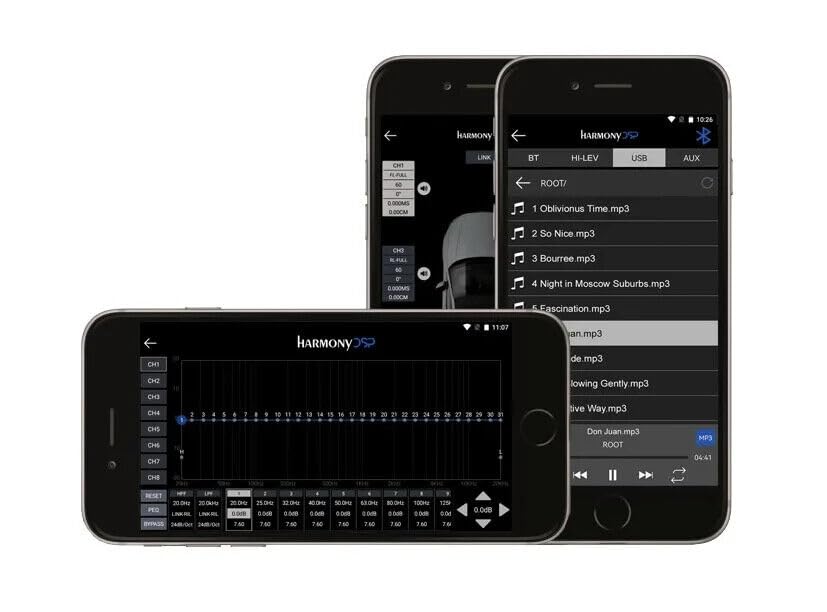
ຮູບພາບ: Screenshots of the Zapco Harmony DSP mobile application on a smartphone, illustrating the interface for Bluetooth streaming and DSP adjustments.
ການຖ່າຍທອດ Bluetooth:
To stream audio wirelessly, enable Bluetooth on your mobile device and pair it with the HB-410-ADSP. The device name will typically appear as "Zapco HB-410-ADSP" or similar. Once paired, you can play audio from your device through the ampມີຊີວິດຊີວາ.
Integrated Music Player:
ໄດ້ amplifier includes a built-in music player that supports various file formats. You can manage and play music files directly through the mobile application.
ບໍາລຸງຮັກສາ
The Zapco HB-410-ADSP is designed for durability and requires minimal maintenance. Follow these guidelines to ensure its continued performance:
- ທໍາຄວາມສະອາດ: ໃຊ້ຜ້າແຫ້ງທີ່ອ່ອນໆເພື່ອເຮັດຄວາມສະອາດພາຍນອກ amplifier. Avoid using harsh chemicals or abrasive cleaners.
- ການລະບາຍອາກາດ: ຮັບປະກັນວ່າ amplifier's ventilation openings are not obstructed to prevent overheating.
- ການເຊື່ອມຕໍ່: ກວດເບິ່ງທຸກສາຍເຊື່ອມຕໍ່ແຕ່ລະໄລຍະເພື່ອຮັບປະກັນວ່າພວກມັນປອດໄພ ແລະ ບໍ່ມີການກັດກ່ອນ.
- ສະພາບແວດລ້ອມ: ຕິດຕັ້ງ amplifier in a location that is protected from excessive moisture, dust, and extreme temperatures.
ການແກ້ໄຂບັນຫາ
If you encounter issues with your Zapco HB-410-ADSP, refer to the following common problems and solutions:
- ບໍ່ມີພະລັງງານ:
- Check all power connections (+12V, GND, REM) for proper contact and voltage.
- Verify that the vehicle's battery is charged.
- Inspect any inline fuses for continuity.
- ບໍ່ມີສຽງອອກ:
- ໃຫ້ແນ່ໃຈວ່າສາຍເຂົ້າ ແລະ ສາຍອອກທັງໝົດໄດ້ເຊື່ອມຕໍ່ກັນຢ່າງແໜ້ນໜາແລ້ວ.
- Check the source device (head unit, phone) for audio output.
- Verify DSP settings; ensure channels are not muted or gain is not set too low.
- Confirm speaker connections are correct and speakers are functional.
- ສຽງບິດເບືອນ:
- ຫຼຸດການເພີ່ມການປ້ອນຂໍ້ມູນຖ້າສັນຍານຖືກຕັດ.
- ກວດສອບຄວາມເຂົ້າກັນໄດ້ຂອງຄວາມຕ້ານທານຂອງລຳໂພງກັບ ampມີຊີວິດຊີວາ.
- Review DSP equalizer and crossover settings for anomalies.
- Mobile App Issues (Input/Output Mapping):
- Some users have reported inconsistencies with input channel mapping to outputs when using the mobile application. If precise mapping is required, it is recommended to use the PC software for configuration.
- ໃຫ້ແນ່ໃຈວ່າແອັບຯມືຖືໄດ້ຮັບການອັບເດດເປັນເວີຊັນລ່າສຸດແລ້ວ.
- ບັນຫາການເຊື່ອມຕໍ່ Bluetooth:
- ຮັບປະກັນ amplifier is in pairing mode or discoverable.
- Delete previous pairings on your mobile device and re-attempt pairing.
- Move the mobile device closer to the amplifier ເພື່ອຍົກເວັ້ນບັນຫາຂອບເຂດ.
ການຮັບປະກັນແລະການສະຫນັບສະຫນູນ
For warranty information, please refer to the documentation provided with your purchase or visit the official Zapco website. If you require technical assistance or have questions not covered in this manual, please contact Zapco customer support through their official channels.
ຊັບພະຍາກອນອອນໄລນ໌: For additional support and software downloads, visit the Zapco Store on Amazon or the official Zapco webເວັບໄຊ.


