1. ບົດແນະນຳ
The Barracuda No Break SR600 is an Uninterruptible Power Supply (UPS) and voltage regulator designed to protect your electronic devices from power outages, surges, ແລະ voltage fluctuations. With a capacity of 600VA/240W, it provides reliable backup power and stable voltage for computers, monitors, gaming consoles, routers, and other sensitive equipment. This manual provides essential information for the proper setup, operation, maintenance, and troubleshooting of your SR600 unit.

Figure 1: Barracuda SR600 No Break Unit
This image shows the Barracuda SR600 No Break unit from an angled perspective, highlighting its compact design and front panel.
2. ຂໍ້ມູນຄວາມປອດໄພ
Please read and follow all safety instructions carefully to prevent injury or damage to the unit and connected equipment.
- ຫ້າມເປີດ UPS ຄasing. ບໍ່ມີສ່ວນທີ່ຜູ້ໃຊ້ບໍລິການພາຍໃນ.
- Do not expose the UPS to rain, moisture, or excessive humidity.
- Ensure the UPS is placed in a well-ventilated area, away from direct sunlight or heat sources.
- ເຊື່ອມຕໍ່ UPS ເຂົ້າກັບປລັກໄຟ AC ທີ່ມີສາຍດິນເທົ່ານັ້ນ.
- Do not connect non-computer related equipment (e.g., medical equipment, life support systems) to the UPS.
- In case of fire, use a dry chemical extinguisher. Water may cause electrical shock.
3. ຜະລິດຕະພັນເກີນview
3.1 ກະດານດ້ານ ໜ້າ
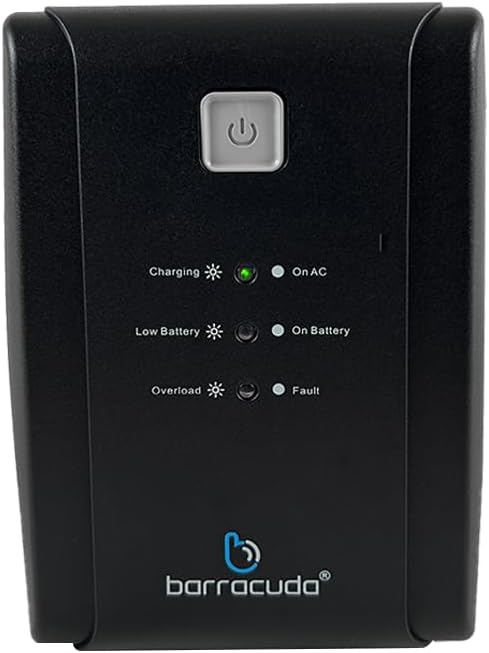
Figure 2: Front Panel of Barracuda SR600
This image displays a close-up of the Barracuda SR600's front panel, showing the power button and LED indicators for Charging, On AC, Low Battery, On Battery, Overload, and Fault.
- ປຸ່ມເປີດປິດ: Press to turn the UPS on or off.
- ຕົວຊີ້ວັດ LED:
- ການສາກໄຟ: ຊີ້ບອກວ່າແບັດເຕີຣີ ກຳ ລັງສາກຢູ່.
- On AC: ຊີ້ບອກວ່າ UPS ກຳລັງເຮັດວຽກດ້ວຍພະລັງງານໄຟຟ້າ.
- ແບັດເຕີຣີຕໍ່າ: Indicates the battery level is low.
- ໃນ ໝໍ້ ໄຟ: Indicates the UPS is operating on battery power.
- ໂຫຼດເກີນ: Indicates the connected load exceeds the UPS capacity.
- ຄວາມຜິດ: ຊີ້ບອກເຖິງຄວາມຜິດພາດຂອງລະບົບ.
3.2 ແຜງດ້ານຫລັງ

Figure 3: Rear Panel of Barracuda SR600
This image shows the rear panel of the Barracuda SR600, detailing the eight power outlets (four for AVR/Backup and four for Surge Only), the circuit breaker, the USB port, and the AC input.
- AVR/Backup Outlets (4): Provide battery backup power and surge protection. Connect critical devices like computers and monitors here.
- Surge Only Outlets (4): Provide surge protection only. Connect non-critical devices like printers or scanners here.
- Breaker ວົງຈອນ: Resettable overload protection.
- ພອດ USB: For connecting to a computer for monitoring software (if applicable).
- AC Input: Connects the UPS to the utility power outlet.
4. ຕັ້ງຄ່າ
4.1 ການຫຸ້ມຫໍ່
Carefully remove the UPS from its packaging. Inspect the unit for any shipping damage. Retain the original packaging for future use or return.
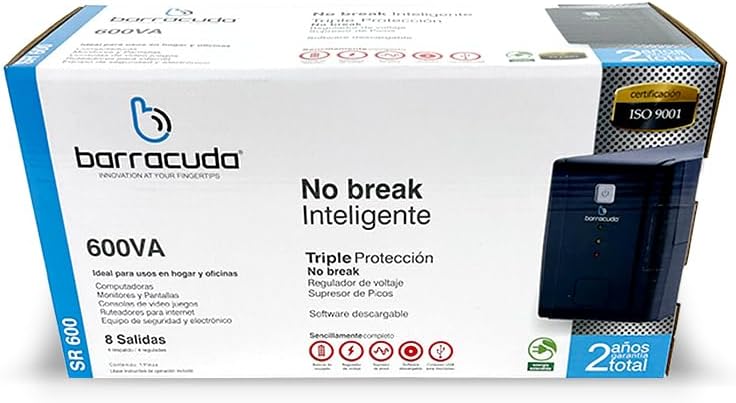
Figure 4: Barracuda SR600 Retail Packaging
This image displays the retail box for the Barracuda SR600, showing product information and branding.
4.2 ການຈັດວາງ
Place the UPS on a flat, stable surface in a clean, dry, and well-ventilated area. Avoid placing it near heat-emitting appliances or in direct sunlight. Ensure there is adequate space around the unit for proper airflow.
4.3 ອຸປະກອນເຊື່ອມຕໍ່
- Plug the UPS power cord into a grounded 120VAC wall outlet.
- Connect your critical devices (e.g., computer, monitor) to the AVR/Backup Outlets ຢູ່ເທິງແຜງດ້ານຫລັງ.
- Connect non-critical devices (e.g., printer, scanner) to the Surge Only Outlets.
- Ensure all connected devices are turned off before plugging them into the UPS.
4.4 ການສາກໄຟເບື້ອງຕົ້ນ
For optimal performance, charge the UPS battery for at least 8 hours before initial use. The unit will charge automatically when connected to AC power, even if the UPS is turned off.
5. ການດໍາເນີນງານ
5.1 ການເປີດ/ປິດ
- ເພື່ອເປີດ: Press and hold the power button on the front panel for approximately 3 seconds until you hear a beep and the 'On AC' LED illuminates.
- ປິດ: Press and hold the power button for approximately 3 seconds until you hear a beep and all LEDs turn off.
5.2 ໂໝດ AC
When the UPS is connected to utility power and the 'On AC' LED is lit, it is operating in AC mode. In this mode, the UPS provides regulated power to connected devices and charges its internal battery.
5.3 ໂໝດແບັດເຕີຣີ
ໃນລະຫວ່າງການພະລັງງານ outage ຫຼື ປະລິມານທີ່ສຳຄັນtage fluctuation, the UPS automatically switches to battery mode. The 'On Battery' LED will illuminate, and the unit will emit an audible alarm (beeping) to indicate it is running on battery power. The alarm will sound more frequently as the battery level becomes critically low.
5.4 LED Indicators Explanation
Refer to Section 3.1 for a detailed description of each LED indicator and its meaning during operation.
6. ບໍາລຸງຮັກສາ
6.1 ການດູແລຫມໍ້ໄຟ
- To maximize battery life, ensure the UPS is connected to AC power at all times to keep the battery fully charged.
- Avoid frequent deep discharges of the battery.
- If the UPS is to be stored for an extended period, fully charge the battery and then disconnect it from AC power. Recharge the battery every 3 months to prevent permanent damage.
6.2 ການທໍາຄວາມສະອາດ
Disconnect the UPS from AC power and all connected devices before cleaning. Use a soft, dry cloth to wipe the exterior of the unit. Do not use liquid or aerosol cleaners.
6.3 ການເກັບຮັກສາ
Store the UPS in a cool, dry place, away from direct sunlight and extreme temperatures. Ensure the battery is fully charged before storage and recharged periodically as mentioned above.
7. ການແກ້ໄຂບັນຫາ
If you experience issues with your Barracuda SR600, refer to the table below for common problems and their solutions.
| ບັນຫາ | ສາເຫດທີ່ເປັນໄປໄດ້ | ການແກ້ໄຂ |
|---|---|---|
| UPS ບໍ່ເປີດ. | ແບັດເຕີຣີໝົດແລ້ວ. | Connect the UPS to AC power and allow it to charge for at least 8 hours. |
| UPS is on but provides no power to outlets. | ເຄື່ອງຕັດວົງຈອນປິດ. | Reduce the load on the UPS and press the circuit breaker button on the rear panel to reset. |
| UPS constantly beeps in AC mode. | ເງື່ອນໄຂການໂຫຼດເກີນ. | Disconnect non-essential equipment from the UPS. Ensure total load does not exceed 240W. |
| ເວລາສຳຮອງຂໍ້ມູນສັ້ນ. | ແບັດເຕີຣີບໍ່ໄດ້ສາກເຕັມ ຫຼື ແບັດເຕີຣີໝົດອາຍຸການໃຊ້ງານ. | Allow the battery to charge for 8 hours. If the problem persists, the battery may need replacement (contact support). |
| Fault LED is lit. | ຄວາມຜິດພາຍໃນ. | Turn off the UPS, disconnect all devices, and unplug from AC. Wait 5 minutes, then reconnect and restart. If the fault persists, contact customer support. |
8. ຂໍ້ມູນຈໍາເພາະ
Technical specifications for the Barracuda No Break SR600.
| ຄຸນສົມບັດ | ຂໍ້ມູນຈໍາເພາະ |
|---|---|
| ຄວາມອາດສາມາດ | 600VA / 240W |
| ການປ້ອນຂໍ້ມູນ Voltage | 120VAC |
| ການປ້ອນຂໍ້ມູນ Voltage ຂອບເຂດ | 120VAC -30% +25% |
| ຜົນໄດ້ຮັບ Voltage | 120VAC |
| ສະບັບtage Regulation (typical) | +- 10% |
| ຄວາມຖີ່ | 50Hz ຫຼື 60Hz |
| ລະບຽບການຄວາມຖີ່ | +- 1% |
| Output Contacts | 4 Energy Backup / 4 Surge Protection |
| ປະເພດຫມໍ້ໄຟ | 12V/4.5Ah |
| ເວລາເພີ່ມເຕີມ | 5 ຊົ່ວໂມງໂດຍສະເລ່ຍ |
| ຂະໜາດ (L x W x H) | 60 x 30 x 25 cm (ຂະຫນາດປະມານຊຸດ) |
| ນ້ຳໜັກ | 6 ກິໂລ (ນ້ໍາຫນັກຊຸດໂດຍປະມານ) |
| ວັດສະດຸ | ໂລຫະ |
9. ການຮັບປະກັນແລະການສະຫນັບສະຫນູນ
The Barracuda No Break SR600 comes with a 2-year total warranty ນັບແຕ່ວັນທີຂອງການຊື້, ກວມເອົາຂໍ້ບົກພ່ອງການຜະລິດແລະຄວາມຜິດພາດພາຍໃຕ້ການນໍາໃຊ້ປົກກະຕິ. ກະລຸນາຮັກສາຫຼັກຖານການຊື້ຂອງທ່ານສໍາລັບການຮຽກຮ້ອງການຮັບປະກັນ.
For technical support, warranty service, or inquiries, please contact Barracuda customer service. Refer to the product packaging or the Barracuda official webເວັບໄຊສໍາລັບຂໍ້ມູນຕິດຕໍ່ໃນປະຈຸບັນຫຼາຍທີ່ສຸດ.


