ແນະນຳ
Thank you for choosing the Mars Gaming MS-H RGB Flow Gaming Speakers. These compact speakers are designed to provide an immersive audio experience with 3D Surround sound and dynamic RGB Flow lighting. This manual will guide you through the setup, operation, and maintenance of your new speakers.
ເນື້ອໃນຊຸດ
- Mars Gaming MS-H RGB Flow Gaming Speakers (2 units)
- Integrated USB Power Cable
- Integrated 3.5mm Auxiliary Audio Cable
- ຄູ່ມືຜູ້ໃຊ້
ຄຸນສົມບັດ
- ການອອກແບບກະທັດຮັດ: Space-saving design suitable for any desk setup.
- ໄຟສາຍ RGB: Dynamic LED lighting for an enhanced visual experience.
- ພະລັງງານ 10W: Delivers clear and powerful audio.
- ສຽງຮອບທິດທາງ 3D: Immersive audio experience with an innovative inverted driver system.
- Integrated Volume Control: Convenient inline control box for easy volume adjustment.
- ການເຊື່ອມຕໍ່ທົ່ວໄປ: Powered via USB and connects to audio sources via a 3.5mm auxiliary jack.
ຄໍາແນະນໍາການຕິດຕັ້ງ
1. ການຈັດວາງ:
Place the two speakers on a stable, flat surface, ideally on either side of your monitor or listening area for optimal stereo separation.
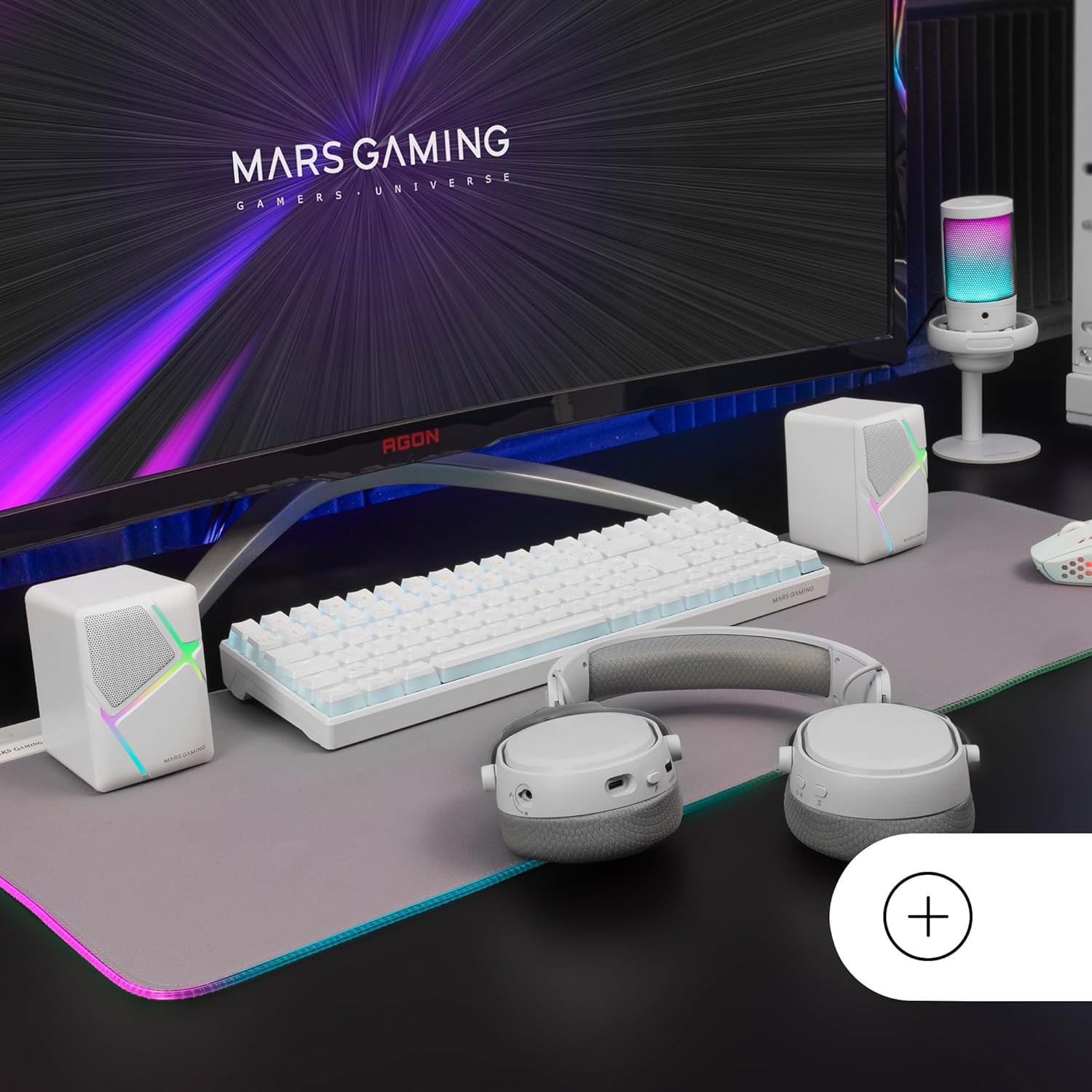
Image: Mars Gaming MS-H speakers set up on a desk with other gaming peripherals.
2. Connect Audio Cable:
Plug the 3.5mm auxiliary audio jack from the speakers into the audio output port of your computer, smartphone, tablet, or music player.

Image: Illustration showing the universal 3.5mm jack connection.
3. Connect USB Power:
Plug the USB-A connector into an available USB port on your computer, a USB wall adapter (not included), or any other compatible USB power source. The speakers will power on and the RGB lighting will activate.
Image: The Mars Gaming MS-H speakers showcasing their RGB Flow lighting feature.
ຄໍາແນະນໍາການດໍາເນີນງານ
1. ເປີດ/ປິດ:
The speakers power on automatically when the USB cable is connected to a power source. Disconnect the USB cable to power off the speakers.
2. ປັບລະດັບສຽງ:
Use the inline volume control box to adjust the audio output level. Rotate the knob clockwise to increase volume and counter-clockwise to decrease it.

Image: The integrated volume control box with a rotary knob.
3. RGB Lighting:
The RGB Flow lighting activates automatically when the speakers are powered on. The lighting pattern is pre-set and cannot be adjusted or turned off independently.
ບໍາລຸງຮັກສາ
- ຮັກສາລຳໂພງໃຫ້ຫ່າງຈາກນ້ຳ, ຄວາມຊຸ່ມ ແລະ ແສງແດດໂດຍກົງ.
- Clean the speaker surfaces with a soft, dry cloth. Do not use abrasive cleaners or solvents.
- Avoid placing heavy objects on the speakers or cables.
- Do not attempt to open or repair the speakers yourself. Contact qualified service personnel for assistance.
ການແກ້ໄຂບັນຫາ
| ບັນຫາ | ສາເຫດທີ່ເປັນໄປໄດ້ | ການແກ້ໄຂ |
|---|---|---|
| ບໍ່ມີສຽງ |
|
|
| ແສງ RGB ບໍ່ເຮັດວຽກ |
|
|
| ສຽງບິດເບືອນ |
|
|
ຂໍ້ມູນຈໍາເພາະ
| ຕົວແບບ | MSHW |
| ຜົນຜະລິດພະລັງງານ | 10 ວັດ |
| ເຕັກໂນໂລຊີການເຊື່ອມຕໍ່ | Auxiliary (3.5mm Jack), USB (for power) |
| ຮູບແບບການອອກສຽງ | ອ້ອມຮອບ |
| impedance | 4 ໂອມ |
| ການຕອບສະໜອງຄວາມຖີ່ | ເຖິງ 20 KHz |
| ວິທີການຄວບຄຸມ | Rotary Knob (Inline Volume Control) |
| ຄຸນນະສົມບັດພິເສດ | RGB Flow LED Lighting |
| ການນໍາໃຊ້ທີ່ແນະນໍາ | Music player, Computer, Smartphone or tablet |
| ອຸປະກອນທີ່ເຂົ້າກັນໄດ້ | Smartphones, tablets, computers, music players |
| ສີ | ສີຂາວ |
| ວັດສະດຸ | Acrylonitrile Butadiene Styrene (ABS) |
| ຂະໜາດສິນຄ້າ (L x W x H) | 10 x 7.9 x 7 cm |
| ນ້ໍາຫນັກລາຍການ | 375 ກຣາມ |
| ປະເພດການຕິດຕັ້ງ | ໂຕະ |
| ປະເທດຕົ້ນກໍາເນີດ | ສະເປນ |
ການຮັບປະກັນແລະການສະຫນັບສະຫນູນ
ສໍາລັບຂໍ້ມູນການຮັບປະກັນແລະການສະຫນັບສະຫນູນດ້ານວິຊາການ, ກະລຸນາອ້າງອີງເຖິງເຈົ້າຫນ້າທີ່ຂອງຜູ້ຜະລິດ webເວັບໄຊ ຫຼືຕິດຕໍ່ຮ້ານຂາຍຍ່ອຍຂອງທ່ານ. ຮັກສາຫຼັກຖານການຊື້ຂອງທ່ານສໍາລັບການຮຽກຮ້ອງການຮັບປະກັນໃດໆ.
Manufacturer: Mars Gaming


