1. ຂໍ້ມູນຄວາມປອດໄພ
ສຳຄັນ: Please read all instructions carefully before using the Bitvae Smart S2 Electric Toothbrush.
- Avoid brushing too hard to prevent damage to gums and enamel.
- Always follow the app's guidance for safe use.
- Ensure there is no water residue in the charging port before charging.
- This product is designed for adult use.
- The toothbrush is IPX7 waterproof, allowing use in the shower and rinsing.
ການປະຕິເສດທາງກົດໝາຍ: ຖະແຫຼງການກ່ຽວກັບການເສີມອາຫານບໍ່ໄດ້ຖືກປະເມີນໂດຍ FDA ແລະບໍ່ໄດ້ມີຈຸດປະສົງເພື່ອວິນິດໄສ, ປິ່ນປົວ, ປິ່ນປົວ, ຫຼືປ້ອງກັນພະຍາດຫຼືສະພາບສຸຂະພາບໃດໆ.
2. ຜະລິດຕະພັນເກີນview
The Bitvae Smart S2 Ultrasonic Whitening Electric Toothbrush is designed to provide a superior oral cleaning experience. It features a powerful magnetic levitation motor, multiple cleaning modes, smart timing, and app connectivity for personalized brushing guidance.
ຄຸນນະສົມບັດທີ່ສໍາຄັນ:
- Powerful Sonic Cleaning: Equipped with a 42000 magnetic levitation motor, it effectively removes debris and more plaque than a manual toothbrush, helping to prevent gingivitis.
- ໂໝດທຳຄວາມສະອາດຫຼາຍຮູບແບບ: Offers 5 distinct modes: Clean, White, Soft, Gum Care, and Smart, to cater to various oral care needs.
- Smart Timer & Pressure Sensor: Features a built-in 2-minute timer with 30-second interval pauses to guide brushing area changes. A pressure indicator lights up red if excessive pressure is applied, protecting your gums and enamel.
- ຊີວິດຫມໍ້ໄຟຍາວ: Provides up to 60 days of use on a single 4-hour charge (when used twice a day for 2 minutes in soft mode). USB charging is compatible with global voltage.
- Oral Care App & Bluetooth Connectivity: Connects via Bluetooth to a dedicated app, offering real-time brushing data, personalized guidance, and customized brushing plans.
- ອຸປະກອນເສີມທີ່ສົມບູນ: Includes 8 replacement brush heads and a convenient travel case.
- UV-Toothbrush Holder: A wall-mounted UV-Toothbrush Holder is included to clean brush heads.
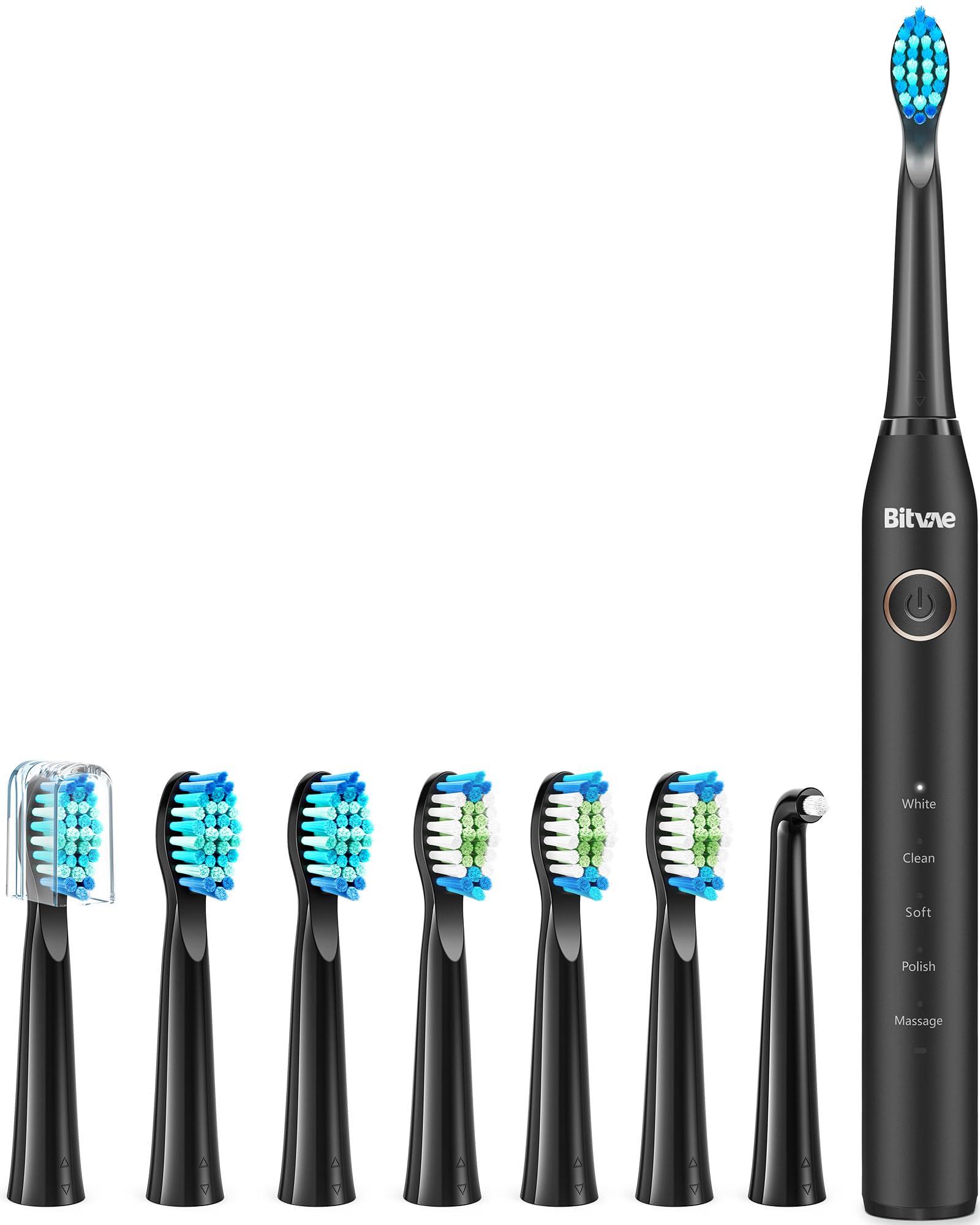
Figure 1: Bitvae Smart S2 Electric Toothbrush with included 8 brush heads and travel case.
3. ຕັ້ງຄ່າ
- ແກະກ່ອງ: Carefully remove all components from the packaging, including the toothbrush handle, brush heads, USB charging cable, and travel case.
- ໄລ່ແປງຖູແຂ້ວ:
- Ensure the charging port is dry and free of water residue.
- Connect the USB charging cable to the toothbrush and a compatible USB power adapter (not included).
- Allow the toothbrush to charge fully. A full charge typically takes 4 hours and provides up to 60 days of use.
- ຕິດຫົວແປງ: Align a new brush head with the metal shaft on the toothbrush handle and push it down until it clicks into place.
- Download the Bitvae App:
- Scan the QR code provided in the instruction manual or search for "iSpruz" in your device's app store (Apple App Store for iOS, Google Play Store for Android).
- ຕິດຕັ້ງແອັບຯໃນໂທລະສັບສະຫຼາດຂອງທ່ານ.
- Connect the Toothbrush to the App:
- Create an account using your email and password, then register.
- ເຂົ້າສູ່ລະບົບບັນຊີຂອງທ່ານ.
- ເປີດ Bluetooth ໃນໂທລະສັບຂອງທ່ານ.
- In the app, click "add device" and select your Bitvae Smart S2 toothbrush from the search results (e.g., "S2").
- ກົດປຸ່ມເປີດປິດຢູ່ແປງຖູແຂ້ວຄ້າງໄວ້ 3 ວິນາທີເພື່ອຈັບຄູ່ມັນກັບອຸປະກອນຂອງທ່ານ.
- Once connected, you can select a profile picture and name your device within the app.
Video 1: This video demonstrates the unboxing and initial setup of the Bitvae Smart S2 Electric Toothbrush, including connecting to the app and highlighting key features like the UV holder and multiple brush heads.
4. ຄໍາແນະນໍາການດໍາເນີນງານ
ເປີດ/ປິດ:
Press the power button once to turn the toothbrush on. Press and hold the power button for 3 seconds to turn it off.
ການເລືອກໂໝດ:
After powering on, press the power button repeatedly to cycle through the 5 cleaning modes. The selected mode will be indicated by an illuminated light on the handle.
- ສະອາດ: Standard daily teeth cleaning.
- ສີຂາວ: Designed to remove surface stains for whitening.
- ອ່ອນ: ການທຳຄວາມສະອາດຢ່າງອ່ອນໂຍນສຳລັບແຂ້ວ ແລະ ເຫືອກທີ່ລະອຽດອ່ອນ.
- ການດູແລເຫງືອກ: Stimulates and massages sore gums.
- ສະຫຼາດ: Connects with the app for personalized brushing guidance and tracking.

Figure 2: The toothbrush handle displaying the five available cleaning modes: White, Clean, Soft, Sensitive, and Massage.
Smart Timer & Brushing Guidance:
The toothbrush features a built-in 2-minute timer, which is the dentist-recommended brushing time. It pauses every 30 seconds to remind you to move to a different quadrant of your mouth, ensuring thorough cleaning.

Figure 3: Visual representation of the Smart Timer feature, showing the 2-minute brushing cycle and 30-second pauses for changing brushing areas.
ເຊັນເຊີຄວາມດັນ:
The integrated pressure sensor helps protect your gums and teeth. If you apply too much pressure during brushing, the indicator light on the toothbrush will illuminate red, prompting you to reduce pressure.
Using the Oral Care App:
Once connected to the iSpruz app, turn on the toothbrush to start brushing. Your brushing status, including coverage and pressure, will be displayed in real-time on the app, guiding you to brush like a dentist.
5. ບໍາລຸງຮັກສາ
ທໍາຄວາມສະອາດແປງແຂ້ວ:
- ຫຼັງຈາກການນໍາໃຊ້ແຕ່ລະຄັ້ງ, rinse ຫົວແປງແລະຈັດການຢ່າງລະອຽດພາຍໃຕ້ນ້ໍາ.
- Wipe the handle with a soft cloth to remove any toothpaste residue.
- Ensure the charging port is dry before placing the toothbrush on charge.
ການປ່ຽນຫົວແປງ:
Dentists recommend replacing your toothbrush head every 3 months, or sooner if the bristles become frayed. To replace:
- Grip the toothbrush handle firmly.
- Pull the old brush head straight off the metal shaft.
- Align a new Bitvae replacement brush head with the metal shaft and push it down until it clicks into place.

Figure 4: This image illustrates the superior cleaning power of the Bitvae electric toothbrush compared to a manual toothbrush, emphasizing its 40,000 pulses per minute vibration frequency.
Using the UV-Toothbrush Holder (if applicable):
If your model includes the HD2 UV-Toothbrush Holder, place your brush heads inside after use. The UV light will help sanitize the bristles, promoting better hygiene. Refer to the holder's specific instructions for operation.
6. ການແກ້ໄຂບັນຫາ
- ແປງຖູແຂ້ວບໍ່ເປີດ: Ensure the toothbrush is fully charged. If the battery is low, the low battery reminder will activate.
- Toothbrush not vibrating: Check if a brush head is properly attached. If the issue persists, contact customer support.
- ບັນຫາການເຊື່ອມຕໍ່ແອັບ:
- ໃຫ້ແນ່ໃຈວ່າ Bluetooth ຖືກເປີດໃຊ້ຢູ່ໃນໂທລະສັບສະຫຼາດຂອງທ່ານ.
- Make sure the toothbrush is within range of your phone.
- Restart both the toothbrush and the app.
- If you encounter any problems after Step 4 of the setup, please go to "Help Desk" in your app account for assistance.
- Pressure sensor constantly red: You may be brushing too hard. Adjust your brushing technique to apply gentler pressure.
7. ຂໍ້ມູນຈໍາເພາະ
| ຄຸນສົມບັດ | ລາຍລະອຽດ |
|---|---|
| ໝາຍເລກຕົວແບບ | BVUS43-S2BK02-h |
| ປະເພດມໍເຕີ | 42000 Magnetic Levitation Motor |
| ໂໝດແປງ | 5 (Clean, White, Soft, Gum Care, Smart) |
| ປະເພດຫມໍ້ໄຟ | Rechargeable Li-on Battery (1 AAA batteries included) |
| ຊີວິດຫມໍ້ໄຟ | Up to 60 days (2 mins, twice daily, soft mode) |
| ເວລາສາກໄຟ | 4 ຊົ່ວໂມງ |
| ການປະເມີນກັນນ້ໍາ | IPX7 |
| ການເຊື່ອມຕໍ່ | ເທັກໂນໂລຍີ Bluetooth |
| ຄຸນນະສົມບັດພິເສດ | Smart Timer, Pressure Indicator, Replaceable Brush Head, Low Battery Reminder |
| ຊ່ວງອາຍຸ | ຜູ້ໃຫຍ່ |
| ຄວາມຫມັ້ນຄົງຂອງລາຍການ | ອ່ອນພິເສດ |
| ຂະໜາດແພັກເກັດ | 9.25 x 4.72 x 1.81 ນິ້ວ |
| ນ້ໍາຫນັກລາຍການ | 4.44 ອອນ |
8. ການຮັບປະກັນແລະການສະ ໜັບ ສະ ໜູນ
The Bitvae Smart S2 Electric Toothbrush comes with a free 1-year warranty. For any questions or assistance, please contact Bitvae customer service.
If you are unable to install the app or encounter any problems, please contact customer service:
- Click on "Your Account" > "Your Orders" > Find your order and click on "Contact Seller".
- ອີເມວ: support@ispruz.com
- ໂທລະສັບ: +1 972 679 9068


