1. ຜະລິດຕະພັນເກີນview
The Imou Ranger Dual 8MP (5MP+3MP) Indoor WiFi Security Camera offers comprehensive surveillance with its innovative dual-lens design. It combines a fixed lens for continuous monitoring of critical areas and a 360° pan-tilt lens for broader coverage. Equipped with advanced AI detection and automatic tracking, this camera provides reliable indoor security.
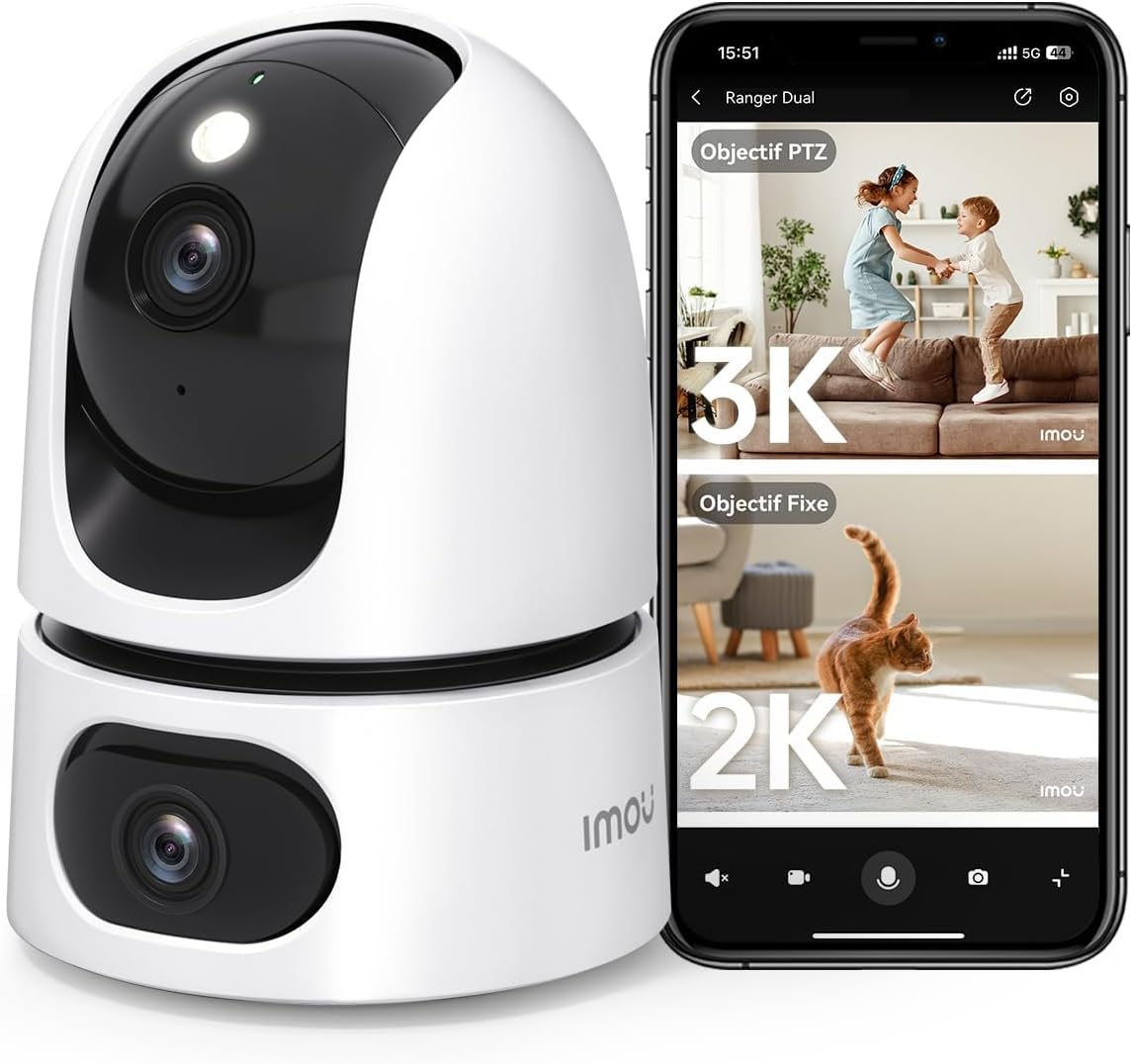
Image: The Imou Ranger Dual 8MP camera shown alongside a smartphone displaying its dual-view interface, with a 3K PTZ view and a 2K fixed view.
ຄຸນນະສົມບັດທີ່ສໍາຄັນ:
- ລະບົບເລນຄູ່: Features a fixed lens for static monitoring and a 360° pan-tilt lens for dynamic area coverage, eliminating blind spots.
- AI Detection & Auto Tracking: Accurately detects humans, pets, and abnormal sounds, reducing false alarms. The camera automatically tracks detected movement.
- 8MP Ultra HD ແລະ ວິໄສທັດໃນຕອນກາງຄືນສີ: Combines a 3MP fixed lens and a 5MP pan-tilt lens for a total 8MP resolution. Offers up to 15 meters of clear color night vision.
- Two-Way Audio & Alarms: Built-in microphone and speaker enable clear two-way communication. Sound and light alarms can deter unwanted visitors.
- ໂໝດຄວາມເປັນສ່ວນຕົວ: Physically conceals the camera lens with a single tap in the app to ensure privacy.
- ການເກັບຮັກສາແບບຍືດຫຍຸ່ນ: Supports Micro SD card (up to 256GB, not included), NVR, Cloud storage, RTSP, and Onvif.
- ການເຊື່ອມໂຍງເຮືອນອັດສະລິຍະ: Compatible with Amazon Alexa for voice control and live view.

Image: An illustration of the Imou Ranger Dual camera highlighting its two lenses and their respective fields of view, emphasizing no blind spots.
2. ເນື້ອໃນຊຸດ
ກະລຸນາກວດເບິ່ງຊຸດສຳລັບລາຍການຕໍ່ໄປນີ້:
- Imou Ranger Dual 8MP Camera
- Power Adapter
- ແຜ່ນຕິດ
- screws mounting ແລະ plugs ຝາ
- ຄູ່ມືເລີ່ມຕົ້ນດ່ວນ
- ແຜນທີ່ ຕຳ ແໜ່ງ ຕິດຕັ້ງ
3. ຄູ່ມືການຕິດຕັ້ງ
3.1 ການຕິດຕັ້ງເບື້ອງຕົ້ນ
- ເປີດ: Connect the camera to a power outlet using the provided power adapter. The camera will power on and its indicator light will flash.
- ດາວໂຫຼດແອັບ Imou Life: ຊອກຫາ 'Imou Life' ໃນຮ້ານແອັບມືຖືຂອງທ່ານ (App Store ສຳລັບ iOS ຫຼື Google Play Store ສຳລັບ Android) ແລະ ດາວໂຫຼດແອັບພລິເຄຊັນ.
- ສ້າງບັນຊີ: Open the Imou Life app and follow the on-screen instructions to create a new account or log in to an existing one.
- ເພີ່ມອຸປະກອນ: Tap the '+' icon in the top right corner of the app to add your camera. Scan the QR code located on the camera or its packaging.
- ເຊື່ອມຕໍ່ກັບ Wi-Fi: Follow the app's instructions to connect the camera to your 2.4GHz Wi-Fi network. Ensure your Wi-Fi password is correct.
- ການຈັດວາງ: Position the camera in your desired indoor location. It can be placed on a flat surface or mounted to a wall/ceiling using the included mounting plate and screws.
3.2 ຄໍາແນະນໍາການຕິດຕັ້ງ
For optimal performance, choose a location that provides a clear view of the area you wish to monitor and is within range of your Wi-Fi signal.
- ເລືອກສະຖານທີ່: Identify a suitable indoor wall or ceiling for mounting.
- ຈຸດຂຸດເຈາະເຄື່ອງໝາຍ: Use the provided installation position map to mark the screw holes on the surface.
- ຮູເຈາະ: Drill holes at the marked positions and insert the wall plugs if necessary.
- ຕິດແຜ່ນຍຶດຕິດ: Secure the mounting plate to the wall/ceiling using the screws.
- ຕິດກ້ອງ: Align the camera with the mounting plate and twist it to lock it into place.
4. ຄໍາແນະນໍາການດໍາເນີນງານ
The Imou Ranger Dual camera is controlled primarily through the Imou Life mobile application.
4.1 ດໍາລົງຊີວິດ View & ຫຼິ້ນຄືນ
- Open the Imou Life app and select your camera from the device list to access the live view.
- You can switch between the fixed lens view and the pan-tilt lens view.
- Use the on-screen controls to pan (horizontal) and tilt (vertical) the movable lens.
- ການເຂົ້າເຖິງບັນທຶກ footage via the playback function, available if a Micro SD card or cloud storage is active.

Image: A smartphone screen showing four simultaneous live camera feeds, demonstrating the multi-view ຄວາມສາມາດ.
4.2 AI Detection & Tracking
- ເປີດໃຊ້ການກວດຫາ: In the app settings, navigate to 'Detection Settings' to enable Human Detection, Pet Detection, and Abnormal Sound Detection.
- ປັບຄວາມອ່ອນໄຫວ: Customize detection sensitivity levels to minimize false alarms.
- ການຕິດຕາມອັດຕະໂນມັດ: When enabled, the pan-tilt lens will automatically follow detected human or pet movement within its field of view.
- ການແຈ້ງເຕືອນ: Receive instant alerts on your smartphone when an event is detected.

Image: An image illustrating the camera's AI detection capabilities, showing a child and a dog with detection boxes around them, indicating auto-tracking.
4.3 ສຽງສອງທາງ
- ໃນລະຫວ່າງການຖ່າຍທອດສົດ view, tap the microphone icon in the app to speak through the camera's speaker.
- The camera's built-in microphone will pick up audio from the camera's location.
4.4 ໂໝດຄວາມເປັນສ່ວນຕົວ
- To activate Privacy Mode, tap the designated icon in the Imou Life app. The camera lens will physically rotate downwards, blocking its view and ensuring privacy.
- Tap the icon again to deactivate Privacy Mode.

Image: The Imou Ranger Dual camera with its lens rotating downwards, indicating the activation of privacy mode.
5. ບໍາລຸງຮັກສາ
5.1 ການທໍາຄວາມສະອາດ
- ໃຫ້ແນ່ໃຈວ່າກ້ອງຖ່າຍຮູບຖືກປິດແລ້ວກ່ອນທຳຄວາມສະອາດ.
- ໃຊ້ຜ້າປຽກແຫ້ງເພື່ອເຊັດຕົວກ້ອງ.
- For the lens, use a lens cleaning cloth specifically designed for optical surfaces. Avoid abrasive materials or harsh chemicals.
5.2 ການອັບເດດເຟີມແວ
- Regularly check for firmware updates through the Imou Life app. Updates often include performance improvements and security enhancements.
- Follow the in-app instructions to perform firmware updates. Ensure the camera remains powered on and connected to Wi-Fi during the update process.
6. ການແກ້ໄຂບັນຫາ
6.1 ກ້ອງຖ່າຍຮູບອອບລາຍ
- ກວດສອບພະລັງງານ: ໃຫ້ແນ່ໃຈວ່າກ້ອງຖ່າຍຮູບໄດ້ເຊື່ອມຕໍ່ກັບແຫຼ່ງພະລັງງານຢ່າງຖືກຕ້ອງ ແລະ ອະແດບເຕີເຮັດວຽກຢູ່.
- ກວດເບິ່ງ Wi-Fi: Verify your Wi-Fi network is active and the camera is within range. Restart your router if necessary.
- ເພີ່ມອຸປະກອນຄືນໃໝ່: If issues persist, try removing the device from the Imou Life app and re-adding it.
6.2 ຄຸນນະພາບຮູບພາບທີ່ບໍ່ດີ
- ເລນສະອາດ: ຄ່ອຍໆທຳຄວາມສະອາດເລນກ້ອງຖ່າຍຮູບດ້ວຍຜ້າອ່ອນໆແລະແຫ້ງ.
- ກວດສອບເຄືອຂ່າຍ: Ensure a stable internet connection for optimal streaming quality.
- ແສງ: Adjust camera placement to avoid direct glare or insufficient lighting.
6.3 ສັນຍານເຕືອນທີ່ບໍ່ຖືກຕ້ອງ
- ປັບຄວາມອ່ອນໄຫວ: In the app's detection settings, reduce the sensitivity for human, pet, or sound detection.
- ເຂດກວດຫາ: Configure specific detection zones to monitor only relevant areas and exclude high-traffic zones.
7. ຂໍ້ມູນຈໍາເພາະ
| ຄຸນສົມບັດ | ລາຍລະອຽດ |
|---|---|
| ຍີ່ຫໍ້ | ອິໂມ |
| ຊື່ຕົວແບບ | Ranger Dual 8MP |
| ໝາຍເລກຕົວແບບ | IPC-S2XP-8M0WED |
| ຄວາມລະອຽດ | 8MP (3MP Fixed Lens + 5MP Pan-Tilt Lens) |
| ເຕັກໂນໂລຊີໄຮ້ສາຍ | Wi-Fi |
| ສະບັບtage | 5 ໂວນ |
| ຂອບເຂດວິໄສທັດກາງຄືນ | 10 ແມັດ |
| ຄຸນນະສົມບັດພິເສດ | Two-way audio, Dual lens, Human/pet detection, Privacy protection, Night vision |
| ການນໍາໃຊ້ | ຄວາມປອດໄພພາຍໃນ |
| ອຸປະກອນທີ່ເຂົ້າກັນໄດ້ | ໂທລະສັບສະຫຼາດ |
| ແຫຼ່ງພະລັງງານ | ສາຍໄຟຟ້າ |
| ປະເພດການຕິດຕັ້ງ | ຕົວຍຶດຕິດຝາ |
| ວັດສະດຸ | ພາດສະຕິກ |
| ຂະໜາດແພັກເກັດ | 19.6 x 10 x 10 cm |
| ນ້ໍາຫນັກຊຸດ | 470 ກຣາມ |
8. ການຮັບປະກັນແລະການສະຫນັບສະຫນູນ
For detailed warranty information, please refer to the warranty card included with your product or visit the official Imou website. For technical support, frequently asked questions, and further assistance, please utilize the 'Help' section within the Imou Life application or visit the Imou support portal online.


