1. ບົດແນະນຳ
The Trevi DAB 7F80 R is a portable digital radio offering DAB, DAB+, and FM reception, along with Bluetooth connectivity. It features a high-readability Dot Matrix display, a programmable alarm clock, and a headphone jack. This manual provides instructions for the proper setup, operation, and maintenance of your device.
2. ຂໍ້ມູນຄວາມປອດໄພ
- ອ່ານຄໍາແນະນໍາທັງຫມົດຢ່າງລະອຽດກ່ອນທີ່ຈະໃຊ້ອຸປະກອນ.
- ຢ່າປ່ອຍໃຫ້ອຸປະກອນຖືກນໍ້າ, ຄວາມຊຸ່ມຊື່ນ, ຫຼືອຸນຫະພູມທີ່ຮຸນແຮງ.
- Use only the specified power source (4 x AAA batteries or a compatible 5V DC adapter, not included).
- ຢ່າພະຍາຍາມຖອດປະກອບ, ສ້ອມແປງ ຫຼື ດັດແປງອຸປະກອນ. ໃຫ້ສົ່ງບໍລິການທັງໝົດໄປຫາພະນັກງານທີ່ມີຄຸນວຸດທິ.
- ຖິ້ມແບດເຕີລີ່ຢ່າງມີຄວາມຮັບຜິດຊອບຕາມກົດລະບຽບທ້ອງຖິ່ນ.
- ຮັກສາອຸປະກອນໃຫ້ຫ່າງຈາກສະຫນາມແມ່ເຫຼັກທີ່ເຂັ້ມແຂງ.
3. ເນື້ອໃນຊຸດ
ກະລຸນາກວດເບິ່ງວ່າລາຍການຕໍ່ໄປນີ້ແມ່ນລວມຢູ່ໃນຊຸດຂອງທ່ານ:
- Trevi DAB 7F80 R Main Unit
- ຄູ່ມືຜູ້ໃຊ້ (ເອກະສານນີ້)
- ໃບຢັ້ງຢືນການຮັບປະກັນ
4. ຜະລິດຕະພັນເກີນview
Familiarize yourself with the components and controls of your Trevi DAB 7F80 R radio.
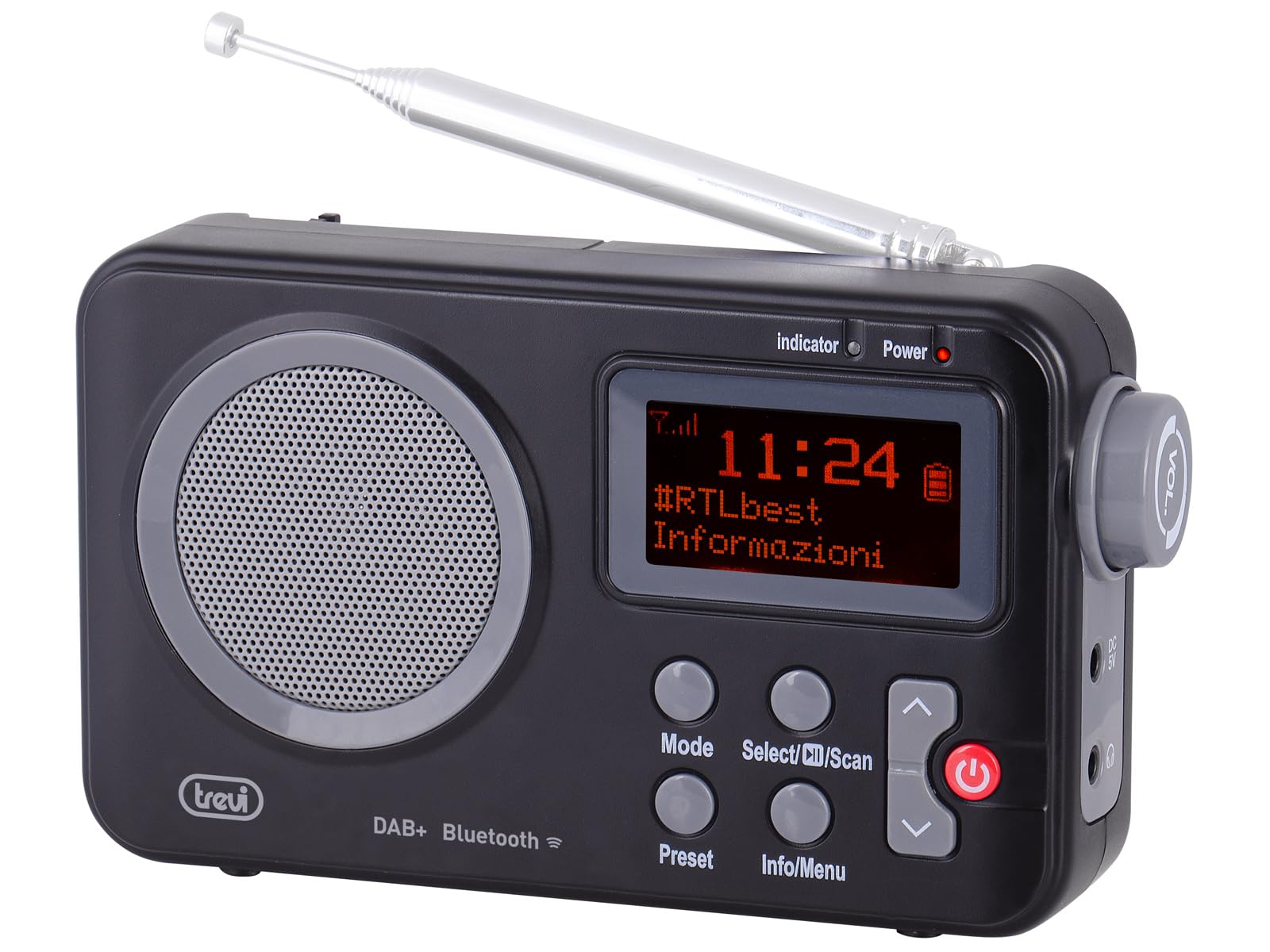
ຮູບທີ 1: ດ້ານໜ້າ view of the Trevi DAB 7F80 R radio. This image displays the Dot Matrix screen, the main speaker grille, and the primary control buttons including Mode, Select/Scan, Preset, Info/Menu, and Power. The extendable telescopic antenna is visible at the top.
ການຄວບຄຸມ ແລະຄຸນສົມບັດ:
- ຈໍສະແດງຜົນ: High-readability Dot Matrix screen for station information, time, and menu navigation.
- ລໍາໂພງ: ລຳໂພງປະສົມປະສານສຳລັບຜົນຜະລິດສຽງ.
- ປຸ່ມເປີດປິດ: ເປີດ/ປິດວິທະຍຸ.
- ປຸ່ມໂໝດ: Switches between DAB/DAB+, FM, and Bluetooth modes.
- Select/Scan Button: Confirms selections in menus, initiates station scans.
- ປຸ່ມຕັ້ງລ່ວງໜ້າ: Accesses and stores favorite radio stations.
- ຂໍ້ມູນ/ປຸ່ມເມນູ: Displays station information and accesses system settings.
- ປຸ່ມລູກສອນຂຶ້ນ/ລົງ: Navigates through menus, adjusts volume, changes stations.
- ຫູຟັງ Jack: ຜົນຜະລິດ 3.5mm ສໍາລັບການຟັງສ່ວນຕົວ.
- ເສົາອາກາດ: ເສົາອາກາດແບບຍືດຫົດໄດ້ເພື່ອການຮັບວິທະຍຸທີ່ດີຂຶ້ນ.
5. ຕັ້ງຄ່າ
5.1 ການເປີດອຸປະກອນ
The Trevi DAB 7F80 R can be powered by batteries or an external AC adapter.
- ການຕິດຕັ້ງຫມໍ້ໄຟ: Open the battery compartment cover on the back of the unit. Insert 4 x AAA batteries (not included), ensuring correct polarity (+/-). Close the cover securely.
- ອະແດັບເຕີ AC (ທາງເລືອກ): For continuous power, connect a compatible 5V DC, 1A AC adapter (not included) to the DC IN port on the side of the radio.
ຄໍາເຕືອນທີ່ສໍາຄັນ: Do not use batteries in the device when it is connected to an AC adapter for extended periods. This may lead to battery leakage or damage to the unit. If using the AC adapter, remove the batteries. If using batteries, disconnect the AC adapter.
5.2 Initial Power On and Station Scan
- ຂະຫຍາຍເສົາອາກາດ telescopic ຢ່າງເຕັມສ່ວນສໍາລັບການຮັບທີ່ດີທີ່ສຸດ.
- ກົດ ພະລັງງານ ປຸ່ມເພື່ອເປີດວິທະຍຸ.
- ເມື່ອໃຊ້ຄັ້ງທຳອິດ, ວິທະຍຸອາດຈະແນະນຳໃຫ້ທ່ານເລືອກພາສາ. ໃຊ້ ລູກສອນຂຶ້ນ / ລົງ buttons to navigate and Select/Scan ເພື່ອຢືນຢັນ.
- The radio will automatically perform a full scan for DAB/DAB+ stations. This process may take a few minutes. Once complete, the first available station will begin playing.
6. ຄໍາແນະນໍາການດໍາເນີນງານ
6.1 Radio Mode (DAB/DAB+, FM)
- ໂໝດສະຫຼັບ: ກົດ ໂໝດ button repeatedly to cycle between DAB, FM, and Bluetooth modes.
- ການສະແກນຫາສະຖານີ:
- In DAB mode, a full scan is usually performed on first use. To perform a new scan, press and hold Select/Scan.
- ໃນໂຫມດ FM, ກົດ Select/Scan ເພື່ອສະແກນອັດຕະໂນມັດສໍາລັບສະຖານີຕໍ່ໄປ.
- ເລືອກສະຖານີ: ໃຊ້ ລູກສອນຂຶ້ນ / ລົງ ປຸ່ມຕ່າງໆເພື່ອຊອກຫາສະຖານີທີ່ມີຢູ່.
- ເກັບຮັກສາ presets: The radio can store up to 20 DAB/DAB+ and 20 FM stations.
- ປບັກັບສະຖານີທີ່ຕ້ອງການ.
- ກົດຄ້າງໄວ້ ຕັ້ງໄວ້ລ່ວງໜ້າ ກົດປຸ່ມຈົນກ່ວາ 'Preset Store' ປາກົດຢູ່ໃນຈໍສະແດງຜົນ.
- ໃຊ້ ລູກສອນຂຶ້ນ / ລົງ ປຸ່ມເພື່ອເລືອກຕົວເລກທີ່ຕັ້ງໄວ້ລ່ວງໜ້າ (1-20).
- ກົດ Select/Scan ເພື່ອຢືນຢັນແລະບັນທຶກສະຖານີ.
- Presets ທີ່ລະລຶກ: ກົດ ຕັ້ງໄວ້ລ່ວງໜ້າ button briefly. Use the ລູກສອນຂຶ້ນ / ລົງ buttons to select the desired preset number, then press Select/Scan.
- RDS/DLS Information: In FM or DAB mode, press the ຂໍ້ມູນ/ເມນູ button repeatedly to cycle through available information such as station name, program type, time, and song title (if broadcast).
6.2 ແບບບູທູດ
- ກົດ ໂໝດ button until 'Bluetooth' appears on the display. The radio will enter pairing mode, indicated by a flashing Bluetooth icon.
- ໃນໂທລະສັບສະຫຼາດ, ແທັບເລັດ ຫຼື ແລັບທັອບຂອງທ່ານ, ໃຫ້ເປີດໃຊ້ Bluetooth ແລະ ຄົ້ນຫາອຸປະກອນທີ່ມີຢູ່.
- Select 'Trevi DAB 7F80 R' from the list of devices to pair. Once connected, the Bluetooth icon will stop flashing.
- You can now play audio from your connected device through the radio. Use your device's controls for playback and the radio's volume controls for audio level.
6.3 ຟັງຊັນໂມງ ແລະ ໂມງປຸກ
The radio features an integrated clock and two programmable alarms.
- ການກໍານົດເວລາ:
- ກົດຄ້າງໄວ້ ຂໍ້ມູນ/ເມນູ ປຸ່ມເພື່ອເຂົ້າໄປໃນເມນູຕົ້ນຕໍ.
- ໃຊ້ ລູກສອນຂຶ້ນ / ລົງ buttons to navigate to 'Time/Date' and press Select/Scan.
- Select 'Set Time/Date' and adjust the hour, minute, day, month, and year using the ລູກສອນຂຶ້ນ / ລົງ buttons and confirming each step with Select/Scan.
- Setting Alarms (Alarm 1 / Alarm 2):
- From the main menu, navigate to 'Alarm' and press Select/Scan.
- Select 'Alarm 1 Setup' or 'Alarm 2 Setup'.
- Configure the alarm settings: 'On Time' (hour/minute), 'Duration', 'Source' (Buzzer or last used radio station), 'Volume', and 'Frequency' (Daily, Weekdays, Weekends, Once). Use ລູກສອນຂຶ້ນ / ລົງ ປຸ່ມເພື່ອປັບຄ່າຕ່າງໆ ແລະ Select/Scan ເພື່ອຢືນຢັນການຕັ້ງຄ່າແຕ່ລະອັນ.
- Ensure the alarm is set to 'On' in the alarm setup menu.
- Deactivating a sounding alarm: ກົດ ພະລັງງານ ປຸ່ມເພື່ອປິດການປຸກ.
6.4 ການໃຊ້ຫູຟັງ
To listen privately, insert standard 3.5mm headphones into the headphone jack located on the side of the radio. The internal speaker will automatically mute.
7. ບໍາລຸງຮັກສາ
- ທໍາຄວາມສະອາດ: Wipe the radio with a soft, dry, lint-free cloth. Do not use abrasive cleaners, waxes, or solvents.
- ການປ່ຽນແບັດເຕີຣີ: When the low battery indicator appears on the display, replace all four AAA batteries with new ones.
- ການເກັບຮັກສາ: If the radio will not be used for an extended period, remove the batteries to prevent leakage and potential damage. Store the device in a cool, dry place.
8. ການແກ້ໄຂບັນຫາ
If you encounter issues with your Trevi DAB 7F80 R, please refer to the following common problems and solutions:
- ວິທະຍຸບໍ່ເປີດ:
- Check if batteries are correctly inserted and not depleted. Replace if necessary.
- ຖ້າໃຊ້ອະແດັບເຕີ AC, ໃຫ້ແນ່ໃຈວ່າມັນເຊື່ອມຕໍ່ຢ່າງຖືກຕ້ອງ ແລະປລັກສຽບໄຟເຮັດວຽກໄດ້.
- ບໍ່ມີສຽງ ຫຼືຄຸນນະພາບສຽງບໍ່ດີ:
- ປັບລະດັບສຽງ.
- Ensure headphones are not connected if you want sound from the speaker.
- Check radio reception. Extend and adjust the antenna. Try moving the radio to a different location.
- For Bluetooth, ensure the device is paired and audio is playing from the source.
- Clock resets after power loss or battery change:
- This model does not feature a backup battery for the clock. It is normal for the time to reset when power is completely removed (e.g., batteries removed or AC adapter unplugged). You will need to re-set the time manually as described in section 6.3.
- ຊີວິດຫມໍ້ໄຟສັ້ນ:
- Battery life can vary depending on usage and battery quality. Use high-quality alkaline batteries for best performance.
- For prolonged use, consider using a compatible 5V DC AC adapter (not included).
- Difficulty with setup or navigation (e.g., station search, alarm setup):
- The radio uses a limited number of buttons for various functions. Refer to the specific operating instructions in section 6 for detailed, step-by-step guidance. Some functions may require pressing buttons multiple times or holding them down.
- Radio turns off when switching between battery and AC power:
- This is expected behavior. The radio will power cycle when changing its primary power source. Ensure you have saved any settings or presets before switching.
9. ຂໍ້ມູນຈໍາເພາະ
| ຍີ່ຫໍ້ | Trevi |
| ຕົວແບບ | DAB 7F80 R |
| ສີ | ດຳ |
| ເທັກໂນໂລຍີ Tuning | DAB/DAB+, FM |
| ແຖບວິທະຍຸທີ່ຮອງຮັບ | DAB, DAB+, FM (3 bands) |
| Bluetooth | ແມ່ນແລ້ວ |
| ຈໍສະແດງຜົນ | High-readability Dot Matrix |
| ປຸກ | 2 ໂມງປຸກທີ່ສາມາດຕັ້ງໂປຣແກຣມໄດ້ |
| ກຳນົດລ່ວງໜ້າ | 20 DAB/DAB+, 20 FM |
| ແຫຼ່ງພະລັງງານ | 4 x AAA batteries (not included) or 5V DC adapter (not included) |
| ອຸປະກອນທີ່ເຂົ້າກັນໄດ້ | Smartphone, tablet, laptop |
| ຂະໜາດສິນຄ້າ (L x W x H) | 14 x 3.5 x 8.5 cm |
| ອົງປະກອບລວມ | Main unit, user manual, warranty certificate |
10. ການຮັບປະກັນແລະການສະຫນັບສະຫນູນ
This product is supplied with a warranty certificate. For detailed information regarding warranty terms and conditions, please refer to the certificate included in your package.
For technical support, troubleshooting beyond this manual, or warranty claims, please contact your retailer or the manufacturer's customer service using the contact information provided with your purchase.


