1. ບົດແນະນຳ
ຂອບໃຈສໍາລັບການຊື້asing the MUSE M-15 Alarm Clock Radio. This manual provides essential information for the safe and efficient operation of your device. Please read it thoroughly before use and retain it for future reference.
2. ຂໍ້ມູນຄວາມປອດໄພ
- ແຫຼ່ງພະລັງງານ: Use only the specified battery type (1 AA battery). Ensure correct polarity when inserting batteries.
- ນ້ໍາແລະຄວາມຊຸ່ມ: Do not expose the device to water, rain, or excessive moisture. Avoid placing it near liquids.
- ຄວາມຮ້ອນ: ຮັກສາອຸປະກອນໃຫ້ຫ່າງຈາກແຫຼ່ງຄວາມຮ້ອນເຊັ່ນ: radiators, ເຄື່ອງບັນທຶກຄວາມຮ້ອນ, ເຕົາ, ຫຼືອຸປະກອນອື່ນໆ (ລວມທັງ. amplifiers) ທີ່ຜະລິດຄວາມຮ້ອນ.
- ທໍາຄວາມສະອາດ: ເຮັດຄວາມສະອາດພຽງແຕ່ດ້ວຍຜ້າແຫ້ງ. ຢ່າໃຊ້ເຄື່ອງເຮັດຄວາມສະອາດຂອງແຫຼວຫຼືເຄື່ອງເຮັດຄວາມສະອາດ aerosol.
- ການບໍລິການ: ຢ່າພະຍາຍາມບໍລິການຜະລິດຕະພັນນີ້ດ້ວຍຕົນເອງ. ອ້າງເຖິງການບໍລິການທັງtoົດໃຫ້ກັບພະນັກງານບໍລິການທີ່ມີຄຸນວຸດທິ.
- ການຖິ້ມຂີ້ເຫຍື້ອ: Dispose of batteries and the device according to local regulations. Do not dispose of batteries in fire.
3. ຜະລິດຕະພັນເກີນview
Familiarize yourself with the components of your MUSE M-15 Alarm Clock Radio.
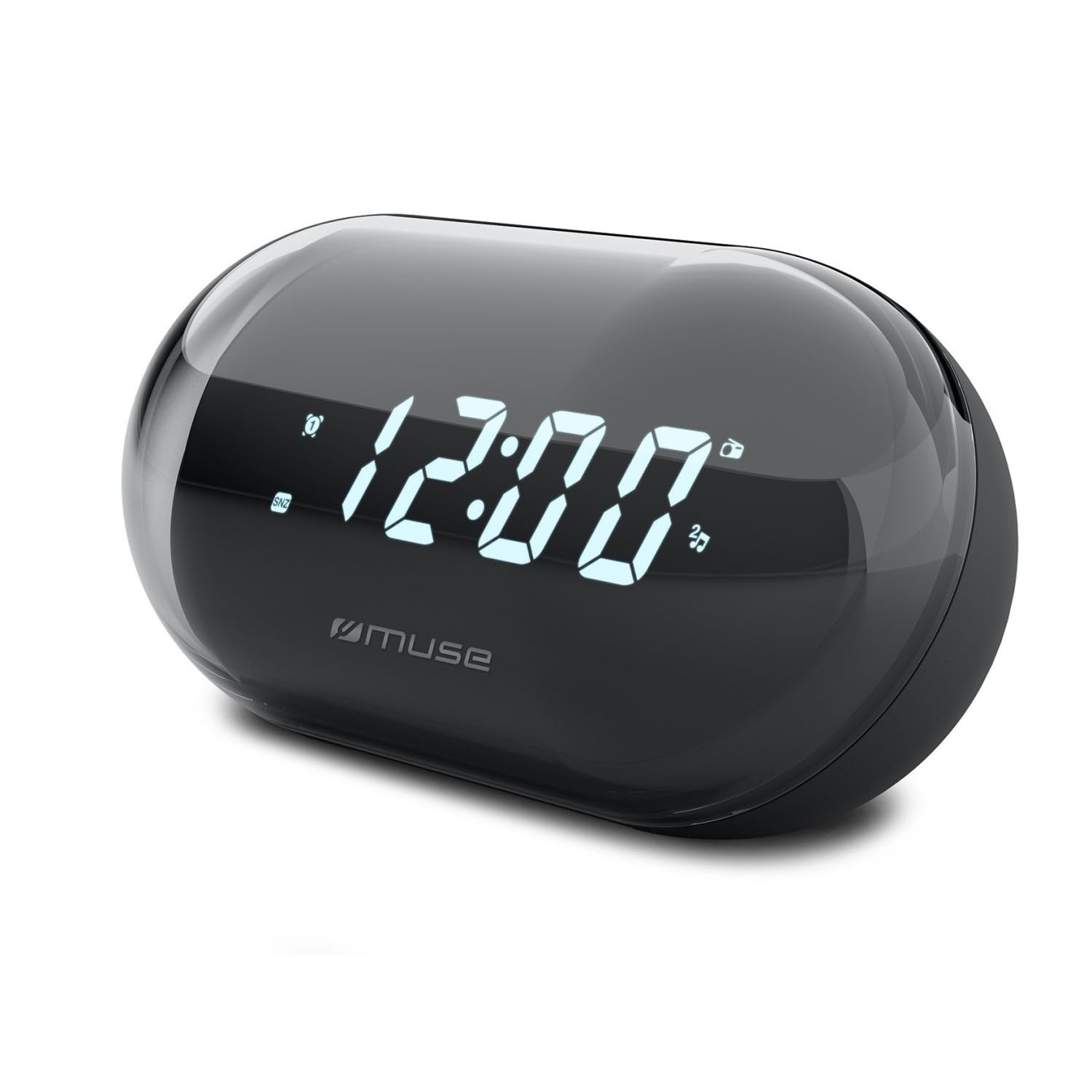
ຮູບພາບ: ທາງຫນ້າ view of the MUSE M-15 Alarm Clock Radio, showing the digital display and control buttons.
ການຄວບຄຸມ ແລະຄຸນສົມບັດ:
- ຈໍດິຈິຕອນ: ສະແດງເວລາ, ສະຖານະການເຕືອນໄພ ແລະ ຄວາມຖີ່ວິທະຍຸ.
- ປຸ່ມຕັ້ງເວລາ: Used to adjust the current time.
- ປຸ່ມຕັ້ງໂມງປຸກ: Used to set and activate/deactivate the alarm.
- ປຸ່ມປັບແຕ່ງ (+/-): Used to adjust radio frequency.
- ການຄວບຄຸມລະດັບສຽງ: ປັບລະດັບສຽງອອກ.
- ປຸ່ມ Power / Mode: Turns the device on/off and switches between radio and clock modes.
- ປຸ່ມເລື່ອນ: ປິດສຽງປຸກຊົ່ວຄາວ.
- ຊ່ອງໃສ່ຫມໍ້ໄຟ: Located on the back, for 1 AA battery.
4. ຕັ້ງຄ່າ
4.1 ການຕິດຕັ້ງຫມໍ້ໄຟ
- ຊອກຫາຝາປິດຊ່ອງໃສ່ຫມໍ້ໄຟຢູ່ດ້ານຫຼັງຂອງໜ່ວຍ.
- ເລື່ອນຫຼືຍົກຝາປິດເພື່ອເປີດຊ່ອງໃສ່.
- Insert one (1) AA battery, ensuring the correct polarity (+ and -) matches the diagram inside the compartment.
- ປ່ຽນຝາປິດຊ່ອງໃສ່ຫມໍ້ໄຟໃຫ້ປອດໄພ.
Note: The MUSE M-15 is battery-powered and does not require an external power adapter.
5. ຄໍາແນະນໍາການດໍາເນີນງານ
5.1 ການ ກຳ ນົດເວລາ
- ໃນຮູບແບບໂມງ, ກົດແລະຖືປຸ່ມ ປຸ່ມຕັ້ງເວລາ ຈົນກວ່າຕົວເລກຊົ່ວໂມງຈະເລີ່ມກະພິບ.
- ໃຊ້ Tuning Buttons (+/-) ເພື່ອປັບຊົ່ວໂມງ. ກົດປຸ່ມ ປຸ່ມຕັ້ງເວລາ ອີກເທື່ອຫນຶ່ງເພື່ອຢືນຢັນຊົ່ວໂມງແລະຍ້າຍໄປນາທີ.
- ໃຊ້ Tuning Buttons (+/-) to adjust the minutes. Press the ປຸ່ມຕັ້ງເວລາ ອີກເທື່ອໜຶ່ງເພື່ອປະຢັດເວລາ ແລະ ອອກຈາກໂໝດການຕັ້ງຄ່າເວລາ.
5.2 ການຕັ້ງໂມງປຸກ
- ກົດຄ້າງໄວ້ ປຸ່ມຕັ້ງເຕືອນ until the alarm hour digits begin to flash.
- ໃຊ້ Tuning Buttons (+/-) to adjust the alarm hour. Press the ປຸ່ມຕັ້ງເຕືອນ ອີກເທື່ອໜຶ່ງເພື່ອຢືນຢັນ ແລະ ຍ້າຍໄປທີ່ນາທີ.
- ໃຊ້ Tuning Buttons (+/-) to adjust the alarm minutes. Press the ປຸ່ມຕັ້ງເຕືອນ one more time to save the alarm time.
- To activate or deactivate the alarm, briefly press the ປຸ່ມຕັ້ງເຕືອນ. An alarm icon will appear on the display when activated.
5.3 Using the Radio
- ກົດ ປຸ່ມເປີດ/ໂໝດ to switch to radio mode. The display will show the radio frequency.
- ໃຊ້ Tuning Buttons (+/-) to manually tune to your desired radio station.
- ປັບລະດັບສຽງໂດຍໃຊ້ ການຄວບຄຸມປະລິມານ.
- ເພື່ອປິດວິທະຍຸ, ກົດປຸ່ມ ປຸ່ມເປີດ/ໂໝດ again to return to clock mode or turn off the device.
5.4 Snooze ຟັງຊັນ
ເມື່ອສຽງສັນຍານເຕືອນ, ກົດປຸ່ມ ປຸ່ມ Snooze to temporarily silence the alarm for a few minutes. The alarm will sound again after the snooze period ends.
6. ບໍາລຸງຮັກສາ
6.1 ການທໍາຄວາມສະອາດ
ເຊັດດ້ານນອກຂອງອຸປະກອນດ້ວຍຜ້າອ່ອນ, ແຫ້ງ. ຢ່າໃຊ້ເຄື່ອງເຮັດຄວາມສະອາດຂັດ, ຂີ້ເຜີ້ງ, ຫຼືສານລະລາຍເພາະວ່າພວກມັນອາດຈະທໍາລາຍການສໍາເລັດຮູບ.
6.2 ການທົດແທນຫມໍ້ໄຟ
When the display dims or the device functions become erratic, it is time to replace the battery. Follow the battery installation steps in Section 4.1.
7. ການແກ້ໄຂບັນຫາ
| ບັນຫາ | ສາເຫດທີ່ເປັນໄປໄດ້ | ການແກ້ໄຂ |
|---|---|---|
| ອຸປະກອນບໍ່ເປີດ. | ແບັດເຕີຣີຕາຍ ຫຼືໃສ່ບໍ່ຖືກຕ້ອງ. | Replace the AA battery or check its polarity. |
| ໂມງປຸກບໍ່ມີສຽງ. | ໂມງປຸກບໍ່ໄດ້ເປີດໃຊ້ງານ ຫຼື ລະດັບສຽງຕໍ່າເກີນໄປ. | Ensure the alarm icon is visible on the display. Increase the volume. |
| ການຮັບວິທະຍຸທີ່ບໍ່ດີ. | ສັນຍານອ່ອນຫຼືການແຊກແຊງ. | Reposition the device or extend the antenna (if applicable). Try tuning to a stronger station. |
| Time/Alarm settings reset. | ພະລັງງານແບັດເຕີຣີຕໍ່າເກີນໄປ. | ປ່ຽນແບັດ AA. |
8. ຂໍ້ມູນຈໍາເພາະ
- ຕົວແບບ: MUSE M-15
- ຂະໜາດສິນຄ້າ (L x W x H): 15 x 3.81 x 10 ຊມ (5.9 x 1.5 x 3.9 ນິ້ວ)
- ນ້ຳໜັກ: 300 ກຣາມ (0.66 ປອນ)
- ແຫຼ່ງພະລັງງານ: ແບັດເຕີຣີ 1 x AA (ບໍ່ລວມ)
- ປະເພດການສະແດງ: ດິຈິຕອລ
- ຄຸນສົມບັດ: Alarm, Radio, Digital Time Display
- ປະເພດການຕິດຕັ້ງ: Table Mount
9. ການຮັບປະກັນແລະການສະຫນັບສະຫນູນ
This product is covered by a standard manufacturer's warranty. For detailed warranty information, please refer to the warranty card included with your purchase or visit the official MUSE webເວັບໄຊ.
For technical support, troubleshooting assistance, or spare parts inquiries, please contact MUSE customer service through their official webເວັບໄຊ ຫຼືຂໍ້ມູນການຕິດຕໍ່ທີ່ສະໜອງໃຫ້ຢູ່ໃນການຫຸ້ມຫໍ່ຜະລິດຕະພັນຂອງທ່ານ.
Please have your model number (M-15) and purchase date available when contacting support.


