ແນະນຳ
Thank you for choosing the Forever Smartwatch 3 SW-320. This device is designed to assist you in monitoring your daily activities, health metrics, and staying connected. This manual will guide you through the essential steps to get started and make the most of your smartwatch.

Image: The Forever Smartwatch 3 SW-320, displaying both digital and analog watch face options.
ຕັ້ງຄ່າ
1. ການສາກ Smartwatch
Before initial use, fully charge your smartwatch. Connect the charging cable to the charging contacts on the back of the watch and to a USB power source. The watch display will indicate charging status.
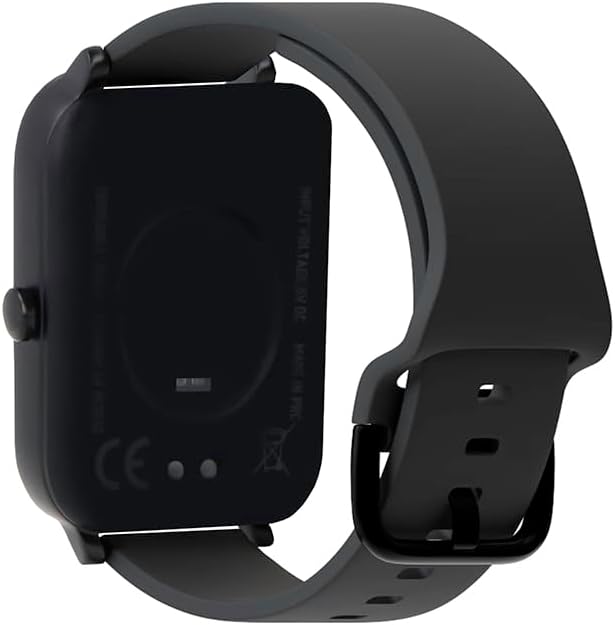
ຮູບພາບ: ດ້ານຫລັງ view ຂອງໂມງອັດສະລິຍະ, ໂດຍເນັ້ນໃສ່ຈຸດຕິດຕໍ່ການສາກໄຟ ແລະ ເຊັນເຊີສຸຂະພາບ.
2. ເປີດ / ປິດພະລັງງານ
To power on, press and hold the side button until the screen lights up. To power off, navigate to the power off option in the settings menu or press and hold the side button and select "Power Off".
3. ການຈັບຄູ່ກັບໂທລະສັບສະຫຼາດຂອງທ່ານ
- Download the official Forever Smartwatch application from your smartphone's app store (iOS or Android).
- ໃຫ້ແນ່ໃຈວ່າ Bluetooth ຖືກເປີດໃຊ້ຢູ່ໃນໂທລະສັບສະຫຼາດຂອງທ່ານ.
- Open the Forever Smartwatch app and follow the on-screen instructions to search for and pair with your SW-320 smartwatch.
- ຢືນຢັນຄຳຮ້ອງຂໍການຈັບຄູ່ທັງໃນໂທລະສັບສະຫຼາດ ແລະ ໂມງອັດສະລິຍະຂອງທ່ານ.
The smartwatch is compatible with smartphones and tablets via Bluetooth connectivity.
ຄໍາແນະນໍາການດໍາເນີນງານ
ການນໍາທາງພື້ນຖານ
The Forever Smartwatch 3 SW-320 features a full touchscreen interface. Swipe left, right, up, or down to navigate through menus and features. Tap to select an option or open an application.
ຄຸນນະສົມບັດທີ່ສໍາຄັນ
- ການຕິດຕາມການເຄື່ອນໄຫວ: Monitor steps, distance, calories burned, and active minutes.
- ການກວດສອບອັດຕາການເຕັ້ນຫົວໃຈ: ຕິດຕາມອັດຕາການເຕັ້ນຂອງຫົວໃຈຂອງທ່ານຢ່າງຕໍ່ເນື່ອງຕະຫຼອດມື້.
- Pedometer: Counts your steps automatically.
- ການວິເຄາະການນອນ: Tracks your sleep patterns, including deep and light sleep stages.
- ການແຈ້ງເຕືອນ: ຮັບການແຈ້ງເຕືອນສຳລັບການໂທ, ຂໍ້ຄວາມ ແລະ ການແຈ້ງເຕືອນແອັບໂດຍກົງໃນຂໍ້ມືຂອງທ່ານ.
- ໜ້າໂມງທີ່ສາມາດປັບແຕ່ງໄດ້: Personalize your smartwatch with various pre-installed watch faces or upload your own images.
- ໂໝດກິລາ: Access various sports modes for accurate tracking during different physical activities.
- ເຕືອນຄວາມຊຸ່ມ: Set reminders to drink water throughout the day.
- ເຄື່ອງວັດອຸນຫະພູມ: ວັດແທກອຸນຫະພູມຮ່າງກາຍ.
- Oximeter (SpO2): Monitors blood oxygen levels.
- ການຕິດຕາມຮອບວຽນປະຈຳເດືອນ: Helps track and predict menstrual cycles.

Image: Smartwatch screen showing real-time activity data during a workout, including heart rate and calories burned.

Image: Visual representation of key features: sports modes, thermometer, oximeter, IP68 water resistance, sleep analysis, dual strap options, and 1.7-inch display.

Image: The smartwatch showing sleep duration and quality metrics, with a person sleeping peacefully.
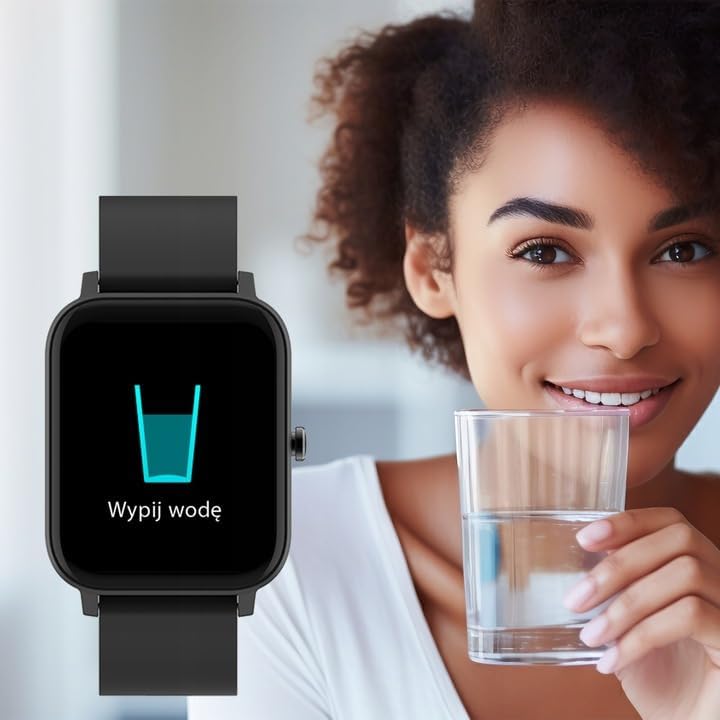
Image: Smartwatch displaying a "Drink Water" reminder, encouraging hydration.
ບໍາລຸງຮັກສາ
ທໍາຄວາມສະອາດ smartwatch ຂອງທ່ານ
ເຮັດຄວາມສະອາດໂມງອັດສະລິຍະ ແລະ ສາຍຂອງທ່ານເປັນປະຈຳເພື່ອປ້ອງກັນການລະຄາຍເຄືອງຜິວໜັງ ແລະ ຮັກສາການເຮັດວຽກຂອງອຸປະກອນ. ໃຊ້ຜ້ານຸ້ມ, ຜ້າເຊັດໂຕamp ຜ້າເຊັດໜ້າຈໍ ແລະ ຄasing. For the strap, follow the manufacturer's recommendations based on the material. Avoid harsh chemicals or abrasive materials.
ການຕໍ່ຕ້ານນ້ໍາ
The Forever Smartwatch 3 SW-320 features IP68 water resistance. This means it is protected against dust and can withstand immersion in water up to 1.5 meters for up to 30 minutes. It is suitable for daily use and light water activities, but not recommended for diving, hot showers, or high-pressure water exposure.
ການດູແລຫມໍ້ໄຟ
To prolong battery life, avoid exposing the smartwatch to extreme temperatures. Charge the device fully before its first use and when the battery is low. Do not leave the battery completely drained for extended periods.
ການແກ້ໄຂບັນຫາ
Smartwatch Not Turning On
Ensure the smartwatch is fully charged. Connect it to the charger for at least 30 minutes before attempting to power it on again.
ບໍ່ສາມາດຈັບຄູ່ກັບໂທລະສັບສະຫຼາດໄດ້
- Make sure Bluetooth is enabled on your smartphone and the smartwatch.
- Ensure the smartwatch is within the Bluetooth range of your phone (typically 10 meters).
- Restart both your smartphone and smartwatch.
- Check if the Forever Smartwatch app is updated to the latest version.
- ຖ້າເຄີຍຈັບຄູ່ມາກ່ອນແລ້ວ, ລອງຍົກເລີກການຈັບຄູ່ ແລະ ຈັບຄູ່ອຸປະກອນຄືນໃໝ່ຜ່ານການຕັ້ງຄ່າ Bluetooth ຂອງໂທລະສັບຂອງທ່ານ ແລະ ແອັບ.
ການອ່ານສຸຂະພາບທີ່ບໍ່ຖືກຕ້ອງ
For accurate heart rate and activity tracking, ensure the smartwatch is worn snugly on your wrist, about one finger's width above your wrist bone. Avoid excessive movement during measurements. Environmental factors and skin conditions can affect sensor accuracy.
ການແຈ້ງເຕືອນບໍ່ປາກົດ
Verify that notification permissions are granted for the Forever Smartwatch app in your smartphone's settings. Also, check the app's settings to ensure notifications are enabled for the desired applications.
ຂໍ້ມູນຈໍາເພາະ
| ຍີ່ຫໍ້ | ຕະຫຼອດໄປ |
| ຊື່ຕົວແບບ | 3 SW-320 |
| ໝາຍເລກຕົວແບບ | GSM169759 |
| ຂະຫນາດຈໍສະແດງຜົນ | 1.7 ນິ້ວ |
| ຄວາມລະອຽດການສະແດງ | 240 x 280 |
| ການເຊື່ອມຕໍ່ | Bluetooth |
| ອຸປະກອນທີ່ເຂົ້າກັນໄດ້ | ໂທລະສັບສະຫຼາດ, ແທັບເລັດ |
| ຄຸນນະສົມບັດພິເສດ | Heart Rate Monitor, Pedometer, Thermometer, Oximeter |
| ປະເພດຫມໍ້ໄຟ | 1 Lithium Ion |
| ອາຍຸຫມໍ້ໄຟສະເລ່ຍ | Up to 1 Day (usage dependent) |
| ນ້ຳໜັກ | 180 g |
| ຂະໜາດ | 11.5 x 9 x 7 cm |
| ການຕໍ່ຕ້ານນ້ໍາ | IP68 |
| ການໂຕ້ຕອບຂອງມະນຸດ | ໜ້າຈໍສຳຜັດ |
Note: Battery life and charging times can vary based on usage and environmental conditions. The "1 Day" for charging time in the original data is likely an error and typically refers to battery life.
ການຮັບປະກັນແລະການສະຫນັບສະຫນູນ
For warranty information and technical support, please refer to the documentation included with your product or visit the official FOREVER webເວັບໄຊ. ຮັກສາຫຼັກຖານການຊື້ຂອງທ່ານສໍາລັບການຮ້ອງຂໍການຮັບປະກັນ.
If you encounter issues not covered in this manual, please contact FOREVER customer service for assistance.


