1. ບົດແນະນຳ
Thank you for choosing the Charmast C05S 5000mAh Portable Power Bank. This device is designed to provide convenient and fast charging for your mobile devices on the go. Its compact size, built-in cable, and digital display make it an essential accessory for daily use and travel.
2. ເນື້ອໃນຊຸດ
- Charmast C05S 5000mAh Portable Power Bank with built-in Lightning cable (x1)
- USB-C to USB-C charging cable (x1)
- ຄູ່ມືຜູ້ໃຊ້ (x1)

3. ຜະລິດຕະພັນເກີນview
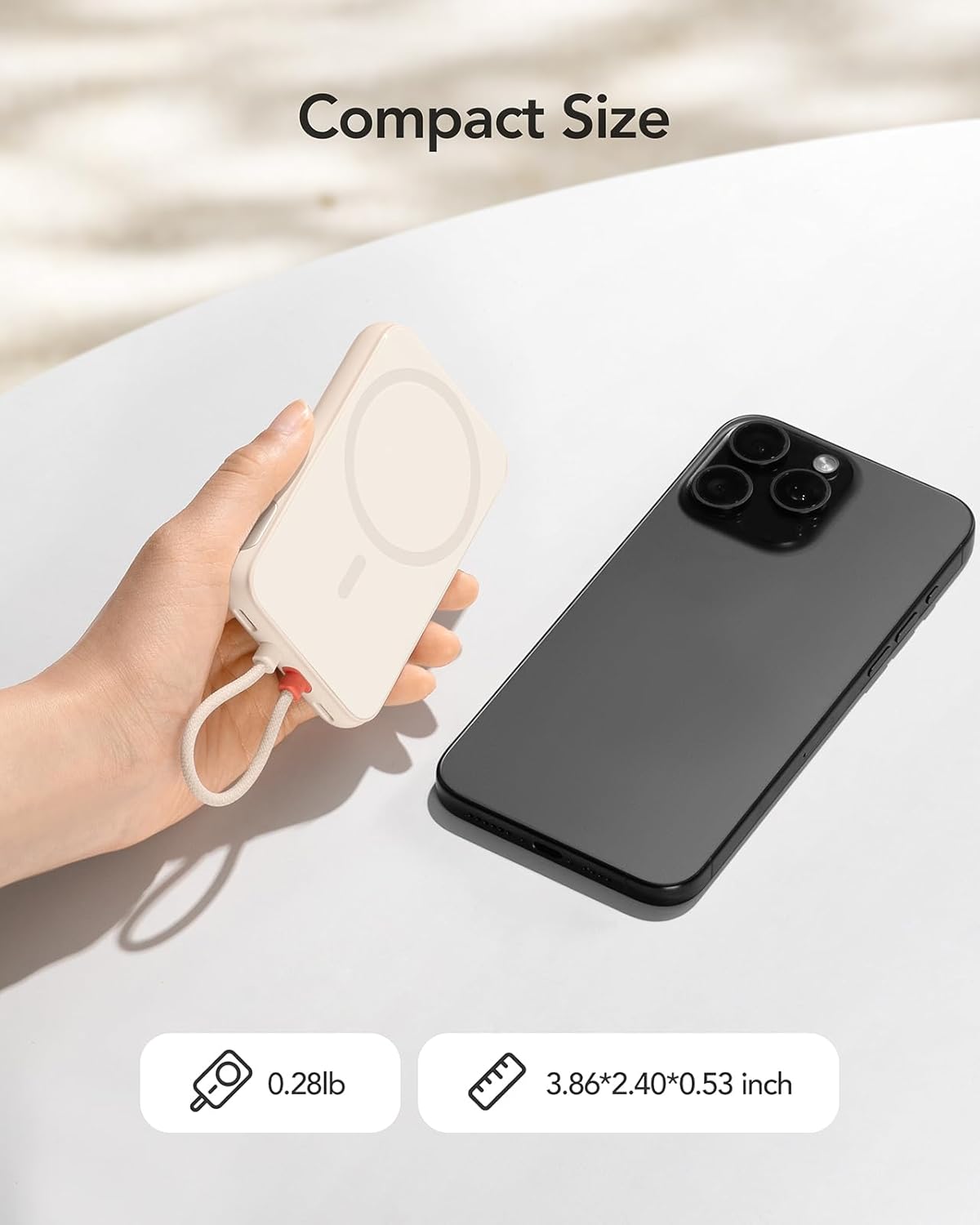
The Charmast C05S is a slim and lightweight power bank designed for portability and efficiency.
- ຂະໜາດ: 3.86 x 2.40 x 0.53 ນິ້ວ
- ນ້ຳໜັກ: Approximately 0.28 pounds (5.9 ounces)
- ສາຍໄຟໃນຕົວ: Features an integrated Lightning cable for direct connection to compatible Apple devices.
- ຜອດ USB-C: A versatile USB-C port for both input (recharging the power bank) and output (charging other devices).
- ຈໍດິຈິຕອນ: An LED screen on the side indicates the remaining battery percentage.

4. Setup and Recharging the Power Bank
Before first use, fully charge your Charmast C05S Power Bank.
- ການນໍາໃຊ້ພອດ USB-C: Connect the provided USB-C to USB-C cable to the power bank's USB-C port and to a compatible USB wall adapter (not included). The power bank will fully recharge in approximately 2.0 hours.
- Using the Built-in Lightning Cable: Connect the built-in Lightning cable to a compatible Lightning input port on a wall adapter. The power bank will fully recharge in approximately 3.5 hours.
ຈໍສະແດງຜົນດິຈິຕອນຈະສະແດງຄວາມຄືບໜ້າຂອງການສາກໄຟ, ເຊິ່ງຊີ້ບອກ 100% ເມື່ອສາກເຕັມແລ້ວ.

5. ຄໍາແນະນໍາການດໍາເນີນງານ
ເພື່ອສາກອຸປະກອນຂອງທ່ານ:
- For iPhone (Lightning devices): Pull out the built-in Lightning cable and connect it directly to your iPhone or other compatible Lightning device.
- For USB-C devices: Use the provided USB-C to USB-C cable. Connect one end to the power bank's USB-C port and the other end to your USB-C compatible device.
ທະນາຄານພະລັງງານຈະເລີ່ມສາກໄຟອຸປະກອນຂອງທ່ານໂດຍອັດຕະໂນມັດ. ຈໍສະແດງຜົນດິຈິຕອລຈະສະແດງແບັດເຕີລີທີ່ຍັງເຫຼືອtage ຂອງທະນາຄານພະລັງງານ.


6. ຈໍດິຈິຕອນ
The integrated digital display provides real-time information about the power bank's battery level. It shows the remaining percentage, allowing you to easily monitor when it's time to recharge the power bank.
- To activate the display, press the on/off button located on the side of the power bank.
- The display will automatically turn off after a short period of inactivity to conserve power.
7. Universal Compatibility and Charging Speed
The Charmast C05S Power Bank offers broad compatibility and fast charging capabilities.
- ສາຍຟ້າຜ່າໃນຕົວ: Universally compatible with iPhone 14, 13, 12, 11, 8, 7 series, and other Lightning-enabled devices.
- ຜອດ USB-C: Compatible with iPhone 15 series, Samsung S24/S23/S22/S21/S20, Google Pixel series, other Android phones, and various low-current devices such as portable fans, neck fans, Bluetooth headphones, and heated vests.
- ການສາກໄວ 20W PD: Supports Power Delivery (PD) 20W fast charging, significantly reducing charging times for both your devices and the power bank itself.


8. ການບໍາລຸງຮັກສາແລະການດູແລ
ເພື່ອຮັບປະກັນອາຍຸການໃຊ້ງານທີ່ຍາວນານ ແລະ ປະສິດທິພາບທີ່ດີທີ່ສຸດຂອງ Power Bank ຂອງທ່ານ:
- ລະດັບຫມໍ້ໄຟ: Keep the power bank's battery level above 40% to improve overall battery life and maintain efficient charging speeds.
- ການເກັບຮັກສາ: ເກັບຮັກສາ Power bank ໃນບ່ອນທີ່ເຢັນ, ແຫ້ງ, ຫ່າງຈາກແສງແດດໂດຍກົງ ແລະອຸນຫະພູມທີ່ຮຸນແຮງ.
- ທໍາຄວາມສະອາດ: ໃຊ້ຜ້າປຽກແຫ້ງເພື່ອເຮັດຄວາມສະອາດດ້ານນອກຂອງ power bank. ຫຼີກເວັ້ນການນໍາໃຊ້ສານເຄມີທີ່ຮຸນແຮງຫຼືວັດສະດຸຂັດ.
- ຫຼີກລ້ຽງການຫຼຸດລົງ: ປົກປ້ອງອຸປະກອນຈາກການຕົກແລະຜົນກະທົບ, ເຊິ່ງສາມາດທໍາລາຍອົງປະກອບພາຍໃນ.

9. ການແກ້ໄຂບັນຫາ
If you encounter issues with your Charmast C05S Power Bank, please refer to the following common solutions:
- ອຸປະກອນບໍ່ໄດ້ສາກໄຟ: Ensure the power bank is sufficiently charged. Check that the charging cable (built-in Lightning or USB-C) is securely connected to both the power bank and your device. Try a different cable or device to isolate the issue.
- Power bank ບໍ່ສາກໄຟ: Verify that the charging cable and wall adapter are functioning correctly. Ensure the cable is properly inserted into the power bank's input port.
- Digital display not showing: Press the on/off button on the side of the power bank to reactivate the display. If it remains off, the power bank might be fully depleted and requires recharging.
- ການສາກໄຟຊ້າ: Ensure you are using a 20W PD compatible wall adapter for optimal fast charging. Charging speed can also be affected by the device being charged and its current battery level.
10. ຂໍ້ມູນຈໍາເພາະ
| ຄຸນສົມບັດ | ລາຍລະອຽດ |
|---|---|
| ໝາຍເລກຕົວແບບ | C05S |
| ຄວາມອາດສາມາດຫມໍ້ໄຟ | 5000 ລ້ານamp ຊົ່ວໂມງ (mAh) |
| ຂະໜາດສິນຄ້າ | 3.86 x 2.4 x 0.53 ນິ້ວ |
| ນ້ໍາຫນັກລາຍການ | 5.9 ອອນ |
| ການປ້ອນຂໍ້ມູນ (USB-C) | 20W PD (Max) |
| Input (Lightning) | 10W (ສູງສຸດ) |
| ຜົນຜະລິດ (ສາຍຟ້າຜ່າໃນຕົວ) | 20W PD (Max) |
| ຜົນຜະລິດ (ພອດ USB-C) | 20W PD (Max) |
| ຄຸນນະສົມບັດພິເສດ | Built-in Cable, Digital Display, Fast Charging, Pocket Size, Ultra Slim |
11. ການຮັບປະກັນແລະການສະຫນັບສະຫນູນ
Charmast provides ສະຫນັບສະຫນູນ 24 ເດືອນ for this product. If you encounter any problems or have questions, please contact us through Amazon. We are committed to resolving any issues within 24 hours.
12. ຂໍ້ມູນຄວາມປອດໄພ
ກະລຸນາອ່ານ ແລະ ປະຕິບັດຕາມຄຳແນະນຳດ້ານຄວາມປອດໄພເຫຼົ່ານີ້ເພື່ອປ້ອງກັນຄວາມເສຍຫາຍຕໍ່ຜະລິດຕະພັນ ຫຼື ການບາດເຈັບຕໍ່ຕົວທ່ານເອງ:
- ຫ້າມບໍ່ໃຫ້ສາຍສາກໄຟຖືກນ້ຳ, ຄວາມຊຸ່ມ, ຫຼືອຸນຫະພູມທີ່ຮຸນແຮງ.
- ຢ່າຖອດປະກອບ, ແກ້ໄຂ, ຫຼືພະຍາຍາມສ້ອມແປງອຸປະກອນ.
- ຮັກສາໃຫ້ໄກຈາກເດັກນ້ອຍ.
- ຫຼີກລ່ຽງການຕົກ ຫຼື ເຮັດໃຫ້ Power Bank ໄດ້ຮັບຜົນກະທົບຢ່າງໜັກ.
- ຖິ້ມທະນາຄານພະລັງງານຢ່າງມີຄວາມຮັບຜິດຊອບຕາມລະບຽບທ້ອງຖິ່ນ. ຫ້າມຖິ້ມຂີ້ເຫຍື້ອໃນຄົວເຮືອນ.


